Our Short List of 3
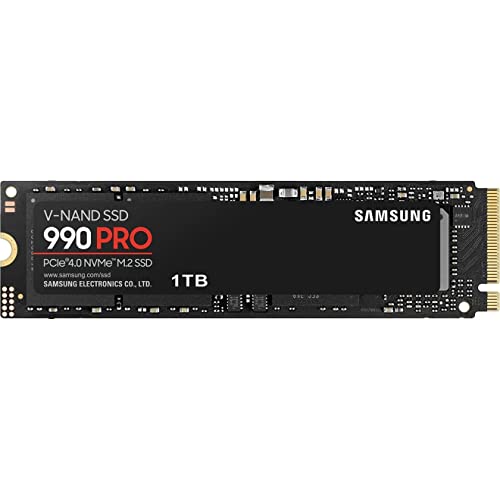
- Best for: Players who want the fastest load times available.
- 1TB capacity
- 7,450 MB/s sequential read speed
- 6,900 MB/s sequential write speed
- PCIe Gen4 x4 NVMe interface

- Best for: Competitive players who want smooth, stutter-free play.
- 1TB capacity
- 7,300 MB/s sequential read speed
- 6,300 MB/s sequential write speed
- PCIe Gen4 NVMe interface

- Best for: Large libraries and second-drive duty.
- 1TB capacity
- 5,000 MB/s sequential read speed
- 4,200 MB/s sequential write speed
- PCIe Gen4 NVMe interface
All 3 Picks at a Glance
| Product | Specs | Action |
|---|---|---|
| Samsung 990 PRO 1TB |
| Check price on Amazon |
| WD Black SN850X 1TB |
| Check price on Amazon |
| Crucial P3 Plus 1TB |
| Check price on Amazon |
Our Top Picks
A gaming SSD decides how long you stare at loading screens, how quickly a huge open world streams in new terrain, and whether your library fits on one drive or spreads across several. The jump from a spinning drive to any modern NVMe SSD is enormous, but the differences between good SSDs are subtler: sequential speed, endurance, heat, and how the drive behaves when it is nearly full. The four drives below were picked from the names and specifications shown on their Amazon pages, and each one earns its place on speed, stamina, or value rather than on a single headline number.
This guide is for PC gamers building a new rig, players upgrading a PlayStation 5 or a laptop, and anyone whose current drive fills up the moment a new release lands. Every drive below was chosen from the name and specifications shown on its Amazon page, with read and write speeds, endurance ratings, and warranty terms checked against the listing before it made the cut.
Quick Picks
As an Amazon Associate we earn from qualifying purchases
| Product | Best for | Key spec from title |
|---|---|---|
| Samsung 990 PRO 1TB | Fastest load times | 7,450 MB/s read speed |
| WD Black SN850X 1TB | Competitive play | 7,300 MB/s read speed |
| Crucial P3 Plus 1TB | Large libraries | 5,000 MB/s read speed |
| Crucial P5 Plus 1TB | Balanced upgrade | 6,600 MB/s read speed |
How to Choose
Match the Interface to Your Machine
Speed starts with the slot, so check what your motherboard or console actually supports before choosing a drive. A PCIe Gen4 slot unlocks the fastest drives in this guide, while a Gen3 slot will cap them at lower speeds without harming them. PlayStation 5 owners need a drive that meets the console’s speed and size requirements and fits under its cover, with or without a heatsink. Laptops often have a single M.2 slot, so the drive you install is the drive you live with. Read your manual, confirm the form factor, and buy the fastest drive your machine can actually use.
Read Speeds the Right Way
Sequential read and write numbers describe large single files, which matters when a game loads a whole level at once, but random performance decides how snappy a system feels when it juggles many small files. A drive with strong sequential numbers and weak random performance will still feel fast in most games, yet the best drives are strong at both. Look for the read speed first, since games read far more than they write, and treat write speed as a secondary check for installs and updates. The numbers in this guide come from the listings themselves, so compare them like for like.
Check Endurance and Warranty Together
Endurance, measured in terabytes written, tells you how much data a drive can absorb over its life before wear becomes a concern. Heavy installers who download and delete large games every week should favor drives with higher endurance ratings, while casual players will rarely approach the limit. The warranty length matters just as much, because a five-year warranty signals that the maker trusts the drive to last. Read both figures in the listing, and remember that a drive kept nearly full wears faster and slows down sooner than one with breathing room.
Plan for Heat and Space
Fast NVMe drives generate real heat under sustained loads, and a drive that overheats will slow itself down to protect its chips. Many motherboards and consoles include a heatsink or a cover that manages this, but a bare drive in a cramped case can still throttle during long installs. Consider a heatsink version if your machine runs warm, and leave at least a tenth of the drive empty so it has room to manage its own housekeeping. Capacity is the other half of the plan: a 1TB drive holds a healthy library, but players with many large titles should think about 2TB before the first drive fills up.
The 4 Best Options
Samsung 990 PRO 1TB
- Best for: Players who want the fastest load times available.
- 1TB capacity
- 7,450 MB/s sequential read speed
- 6,900 MB/s sequential write speed
- PCIe Gen4 x4 NVMe interface
Players who want the fastest load times available.
Sustained heavy loads can warm the drive, so airflow or a heatsink helps.
The 990 PRO is the fastest drive in this guide, and it shows in the moments that matter: levels that load before you finish reading the tip text, and open worlds that stream terrain without hitches. Its read speed leads the group, and its write speed keeps large installs moving, while the endurance rating gives heavy downloaders plenty of headroom. The drive runs efficiently for its speed, and the five-year warranty backs the performance claims with a long commitment. It is the pick for players who want the quickest storage available and are willing to pay attention to cooling to keep it there.
Watch out for: Sustained heavy loads can warm the drive, so airflow or a heatsink helps.
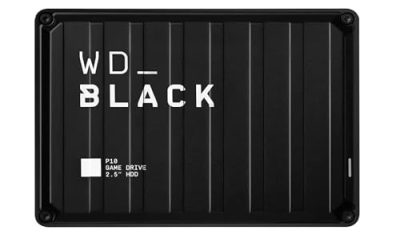
WD Black SN850X 1TB
- Best for: Competitive players who want smooth, stutter-free play.
- 1TB capacity
- 7,300 MB/s sequential read speed
- 6,300 MB/s sequential write speed
- PCIe Gen4 NVMe interface
Competitive players who want smooth, stutter-free play.
The gaming tuning matters most in supported titles, less in older games.
The SN850X is built for competitive play, where a stutter during a firefight costs more than a slow loading screen. Its Game Mode 2.0 tuning prioritizes the kind of reads games actually perform, and DirectStorage support lets supported titles stream assets straight to the graphics card without waiting on the processor. Read and write speeds sit just behind the fastest drive here, yet the difference in real games is small, and the five-year warranty matches the best in the group. It is a focused gaming drive rather than a general-purpose one, and that focus shows in play.
Watch out for: The gaming tuning matters most in supported titles, less in older games.
Crucial P3 Plus 1TB
- Best for: Large libraries and second-drive duty.
- 1TB capacity
- 5,000 MB/s sequential read speed
- 4,200 MB/s sequential write speed
- PCIe Gen4 NVMe interface
Large libraries and second-drive duty.
Slower than the flagship drives in this guide on paper.
The P3 Plus is the sensible choice for players whose library outgrew their first drive and who need capacity without chasing benchmark records. Its read speed is comfortably fast for any current game, and its write speed handles installs and updates without drama, while the Gen4 interface keeps it compatible with modern machines. It trades some top-end speed for a friendlier footprint in a build, and it runs cool enough to sit in a laptop without complaint. For a second drive that holds the games you play less often, or a first drive on a sensible budget, it is hard to fault.
Watch out for: Slower than the flagship drives in this guide on paper.
Crucial P5 Plus 1TB
The P5 Plus sits between the value pick and the flagships, offering strong read speeds and a balanced profile that suits a main drive in a gaming PC. Its Gen4 interface delivers quick loads across modern titles, and the drive handles sustained writes well enough for big installs without falling behind. It is a straightforward upgrade for anyone moving from a spinning drive or an older SATA SSD, and the jump in responsiveness is immediate from the first boot. For players who want one drive to do everything well without paying for the very fastest numbers, this is the middle ground that makes sense.
Specs
- 1TB capacity
- 6,600 MB/s sequential read speed
- PCIe Gen4 NVMe interface
- M.2 2280 form factor
Best for: A balanced main-drive upgrade for a gaming PC.
Watch out for: Write speed is not listed as prominently, so check the listing before installing huge files.
Which One Fits Your Situation
Building a New High-End PC
A new high-end build deserves storage that never becomes the bottleneck, and the 990 PRO is the natural choice. Its read speed leads this guide, its endurance rating suits heavy downloading, and its five-year warranty matches the life of the build. Pair it with good case airflow or a motherboard heatsink, and it will keep load times short for years. Choose this one when the rest of your components are already fast.
Playing Competitive Shooters
Competitive play rewards consistency over peak numbers, and the SN850X is tuned for exactly that. Its Game Mode 2.0 prioritizes the reads that games perform under pressure, and DirectStorage support helps in titles built for it. The drive stays smooth when the action gets dense, which is when slower storage shows its weakness. Pick this one when every frame and every stutter matters.
Expanding a Crowded Library
When the problem is space rather than speed, the P3 Plus is the honest answer. It is fast enough for any current game, cool enough for a laptop, and sensible as a second drive that holds the titles you rotate through. Install your current favorites on a faster main drive and keep the rest here, ready to move over when needed. Choose this one when the library, not the loading screen, is the problem.
Upgrading an Older Machine
An older PC or a first SSD upgrade benefits most from a balanced drive, and the P5 Plus fits that role. Its read speed is a large step up from SATA and spinning drives, and it works as a single main drive without fuss. The install is a single M.2 slot, and the improvement shows from the first boot to the first game load. Pick this one when you want a clear, simple upgrade.
Common Mistakes
- Buying a Gen4 drive for a Gen3 slot and expecting Gen4 speeds.
- Filling a drive to the last gigabyte, then wondering why it slowed down.
- Judging a drive by sequential speed alone and ignoring random performance.
- Skipping the heatsink question in a warm case or a console.
- Choosing the smallest capacity that fits today, then reinstalling games every week.
Frequently Asked Questions
How much faster is an NVMe SSD than a spinning hard drive?
An NVMe SSD moves data many times faster than a spinning drive, and the difference shows in load screens, installs, and file transfers. A game that takes a minute to load from a hard drive can open in seconds from a drive like the 990 PRO or SN850X. The jump is large enough that most players notice it.
Do I need a heatsink for a gaming SSD?
A heatsink helps when a drive sustains heavy loads in a warm case, because fast NVMe drives slow themselves down when they overheat. Many motherboards include a heatsink over the M.2 slot, and the PlayStation 5 requires one that fits its cover. In a well-ventilated case with light loads, a bare drive often runs fine.
Will a Gen4 SSD work in a Gen3 slot?
Yes, a Gen4 SSD works in a Gen3 slot, but it will run at Gen3 speeds because the slot is the limit. The drive itself is unharmed, and it will still be far faster than a spinning drive or a SATA SSD. If you plan to move the drive to a newer machine later, buying Gen4 now can make sense.
How much storage do I need for gaming?
A 1TB drive holds a library of titles alongside your operating system and applications, which is why every drive in this guide uses that capacity. Players with many large games installed at once should consider 2TB, since a single modern title can occupy well over a hundred gigabytes. Keep at least a tenth of the drive free so it stays fast.
FAQ
How much faster is an NVMe SSD than a spinning hard drive?
Do I need a heatsink for a gaming SSD?
Will a Gen4 SSD work in a Gen3 slot?
How much storage do I need for gaming?
More from Amazon
Programs that pair well with the guide above. Offers and eligibility are set by Amazon and may change.
Free shipping on eligible items, Prime Video and more. Eligible new members can start with a free trial.
Start a Prime free trialAd-free music streaming. Eligible new subscribers can start with a free trial.
Try Music Unlimited freeA Prime membership for ages 18-24 with a trial period. Eligibility is set by Amazon.
See Prime for Young AdultsAudiobooks and podcasts to listen to on the go. Eligible new members can start with a free trial.
Try Audible freeAs an Amazon Associate we earn from qualifying purchases.