Our Short List of 3

- Best for: Streamers who want an uncompressed 1080p60 feed and already use a separate microphone
- Resolution and frame rate: Full HD 1080p at 60fps, uncompressed, HDR enabled
- Sensor: Sony STARVIS CMOS sensor
- Lens: f/2.4 aperture, 24mm equivalent, fixed focus
- Focus range: 30 to 120 cm

- Best for: Gamers streaming from dim rooms who need strong automatic light correction
- Resolution and frame rate: Full HD 1080p at 60FPS, uncompressed
- Sensor: Sony IMX327 CMOS with STARVIS technology, adaptive light sensor
- HDR: HDR enabled at 30fps
- Field of view: Adjustable 103, 90, and 80 degrees

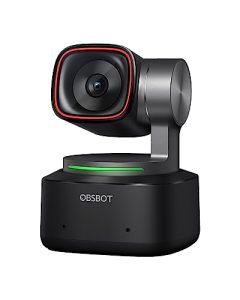
- Best for: Streamers who move, stand, and gesture during play and want the camera to follow
- Resolution and frame rate: 4K at 60 FPS
- Sensor: 1/1.5 inch CMOS sensor
- Design: AI-powered PTZ with two-axis gimbal
- Tracking: AI tracking with multiple modes, auto focus
All 3 Picks at a Glance
| Product | Specs | Action |
|---|---|---|
| Elgato Facecam MK.2 |
| Check price on Amazon |
| Razer Kiyo Pro |
| Check price on Amazon |
| OBSBOT Tiny 2 |
| Check price on Amazon |
Key takeaways
- Compare the best PC webcams for gaming facecams, with smooth high frame rates, strong low-light sensors, and fields of view sized for stream overlays.
A gaming facecam has a harder job than a meeting camera. Your gameplay runs at a high frame rate while your face sits in a small overlay box, often lit by nothing more than monitor glow and RGB strips, so a webcam that looks fine on a video call can still smear your reactions, crush your face into shadow, or crop your headset out of frame. The real decision is which combination of frame rate, low-light sensor, and field of view matches the way you actually play and stream.
This guide is for PC gamers adding a facecam to a stream, players who record reaction footage for clips, and anyone replacing a soft laptop camera on a gaming desk. Every pick below is a dedicated webcam whose listing states gaming-relevant numbers, including frame rate at 1080p, sensor type, and field of view, so the shortlist is built on published specs rather than marketing labels.
Quick Picks
As an Amazon Associate we earn from qualifying purchases
| Product | Best for | Key spec from title |
|---|---|---|
| Elgato Facecam MK.2 | Streamers who want uncompressed 1080p video | Full HD 1080p 60fps with HDR enabled |
| Razer Kiyo Pro | Dim game rooms with mixed lighting | 1080p 60FPS with adaptive light sensor |
| OBSBOT Tiny 2 | Players who move around while streaming | 4K PTZ with AI tracking and 60 FPS |
| Logitech StreamCam | Simple plug-and-play facecam setups | Full HD 1080p 60 fps with smart auto-focus |
How to Choose
Frame Rate at the Resolution You Stream
Your facecam should move as smoothly as the game beside it. A camera limited to 1080p at 30 frames per second looks visibly steppy next to fast gameplay, while 1080p at 60 frames per second keeps head movement and reactions fluid inside the overlay. Check the frame rate at the exact resolution you plan to broadcast, because some models only reach their highest rate at 720p, and HDR modes on several webcams step the rate down. If your platform or capture software caps the facecam anyway, a strong 1080p60 mode still leaves headroom for recording clips locally at full smoothness.
Sensor Size and Low-Light Handling
Game rooms are rarely lit like offices. Monitor glow, a desk lamp behind you, and colored LED strips all push a small sensor into noisy, washed-out territory. Look for a named sensor with a low-light design, such as a Sony STARVIS chip, and for HDR support that keeps a bright monitor from blowing out one side of your face. A larger sensor gathers more light before software correction has to intervene, which means less grain when you lean back mid-match. Adaptive light sensors that adjust exposure automatically are especially useful when game scenes swing between dark dungeons and bright menus.
Field of View for a Facecam Frame
Field of view decides how much of you and your room lands inside the overlay. A narrow view around the high seventies keeps the frame tight on your face and chair, which suits a small corner box. A wider view past ninety degrees shows your headset, shoulders, and setup behind you, but it also shrinks your face within the same overlay space. Adjustable field of view is the flexible middle ground: the Razer Kiyo Pro, for example, switches between wide, medium, and narrow framings in software. Match the angle to your overlay size rather than defaulting to the widest setting available.
Autofocus and Exposure Control
You lean in during tense rounds and slump back between matches, so focus and exposure have to follow without hunting. Autofocus models track that movement, while fixed-focus designs like the Elgato Facecam MK.2 keep a defined range sharp and never pulse while searching. Neither approach wins outright; the better question is whether the camera software lets you lock exposure and white balance manually. Locked settings stop the image from brightening every time a white menu opens. PTZ models such as the OBSBOT Tiny 2 go further, physically panning to keep you centered when you shift in your chair.
The 4 Best Options
Elgato Facecam MK.2
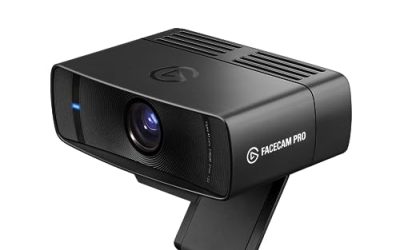
- Best for: Streamers who want an uncompressed 1080p60 feed and already use a separate microphone
- Resolution and frame rate: Full HD 1080p at 60fps, uncompressed, HDR enabled
- Sensor: Sony STARVIS CMOS sensor
- Lens: f/2.4 aperture, 24mm equivalent, fixed focus
- Focus range: 30 to 120 cm
Streamers who want an uncompressed 1080p60 feed and already use a separate microphone
There is no built-in microphone at all, so budget for separate audio if you do not own a mic
The Facecam MK.2 is built around one idea: send the cleanest possible 1080p signal into your streaming software. Its listing highlights uncompressed 1080p60 capture with HDR, a Sony sensor, and PTZ-style digital pan, tilt, and zoom control through the companion app, which suits a facecam that gets cropped inside an overlay. Settings save to onboard flash memory, so your exposure and framing survive a PC restart or a move to another machine. Streamers who already own a separate microphone and want a set-and-forget camera for OBS will feel most at home here.
Razer Kiyo Pro
- Best for: Gamers streaming from dim rooms who need strong automatic light correction
- Resolution and frame rate: Full HD 1080p at 60FPS, uncompressed
- Sensor: Sony IMX327 CMOS with STARVIS technology, adaptive light sensor
- HDR: HDR enabled at 30fps
- Field of view: Adjustable 103, 90, and 80 degrees
Gamers streaming from dim rooms who need strong automatic light correction
HDR mode drops the frame rate, so choose between HDR and 60fps before each type of session
The Kiyo Pro targets the lighting problem directly. Its high-performance adaptive light sensor, built on a Sony IMX327 sensor with STARVIS technology, adjusts to dim rooms without a ring light, and the listing promises uncompressed 1080p at 60 frames per second for smooth facecam motion. HDR is available at a lower frame rate when a bright window or monitor fights your face for exposure. The wide-angle lens offers three selectable fields of view, so you can tighten the frame for a small overlay or open it up to show your setup, making it a flexible pick for gamers whose rooms change from day to night sessions.
OBSBOT Tiny 2
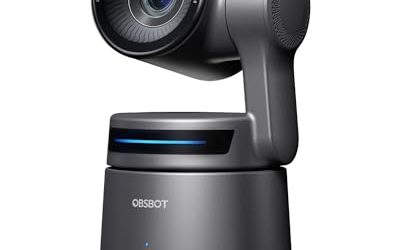
- Best for: Streamers who move, stand, and gesture during play and want the camera to follow
- Resolution and frame rate: 4K at 60 FPS
- Sensor: 1/1.5 inch CMOS sensor
- Design: AI-powered PTZ with two-axis gimbal
- Tracking: AI tracking with multiple modes, auto focus
Streamers who move, stand, and gesture during play and want the camera to follow
The tracking and control features need the OBSBOT software to shine, so expect a longer setup than a fixed webcam
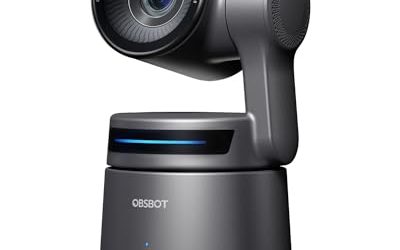
The Tiny 2 is the only pick here on a motorized gimbal. Its two-axis PTZ design, AI tracking, and voice and gesture control keep you framed when you stand up for a victory lap, lean toward a second monitor, or demonstrate something away from your chair. The listing pairs a large 1/1.5 inch sensor with 4K capture at 60 frames per second and HDR light correction, which gives plenty of resolution headroom for digital crops inside a 1080p stream. Dual omnidirectional microphones with noise cancelling are built in. It suits animated streamers who treat the facecam as part of the show rather than a static portrait.
Logitech StreamCam
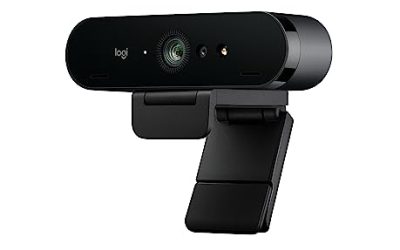
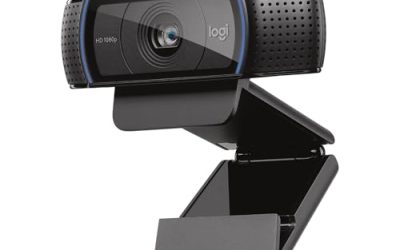
The StreamCam keeps things deliberately simple. It records Full HD 1080p at 60 frames per second through a premium glass lens, connects over USB-C, and leans on smart auto-focus and auto exposure to handle framing without manual tuning. Facial tracking helps it reframe as you shift, and the mount rotates for vertical video if you cut clips for short-form platforms between streams. Dual front-facing microphones are built in for casual voice chat. For a gamer who wants a tidy facecam that works the moment it is plugged in, and who plays in reasonably steady lighting, it covers the essentials with the least setup effort of the group.
Specs
- Resolution and frame rate: Full HD 1080p at 60 fps
- Lens: Premium glass lens
- Field of view: 78 degrees diagonal
- Focus and exposure: Smart auto-focus and auto exposure with facial tracking
- Connection: USB-C
- Microphones: Dual omnidirectional microphones
- Orientation: Rotates for vertical video
- Model number: 960-001280
Best for: Gamers who want a straightforward USB-C facecam with automatic framing help
Watch out for: The fixed 78 degree view cannot widen for group shots or narrow further for a tighter crop
ASIN: B07W4DHNBF
Which One Fits Your Situation
You Stream From a Dark Room With RGB Lighting
Low light is the deciding factor here, and the Razer Kiyo Pro is the natural pick because its adaptive light sensor corrects exactly this scenario without extra lamps. The Elgato Facecam MK.2 is the alternative if your lighting stays constant, since its HDR and STARVIS sensor handle monitor glow well once exposure is locked. Whichever camera you choose, lock the exposure after your room reaches its usual nighttime state.
You Want the Cleanest Signal for OBS Overlays
Choose the Elgato Facecam MK.2. Uncompressed 1080p60 output avoids the softness that heavy in-camera compression can add before your streaming software scales the facecam down into an overlay. Its digital PTZ controls let you reframe inside the app instead of remounting the camera, and saved settings on the device itself keep that framing consistent across sessions and machines. Just remember the missing microphone: pair it with the headset mic or USB microphone you likely already use for game audio.
You Move Around During Streams and Events
The OBSBOT Tiny 2 fits players who stand for celebrations, walk to a shelf mid-stream, or co-stream from a couch. The gimbal follows you physically instead of cropping a static wide shot, and gesture control triggers zoom without touching the keyboard mid-game. Its large sensor also helps when movement takes you away from your main light. Fixed cameras here assume you stay seated, so movement is the clearest reason to step up.
You Just Want a Facecam That Works Out of the Box
Pick the Logitech StreamCam. Plug it into a USB-C port, let the smart auto-focus and exposure settle, and the facecam is ready for Discord calls and casual streams alike. Its narrower view keeps the frame focused on you rather than your room, which suits a small overlay, and the rotating mount doubles as a quick route to vertical clips. It gives up manual depth and tracking tricks, but for a first gaming webcam that trade is usually right.
Common Mistakes
- Judging a webcam by its maximum resolution while ignoring the frame rate at that resolution, then streaming a choppy 4K facecam beside smooth gameplay
- Leaving auto exposure and auto white balance unlocked, so every bright menu or dark cutscene makes your face pulse brighter and darker on stream
- Picking the widest field of view by default and ending up with a tiny face in the overlay plus a distracting view of the whole room
- Forgetting that some streaming webcams have no microphone, and discovering the gap live instead of checking the listing before the first broadcast
- Mounting the camera far off to the side of an ultrawide monitor, which makes you appear to look away from your audience the entire session
Frequently Asked Questions
Is 1080p60 enough for a gaming facecam, or do I need 4K?
For most streamers, 1080p60 is the sweet spot because the facecam occupies a small overlay and platforms compress the outgoing stream anyway. A 4K model such as the OBSBOT Tiny 2 earns its place through cropping headroom and tracking features rather than raw resolution. Prioritize a smooth frame rate and a good sensor over the resolution number on the box.
Why does my face look grainy on stream even with a good webcam?
Grain usually comes from low light forcing the sensor to raise its gain, not from a lack of resolution. A larger or low-light-optimized sensor, a lamp aimed at your face instead of the wall behind you, and locked exposure settings all reduce noise. Software noise reduction inside streaming apps can soften the image further, so fix the lighting before reaching for filters.
Should a gaming webcam have autofocus or fixed focus?
Both designs work for a seated player. Autofocus follows you when you lean toward the screen, which suits animated play styles, while fixed focus stays sharp across a set distance range and never pulses while searching. The Elgato Facecam MK.2 uses fixed focus tuned for desk distances. Choose based on how much you move, and disable focus hunting in software if your camera allows it.
Where should I mount a webcam for gaming streams?
Center it on top of the monitor you look at most, as close to eye level as you can manage, so your gaze reads as directed at the audience. Side mounting on a second screen makes you appear distracted. Keep the distance within the focus range stated on the listing, and check the framing in your streaming software rather than the camera app before going live.
FAQ
Is 1080p60 enough for a gaming facecam, or do I need 4K?
Why does my face look grainy on stream even with a good webcam?
Should a gaming webcam have autofocus or fixed focus?
Where should I mount a webcam for gaming streams?
More from Amazon
Programs that pair well with the guide above. Offers and eligibility are set by Amazon and may change.
Free shipping on eligible items, Prime Video and more. Eligible new members can start with a free trial.
Start a Prime free trialAd-free music streaming. Eligible new subscribers can start with a free trial.
Try Music Unlimited freeA Prime membership for ages 18-24 with a trial period. Eligibility is set by Amazon.
See Prime for Young AdultsAudiobooks and podcasts to listen to on the go. Eligible new members can start with a free trial.
Try Audible freeAs an Amazon Associate we earn from qualifying purchases.