Our Short List of 3

- Resolution and frame rate: 1080p at 60 fps uncompressed over USB 3.0; HDR supported
- Sensor: Sony CMOS sensor tuned for indoor and low-light use
- Lens: Elgato Prime Lens, f/2.4, 24 mm full-frame equivalent
- Focus: fixed focus, sharp from 30 to 120 cm

- Resolution and frame rate: 1080p at 60 fps uncompressed over USB 3.0; HDR at 1080p and 30 fps
- Sensor: 1/2.8-inch CMOS with adaptive light sensing for dim rooms
- Lens: wide-angle, f/2.0
- Field of view: adjustable 103, 90, or 80 degrees

- Resolution and frame rate: 4K at 30 fps; 1080p at 60 fps
- Sensor: 1/2-inch CMOS
- Tracking: AI subject tracking and auto framing on a two-axis gimbal; gesture control
- Focus: phase-detection autofocus
All 4 Picks at a Glance
| Product | Specs | Action |
|---|---|---|
| Elgato Facecam MK.2 — best overall for Twitch |
| Check price on Amazon |
| Razer Kiyo Pro — best for low-light rooms |
| Check price on Amazon |
| OBSBOT Tiny 2 Lite — best with AI tracking |
| Check price on Amazon |
 Logitech C922x Pro Stream — best value classic |
| Check price on Amazon |
Key takeaways
- Compare the best webcams to stream on Twitch for a cleaner facecam: uncompressed 1080p60 video, low-light sensors, autofocus and OBS-ready controls.
A Twitch facecam lives in a small corner of the screen, but viewers judge a channel by it in seconds. Blurry focus, washed-out color, or a frame rate that drops every time the game gets busy all signal a low-effort broadcast, even when the gameplay itself is sharp. The good news is that Twitch caps live output at 1080p and 60 frames per second, so a well-chosen webcam can cover the platform completely without overspending on resolution you will never send to viewers.
What separates a streaming webcam from a meeting camera is control. Live video cannot be fixed in editing, so the camera has to hold exposure, white balance, and focus steady while your room lighting and your game both change. The five picks below were chosen for exactly that job: smooth 60 fps capture, sensors that cope with dim gaming rooms, reliable autofocus or a well-judged fixed focus, and companion software that works cleanly alongside OBS Studio or Streamlabs.
As an Amazon Associate, we earn from qualifying purchases.
Quick answer
The Elgato Facecam MK.2 is the top pick for most Twitch channels: uncompressed 1080p at 60 frames per second, HDR, and full manual control in Camera Hub keep a facecam clean in mixed room light. Streamers in dim rooms should look at the Razer Kiyo Pro, while the OBSBOT Tiny 2 Lite suits anyone who moves around on camera.
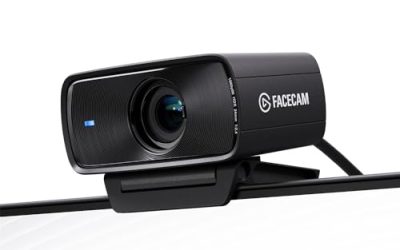
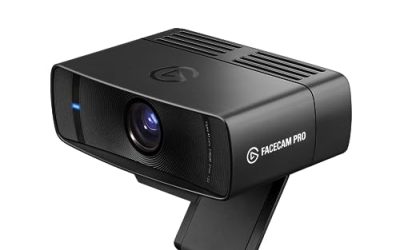
Elgato Facecam MK.2 — best overall for Twitch
- Resolution and frame rate: 1080p at 60 fps uncompressed over USB 3.0; HDR supported
- Sensor: Sony CMOS sensor tuned for indoor and low-light use
- Lens: Elgato Prime Lens, f/2.4, 24 mm full-frame equivalent
- Focus: fixed focus, sharp from 30 to 120 cm
Twitch broadcasts top out at 1080p60, and the Facecam MK.2 is built to deliver exactly that feed with nothing wasted. Over a USB 3.0 connection it sends uncompressed 1080p video at 60 frames per second, which means OBS receives a clean signal with no compression smearing around your face when the action on screen gets chaotic. HDR support helps when a bright window or a lit display sits behind you, holding detail in the highlights instead of blowing them out.
The fixed-focus Elgato Prime Lens is tuned for a desk setup, staying sharp across the distance range where a streamer actually sits, roughly an arm’s length from the monitor. Because focus never hunts, the image stays calm during animated moments. The real advantage is Camera Hub software: exposure, white balance, contrast, and ISO-style gain can all be set manually and locked, then saved to memory on the camera itself, so your look survives reboots and app updates. Digital pan, tilt, and zoom let you tighten the frame without moving the mount, and a sliding privacy shutter covers the lens when the stream ends.
There is no built-in microphone, which is a deliberate choice rather than a gap. Twitch audiences hear the difference between a headset or desk mic and a camera mic immediately, and Elgato assumes you already own proper audio. If your setup is a single USB device for both picture and sound, look further down this list.
Key specs
Razer Kiyo Pro — best for low-light rooms
- Resolution and frame rate: 1080p at 60 fps uncompressed over USB 3.0; HDR at 1080p and 30 fps
- Sensor: 1/2.8-inch CMOS with adaptive light sensing for dim rooms
- Lens: wide-angle, f/2.0
- Field of view: adjustable 103, 90, or 80 degrees
Many Twitch rooms are lit by little more than monitor glow and an LED strip, and that is where most webcams fall apart into grain. The Kiyo Pro answers with a large 1/2.8-inch sensor paired with an adaptive light sensor that adjusts sensitivity to the room, so the picture holds together at light levels where smaller sensors turn noisy. It captures uncompressed 1080p at 60 frames per second over USB 3.0, matching the Facecam class on smoothness while clearly beating it in the dark.
Flexibility is the second strength. The wide-angle lens offers three fields of view — 103, 90, and 80 degrees — so the same camera can show a full room setup for just-chatting segments or crop tight for focused gameplay. Autofocus keeps you sharp when you lean in to read chat, and an HDR mode at 30 frames per second is there for high-contrast scenes, though most streamers will leave the camera at 60 fps for motion. Razer Synapse provides the manual controls for exposure and white balance locking.
Unlike the Facecam MK.2, the Kiyo Pro includes a built-in omnidirectional microphone. It will not replace a dedicated mic for a serious channel, but it is genuinely useful for a first setup, a backup audio source, or console-adjacent streaming where simplicity matters. The mount clips to a monitor or screws onto a tripod, and a lens cover is included for privacy between sessions.
Key specs
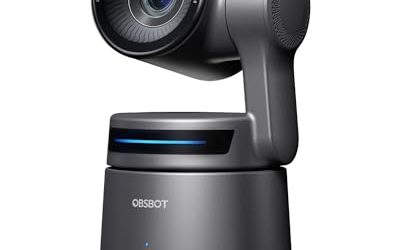
OBSBOT Tiny 2 Lite — best with AI tracking
- Resolution and frame rate: 4K at 30 fps; 1080p at 60 fps
- Sensor: 1/2-inch CMOS
- Tracking: AI subject tracking and auto framing on a two-axis gimbal; gesture control
- Focus: phase-detection autofocus
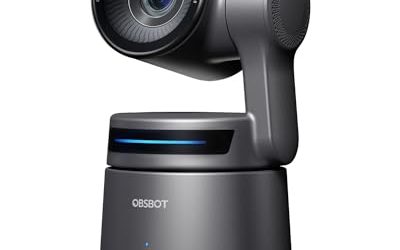
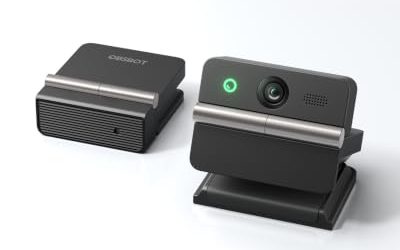
Some channels are not desk-bound. Fitness streams, music performances, tabletop builds, and energetic just-chatting formats all involve standing up, stepping back, and moving around the room. The Tiny 2 Lite mounts its camera on a two-axis motorized gimbal and uses AI tracking to pan and tilt after you, keeping you framed and in focus without a camera operator. Gesture controls let you toggle tracking or zoom from across the room, which is far more practical mid-stream than walking back to the keyboard.
The hardware underneath is strong for a streaming camera: a large 1/2-inch sensor feeds 4K at 30 frames per second or 1080p at 60 frames per second, and phase-detection autofocus locks on quickly as you move. On Twitch you will run it at 1080p60, where the bigger sensor pays off as cleaner low-light video and a shallower, more camera-like depth of field than flat webcam optics produce. Dual microphones with AI noise canceling handle voice respectably when you are away from a desk mic.
Preset positions in the OBSBOT Center app let you jump between saved framings — desk view, wide room view, product close-up — with a click, which variety and IRL-style streamers use constantly. The trade-offs are moving parts that demand a stable mount and a setup process with more options to learn than a fixed camera. For a seated, static facecam it is more machinery than you need; for anyone who performs on camera, nothing else on this list does the same job.
Key specs
Logitech StreamCam — best autofocus all-rounder
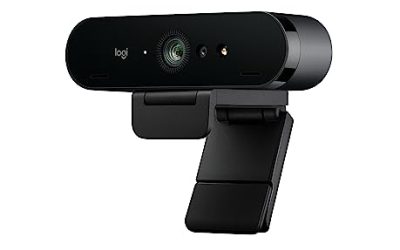
The StreamCam is the pick for streamers who lean, gesture, hold products up to the lens, and generally refuse to sit still at a fixed distance. Its autofocus is fast and confident, snapping back to your face after a close-up of a controller or a new piece of gear, and automatic exposure adjusts smoothly when a bright game scene floods the room with light. Capture runs at 1080p and 60 frames per second, so motion stays as fluid as the platform allows.
Logitech’s software adds auto framing that keeps you centered if you shift in your chair, and the camera body rotates in its mount for vertical video, which matters for streamers who also cut clips for phone-first platforms from the same setup. Dual omnidirectional microphones with a noise reduction filter are built in and sound serviceable for chat-driven streams, though a dedicated mic remains the better long-term plan.
The StreamCam connects over USB-C, which keeps the cable tidy on modern PCs, and it ships with both a monitor mount and a tripod mount for flexible placement. It lacks the manual depth of Elgato’s Camera Hub and the low-light muscle of the Kiyo Pro’s bigger sensor, and its 78-degree field of view is narrower than most rivals — fine for a facecam, less so for showing off a room. As a balanced, forgiving camera that simply looks good with minimal tweaking, it earns its place here.
Key specs
- Resolution and frame rate: 1080p at 60 fps
- Field of view: 78 degrees diagonal
- Focus: autofocus, with auto exposure and auto framing in Logitech software
- Microphones: dual omnidirectional with noise reduction filter
- Mounting: monitor mount and tripod mount included; rotates for vertical video
- Connection: USB-C
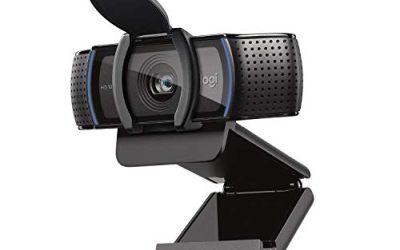
Logitech C922x Pro Stream — best value classic
- Resolution and frame rate: 1080p at 30 fps, or 720p at 60 fps
- Field of view: 78 degrees
- Focus: autofocus, with automatic HD light correction
- Microphones: dual stereo microphones
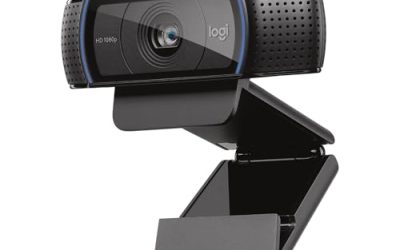
The C922 line has been a default Twitch camera for years, and the C922x remains the sensible way into streaming without overspending. It offers a choice between 1080p at 30 frames per second for maximum detail and 720p at 60 frames per second for smoother motion, and many experienced streamers still prefer the 720p60 mode for a small facecam window, where the extra frames read as more lifelike than extra pixels. Autofocus and automatic light correction handle ordinary room lighting without any software fuss.
This is also the most complete package in the guide. A small tripod is in the box, the dual stereo microphones are good enough to carry a new channel, and the camera has a long history of painless compatibility with OBS Studio, Streamlabs, and XSplit — it was designed with streaming software bundles in mind. Logitech’s current apps provide background replacement and basic image controls for streamers who want a cleaner backdrop without a green screen.
The limits are age-related rather than fatal: the sensor is smaller than the Kiyo Pro’s, so dim rooms get grainy sooner; the connection is USB 2.0; and there is no uncompressed 1080p60 mode at any setting. None of that prevents a good-looking stream in a reasonably lit room. For a first dedicated streaming camera, or a reliable second angle for an established setup, the C922x is still easy to recommend.
Key specs
How to choose
Frame rate first. Twitch delivers up to 1080p at 60 frames per second, and a facecam that matches that rate looks noticeably more alive next to fast gameplay. Every pick here reaches 60 fps at 1080p or 720p. Decide which trade you prefer at your streaming resolution: full 1080p60 (Facecam MK.2, Kiyo Pro, StreamCam, Tiny 2 Lite at 1080p) or the C922x’s smoother-but-softer 720p60 mode.
Sensor size beats resolution for dim rooms. A facecam is downscaled by the platform anyway, so a larger sensor with clean low-light output usually looks better on stream than a small 4K sensor struggling in the dark. If your room runs on monitor glow, prioritize the Kiyo Pro’s adaptive sensor or the Tiny 2 Lite’s 1/2-inch sensor over spec-sheet resolution.
Focus style should match how you move. Fixed focus (Facecam MK.2) never hunts and suits a seated streamer at a consistent distance. Autofocus (Kiyo Pro, StreamCam, Tiny 2 Lite) suits anyone who leans in, holds items up, or changes position. Gimbal tracking on the Tiny 2 Lite is the next step up for performers who leave the chair entirely.
Software control matters more than most spec sheets admit. Locked manual exposure and white balance stop your face from pulsing brighter and darker as game scenes change. Camera Hub, Synapse, OBSBOT Center, and Logitech’s apps all offer some level of this; check that your pick lets you disable automatic exposure before buying, because full-auto cameras are the most common cause of a flickering facecam.
Audio is a separate decision. Two picks here have no microphone or treat it as secondary. That is fine — most established channels run a dedicated USB or XLR mic — but a new streamer who needs one device for everything should weight the Kiyo Pro, StreamCam, or C922x more heavily.
Who should skip
Skip this entire category if you already own a recent mirrorless or DSLR camera with clean HDMI output; a capture card will give you a better picture than any webcam, and the money is better spent there. Also skip these picks if your stream has no facecam at all — commentary-only and VTuber channels gain nothing from a camera upgrade.
Within the list, skip the Tiny 2 Lite if you stream seated and still; its gimbal solves a problem you do not have. Skip the C922x if your room is dim and unlit, because its smaller sensor will grain before the others. And skip the Facecam MK.2 if you need a built-in microphone or autofocus for close-up product work — its fixed focus and mic-free design are deliberate, and fighting them helps no one.
Frequently Asked Questions
Is 4K worth it for a Twitch webcam?
For live output, mostly no. Twitch caps broadcasts at 1080p60, so a 4K camera’s extra resolution is downscaled before viewers see it. A 4K model such as the Tiny 2 Lite can still make sense for its larger sensor, digital zoom headroom, and use in recorded videos, but pure Twitch streamers get more from frame rate and low-light performance than from resolution.
What frame rate should I stream my facecam at?
Match the camera to your broadcast: 60 frames per second looks best alongside 60 fps gameplay and is the default choice for the cameras here. If your PC or internet connection struggles, a 720p60 facecam usually looks better in a small overlay window than a choppy 1080p30 one, which is exactly the trade the C922x offers.
Do I need a separate microphone with these webcams?
A dedicated microphone is the single biggest audio upgrade for any channel, and the Facecam MK.2 ships without a mic at all on that assumption. The built-in microphones on the Kiyo Pro, StreamCam, Tiny 2 Lite, and C922x are fine for a new channel, calls, and backup audio, but plan on a USB or XLR mic if streaming becomes a regular habit.
How much light does a streaming webcam need?
Less than you might fear, if the sensor is up to it. A single soft light source in front of you — a desk lamp bounced off a wall, or an inexpensive panel — transforms even a mid-range camera. Larger-sensor picks such as the Kiyo Pro and Tiny 2 Lite tolerate dim rooms best, but no webcam fully compensates for a dark room with a bright screen behind you.
Final verdict
For most Twitch streamers, the Elgato Facecam MK.2 is the camera to buy: uncompressed 1080p60, HDR, and manual controls that stay where you set them cover the platform’s full output spec with headroom to spare. Choose the Razer Kiyo Pro if your room is dim, the OBSBOT Tiny 2 Lite if you move around on camera, the Logitech StreamCam for forgiving autofocus in an everyday setup, and the C922x if you want a proven, complete package for less. Any of the five will hold a clean facecam; match the pick to your light, your movement, and your microphone situation, and your stream will look the part.
Product and ASIN Reference
| Product | ASIN |
|---|---|
| Elgato Facecam MK.2 | B0CW1S7XP5 |
| Razer Kiyo Pro | B08T1MWX6J |
| OBSBOT Tiny 2 Lite | B0CZ6XY78Y |
| Logitech StreamCam | B07W4DHNBF |
| Logitech C922x Pro Stream | B01LXCDPPK |
FAQ
Is 4K worth it for a Twitch webcam?
What frame rate should I stream my facecam at?
Do I need a separate microphone with these webcams?
How much light does a streaming webcam need?
More from Amazon
Programs that pair well with the guide above. Offers and eligibility are set by Amazon and may change.
Free shipping on eligible items, Prime Video and more. Eligible new members can start with a free trial.
Start a Prime free trialAd-free music streaming. Eligible new subscribers can start with a free trial.
Try Music Unlimited freeA Prime membership for ages 18-24 with a trial period. Eligibility is set by Amazon.
See Prime for Young AdultsAudiobooks and podcasts to listen to on the go. Eligible new members can start with a free trial.
Try Audible freeAs an Amazon Associate we earn from qualifying purchases.