Key takeaways
- Explore the best dell inspiron 11 laptops under 500 for light everyday use, with compact 2-in-1 designs, touchscreens, and realistic limits to expect.
The Dell Inspiron 11 line was built for people who want a small, light laptop for everyday tasks without carrying a full-size machine. Both models in this guide are 11.6-inch 2-in-1 convertibles with touchscreens, which means they fold back into tablet mode for reading, note-taking, and watching video on the sofa, in a cafe, or on a train. They are not gaming machines or workstations, and they were never meant to be, but for browsing, email, documents, and streaming they remain practical, portable companions.

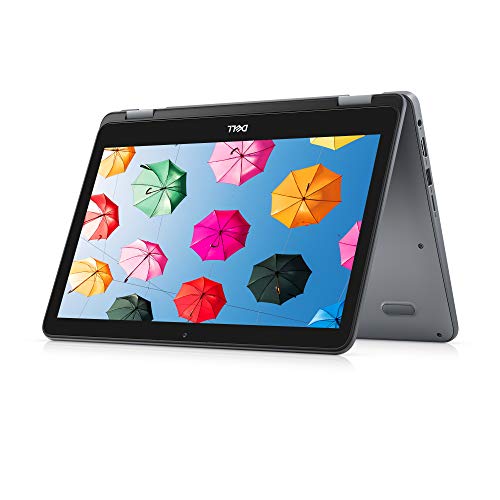
Because the Inspiron 11 is an older line, the catalogue is thin, and only two configurations have verifiable listings on Amazon US. This guide covers both of them honestly, explains what each one can and cannot do, and helps you decide whether a compact 11-inch convertible still fits your life, or whether a larger modern laptop would serve you better. It also flags the storage and condition checks that matter most with older models.
As an Amazon Associate we earn from qualifying purchases
Quick Picks
| Product | Best for | Key spec from title |
|---|---|---|
| Dell Inspiron 11 3147 | Everyday browsing with room for files | 11.6-inch touch 2-in-1 laptop with 500GB storage |
| Dell Inspiron 11 3195 | Lightweight tablet-style use on the move | 11.6-inch touch 2-in-1 laptop with fast SSD |
How to Choose
Set realistic expectations for an 11-inch laptop
An 11-inch laptop is a companion machine, not a desktop replacement, and the honest way to judge one is by what it does well rather than what it cannot do. Browsing, email, word processing, video calls, and streaming all run comfortably on these machines, while heavy photo editing, modern gaming, and large spreadsheets will feel cramped and slow. The small screen keeps the laptop light and easy to carry, but it also means less room for side-by-side windows and smaller text that can tire your eyes during long sessions. If most of your tasks are light work, an Inspiron 11 can serve you well for years.
Compare the two configurations carefully
The two Inspiron 11 models in this guide differ in processor, storage, and age, and those differences shape what each one handles best. The 3147 runs an Intel Pentium processor with a 500GB hard drive, which gives you more room for files, while the 3195 runs an AMD A9 processor with faster memory and a smaller 64GB solid-state drive, which makes it feel snappier when opening applications. Storage matters more than it seems, because 64GB fills quickly once Windows updates and applications are installed, while 500GB gives you room to breathe. Read the full specification list for each listing, and weigh the processor, memory, and storage before you choose.
Check the screen and the hinge
Both Inspiron 11 models use an 11.6-inch HD touchscreen with a 360-degree hinge, which lets the laptop fold flat into tablet mode or stand in tent mode for watching video. The touchscreen is genuinely useful for scrolling, tapping, and drawing. Check the hinge carefully in the listing photos and the description, because a convertible lives or dies by its hinge, and a loose or stiff hinge makes tablet mode frustrating. The HD resolution is modest by modern standards, so text will not look as sharp as on a newer Full HD screen, but at this size the difference is less noticeable than the specification sheet suggests.
Confirm the listing condition before ordering
Because these are older models, the condition of the listing matters as much as the specification. Some listings are for new old-stock units, others are refurbished, and a few are sold by third-party sellers with varying return terms. Read the listing title and description carefully, confirm whether the unit is new or refurbished, and check what operating system is installed, because an older Windows version may need updates before it feels current. Battery health matters too on an older laptop, so look for any mention of battery condition in the listing. A careful read of the listing protects you from surprises that the specification sheet cannot show.
The 2 Best Options
Both models share the same 11.6-inch touchscreen and 360-degree hinge, so the choice comes down to storage, processor, and how you work rather than size alone. The 3147 gives you room for files with its 500GB hard drive, while the 3195 feels quicker with its solid-state drive and faster memory. Read each pick below, then match it to your habits.
Dell Inspiron 11 3147
The Dell Inspiron 11 3147 is the more practical of the two for everyday use, thanks to its 500GB hard drive and its familiar Intel Pentium processor. The 11.6-inch touchscreen folds back a full 360 degrees, so the laptop works as a tablet for reading or a tent for video on a small table. With 4GB of memory it handles browsing, email, and documents without complaint, and the larger hard drive means you can keep photos, music, and files on the machine. It is not fast by modern standards, and the hard drive makes startup slower, but for light daily work it is a steady, honest machine.
Specs
- 11.6-inch HD touchscreen for tapping, scrolling, and drawing
- 1366 by 768 resolution on an 11.6-inch panel
- Intel Pentium N3540 quad-core processor
- 4GB of system memory
- 500GB hard disk drive for file storage
- 360-degree hinge that folds flat into tablet mode
- Tent mode for watching video on a small table
- Built-in webcam for video calls
- Built-in microphone for calls and voice notes
- Compact 2-in-1 design that fits in a small bag
Best for: Everyday browsing, email, and documents, with room for photos, music, and files on the machine.
Watch out for: The hard drive is slower than a solid-state drive, so startup and application loading take longer. Plan for the wait when you switch the machine on, and keep only the programs you use most installed.
Dell Inspiron 11 3195
The Dell Inspiron 11 3195 is the lighter and newer-feeling of the pair, with an AMD A9 processor, faster DDR4 memory, and a 64GB solid-state drive that makes the machine feel responsive. Its 11.6-inch touchscreen folds back into tablet mode just like the 3147, and the whole machine is light enough to carry in a small bag all day. The trade-off is storage, because 64GB fills quickly, so this model suits someone who lives mostly in a browser and stores files in the cloud. If your work is web-based and you value a snappier feel over local storage, the 3195 fits better.
Specs
- 11.6-inch HD touchscreen for tapping, scrolling, and drawing
- 1366 by 768 resolution on an 11.6-inch panel
- AMD A9-9420e dual-core processor with Radeon R5 graphics
- 4GB DDR4 system memory
- 64GB solid-state storage for fast startup
- 360-degree hinge that folds flat into tablet mode
- Tent mode for watching video on a small table
- Lightweight design at around 1.2 kilograms
- Built-in webcam for video calls
- HDMI output for an external screen
- MicroSD card slot for extra storage
Best for: Web-based work, streaming, and tablet-style use on the move, where a light body and a quick feel matter most.
Watch out for: The 64GB of storage fills quickly, so plan on cloud storage or a microSD card for extra files. Check your storage habits before you order, because moving files later is a chore on a small drive.
Which One Fits Your Situation
A student who needs a light note-taker
If you carry a laptop between classes to take notes, browse, and write essays, the Inspiron 11 3195 suits you best, because its solid-state drive feels quick and its light body disappears into a backpack. Keep your files in the cloud, use the touchscreen, and fold it into tablet mode to read. The small screen is a fair trade for a machine you will carry every day.
A home user who wants a second machine
If you want a second laptop for the kitchen table or the sofa, the Inspiron 11 3147 is the better choice, because its 500GB hard drive holds photos, music, and documents without cloud juggling. Use it for email, video calls, streaming, and light browsing, and it will feel like a proper little computer rather than a web-only device. That storage makes it forgiving for a household machine.
A traveller who packs light
If you travel with a small bag and need a machine that works on a plane tray or in a cafe, either Inspiron 11 works, but the 3195 edges ahead on weight and responsiveness. Its touchscreen is easy to use in tight spaces, and the hinge props it in tent mode for films. Bring a charger and a small mouse, and you have a complete travel setup.
A buyer who wants the most storage
If you keep files locally and dislike relying on cloud storage, the Inspiron 11 3147 is the only sensible pick of the two, because its 500GB drive holds about eight times as much as the 3195. Photos, music, and documents will fit comfortably, with no storage chores every few weeks. Accept the slower startup in exchange for the breathing room, and the machine will serve you well.
Common Mistakes
- Expecting an 11-inch convertible to replace a full-size laptop for heavy work, when its strength is light everyday tasks in a portable body. List your five most common tasks first, and buy only when each one is light work.
- Ignoring the storage difference between the two models, and buying the 64GB machine when you keep most of your files locally. Count the files you keep on your machine today before you choose, because 64GB leaves little room for growth.
- Skipping the listing condition check, and receiving a refurbished unit when you expected new old stock. Read the title and description carefully, and confirm whether the unit is new or refurbished before you order.
- Judging the laptop by its processor name alone, without weighing memory, storage type, and screen size together. Compare the full specification list for each model, because the processor tells only part of the story.
- Forgetting that a small screen means less room for side-by-side windows, which can frustrate anyone who multitasks heavily. Try working with one window at a time for a day, and see whether the small screen still suits your habits.
Frequently Asked Questions
Can the Dell Inspiron 11 run modern games?
No, not in any practical sense. Both models use low-power processors and integrated graphics designed for everyday tasks, not gaming. Older and very light games may run at low settings, but modern titles will stutter or refuse to start. These laptops are built for browsing, documents, streaming, and video calls, and they do that work well.
Is 4GB of memory enough for everyday use?
For light use, yes. Browsing with a handful of tabs, email, word processing, and streaming all run fine with 4GB, and both models handle that workload without complaint. The machine will slow down if you open many tabs at once or run several heavy applications together. Heavier workloads call for 8GB or more.
Which Inspiron 11 is better, the 3147 or the 3195?
It depends on how you store your files. The 3147 suits people who keep files on the laptop, because its 500GB hard drive gives you far more room. The 3195 suits people who live in a browser and store files in the cloud, because its solid-state drive feels faster. Choose by storage habits rather than by model number.
Should I buy an older Inspiron 11 or a newer budget laptop?
A newer budget laptop with a Full HD screen, 8GB of memory, and a solid-state drive is usually the better buy, because it will feel faster and last longer. The Inspiron 11 still makes sense when you want an 11-inch convertible, a touchscreen, and a very light machine, and the listing is for a new unit.
FAQ
Can the Dell Inspiron 11 run modern games?
Is 4GB of memory enough for everyday use?
Which Inspiron 11 is better, the 3147 or the 3195?
Should I buy an older Inspiron 11 or a newer budget laptop?
More from Amazon
Programs that pair well with the guide above. Offers and eligibility are set by Amazon and may change.
Free shipping on eligible items, Prime Video and more. Eligible new members can start with a free trial.
Start a Prime free trialAd-free music streaming. Eligible new subscribers can start with a free trial.
Try Music Unlimited freeA Prime membership for ages 18-24 with a trial period. Eligibility is set by Amazon.
See Prime for Young AdultsAudiobooks and podcasts to listen to on the go. Eligible new members can start with a free trial.
Try Audible freeAs an Amazon Associate we earn from qualifying purchases.