Our Short List of 3

- Sensor: Laser, up to 16,400 DPI
- Buttons: 12 thumb buttons plus a fire button, 18 programmable in total
- Polling rate: 1000 Hz
- Acceleration: 30 G

- Sensor: Gaming-grade laser, up to 8,200 DPI
- Buttons: 20 programmable, including a 12-button thumb grid
- Extra input: G-Shift button for a second layer of assignments
- Polling rate: 1000 Hz

- Sensor: Avago ADNS-9800 laser (Pro-Aim R3), 200 to 8,200 DPI in 41 steps
- Polling rate: 1000 Hz, 1 ms response
- Tracking speed: 150 inches per second, 30 G acceleration
- Buttons: 8 programmable with EasyShift second layer
All 4 Picks at a Glance
| Product | Specs | Action |
|---|---|---|
| 1. UtechSmart Venus — Laser MMO Mouse With a 12-Button Thumb Grid |
| Check price on Amazon |
| 2. Logitech G600 — 20 Buttons and G-Shift for MMO Players |
| Check price on Amazon |
| 3. ROCCAT Kone XTD — Avago ADNS-9800 With Surface Calibration |
| Check price on Amazon |
 5. Perixx MX-2000IIB — ADNS-9500 Laser With Weight Tuning |
| Check price on Amazon |
Our Top Picks
Most gaming mice sold today use optical sensors, yet a small group of laser models still earns its place on certain desks. A laser sensor lights the surface with a focused beam and reads the reflected pattern at a steep angle, so it can follow movement on glass, polished wood, glossy laminate, lacquered desk tops, and hard pads. Those are exactly the surfaces where an optical sensor, which depends on visible surface texture lit by an LED, often loses tracking and leaves the cursor skipping or frozen. If your setup sits on a glass desk or a hard pad, a laser mouse is not a nostalgic pick; it is the practical one.
Honesty matters with this class, so here is the other side. On soft cloth pads, many laser sensors show a small amount of built-in acceleration variance, and their lift-off distance tends to run higher than on current optical designs. Competitive players who live on cloth usually prefer optical for that reason. The big peripheral makers have also moved almost entirely to optical sensors, which makes the laser class a legacy class: the five models below are established designs built around proven Avago laser sensors, and remaining listings often come from marketplace sellers rather than fresh production runs. Each pick below is a genuine laser model, with its sensor type, DPI range, buttons, and connection laid out so you can match it to your desk and your games.
1. UtechSmart Venus — Laser MMO Mouse With a 12-Button Thumb Grid
- Sensor: Laser, up to 16,400 DPI
- Buttons: 12 thumb buttons plus a fire button, 18 programmable in total
- Polling rate: 1000 Hz
- Acceleration: 30 G
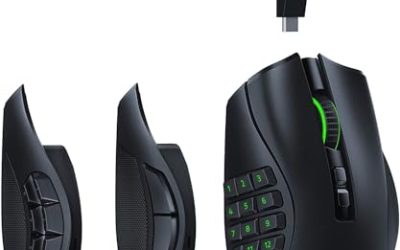
The UtechSmart Venus is the easiest laser mouse to find in MMO circles, and its layout explains why. Twelve thumb buttons sit in a tilted grid on the left side, shaped so your thumb can learn positions by touch, and a dedicated fire button rests beside the left click. The laser sensor reaches 16,400 DPI with on-the-fly adjustment, which gives plenty of headroom for camera turns in MMOs and real-time strategy games, while five onboard profiles let you carry separate bindings for different titles. An adjustable weight system lets you add or remove mass until the glide feels right on a hard pad, and the RGB lighting zones can be matched to the rest of a setup or switched off entirely.
Because the Venus has stayed in production far longer than most laser designs, it is also the pick here with the most consistent listing history. The wired connection keeps input latency simple, the braided cable holds up well on desk edges, and the configuration software stores macros, DPI steps, and lighting on the mouse itself. Players who want one mouse that covers an MMO hotbar, a MOBA item row, and daily desktop work will find the Venus the most complete package in this group.
2. Logitech G600 — 20 Buttons and G-Shift for MMO Players
- Sensor: Gaming-grade laser, up to 8,200 DPI
- Buttons: 20 programmable, including a 12-button thumb grid
- Extra input: G-Shift button for a second layer of assignments
- Polling rate: 1000 Hz
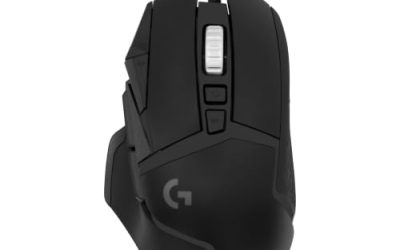
The Logitech G600 pairs a gaming-grade laser sensor with the deepest button layout Logitech has put on a mouse. Twenty programmable buttons include a twelve-button thumb panel, and the ring-finger G-Shift button acts like a shift key: hold it down and every thumb button takes a second assignment, which effectively doubles your hotbar without moving your hand. The laser sensor tracks up to 8,200 DPI and keeps working on hard and glossy surfaces that defeat many optical models, so the G600 suits glass-desk MMO setups particularly well. Onboard memory stores your profiles on the mouse, and the sculpted right-handed shell supports the palm through long sessions.
The G600 has been a fixture of MMO gaming for years, and its listings today lean on remaining stock and marketplace sellers, so check the listing details carefully before ordering. The configuration software is mature, the thumb grid has a dual-dish shape that helps you find rows by feel, and the RGB backlight on the thumb panel doubles as a profile indicator. For players whose games live and die by the number of abilities under one thumb, the G600 remains the benchmark in this class.
3. ROCCAT Kone XTD — Avago ADNS-9800 With Surface Calibration
- Sensor: Avago ADNS-9800 laser (Pro-Aim R3), 200 to 8,200 DPI in 41 steps
- Polling rate: 1000 Hz, 1 ms response
- Tracking speed: 150 inches per second, 30 G acceleration
- Buttons: 8 programmable with EasyShift second layer
The Kone XTD is built around the Avago ADNS-9800 laser sensor, sold by ROCCAT as the Pro-Aim R3, and it adds a feature few mice of any sensor type offer: a Tracking and Distance Control Unit that calibrates the sensor to your exact surface and lets you set lift-off distance anywhere from one to five millimetres. That calibration is a genuine advantage on glass and hard pads, where lift-off behaviour decides whether small repositioning movements stay clean. DPI adjusts in 41 true steps between 200 and 8,200, the 72 MHz Turbo Core V2 processor handles macros without lag, and 576 KB of onboard memory stores your profiles.
Eight programmable buttons gain a second layer through EasyShift, which turns one held button into a modifier for all the others, and the 4D Titan wheel clicks in four directions. Four clip-in weights of five grams each let you tune the balance of the 123-gram shell, and two light rails along the flanks carry the multi-colour illumination. The Kone XTD is a larger, right-handed mouse that rewards a palm grip, and its combination of a top-tier laser sensor and real surface calibration makes it the most technically complete pick here for hard-surface players.
4. SteelSeries Sensei [RAW] — Stripped-Down Tournament Shape
The Sensei [RAW] takes the ambidextrous shape that tournament players made famous and removes everything that does not serve tracking. Its Avago ADNS-9500 laser sensor covers 90 to 5,700 CPI, tracks at 150 inches per second, and keeps working across hard pads, wood, and other firm surfaces where optical sensors can struggle. At 90 grams with a low, symmetrical shell, the RAW suits claw and fingertip grips and either hand, with two buttons on each flank so left-handed players get the same layout as right-handed ones. Illumination is a single white LED, the cable is braided, and the rubberized finish grips well during long sessions.
SteelSeries built the RAW as the focused sibling of the original Sensei, trading the colour lighting and onboard display for a simpler, lighter mouse. Settings are handled through the SteelSeries Engine software, and the CPI switch behind the wheel jumps between two sensitivity levels mid-game. Players who want a laser sensor in a proven competitive shape, without MMO button grids or extra hardware, will find the Sensei [RAW] the cleanest option in this roundup.
Specs
- Sensor: Avago ADNS-9500 laser, 90 to 5,700 CPI
- Polling rate: 1000 Hz
- Tracking speed: 150 inches per second, 30 G acceleration
- Buttons: 8, with two on each side
- Shape: Ambidextrous, right- and left-hand use
- Weight: 90 g
- Lighting: White LED
- Connection: Wired USB, braided cable
5. Perixx MX-2000IIB — ADNS-9500 Laser With Weight Tuning
- Sensor: Avago ADNS-9500 laser, up to 5,600 DPI (settings from 500 to 5,000 DPI)
- Polling rate: 1000 Hz
- Tracking speed: 150 inches per second, 30 G acceleration
- Buttons: 11 programmable
The Perixx MX-2000IIB brings the same Avago ADNS-9500 laser family as the Sensei [RAW] to a larger, right-handed ergonomic shell. The sensor is factory rated to 5,600 DPI, with in-use settings running from 500 to 5,000 DPI, and it tracks happily on hard and semi-gloss surfaces. Eleven programmable buttons, five user profiles, and a weight tuning cartridge give it the customisation depth of the bigger names here, while Omron main switches provide a crisp, consistent click. A gold-plated USB plug and a braided fibre cable round out a build that has kept this model in circulation for years.
The MX-2000IIB stores your DPI steps, macros, and lighting choices across its five profiles, so a work setup and a gaming setup can live on the same mouse. Its sculpted thumb rest and taller palm hump favour a relaxed palm grip, and the adjustable weight lets heavier-mouse fans dial in the feel they prefer. For players who want laser tracking on a hard desk with full-size ergonomics and deep button programming, the Perixx is a strong closing pick.
How to Choose a Gaming Laser Mouse
Start with your surface. The whole case for a laser mouse rests on where it will track. Laser sensors read surfaces through reflected light at an angle, so glass, polished stone, lacquered wood, glossy laminate, and hard plastic or aluminium pads are all workable. Very clear glass over a featureless background can still challenge any sensor, and a dark, matte desk gives laser no advantage over optical. If you play on a thick cloth pad, read the trade-off plainly: optical sensors generally track cloth with less acceleration variance, and a laser mouse earns its keep on hard and glossy surfaces first.
Know the sensor families. Nearly every respected laser gaming mouse runs on one of two Avago lines. The ADNS-9500, found in the Sensei [RAW] and the Perixx MX-2000IIB, is the older workhorse with a ceiling near 5,700 CPI. The ADNS-9800, used in the Kone XTD and the Venus class of MMO mice, raises the ceiling to 8,200 DPI natively, with some designs interpolating beyond that. Headline DPI is mostly headroom; most players compete between 400 and 3,200 DPI, so treat the sensor family, the tracking speed figure, and the surface behaviour as the real specifications.
Check lift-off and calibration. Laser sensors often keep tracking a little higher above the surface than optical ones, which can add cursor drift when you reposition the mouse. A model with adjustable lift-off, like the Kone XTD and its one-to-five-millimetre range, lets you tune that behaviour to your pad. Surface calibration, where offered, is worth using once per desk or pad change.
Match shape and buttons to your games. MMO and strategy players gain the most from thumb grids like those on the Venus and G600, plus a modifier layer such as G-Shift or EasyShift. Shooter players usually prefer a lighter, symmetrical shell like the Sensei [RAW]. Weight tuning appears on several picks here and genuinely changes how a mouse feels during slow, precise movements, so use it rather than leaving every weight in or out by default.
Plan for legacy software and listings. These are mature designs, and their configuration tools were written for older Windows versions; most still run, and onboard memory means your settings travel with the mouse once saved. Because remaining listings often come from marketplace sellers, read the listing details closely, confirm the exact model name and sensor, and check the return terms before ordering. A laser mouse bought for the right surface will serve for years; one bought for the wrong surface helps nobody.
Frequently Asked Questions
Can a laser gaming mouse really work on a glass desk?
Yes, within limits. A laser sensor reads microscopic texture through reflected light, so it can track on glass surfaces that leave an optical sensor with nothing to follow. Frosted, tinted, or textured glass works best; perfectly clear glass over a plain, empty background gives the sensor the least to read and can still cause dropouts. A thin glass-effect hard pad is the most reliable way to get the same feel.
Is a laser sensor better than an optical sensor for gaming?
Neither type wins everywhere. Optical sensors are the current default because they track cloth pads with very consistent movement and low lift-off. Laser sensors track a far wider range of surfaces, including glass and glossy hard pads, and they offer very high DPI ceilings. The better sensor is the one that matches your desk: hard or glossy surfaces point to laser, soft cloth pads point to optical.
Why are so few new laser gaming mice released now?
Peripheral makers standardised on optical sensors because modern optical designs deliver consistent tracking at high production volumes, and the esports scene adopted them as the default. Laser development effectively paused, which is why the respected laser models still listed today are established designs from the Avago 9500 and 9800 era rather than new releases. The technology did not stop working; the market simply moved on.
What DPI setting suits a laser gaming mouse?
Most players settle between 400 and 3,200 DPI in game, whatever the headline maximum says. Lower settings favour control in shooters, while higher settings help with fast camera movement in strategy and MMO titles. Use the DPI switch to keep two or three steps you actually need, and if your mouse offers surface calibration or lift-off adjustment, set those once for your pad before fine-tuning sensitivity.
Disclosure: As an Amazon Associate, we earn from qualifying purchases made through links on this page, at no extra cost to you.
FAQ
Can a laser gaming mouse really work on a glass desk?
Is a laser sensor better than an optical sensor for gaming?
Why are so few new laser gaming mice released now?
What DPI setting suits a laser gaming mouse?
More from Amazon
Programs that pair well with the guide above. Offers and eligibility are set by Amazon and may change.
Free shipping on eligible items, Prime Video and more. Eligible new members can start with a free trial.
Start a Prime free trialAd-free music streaming. Eligible new subscribers can start with a free trial.
Try Music Unlimited freeA Prime membership for ages 18-24 with a trial period. Eligibility is set by Amazon.
See Prime for Young AdultsAudiobooks and podcasts to listen to on the go. Eligible new members can start with a free trial.
Try Audible freeAs an Amazon Associate we earn from qualifying purchases.