Our Top Picks
 ASUS ROG Strix G16 Gaming Laptop16GB DDR5 | 1TB SSD13.94 x 0.89 x 10.39 inches5.51 poundsCheck on Amazon
A gaming laptop lives a harder life than any other computer in the house. It gets carried to class, opened and closed dozens of times a day, and run hot for hours. A machine that looks impressive in a product photo can still develop a wobbly hinge, a flexing keyboard deck, or a cracked corner within a year if the chassis was built to a budget rather than a standard. Build quality is the difference between a laptop that survives that routine and one that falls apart around good hardware.
This guide is for gamers who move their laptop often or want a machine that feels solid after years of daily use. It covers students carrying a laptop between lectures, players who set up at a friend’s place every weekend, and buyers who would rather spend once on a sturdy machine than replace a flimsy one. Every laptop below was picked from its Amazon listing title and specifications, so the build details here come from the product pages themselves.
Quick Picks
As an Amazon Associate we earn from qualifying purchases.
| Product | Best for | Key spec from title |
|---|---|---|
| ASUS ROG Strix G16 | A sturdy all-rounder for daily carrying | Core i7-13650HX, RTX 4060, 16GB DDR5, 1TB SSD, 16-inch 165Hz display |
| Acer Predator Helios 16 | A desk-first machine with a rigid frame | Core i7-13700HX, RTX 4060, 16GB DDR5, 1TB SSD, 16-inch WQXGA 165Hz display |
| Lenovo Legion Slim 5 16 | A slim laptop that still feels solid | Ryzen 5 7640HS, RTX 4060, 16GB DDR5, 512GB SSD, 16-inch 144Hz display |
How to Choose
Start with the chassis material and the lid
The lid takes the most abuse of any part, because it gets pressed in a bag, gripped one-handed and flexed every time the screen opens. A metal lid resists twisting far better than a thin plastic one, and a lid with a rigid frame shields the panel behind it. Check the listing for the chassis material and look for aluminum or magnesium in the description. A laptop that lists a metal top cover and a reinforced base is making a real claim about durability, while a listing that says nothing about materials is usually hiding a plastic shell. Handle the machine in a store when you can and press the lid gently to feel for flex.
Check the hinges, the keyboard deck, and the ports
Hinges fail more often than any other moving part on a gaming laptop, so inspect them first. A good hinge opens smoothly with one hand, holds the screen steady at any angle, and shows no wobble when tapped. The keyboard deck matters just as much, because a deck that flexes under your palms will feel cheap within weeks and can stress the board underneath. Ports are the third weak point: a port that sits in a thin plastic edge will loosen over time, while one mounted in a metal side panel stays firm. Look for listings that mention a reinforced hinge or a metal deck, and read the port list to confirm the connections you use daily are present.
Judge the cooling design, because heat ages a body
A gaming laptop that runs hot does not just throttle its graphics card; heat also dries out adhesives, warps thin plastic, and makes fans work harder year after year. Cooling is therefore a build quality question, not only a performance one. Look for dual fans, rear or side exhaust vents, and a listing that names the thermal design rather than hiding it. A laptop with vents on the back and sides moves hot air away from your hands and the desk surface, while a machine with a single narrow vent will run louder and hotter under the same load. Keep the vents clear of bedding and soft surfaces, and expect to clean dust from the intakes every few months.
Weigh the trade-off between sturdiness and portability
A thicker laptop is usually the sturdier one, because its frame has room for a rigid skeleton, larger fans, and thicker panels. A slim laptop can still be well built, but it gives up that margin and asks more of its materials, so the quality of the metal and the hinge matters even more. Think honestly about how far the machine travels: a laptop that mostly sits on a desk can afford extra weight, while one that rides in a backpack every day should be light enough that you actually carry it. The right choice is the sturdiest machine you are willing to carry, not the heaviest machine on the shelf.
The 3 Best Options
ASUS ROG Strix G16 (G614JV-AS74)
The Strix G16 is the safe middle ground for a buyer who wants a strong body without giving up portability. Its chassis is built around a 16-inch frame that feels planted on a desk, and the 165Hz panel makes fast games look smooth without exotic hardware. The Core i7 processor and the full-power RTX 4060 handle modern titles at the panel’s pace, while the 1TB drive leaves room for a game library alongside everyday files. It suits a student or a player who carries one machine between home, class, and a friend’s setup, and wants the lid and base to feel the same after a year of that routine.
Specs
- Intel Core i7-13650HX processor
- NVIDIA GeForce RTX 4060 Laptop GPU, 140W
- 16GB DDR5 memory
- 1TB PCIe Gen4 SSD
- 16-inch display with a 165Hz refresh rate
Best for: Daily carrying between home, class, and game nights.
Watch out for: Confirm the exact configuration on the listing before ordering, because the Strix G16 ships in several builds with the same name.
Acer Predator Helios 16 (PH16-71-74UU)
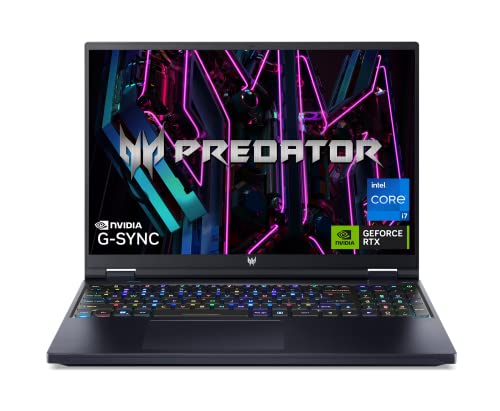
The Helios 16 is the most desk-bound machine in this group, and its build reflects that priority. The 16-inch WQXGA panel runs at 165Hz with G-SYNC, so motion stays smooth in fast games, and the Core i7-13700HX pairs with a 140W RTX 4060 for steady frame rates at the higher resolution. Two Thunderbolt 4 ports and HDMI 2.1 give it the connectivity of a desktop replacement, which fits a player who docks the laptop to a monitor and leaves it in one place. The rigid frame and the generous venting suit long sessions where the machine stays plugged in and the fans have room to breathe.
Specs
- Intel Core i7-13700HX processor
- NVIDIA GeForce RTX 4060 Laptop GPU, 8GB GDDR6, 140W
- 16-inch WQXGA 2560 x 1600 IPS display, 165Hz, 3ms, G-SYNC
- 16GB DDR5 memory
- 1TB PCIe Gen 4 SSD
- Two Thunderbolt 4 USB-C ports, HDMI 2.1, Killer Wi-Fi 6E
- Windows 11 Home
Best for: A fixed desk setup with an external monitor and long plugged-in sessions.
Watch out for: It is the heaviest machine here, so weigh it in your bag before committing to daily travel.
Lenovo Legion Slim 5 16
The Legion Slim 5 is the pick for a buyer who wants a thinner laptop without accepting a flimsy one. Its slim frame still carries a full-power 140W RTX 4060, a six-core Ryzen 5 processor, and a 16-inch 144Hz display, so it plays modern games well while staying easy to slip into a bag. The 80Wh battery and the 4-zone RGB keyboard round out a machine aimed at players who work and play on the same laptop. It fits a commuter or a student who values a lighter carry but still wants a chassis that holds its shape after months of daily opening and closing.
Specs
- AMD Ryzen 5 7640HS processor, 6 cores
- NVIDIA GeForce RTX 4060 Laptop GPU, 140W
- 16GB DDR5-5600 memory
- 512GB PCIe Gen 4 SSD
- 16-inch 1920 x 1200 IPS display, 144Hz, G-SYNC and FreeSync
- 80Wh battery
- 4-zone RGB keyboard
Best for: A slim daily carry that still plays modern games well.
Watch out for: The 512GB drive fills quickly with large games, so plan for the second M.2 slot or external storage.
Which One Fits Your Situation
You carry your laptop everywhere, every day
Pick the Legion Slim 5. Its thinner frame and lighter carry make the daily trip painless, and the full-power RTX 4060 means the slim body does not force a performance compromise. The 144Hz display is smooth enough for competitive play, and the solid chassis holds up to constant opening and closing. Keep a sleeve in your bag to protect the lid from keys and chargers.
You want the sturdiest machine and rarely move it
Pick the Predator Helios 16. Its rigid frame, high-resolution 165Hz panel, and desktop-style connectivity suit a permanent desk setup, and the heavier body is a fair trade when the laptop stays in one place. The dual Thunderbolt 4 ports make docking simple, and the cooling has room to work during long sessions. Measure your desk depth first, because the 16-inch frame needs real space.
You want one laptop for class, work, and play
Pick the ROG Strix G16. It balances a strong chassis with a portable size, and the 1TB drive holds a game library alongside school or work files without constant juggling. The 165Hz panel suits both fast games and smooth scrolling, and the full-power graphics card keeps it relevant for years. It is the easiest of the three to recommend without knowing the exact routine.
You play long sessions and worry about heat
Pick the Helios 16 or the Strix G16 over the slim Legion, because thicker frames move heat out more easily and keep fan noise lower under sustained load. Both name a 140W RTX 4060 with room to breathe, and both give their vents space on the rear and sides. Whichever you choose, keep the intakes clear and give the machine a hard, flat surface to sit on.
Common Mistakes
- Judging build quality from a product photo instead of the chassis material, hinge design, and deck rigidity named in the listing.
- Buying the thinnest laptop available and then carrying it in an unpadded bag where the lid takes every knock.
- Ignoring cooling and then running long sessions on bedding or a soft lap surface that blocks the intakes.
- Choosing a model by its graphics card name alone, without checking the wattage, because two laptops with the same card can perform very differently.
- Forgetting to confirm the exact configuration on the listing, since popular models ship in several builds with the same name and different storage or memory.
Frequently Asked Questions
Does a metal chassis really make a gaming laptop last longer?
A metal chassis resists twisting and denting far better than thin plastic, and it protects the panel and the board inside when the laptop is squeezed in a bag or bumped on a desk. Metal also spreads heat more evenly, which helps the machine age gracefully. The trade-off is weight, so a metal body suits buyers who value durability over the lightest possible carry.
What is the first thing to check for build quality on a listing?
Look for the chassis material and the hinge description first, because those two details tell you how the laptop handles daily opening, closing, and carrying. A listing that names aluminum or a reinforced hinge is making a checkable claim. If the listing says nothing about materials, treat the body as plastic until you can handle the machine yourself.
Is a heavier gaming laptop always better built?
Not always, but weight and rigidity often travel together, because a thicker frame leaves room for a stronger skeleton and larger cooling parts. A well-designed slim laptop can still be sturdy, as the Legion Slim 5 shows, yet it asks more of its materials and hinges. Judge each machine on its chassis, hinge, and cooling rather than on weight alone.
How much does cooling matter for a laptop’s lifespan?
Cooling matters a great deal, because sustained heat dries adhesives, stresses solder joints, and forces fans to spin faster and wear out sooner. A laptop with dual fans and clear rear vents will run cooler and quieter over years of use than one with a single narrow vent. Keep the intakes clean and the machine on a hard surface to give the cooling design its best chance.
FAQ
Does a metal chassis really make a gaming laptop last longer?
What is the first thing to check for build quality on a listing?
Is a heavier gaming laptop always better built?
How much does cooling matter for a laptop’s lifespan?
More from Amazon
Programs that pair well with the guide above. Offers and eligibility are set by Amazon and may change.
Free shipping on eligible items, Prime Video and more. Eligible new members can start with a free trial.
Start a Prime free trialAd-free music streaming. Eligible new subscribers can start with a free trial.
Try Music Unlimited freeA Prime membership for ages 18-24 with a trial period. Eligibility is set by Amazon.
See Prime for Young AdultsAudiobooks and podcasts to listen to on the go. Eligible new members can start with a free trial.
Try Audible freeAs an Amazon Associate we earn from qualifying purchases.