Our Short List of 3

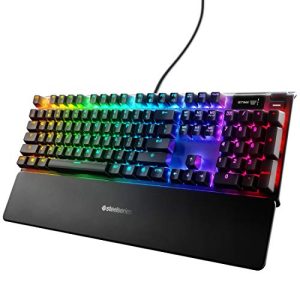
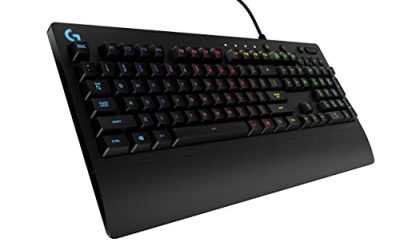
- Best for: Gamers who want a complete full-size board for play and everyday work.
- Full-size layout with number pad and navigation cluster
- HyperX Red linear switches
- RGB backlighting
- Aluminum body

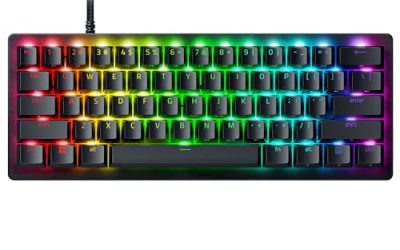
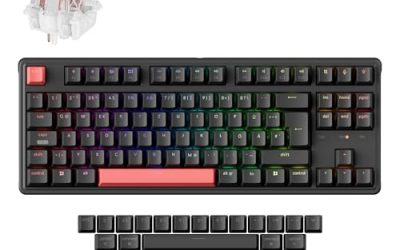
- Best for: Competitive players who want maximum mouse room on a small desk.
- 60 layout, the most compact size in this guide
- HyperX Red switches
- Model HKBO1S-RB-US/G
- RGB backlighting

- Best for: Players who want a compact board but refuse to give up arrow keys.
- 65 layout with dedicated arrow keys
- HyperX Red linear switches
- Black US layout
- RGB backlighting
All 4 Picks at a Glance
| Product | Specs | Action |
|---|---|---|
| HyperX Alloy Origins |
| Check price on Amazon |
| HyperX Alloy Origins 60 |
| Check price on Amazon |
| HyperX Alloy Origins 65 |
| Check price on Amazon |
| HyperX Alloy Origins 65 Aqua |
| Check price on Amazon |
Key takeaways
- Find the right HyperX gaming keyboard for your desk. We compare five Alloy Origins models by size, switch feel, and layout to match your play style.
HyperX built its keyboard reputation on one idea: a mechanical board that feels fast, stays steady during long sessions, and does not demand a weekend of tinkering before it is ready to play. The Alloy Origins family is the clearest expression of that idea, and it now spans enough sizes and switch options that the hardest part is no longer finding a good board. The hardest part is choosing between several good boards that look similar at first glance but suit very different desks and hands.
This guide is for PC gamers who already know they want a HyperX keyboard and need help narrowing the choice to one model. It covers players setting up a first serious desk, competitive players who want a smaller board for more mouse room, and typists who game after work and want a switch that feels right for both. Every keyboard below was picked from its Amazon listing title and specifications, so the details you read here come from the product pages themselves.
Quick Picks
As an Amazon Associate we earn from qualifying purchases.
| Product | Best for | Key spec from title |
|---|---|---|
| HyperX Alloy Origins | A full-size desk setup with room for everything | Full-size layout with HyperX Red linear switches |
| HyperX Alloy Origins 60 | A compact desk and maximum mouse space | 60 layout with HyperX Red switches |
| HyperX Alloy Origins 65 | A small board that keeps arrow keys | 65 layout with HyperX Red linear switches |
| HyperX Alloy Origins 65 Aqua | A compact board with tactile feedback | 65 layout with HyperX Aqua tactile switches |
| HyperX Alloy Origins Core | A tenkeyless setup without the number pad | Tenkeyless layout with HyperX Red switches |
How to Choose
Pick the size that fits your desk and your mouse
Keyboard size decides how much desk space is left for your mouse. A full-size board gives you a number pad and a complete set of navigation keys, which is handy if you also use the PC for work or data entry. A tenkeyless board drops the number pad and pulls the mouse closer to your body. A 65 board keeps the arrow keys while cutting the footprint, and a 60 board is the smallest option, trading dedicated arrows for the most mouse room of all. Measure the space in front of your monitor, think about how wide your mouse sweeps are in your most-played games, and choose the size that leaves your arm relaxed.
Choose a switch feel before you choose a model
HyperX offers its Alloy Origins boards with different switch types, and the switch is what your fingers actually feel with every press. The HyperX Red switch is linear, which means it travels straight down with no bump and no click, so it suits fast repeated presses and quieter rooms. The HyperX Aqua switch is tactile, which means you feel a small bump as the key registers, giving your fingers a clear signal without a loud click. If you play fast-paced games where you press the same keys again and again, a linear switch usually feels smoother. If you type a lot between matches and like to feel each key register, a tactile switch is often the better fit.
Check the layout against the keys you actually use
A compact keyboard only works if it still gives you the keys your games need, so check the layout against your own habits. Players who rely on arrow keys for menus or movement should be careful with a 60 board, where arrows live on a second layer and need a function key combination. A 65 board solves that problem by keeping dedicated arrow keys in a smaller frame. Tenkeyless boards keep the full navigation cluster, which suits players who use Home, End, Page Up, and Page Down often. Before you buy, list the keys you press most in your main games and confirm the board you pick has them where your fingers expect them.
Think about build, cable, and long-session comfort
A gaming keyboard takes thousands of presses a day, so the frame and the cable matter more than they appear to in a product photo. The Alloy Origins boards use an aluminum body that keeps the board from flexing or sliding around during intense moments. A detachable cable makes the board easier to move, pack, or replace if the cable ever wears out. Keycap legends and backlighting matter too when you play in a dim room, since clear legends and even lighting help you find keys without looking down. Finally, consider wrist comfort: a smaller board lets your hands sit closer together, while a full-size board may need a wrist rest if you type for hours before you play.
The 5 Best Options
HyperX Alloy Origins
- Best for: Gamers who want a complete full-size board for play and everyday work.
- Full-size layout with number pad and navigation cluster
- HyperX Red linear switches
- RGB backlighting
- Aluminum body
Gamers who want a complete full-size board for play and everyday work.
The full-size frame needs a wide desk, so measure your space before you order.
The full-size HyperX Alloy Origins is the safe starting point for anyone who wants a complete keyboard with nothing missing. It gives you the number pad, the navigation cluster, and the function row in the places your hands already know, with no learning curve and no shortcut to remember. The HyperX Red linear switches keep presses smooth and consistent, which suits players who hold the same movement keys for hours. It also works well as a daily driver, since the full layout handles typing and shortcuts without compromise. If you have the desk space and you want one keyboard that does everything, this is the board to buy first.
Watch out for: The full-size frame needs a wide desk, so measure your space before you order.
HyperX Alloy Origins 60
- Best for: Competitive players who want maximum mouse room on a small desk.
- 60 layout, the most compact size in this guide
- HyperX Red switches
- Model HKBO1S-RB-US/G
- RGB backlighting
Competitive players who want maximum mouse room on a small desk.
Arrow keys and the function row sit on a second layer, so check that you are comfortable with function-key combinations.
The HyperX Alloy Origins 60 is the board for players who want the smallest footprint HyperX makes. Its 60 layout removes the number pad, the function row, and the navigation cluster, leaving a compact frame that frees desk space for wide mouse movements. That matters most in low-sensitivity shooters, where the mouse travels far. The HyperX Red switches keep the feel fast and smooth, and the small frame is easy to carry to a LAN setup. It takes a little time to learn the function-layer shortcuts for arrows and media controls, but once they become habit the board feels fast and uncluttered.
Watch out for: Arrow keys and the function row sit on a second layer, so check that you are comfortable with function-key combinations.
HyperX Alloy Origins 65
- Best for: Players who want a compact board but refuse to give up arrow keys.
- 65 layout with dedicated arrow keys
- HyperX Red linear switches
- Black US layout
- RGB backlighting
Players who want a compact board but refuse to give up arrow keys.
The function row is still on a second layer, so media and function shortcuts need a key combination.
The HyperX Alloy Origins 65 sits between the tiny 60 and the larger tenkeyless boards. It keeps dedicated arrow keys, which the 60 gives up, while staying small enough to leave plenty of room for your mouse. That combination suits players who use arrows for menus or movement and still want a compact desk. The HyperX Red linear switches give the same smooth, fast feel as the full-size board, so the typing experience feels like no compromise. It is also a good middle ground if you are unsure about going fully compact: it removes the number pad and function row but keeps the keys most players reach for every session.
Watch out for: The function row is still on a second layer, so media and function shortcuts need a key combination.
HyperX Alloy Origins 65 Aqua
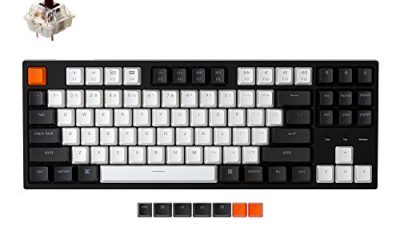
- Best for: Gamers and typists who want tactile feedback in a compact board.
- 65 layout with dedicated arrow keys
- HyperX Aqua tactile switches
- RGB backlighting
- Aluminum body
Gamers and typists who want tactile feedback in a compact board.
The tactile bump feels different from a linear switch, so it is worth trying one first if you have only used linear boards before.
The HyperX Alloy Origins 65 Aqua uses the same 65 frame as the Red version, but its HyperX Aqua switches change how presses feel. Each key gives a tactile bump as it registers, so your fingers get a clear signal without a loud click. That feedback helps typists who want to know a key has registered, and gamers who like a defined actuation point for ability keys. The board keeps the dedicated arrow keys that make the 65 layout practical, and it stays small enough for a tidy desk. If you have tried linear switches and found them too easy to press by accident, this is the version to try.
Watch out for: The tactile bump feels different from a linear switch, so it is worth trying one first if you have only used linear boards before.
HyperX Alloy Origins Core
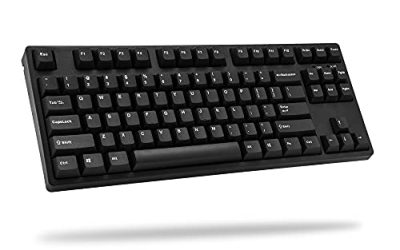
The HyperX Alloy Origins Core is the tenkeyless member of the family, and the easiest compact board to switch to. It drops only the number pad, keeping the function row and navigation cluster where full-size users expect them. That suits players who want more mouse room without relearning their keyboard. The HyperX Red switches keep presses smooth and fast, and the smaller frame sits neatly on crowded desks. It is also a strong choice if you use an external number pad only occasionally, since the pad can stay in a drawer until it is needed.
Specs
- Tenkeyless layout without the number pad
- HyperX Red switches
- Model HX-KB7AQX-US
- RGB backlighting
- Aluminum body
Best for: Players who want a smaller board with no learning curve.
Watch out for: There is no number pad, so keep an external pad nearby if you enter numbers often.
Which One Fits Your Situation
You have a big desk and want one keyboard for everything
Choose the HyperX Alloy Origins in full size. It keeps the number pad, the navigation keys, and the function row, so it handles gaming, typing, and everyday tasks without any compromise. The Red linear switches stay smooth through long sessions, and you never need to remember a second-layer shortcut for a key you use every day.
You play low-sensitivity shooters and need mouse room
Choose the HyperX Alloy Origins 60. Its tiny frame leaves the most desk space for wide mouse sweeps in low-sensitivity shooters, and the Red switches keep repeated presses fast and consistent. Give yourself a few days to learn the function-layer shortcuts, and the board will feel like it disappears under your hands.
You want a compact board but use arrow keys constantly
Choose the HyperX Alloy Origins 65, in Red if you like a smooth press or Aqua if you like a tactile bump. Both keep dedicated arrow keys in a small frame, so you get the desk space of a compact board without losing the keys you reach for in menus and movement.
You want a smaller board with zero relearning
Choose the HyperX Alloy Origins Core. It is tenkeyless, so it only removes the number pad and keeps everything else in the familiar full-size positions. The Red switches keep the feel smooth and fast, and the layout needs no adjustment at all. It suits players who want more mouse room today without spending a week retraining their fingers.
Common Mistakes
- Buying a 60 board without checking whether you rely on arrow keys or the function row in your main games.
- Choosing a switch by name alone instead of thinking about whether you prefer a smooth linear press or a tactile bump.
- Picking a full-size board for a narrow desk and then crowding the mouse into too little space.
- Assuming every Alloy Origins 65 is the same, when the Red and Aqua versions use different switches under the same frame.
- Forgetting the number pad: tenkeyless and compact boards drop it, so players who enter numbers often need a separate pad.
Frequently Asked Questions
What is the difference between the HyperX Alloy Origins 60 and 65?
The 60 is the smaller board: it has no dedicated arrow keys and no function row, with those keys on a second layer. The 65 adds dedicated arrow keys in a larger frame, which suits players who use arrows for menus or movement. Both use the same Alloy Origins build and come with HyperX Red linear switches, so the choice comes down to size and whether you need arrows.
Are HyperX Red switches good for gaming?
HyperX Red switches are linear, which means they travel straight down with no bump and no click. That smooth travel suits fast repeated presses in shooters and action games, and it keeps the board quieter than clicky switches. Players who like to feel a bump when a key registers may prefer the HyperX Aqua tactile switch instead, which is available in the Alloy Origins 65 Aqua.
Do I need a number pad on a gaming keyboard?
Most games do not need a number pad, and many players never touch it during play. A tenkeyless or compact board frees desk space for the mouse, which matters more in most games than the pad does. If you enter numbers often for work or school, keep an external number pad nearby or choose the full-size Alloy Origins instead.
Can one HyperX keyboard work for both gaming and typing?
Yes, and the switch choice decides how well it works for each. The Red linear switch is smooth and fast for games, while the Aqua tactile switch gives clearer feedback for typing. The full-size Alloy Origins covers both uses best because it keeps the complete layout, and the tenkeyless Core is a close second for players who do not need a number pad.
FAQ
What is the difference between the HyperX Alloy Origins 60 and 65?
Are HyperX Red switches good for gaming?
Do I need a number pad on a gaming keyboard?
Can one HyperX keyboard work for both gaming and typing?
More from Amazon
Programs that pair well with the guide above. Offers and eligibility are set by Amazon and may change.
Free shipping on eligible items, Prime Video and more. Eligible new members can start with a free trial.
Start a Prime free trialAd-free music streaming. Eligible new subscribers can start with a free trial.
Try Music Unlimited freeA Prime membership for ages 18-24 with a trial period. Eligibility is set by Amazon.
See Prime for Young AdultsAudiobooks and podcasts to listen to on the go. Eligible new members can start with a free trial.
Try Audible freeAs an Amazon Associate we earn from qualifying purchases.