Our Short List of 3

- Best for: Typists and programmers who want full remapping in the budget tier
- Layout: 87 keys, tenkeyless
- Switches: Keychron Brown, tactile, hot-swappable
- Mounting: Gasket mount
- Software: QMK/VIA programmable
- Best for: Gamers and spreadsheet users who need a number pad and recordable macros
- Layout: 104 keys, full-size, plus 5 macro keys
- Switches: Outemu Brown, tactile, hot-swappable
- Macro recording: Onboard, no software required
- Controls: Dedicated media keys, volume/backlight wheel

- Best for: Small desks, laptop users and anyone who wants one board for several devices
- Layout: 61 keys, 60 percent
- Switches: RK Brown, tactile, hot-swappable
- Connection: Bluetooth 5.0, 2.4 GHz, USB-C wired
- Backlight: RGB
All 4 Picks at a Glance
| Product | Specs | Action |
|---|---|---|
| Keychron C3 Pro |
| Check price on Amazon |
| Redragon K580 VATA |
| Check price on Amazon |
| RK ROYAL KLUDGE RK61 |
| Check price on Amazon |
 HUO JI E-Yooso Z-88 |
| Check price on Amazon |
Key takeaways
- Compare five brown-switch keyboards in the under-50 class, from a full-size macro board to a wireless 60 percent model, with specs and trade-offs.
Choosing a brown-switch keyboard on a tight budget comes down to one decision: how much board you want around the switches. Brown switches give a tactile bump without the click of blue switches, so they suit shared rooms and long typing sessions, but the boards carrying them range from full-size macro decks to pocket-size 60 percent layouts. Layout, hot-swap sockets and connection type matter more here than lighting.
This guide is for gamers, students and home-office workers who want that tactile feel while keeping spending in the entry-level tier. The five picks below cover a programmable Keychron C3 Pro with gasket mounting, a full-size Redragon K580 VATA with dedicated macro keys, the metal-framed Redragon K552 Kumara, a triple-mode RK ROYAL KLUDGE RK61 for small desks, and the 81-key HUO JI E-Yooso Z-88 with a metal panel.
Quick Picks
As an Amazon Associate we earn from qualifying purchases
| Product | Best for | Key spec from title |
|---|---|---|
| Keychron C3 Pro | Typists who want full key remapping | QMK/VIA programmable, gasket mount |
| Redragon K580 VATA | Full-size users who record macros | 5 dedicated macro keys, media wheel |
| Redragon K552 Kumara | First-time mechanical buyers | 87-key TKL, metal frame |
| RK ROYAL KLUDGE RK61 | Small desks and wireless setups | Triple-mode wireless, 61 keys |
| HUO JI E-Yooso Z-88 | Compact layouts with arrow keys kept | 81 keys, metal panel, hot-swappable |
How to Choose
Start With the Layout You Will Actually Use
Layout decides what you give up before switch feel even enters the picture. A full-size board like the K580 VATA keeps the number pad and adds macro keys, which suits spreadsheet work and MMO play. Tenkeyless boards such as the C3 Pro and K552 drop the pad so the mouse sits closer to the body. A 60 percent board like the RK61 removes the function row and arrow keys entirely, pushing them onto a layer. The 81-key Z-88 sits between those poles, keeping arrows and a small navigation cluster in a frame barely wider than a 60 percent deck.
Check Whether the Switches Are Hot-Swappable
Hot-swap sockets let you pull a switch out and press a new one in without soldering, which matters at this budget because the stock brown switch is the part most likely to wear or disappoint. Four of the five picks here are hot-swappable, so a single dead key can be fixed with the included puller instead of a replacement board. Check the pin format before ordering spare switches: some sockets accept 3-pin and 5-pin switches, while others, such as the Z-88, are listed for 3-pin switches only. Soldered boards cost less but lock you into the factory feel.
Match the Connection to Your Desk
Four picks here are wired, and a cable still gives the simplest setup: plug in, no charging, no pairing, and a polling rate the listing states plainly, such as the 1000 Hz rate on the C3 Pro. The RK61 is the exception, with Bluetooth, a 2.4 GHz receiver and a USB-C wired mode on one board, so it can move between a laptop, a tablet and a gaming PC. Wireless freedom costs battery management, though, and the listing rates the RK61 at about 13 hours of use with the backlight at its lightest setting, so heavy lighting shortens that span.
Read the Keycap and Frame Details
Keycaps and frame materials decide how a budget board ages. Double-shot keycaps, listed on the K580 VATA, have legends molded through the cap, so the letters resist fading. A metal frame or top plate, as on the K552 and the Z-88, reduces flex when you type hard. Gasket mounting, used in the C3 Pro, seats the plate on soft material to soften the bottom-out feel. None of these details changes the switch itself, but together they separate a board that feels solid for years from one that rattles within months of daily use.
The 5 Best Options
Keychron C3 Pro
- Best for: Typists and programmers who want full remapping in the budget tier
- Layout: 87 keys, tenkeyless
- Switches: Keychron Brown, tactile, hot-swappable
- Mounting: Gasket mount
- Software: QMK/VIA programmable
Typists and programmers who want full remapping in the budget tier
Wired only, and the shine-through keycaps favor lighting over a muted look
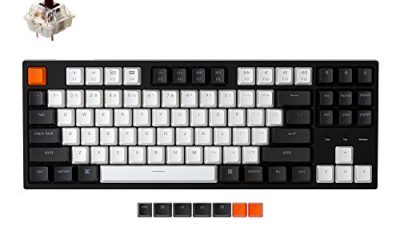
The C3 Pro is the pick for buyers who plan to tune their board rather than replace it. Its QMK and VIA support means every key can be remapped and layered without vendor software, and the gasket-mounted plate softens the typing feel compared with tray-mounted budget boards. The 87-key layout keeps the function row and arrow keys that compact boards sacrifice, and the Keychron Brown switches are hot-swappable, so the feel can change later. Mac, Windows and Linux support is built in, which makes it the natural choice for a mixed-device desk.
Redragon K580 VATA
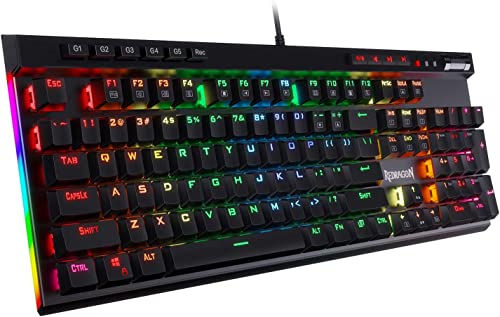
- Best for: Gamers and spreadsheet users who need a number pad and recordable macros
- Layout: 104 keys, full-size, plus 5 macro keys
- Switches: Outemu Brown, tactile, hot-swappable
- Macro recording: Onboard, no software required
- Controls: Dedicated media keys, volume/backlight wheel
Gamers and spreadsheet users who need a number pad and recordable macros
The wide frame and macro column take real desk space, and it is wired only
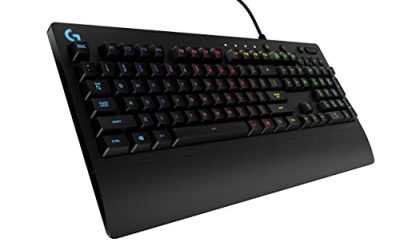
The K580 VATA is the full-size option, built around five dedicated macro keys on the left edge that record combos directly on the board, with no software required for basic recording. A volume and backlight wheel sits in the top corner next to dedicated media controls, and the Outemu Brown switches sit in upgraded hot-swap sockets that accept nearly any 3-pin or 5-pin switch. Double-shot keycaps and a rated lifespan of 50 million keystrokes cover durability, and an ergonomic wrist rest is built into the frame for longer sessions at a desk that has the width for it.
Redragon K552 Kumara
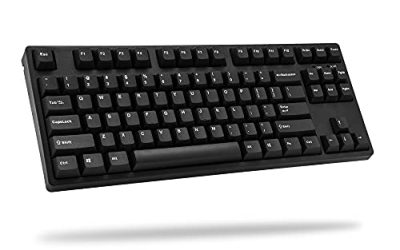
The K552 Kumara is the long-running starter board in this class, and its appeal is a metal frame and genuine mechanical switches at the lowest spending level in this guide. The 87-key tenkeyless layout keeps the function row and arrows while freeing mouse room, and the brown switch variant uses anti-dust proof switches under an RGB backlit deck. It skips hot-swap sockets and software extras, which is exactly why it costs less than the boards around it. For a first mechanical keyboard, or a spare board for a second machine, that trade is easy to justify.
Specs
- Layout: 87 keys, tenkeyless
- Switches: Brown mechanical switches, anti-dust proof design
- Frame: Metal frame
- Backlight: RGB LED
- Connection: Wired
- Model number: K552P-KN
- Compatibility: Windows PC
Best for: First-time mechanical buyers and anyone furnishing a second desk cheaply
Watch out for: Switches are not hot-swappable, so a failed switch means repair or replacement
ASIN: B09FYFGCFZ
RK ROYAL KLUDGE RK61
- Best for: Small desks, laptop users and anyone who wants one board for several devices
- Layout: 61 keys, 60 percent
- Switches: RK Brown, tactile, hot-swappable
- Connection: Bluetooth 5.0, 2.4 GHz, USB-C wired
- Backlight: RGB
Small desks, laptop users and anyone who wants one board for several devices
No dedicated arrow or function keys, and battery life drops with brighter backlighting
The RK61 is the wireless pick, and the only board here that connects three ways: Bluetooth, a 2.4 GHz receiver and a USB-C cable, so it can pair with a laptop for work and plug into a gaming PC at night. The 61-key layout is the smallest in this guide, which leaves maximum room for mouse movement, and the RK Brown switches are hot-swappable for later changes. A coiled cable, a keycap puller and four spare switches come in the box. The built-in battery is rated for about 13 hours with the backlight at its lightest setting, per the listing.
HUO JI E-Yooso Z-88
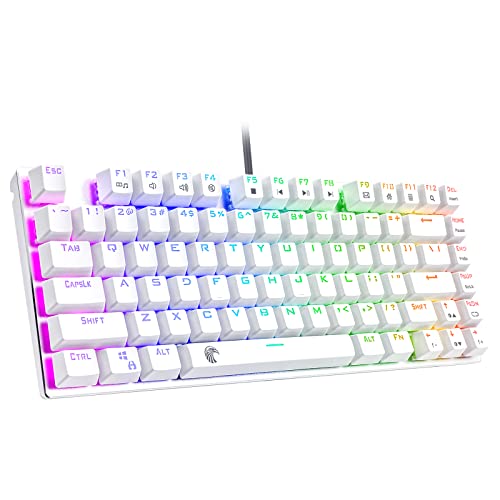
- Best for: Buyers who want compact size without giving up dedicated arrow keys
- Layout: 81 keys, compact
- Switches: Brown mechanical switches, hot-swappable (3-pin)
- Panel: Metal panel
- Backlight: RGB
Buyers who want compact size without giving up dedicated arrow keys
Hot-swap sockets take 3-pin switches only, which narrows replacement choices
The Z-88 answers the main complaint about 60 percent boards by keeping 81 keys: dedicated arrows and a compact navigation cluster return, while the frame stays close to compact size. Its brown switches are described in the listing as a Cherry MX Brown equivalent feel, and the sockets are hot-swappable for 3-pin switches, so replacements and experiments are simple. A metal panel tops the case, the cable detaches over USB-C for easier transport and replacement, and full anti-ghosting with N-key rollover covers fast input. The silver and white finish also stands apart from the black boards in this guide.
Which One Fits Your Situation
You Type All Day and Game at Night
Start with the C3 Pro. Brown switches give tactile confirmation for typing without the click that carries across a room, and the gasket mount softens long sessions. QMK and VIA remapping lets you put media controls, macros or a second layer exactly where your hands already rest, and the tenkeyless frame still keeps the function row for work shortcuts. It is the most adjustable board here for someone whose keyboard earns its keep in documents first and games second.
Your Desk Is Small or Shared
The RK61 fits where the others cannot. At 61 keys it leaves room for wide mouse movements, and its three connection modes mean one board can serve a laptop, a tablet and a PC without cable swapping. The brown switches keep noise down for shared spaces, and hot-swap sockets let you soften or firm up the feel later. Check that the missing arrow keys and function row are acceptable, since both live on a key layer here.
You Need a Number Pad and Macros
Choose the K580 VATA. It is the only full-size board in this guide, with a real number pad for data entry, five macro keys that record on the board itself, and a wheel for volume and backlight control. The hot-swappable Outemu Brown switches and double-shot keycaps are built for heavy daily use. The cost is footprint: measure your desk first, because the macro column and wrist rest make this the widest pick here.
You Want the Lowest Spend Without Giving Up Real Switches
The K552 Kumara and the Z-88 cover the floor of this category in different shapes. The K552 gives you a metal-framed tenkeyless board with the familiar function row, while the Z-88 trims the frame to 81 keys, keeps dedicated arrows and adds hot-swap sockets and a detachable cable. Pick the K552 for the simplest, sturdiest layout, or the Z-88 if switch swapping and a smaller footprint matter more than the full function row.
Common Mistakes
- Buying a 60 percent board for work that needs arrow keys and function keys every day, then fighting the layer shortcuts for months.
- Ordering spare switches without checking the socket pin format, since some boards here take 3-pin switches only.
- Assuming every variant of a model name uses the same switch, when listings sell the same board with red, blue or brown switches under one product family.
- Judging a wireless board by its standby rating instead of its backlit use rating, which is far shorter on the RK61 listing.
- Ignoring desk width on full-size boards with macro columns, which can push the mouse hand into an uncomfortable angle.
Frequently Asked Questions
Are brown switches a good middle ground for gaming and typing?
Yes, that is exactly the role they fill. A brown switch has a small tactile bump you can feel at the actuation point, but no click bar, so it confirms each press without the sharp sound of a blue switch. That makes browns a common choice for people who type long documents during the day, game at night and share a room or office with others.
What does hot-swappable actually change for a buyer?
It changes what happens when a switch wears out or feels wrong. On a hot-swappable board, you pull the switch with the included tool and press in a replacement, with no soldering iron and no new keyboard. Four of the five picks here support it. On a soldered board like the K552, a single failing switch usually means repair work or replacing the whole keyboard instead.
Is a 60 percent keyboard enough for everyday use?
It depends on which keys your routine touches. A 60 percent board like the RK61 covers letters, numbers and basic punctuation directly, but arrows, the function row and navigation keys sit behind a function layer. Typists and casual players often adapt within days. People who live in spreadsheets, code navigation or keyboard shortcuts usually do better with the 81-key Z-88 or a tenkeyless board.
Do these keyboards work across Windows and Mac?
Mostly yes, with one board built for it. The C3 Pro lists Mac, Windows and Linux support and includes the keycap and system switching that dual-platform users need. The RK61 lists support for Windows, Mac, iOS and Android across its wireless modes. The Redragon boards are aimed at Windows PCs, so Mac users should expect typing to work but media and macro keys to follow the Windows layout.
FAQ
Are brown switches a good middle ground for gaming and typing?
What does hot-swappable actually change for a buyer?
Is a 60 percent keyboard enough for everyday use?
Do these keyboards work across Windows and Mac?
More from Amazon
Programs that pair well with the guide above. Offers and eligibility are set by Amazon and may change.
Free shipping on eligible items, Prime Video and more. Eligible new members can start with a free trial.
Start a Prime free trialAd-free music streaming. Eligible new subscribers can start with a free trial.
Try Music Unlimited freeA Prime membership for ages 18-24 with a trial period. Eligibility is set by Amazon.
See Prime for Young AdultsAudiobooks and podcasts to listen to on the go. Eligible new members can start with a free trial.
Try Audible freeAs an Amazon Associate we earn from qualifying purchases.