Our Short List of 3

- Best for: Competitive players who want wireless play in a tenkeyless frame.
- Tenkeyless design, ultra-portable frame
- LIGHTSPEED wireless gaming keyboard
- LIGHTSYNC RGB lighting
- PBT keycaps
- Best for: Players who want a different actuation point for each key.
- HyperMagnetic switches with adjustable actuation
- Esports tenkeyless layout
- OLED screen
- RGB lighting

- Best for: Small desks that still need dedicated arrow keys.
- Compact 65 percent form factor
- Linear Red switches
- Double-shot PBT keycaps
- RGB LED backlight
All 5 Picks at a Glance
| Product | Specs | Action |
|---|---|---|
| Logitech G PRO X TKL Lightspeed |
| Check price on Amazon |
| SteelSeries Apex Pro TKL (2023) |
| Check price on Amazon |
| HyperX Alloy Origins 65 |
| Check price on Amazon |
 ASUS ROG Strix Scope II 96 Wireless |
| Check price on Amazon |
 Keychron K8 Pro |
| Check price on Amazon |
Our Top Picks
- Logitech G PRO X TKL Lightspeed Wireless GamingTKL - Wireless5.91 x 13.86 x 1.34 inches0.3 poundsCheck on Amazon
- ASUS ROG Strix Scope II 96 Wireless MechanicalSnow Linear14.84 x 5.16 x 1.57 inches2.78 poundsCheck on Amazon
Corsair and Razer build good keyboards, so leaving them is rarely about escaping a bad product. The real decision is whether their switches, software and layouts still fit the way you play. Some players want a different switch feel, a smaller footprint, firmware they can reprogram freely, or a board that behaves the same on Mac and Windows without a companion app running in the background. The boards below come from five other makers, and each one matches the same class of hardware on build, switches and connection — the trade-offs are simply different ones.
This guide is for gamers who know what they liked about a Corsair or Razer board — or what pushed them away — and want that same level of hardware from another brand. Every pick was chosen from the name and specifications on its Amazon product page, so layout, switches, connectivity and keycaps can be compared on equal terms before you commit to a switch feel you will live with for years.
Quick Picks
As an Amazon Associate we earn from qualifying purchases
| Product | Best for | Key spec from title |
|---|---|---|
| Logitech G PRO X TKL Lightspeed | Competitive play without a cable | LIGHTSPEED wireless, GX Brown tactile switches |
| SteelSeries Apex Pro TKL (2023) | Tuning actuation per key | HyperMagnetic switches, OLED screen |
| HyperX Alloy Origins 65 | A compact board that keeps arrow keys | 65 percent layout, HyperX Red linear switches |
| ASUS ROG Strix Scope II 96 Wireless | Near-full-size keys in a small frame | 96 percent layout, ROG NX Snow linear switches |
| Keychron K8 Pro | Remapping keys and swapping switches | QMK/VIA, hot-swappable Gateron G Pro Brown |
How to Choose
Match the switch to the way you play
Switches decide how a board feels long after the brand on the case stops mattering. Linear switches travel straight down with no bump, which suits fast repeated presses in shooters and keeps typing quiet. Tactile switches add a small bump at the actuation point, giving fingers confirmation without a click, and most players who mix gaming with long typing sessions settle here. Clicky switches add sound on top of the bump and are best kept away from shared rooms. Hall effect boards such as the SteelSeries pick below go further, letting you change the actuation point per key, so a movement key can trigger early while a typing key stays deep. Choose the feel first, then worry about the logo.
Choose the layout before the brand
Layout shapes your desk more than any feature list. A tenkeyless board drops the number pad but keeps the function row and arrows, freeing space for low-sensitivity mouse movement, which is why two picks in this guide use it. A 65 percent board goes further, keeping arrows while shrinking the frame, and suits small desks or players who carry their board to events. A 96 percent board keeps nearly every key, including a number pad, in a frame barely wider than tenkeyless, so spreadsheet work and gaming share one desk. Full-size boards only make sense if the number pad earns its space every day. Measure the desk, then check whether the keys you actually press survive the cut.
Decide how wireless fits your setup
Wireless is a convenience until latency or battery life makes it a compromise. A 2.4 GHz dongle connection is the mode to use for competitive play, since it behaves closest to a cable, while Bluetooth suits switching between a desktop, a laptop and a tablet, and tolerates a little more delay. Every wireless board here also works wired over USB-C, which covers tournaments, dead batteries and firmware updates in one stroke. Check how the board charges and how long it runs with lighting on, because a board that dies mid-session is worse than a cable you never notice. If you play at one desk and never move the board, a wired-only model saves money for better switches.
Check the software, keycaps and repairability
Two boards can share a switch and still feel different after a year, and the difference is usually keycaps and software. Double-shot PBT keycaps resist shine and keep legends legible, while thinner ABS caps go glossy where your fingers rest. Companion software controls lighting and macros, but it also runs in the background and ties profiles to one operating system; open firmware such as QMK and VIA stores the layout on the board itself, so it follows you between machines. Hot-swappable sockets let you replace a dead switch or try a new feel without soldering, which matters more the longer you keep a board. Read the listing for keycap material, software and socket type before judging the switch alone.
The 5 Best Options
Logitech G PRO X TKL Lightspeed
- Best for: Competitive players who want wireless play in a tenkeyless frame.
- Tenkeyless design, ultra-portable frame
- LIGHTSPEED wireless gaming keyboard
- LIGHTSYNC RGB lighting
- PBT keycaps
Competitive players who want wireless play in a tenkeyless frame.
Not hot-swappable — choose the switch type carefully — and confirm it is still sold before buying.
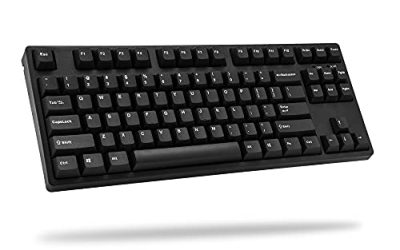
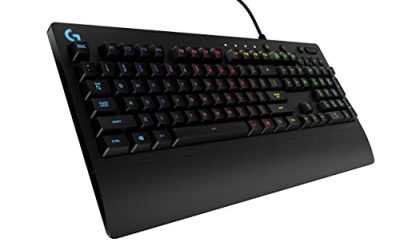
The G PRO X TKL is the closest thing to a tournament board without a Corsair or Razer badge. Its tenkeyless frame leaves real room for mouse movement, and LIGHTSPEED wireless keeps the connection free of cables without giving up the responsiveness competitive play demands. Bluetooth covers a laptop or tablet on the side, and USB-C handles wired play and charging. GX Brown tactile switches give each press a clear bump without a click, and dual-shot PBT keycaps hold up to daily use. LIGHTSYNC RGB runs through Logitech software, so lighting and macros live in one place.
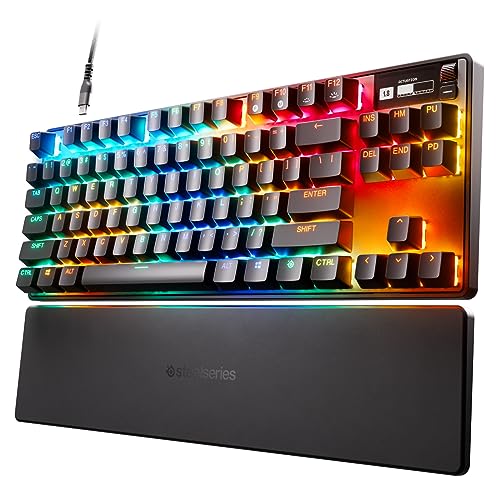
SteelSeries Apex Pro TKL (2023)
- Best for: Players who want a different actuation point for each key.
- HyperMagnetic switches with adjustable actuation
- Esports tenkeyless layout
- OLED screen
- RGB lighting
Players who want a different actuation point for each key.
Wired only — there is no wireless mode — and confirm it is still sold before buying.
The Apex Pro TKL earns its place on one feature no other board here offers: switches whose actuation point you can adjust per key. A movement key can fire at the lightest touch while ability keys stay deeper, which suits players who switch between fast shooters and slower strategy games. The OLED screen shows profiles and settings without opening software, and the tenkeyless frame keeps the desk clear. PBT keycaps and a USB-C wired connection round out a board built for players who tune their setup per game rather than accepting one fixed feel.
HyperX Alloy Origins 65
- Best for: Small desks that still need dedicated arrow keys.
- Compact 65 percent form factor
- Linear Red switches
- Double-shot PBT keycaps
- RGB LED backlight
Small desks that still need dedicated arrow keys.
Wired only, and confirm it is still sold before buying.
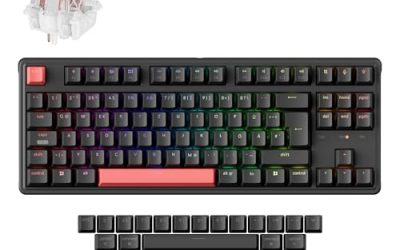
The Alloy Origins 65 is the small-desk answer to a full-size Corsair or Razer board. Its 65 percent frame keeps dedicated arrow keys while giving the mouse far more room, and the aluminium body stays rigid during fast key presses. HyperX Red linear switches travel smoothly with no bump, which suits rapid repeated presses, and double-shot PBT keycaps resist shine over time. RGB lighting and macros run through NGENUITY software, which keeps lighting and key assignments in one place. It is wired only, so one cable stays on the desk — a fair trade for the compact frame.
ASUS ROG Strix Scope II 96 Wireless
- Best for: Players who need a number pad in a near-tenkeyless frame.
- 96 percent full-size layout
- Tri-mode connectivity
- Hot-swappable pre-lubed ROG NX Snow linear switches
- PBT keycaps
Players who need a number pad in a near-tenkeyless frame.
Check the exact switch variant on the listing — and confirm it is still sold before buying.
The Strix Scope II 96 is for players who refuse to give up the number pad but still want a smaller board. Its 96 percent layout packs nearly every key into a frame barely wider than tenkeyless, so spreadsheets and games share one desk without a second keyboard. Tri-mode connectivity covers Bluetooth, 2.4 GHz wireless and wired USB-C, and hot-swappable sockets accept new switches without soldering. Pre-lubed ROG NX Snow linear switches feel smooth from the first press, PBT keycaps hold their texture, and the board works with PC and Mac.
Keychron K8 Pro
- Best for: Typists and gamers who want to remap keys and swap switches.
- QMK/VIA programmable
- Bluetooth and wired connection
- Tenkeyless layout
- RGB backlight
Typists and gamers who want to remap keys and swap switches.
No 2.4 GHz dongle — Bluetooth or wired only — and confirm it is still sold before buying.
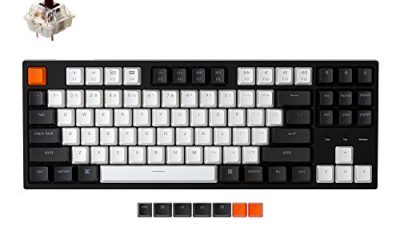
The K8 Pro is the tinkerer’s pick, and the furthest step from the closed ecosystems of the big gaming brands. QMK and VIA firmware let you remap any key, build layers and store macros on the board, so the layout follows you between machines. Hot-swappable sockets take most MX-style switches, so a worn switch or a new feel costs a switch, not a keyboard. Gateron G Pro Brown switches give a gentle tactile bump, Bluetooth and USB-C cover wireless and wired use, and keycaps for Mac and Windows come in the box.
Which One Fits Your Situation
You play competitive shooters and want to cut the cable
The Logitech G PRO X TKL is the pick here. LIGHTSPEED wireless keeps the board free of cables, the tenkeyless frame leaves room for wide mouse sweeps, and GX Brown switches give feedback without a click that distracts. If your desk never moves and you would rather spend on switches than wireless, the SteelSeries Apex Pro TKL gives you adjustable actuation on a wired connection instead.
You want one board for gaming and long typing sessions
Pick the Keychron K8 Pro or the ASUS ROG Strix Scope II 96. The K8 Pro suits typists who remap keys and swap switches, with a gentle tactile bump and keycaps for both Mac and Windows. The ROG board suits anyone who also needs a number pad, since its 96 percent layout keeps it without a full-size frame. Both work wired, so long sessions never depend on a battery.
Your desk is small or you carry your board to events
The HyperX Alloy Origins 65 is the natural fit. Its 65 percent frame keeps arrow keys while freeing the most mouse room of any board here, and the aluminium body survives being moved around. Linear Red switches suit fast repeated presses, and the wired connection means there is nothing to charge before an event. The Logitech G PRO X TKL is the fallback if you need the function row back.
You like changing switches and keymaps after you buy
The Keychron K8 Pro is built for this. Hot-swappable sockets and QMK/VIA firmware mean new switches and new layouts cost minutes, not a new keyboard. The ASUS ROG Strix Scope II 96 is the second choice, with hot-swappable sockets and pre-lubed switches for players who want to experiment without leaving the gaming brands behind entirely.
Common Mistakes
- Buying a compact layout and then missing the number pad or function row you use every day.
- Choosing clicky switches for a shared room or late-night sessions, then living with the noise for the life of the board.
- Picking a wireless board without checking whether it also works wired when the battery runs out.
- Assuming every mechanical board is hot-swappable — the Logitech G PRO X TKL in this guide is not.
- Ordering the wrong switch variant, since the same model is sold in several switch and colour variants — check the listing title before checkout.
Frequently Asked Questions
Are keyboards from other brands as fast as Corsair and Razer boards?
Yes, for most players. A 2.4 GHz wireless connection or a wired USB-C link responds the same way regardless of the badge, and switch speed depends on the switch, not the brand. Hall effect boards such as the SteelSeries Apex Pro TKL add adjustable actuation on top. What changes between brands is software, layout and switch feel — not raw speed.
Do I lose anything by leaving Corsair iCUE or Razer Synapse?
You lose the ecosystem, not the features. Lighting, macros and profiles exist on Logitech, SteelSeries, HyperX and ASUS software too, and Keychron boards store layouts in QMK/VIA firmware instead. The real loss is cross-device syncing: if your mouse, headset and keyboard all shared one app, switching one piece means managing two apps instead of one.
Is a Hall effect keyboard worth it if I only play casually?
Only if you enjoy tuning settings. Adjustable actuation helps competitive players who press the same keys thousands of times a session, but casual players rarely notice the difference. A good tactile or linear board at a lower tier usually feels better value. Buy Hall effect for the adjustment, not because the name sounds faster.
Can I use these keyboards on Mac as well as Windows?
Most of them, with one check first. The Keychron K8 Pro and the ASUS ROG Strix Scope II 96 list Mac support and include Mac keycaps or Mac compatibility on the listing. Logitech, SteelSeries and HyperX boards work on Mac as standard keyboards, but their companion software and extra features are usually Windows-first, so lighting and macro control may be limited.
FAQ
Are keyboards from other brands as fast as Corsair and Razer boards?
Do I lose anything by leaving Corsair iCUE or Razer Synapse?
Is a Hall effect keyboard worth it if I only play casually?
Can I use these keyboards on Mac as well as Windows?
More from Amazon
Programs that pair well with the guide above. Offers and eligibility are set by Amazon and may change.
Free shipping on eligible items, Prime Video and more. Eligible new members can start with a free trial.
Start a Prime free trialAd-free music streaming. Eligible new subscribers can start with a free trial.
Try Music Unlimited freeA Prime membership for ages 18-24 with a trial period. Eligibility is set by Amazon.
See Prime for Young AdultsAudiobooks and podcasts to listen to on the go. Eligible new members can start with a free trial.
Try Audible freeAs an Amazon Associate we earn from qualifying purchases.