Key takeaways
- Three mechanical keyboards under seventy-five that type well, feel solid, and suit gaming and work. Compare switches, layouts, and connectivity before buying.
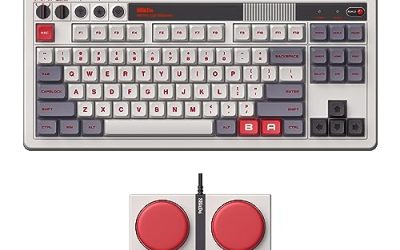
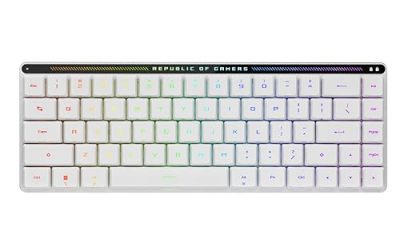
Mechanical keyboards used to carry a premium feel that only showed up at the top of the market, but the under-seventy-five tier has changed that picture. Boards in this range now arrive with hot-swappable sockets, RGB backlighting, double-shot keycaps, and sturdy frames, so a first mechanical board no longer means settling for mushy keys or a hollow case. The three picks below cover the layouts most people actually want: a full tenkeyless workhorse, a Mac-friendly hot-swap board, and a compact wireless sixty-percent board.


Every board here is a genuine mechanical keyboard with individual switches under each key, and every one fits the tier this guide covers. We looked at switch feel, layout, connectivity, build quality, and how easy each board is to live with day after day. Pick the layout that matches your desk first, then let switch feel and connection type narrow the choice.
Quick Picks
As an Amazon Associate we earn from qualifying purchases
| Product | Best for | Key spec from title |
|---|---|---|
| Redragon K552 | First mechanical board for gaming and typing | 87-key TKL with RGB and hot-swappable red switches |
| Keychron C1 | Mac and Windows typists who want hot-swap | 87-key TKL with Gateron G Pro Brown switches |
| RK ROYAL KLUDGE RK61 | Compact wireless board for small desks | 61-key 60 percent with Bluetooth, 2.4GHz, and wired modes |
How to Choose
Switch Feel Comes First
Switches decide how a keyboard feels under your fingers, so they deserve the first look. Linear switches press straight down with no bump, which suits fast gaming and light typing, while tactile switches add a small bump you can feel at the actuation point, which many typists prefer for accuracy. Clicky switches add an audible click on top of that bump, and they can be loud enough to bother anyone sharing your room. All three boards here use a different switch character, so think about where you type and who sits nearby. If unsure, a linear or tactile switch is the safer middle ground, and a hot-swappable board lets you change switches later without buying a whole new keyboard.
Layout Sets Your Desk Footprint
Layout decides how much desk space a keyboard takes and which keys you give up. A tenkeyless board keeps the function row and arrow keys while dropping the number pad, which frees space for your mouse without forcing you to relearn common shortcuts. A sixty-percent board goes further and drops the function row and arrow keys too, moving them onto a function layer, which suits small desks and portable setups. Full-size boards keep everything but take the most room. Measure your desk before you buy, and think honestly about how often you use the number pad. Most gamers and typists adapt to tenkeyless quickly, while sixty-percent layouts suit people who value desk space above all else.
Connectivity and Compatibility
Connection type matters more than it first appears, because it decides where a keyboard can go. A wired board connects over USB and never needs charging, which makes it the simplest choice for a fixed desk setup. Wireless boards add Bluetooth and a 2.4GHz receiver, so one board can move between a desktop, a laptop, and a tablet without a cable trailing across the desk. Check the operating systems a board supports before you buy, since some boards ship with extra keycaps for Mac layouts and some software only runs on Windows. A board that works with both Mac and Windows saves trouble when you switch machines during the day.
Build Quality and Swap Options
Build quality is where cheap boards usually show their limits, so look at the frame and the keycaps. A metal frame adds weight and keeps the board from flexing or sliding during long sessions, while a plastic case keeps the board light and portable. Double-shot keycaps resist wear and keep their legends readable for years, while thin single-shot caps can shine and fade with heavy use. Hot-swappable sockets are worth having even if you never change a switch, because they let you replace a single faulty switch instead of the whole board. Check that the board includes a keycap puller and spare switches, since both make maintenance far easier.
The 3 Best Options
Redragon K552
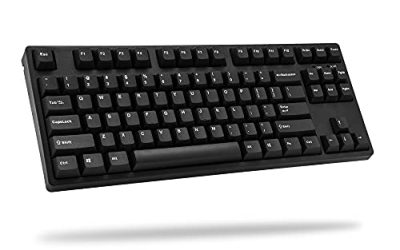
The Redragon K552 is the classic entry point into mechanical keyboards, and it has stayed popular because it gets the basics right. Its tenkeyless layout keeps the keys most people use daily while freeing space for the mouse, and the metal frame gives it a planted feel that lighter boards lack. The hot-swappable red switches press smoothly and quietly, which suits both gaming and long typing sessions, and the RGB backlighting keeps the board readable in a dim room. Double injection molded keycaps resist wear, and the splash-resistant design adds a little insurance against accidents at the desk.
Specs
- 87 keys in a tenkeyless layout
- Hot-swappable red switches, linear switch type
- RGB backlighting
- USB wired connectivity
- Metal frame with anti-ghosting
- Switches rated for 50 million clicks
- Dimensions: 13.94 inches x 4.86 inches x 1.46 inches
- Weight: 875 grams
Best for: First-time mechanical keyboard buyers who want a solid wired tenkeyless board for gaming and typing.
Watch out for: The cable is wired only, so there is no wireless mode, and the keycap legends use a gamer-style font that some typists dislike.
Keychron C1
The Keychron C1 is the pick for people who type on more than one operating system and want a board that adapts without fuss. It ships with keycaps for both Mac and Windows, so the function keys and multimedia controls work correctly whichever machine you sit at, and the USB Type-C cable detaches for easy packing. The hot-swappable sockets accept most three-pin and five-pin MX-style switches, so you can change the feel of the board later without soldering. Gateron G Pro Brown switches give a gentle tactile bump that suits long writing sessions, and the white backlight shines cleanly through the double-shot ABS keycaps.
Specs
- 87 keys in a tenkeyless layout
- Hot-swappable sockets for most 3-pin and 5-pin MX-style switches
- Pre-installed Gateron G Pro Brown switches
- Double-shot ABS keycaps
- White backlight
- USB Type-C wired connection
- Compatible with Mac and Windows
- Switches rated for 50 million keystrokes
Best for: Typists who split time between Mac and Windows and want a hot-swappable board with a tactile feel.
Watch out for: The backlight is white only, with no RGB option, and the board is wired only, so it cannot connect over Bluetooth.
RK ROYAL KLUDGE RK61
The RK ROYAL KLUDGE RK61 packs a full mechanical board into a sixty-percent footprint and connects three ways, which makes it the most flexible pick in this roundup. Bluetooth pairs with up to three devices, the 2.4GHz receiver covers low-latency gaming, and the wired USB-C mode works when the battery runs low. The hot-swappable red switches press smoothly and quietly, and the RGB backlighting runs eighteen backlight modes plus eight monochrome modes. A coiled cable with a metal aviator connector comes in the box, along with a keycap puller and four spare switches, so the board arrives ready to use and easy to maintain.
Specs
- 61 keys in a 60 percent layout
- Hot-swappable red switches, linear switch type
- RGB backlighting with 18 RGB modes and 8 monochrome modes
- Bluetooth, 2.4GHz wireless, and USB-C wired modes
- Double-shot keycaps
- Coiled cable with metal aviator connector included
- Dimensions: 11.4 inches x 3.9 inches x 1.7 inches
- Weight: 500 grams
Best for: Small desks and multi-device setups where wireless freedom and a compact footprint matter most.
Watch out for: The sixty-percent layout has no dedicated arrow keys or function row, so both live on a function layer, and the bundled software runs on Windows only.
Which One Fits Your Situation
Your First Mechanical Keyboard
If you have never owned a mechanical keyboard, the Redragon K552 is the simplest way in. Its tenkeyless layout keeps every key you already know, the metal frame feels solid from the first press, and the hot-swappable red switches are quiet enough for shared rooms. You get RGB lighting and a durable build without learning a new layout, and the wired connection means there is nothing to charge or pair before you sit down to play or type.
You Type on a Mac and a PC
If your day moves between a Mac and a Windows machine, the Keychron C1 removes the friction. It ships with keycaps for both systems, so shortcuts and media keys behave the way you expect on each one, and the detachable USB-C cable makes it easy to carry between desks. The tactile brown switches suit long writing sessions, and the hot-swappable sockets let you fine-tune the feel later without buying another board.
Your Desk Is Small
If desk space is tight, the RK61 gives you the most room back. Its sixty-percent footprint leaves space for a large mouse pad and a notebook, and it still types like a full mechanical board because every key has its own switch. The trade is learning the function layer for arrows and function keys, which most people pick up within a few days of regular use.
You Want Wireless Freedom
If cables bother you or one keyboard must serve several devices, the RK61 is the only pick here with wireless modes. Bluetooth handles a laptop and a tablet, the 2.4GHz receiver covers gaming on a desktop, and the wired mode takes over while the board charges. Keep the receiver in a safe place when you travel, since it is small and easy to misplace.
Common Mistakes
- Buying a sixty-percent board without checking whether you rely on arrow keys or a number pad every day.
- Choosing clicky switches for a shared room or an open office, where the noise can bother everyone nearby.
- Ignoring layout compatibility and finding that your board lacks the keycaps your operating system expects.
- Picking a board for its lighting alone and ending up with thin keycaps and a flexing case.
- Forgetting that wireless boards need charging, and having no wired mode ready when the battery runs out.
Frequently Asked Questions
Are mechanical keyboards in this tier durable enough for daily use?
Yes, when you pick a board with a solid frame and double-shot keycaps. The boards in this guide use switches rated for tens of millions of keystrokes, and metal or sturdy ABS cases hold up to daily typing and gaming. Look for hot-swappable sockets as well, since they let you replace a single worn switch instead of the whole board when one key begins to feel different from the rest.
What does hot-swappable mean?
Hot-swappable means the switches pull out of their sockets by hand, with no soldering needed. You can swap a linear switch for a tactile one, replace a faulty switch, or mix switch types across the board to suit different keys. All three boards in this guide have hot-swappable sockets, so you can change the typing feel later without buying a new keyboard or learning to solder.
Which switch type is best for a first mechanical keyboard?
Linear red switches are the safest first choice for most people, because they press smoothly and quietly and suit both gaming and typing. Tactile brown switches add a small bump that helps typists feel each keypress, which some people prefer for accuracy. Clicky blue switches feel satisfying but are loud, so they suit private rooms better than shared spaces or late-night sessions.
Do I need wireless, or is wired fine?
Wired is fine for a fixed desk setup, since it never needs charging and connects with a single cable. Wireless earns its place when one keyboard serves several devices or when you want a clean desk without cables. The RK61 covers both, with Bluetooth, a 2.4GHz receiver, and a wired mode, while the K552 and the C1 are wired only and suit desks where the keyboard stays in one place.
FAQ
Are mechanical keyboards in this tier durable enough for daily use?
What does hot-swappable mean?
Which switch type is best for a first mechanical keyboard?
Do I need wireless, or is wired fine?
More from Amazon
Programs that pair well with the guide above. Offers and eligibility are set by Amazon and may change.
Free shipping on eligible items, Prime Video and more. Eligible new members can start with a free trial.
Start a Prime free trialAd-free music streaming. Eligible new subscribers can start with a free trial.
Try Music Unlimited freeA Prime membership for ages 18-24 with a trial period. Eligibility is set by Amazon.
See Prime for Young AdultsAudiobooks and podcasts to listen to on the go. Eligible new members can start with a free trial.
Try Audible freeAs an Amazon Associate we earn from qualifying purchases.