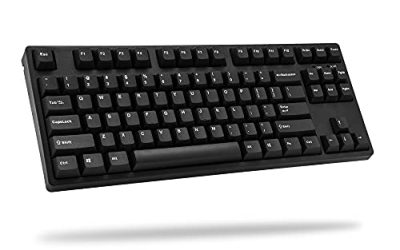
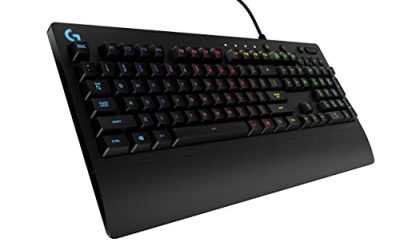
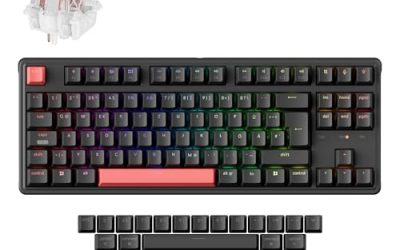
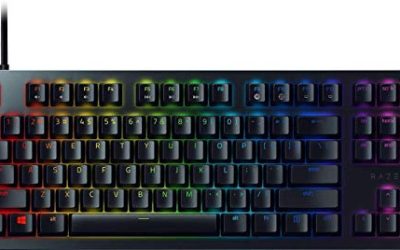
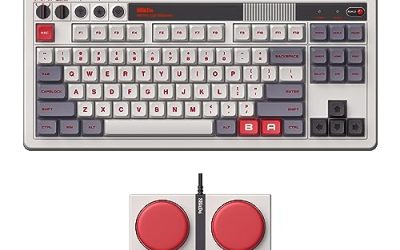
Our Short List of 3
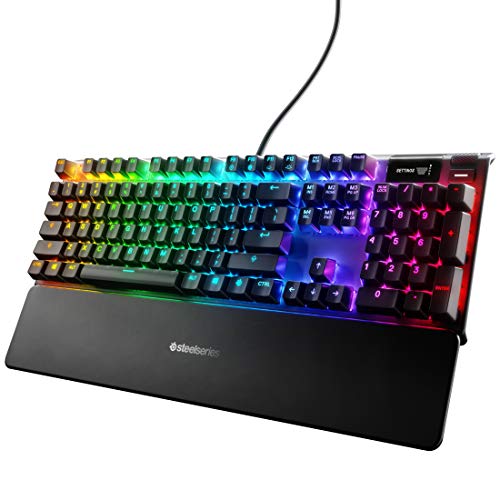
- Best for: players who want a full-size board with a magnetic wrist rest and a quiet linear press.
- OLED smart display for settings and app information
- USB passthrough port
- Dedicated media controls
- Red linear and quiet QX2 switches

- Best for: typists and players who want a tactile feel with a soft-touch palm rest.
- Cherry MX Brown tactile switches
- 104-key full-size layout
- 8,000 Hz hyper-polling with AXON hyper-processing technology
- PBT double-shot keycaps

- Best for: players who want a low-profile board with a magnetic wrist rest at a modest tier.
- Low-profile keys
- Razer Mecha-Membrane switches
- UV-coated keycaps
- Backlit media keys
All 3 Picks at a Glance
| Product | Specs | Action |
|---|---|---|
| SteelSeries Apex 7 Mechanical Gaming Keyboard (Red Switch) |
| Check price on Amazon |
| Corsair K70 RGB PRO Mechanical Gaming Keyboard (Cherry MX Brown) |
| Check price on Amazon |
| Razer Ornata V3 Gaming Keyboard |
| Check price on Amazon |
Our Top Picks
Comfort in a gaming keyboard is decided in the third hour, not the first ten minutes. A board that feels fine during setup can leave wrists stiff and fingers tired once a long session stretches on, so the real choice comes down to key height, switch feel, palm support and how much force each press demands. A low profile, a soft-touch rest or a quiet linear switch can change how a whole evening at the desk feels.
This roundup is for players who game for hours at a stretch, for people who type all day and play at night, and for anyone whose wrists ache after a long evening at the keyboard. Each board below was chosen from the name and specifications stated on its Amazon product page, with the comfort feature it actually lists — a wrist rest, a low profile, a quiet switch — front and center.
Quick Picks
As an Amazon Associate we earn from qualifying purchases.
| Product | Best for | Key spec from title |
|---|---|---|
| Logitech G915 LIGHTSPEED Wireless Gaming Keyboard | Wireless play with a slim, low-profile board | Low-profile GL Clicky switches |
| SteelSeries Apex 7 Mechanical Gaming Keyboard (Red Switch) | Full-size play with a magnetic wrist rest | OLED smart display |
| Corsair K70 RGB PRO Mechanical Gaming Keyboard (Cherry MX Brown) | Tactile typing with a soft-touch palm rest | Cherry MX Brown switches |
| Razer Ornata V3 Gaming Keyboard | Low-profile comfort with a magnetic wrist rest | Mecha-membrane switches |
How to Choose
Key Height and Profile
Key height decides the angle of your wrists more than any other single feature. A low-profile board keeps your hands flatter, closer to the desk surface, which suits people who rest their palms while they type and play. A standard-height board gives each key more travel, and some players prefer that deeper press for feedback. Neither height is better for everyone. If you already use a laptop keyboard happily, a low-profile gaming board will feel familiar. If you like a tall, springy press, a standard board with a wrist rest is the safer match. Check the height figure in the listing before you commit.
Switch Feel and Force
Switches decide how hard your fingers work. Linear switches travel straight down with no bump, so they feel smooth and quiet, and they suit long sessions where every press adds up. Tactile switches add a small bump you can feel, which helps touch typists land each press without bottoming out hard. Clicky switches add sound to that bump, which some players love and housemates often do not. Mecha-membrane switches sit between membrane and mechanical, with a soft cushioned press and a clicky feel. Match the switch to your hands and your room, not to a trend.
Palm and Wrist Support
A wrist rest is the most direct comfort feature a keyboard can offer, and the listing usually says exactly what kind it is. Magnetic rests snap on and off, so you can remove them when you need desk space and attach them for long sessions. Built-in rests are always there, which is convenient but takes up room permanently. Soft-touch rests feel smooth and cool, while plush rests feel warmer and softer. Measure your desk before choosing a full-size board with a rest, since the rest can add several inches to the depth of the whole setup.
Layout, Size and Connection
Layout and connection shape how a board fits your desk and your habits. A full-size board keeps the number pad, which matters for MMO shortcuts and for anyone who enters numbers often, but it pushes the mouse further to the right. A tenkeyless board frees that space and pulls the mouse closer, which can ease shoulder strain. Wireless boards remove the cable and let you shift position freely, though they need charging, while wired boards never run flat and keep latency steady. Decide which trade-off fits your desk before you fall for a feature list.
The 4 Best Options
Logitech G915 LIGHTSPEED Wireless Gaming Keyboard
The G915 suits players who want a slim board that moves freely and keeps wrists flat. Its low-profile GL Clicky switches give a short, laptop-like press with a crisp click, and the aluminum frame stays thin at just 22 mm high. Wireless LIGHTSPEED, Bluetooth and a wired mode cover every setup, while dedicated media keys, a volume roller and five programmable G-keys keep common controls on the board itself. It is the pick for a clean desk and for hands that prefer a shallow press over a tall one.
Specs
- LIGHTSPEED wireless, Bluetooth and wired connection modes
- Low-profile GL Clicky mechanical switches
- LIGHTSYNC RGB lighting with about 16.8 million colors
- Dedicated media keys and volume roller
- Five programmable G-keys
- Three onboard profiles
- Aircraft-grade aluminum alloy frame
- 22 mm ultra-thin design
- Up to 30 hours of play with backlighting at full brightness
Best for: players who want a thin wireless board with a shallow, laptop-like press.
Watch out for: no wrist rest is included, so add your own if you rest your palms; check the seller and condition before ordering, since the original G915 is giving way to the newer G915 X and new stock of this model is thinning.
SteelSeries Apex 7 Mechanical Gaming Keyboard (Red Switch)
- Best for: players who want a full-size board with a magnetic wrist rest and a quiet linear press.
- OLED smart display for settings and app information
- USB passthrough port
- Dedicated media controls
- Red linear and quiet QX2 switches
players who want a full-size board with a magnetic wrist rest and a quiet linear press.
wired only, so the cable stays on the desk; the full-size layout plus wrist rest needs a deep desk, so measure before ordering.
The Apex 7 is the full-size pick for players who want a rest included with the board. Its premium magnetic wrist rest snaps on for long sessions and off when you need the space, and the Red linear switches press smoothly with no bump and little noise. An OLED smart display sits at the top right for settings and app information, and dedicated media controls and a USB passthrough port keep the desk tidy. The aluminum frame and per-key lighting round out a board that feels substantial without feeling stiff.
Watch out for: wired only, so the cable stays on the desk; the full-size layout plus wrist rest needs a deep desk, so measure before ordering.
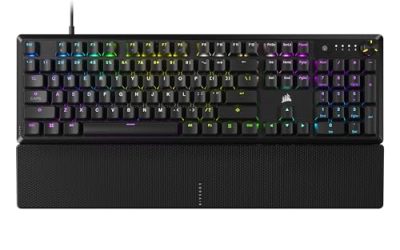
Corsair K70 RGB PRO Mechanical Gaming Keyboard (Cherry MX Brown)
- Best for: typists and players who want a tactile feel with a soft-touch palm rest.
- Cherry MX Brown tactile switches
- 104-key full-size layout
- 8,000 Hz hyper-polling with AXON hyper-processing technology
- PBT double-shot keycaps
typists and players who want a tactile feel with a soft-touch palm rest.
wired only, with a detachable cable to manage; the palm rest is smooth soft-touch plastic rather than plush, so it feels firmer than a cushioned rest.
The K70 RGB PRO suits typists who want a tactile bump without a loud click. Cherry MX Brown switches give a clear feel at the actuation point, and the detachable magnetic soft-touch palm rest supports the wrists through long stretches. PBT double-shot keycaps resist wear, the aluminum frame keeps the board rigid, and dedicated media keys with an aluminum volume roller put playback control within reach. Onboard storage for up to 50 profiles means your lighting and macro setup travels with the board.
Watch out for: wired only, with a detachable cable to manage; the palm rest is smooth soft-touch plastic rather than plush, so it feels firmer than a cushioned rest.
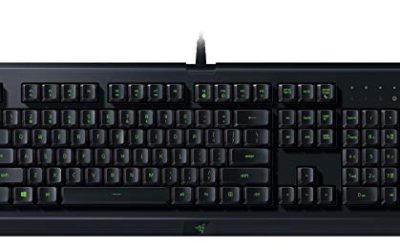
Razer Ornata V3 Gaming Keyboard
- Best for: players who want a low-profile board with a magnetic wrist rest at a modest tier.
- Low-profile keys
- Razer Mecha-Membrane switches
- UV-coated keycaps
- Backlit media keys
players who want a low-profile board with a magnetic wrist rest at a modest tier.
mecha-membrane switches are not true mechanical switches, so the feel differs from a mechanical board; lighting is zoned rather than per-key.
The Ornata V3 is the pick for players who like a low, quiet board with a rest included. Its mecha-membrane switches combine a soft cushioned press with clicky tactile feedback, and the low-profile keys keep the hands close to the desk. A magnetic soft-touch wrist rest snaps on for long sessions, backlit media keys sit along the top, and 10-zone RGB lighting adds color without the complexity of per-key setup. A spill-resistant design adds a practical touch for desks where drinks sit nearby.
Watch out for: mecha-membrane switches are not true mechanical switches, so the feel differs from a mechanical board; lighting is zoned rather than per-key.
Which One Fits Your Situation
You Play Long Sessions Every Night
Pick the SteelSeries Apex 7 or the Corsair K70 RGB PRO. Both include a magnetic rest that supports your palms through hours of play, and both are full-size boards with dedicated media controls, so you can adjust volume and lighting without leaving the game. The Apex 7 is the quieter of the two with its Red linear switches, while the K70 RGB PRO suits players who want a tactile bump they can feel.
Your Desk Is Small or You Move Your Board Around
Pick the Logitech G915 LIGHTSPEED. Its 22 mm thin frame and wireless connection make it easy to slide aside, pack away or shift across the desk, and the low-profile keys keep your wrists flat without a rest. It is the most portable board in this roundup, and it works just as well on a couch setup as it does at a desk.
You Type All Day and Game at Night
Pick the Razer Ornata V3 or the Logitech G915 LIGHTSPEED. Both keep the keys low, which suits long typing stretches as well as evening play, and the Ornata V3 adds a magnetic wrist rest for the hours when your palms start to tire. The G915 adds wireless freedom and programmable G-keys for work shortcuts that double as game macros.
You Share a Room and Need Quiet Keys
Pick the SteelSeries Apex 7 or the Razer Ornata V3. The Apex 7 uses Red linear switches that the listing describes as linear and quiet, with no click to carry across the room. The Ornata V3 uses mecha-membrane switches with a soft cushioned press that stays quieter than a clicky mechanical board. Skip the clicky G915 if anyone nearby is sleeping or on a call.
Common Mistakes
- Choosing a switch type because it is popular, without checking whether its height and force suit your hands.
- Assuming every gaming keyboard includes a wrist rest — several boards in this roundup include one, and one does not.
- Buying a full-size board with a rest for a desk that is too shallow to hold both.
- Picking a clicky board for a shared room, then finding the sound carries further than expected.
- Ignoring the connection type, and ending up with a wireless board that needs charging mid-session or a wired board with a cable in the way.
Frequently Asked Questions
Does a wrist rest really help during long sessions?
A wrist rest helps when it keeps your palms supported and your wrists level with the keys, which reduces the strain of holding your hands in the air. A magnetic rest can be removed when you need desk space and snapped back on for long play. A rest is not a cure for poor posture, so pair it with a chair height that lets your forearms rest level.
Are low-profile keyboards better for comfort?
Low-profile boards suit many people because the keys sit closer to the desk, so the wrists stay flatter and the fingers travel less with each press. Players who like a deep, springy press may find them too shallow, though, and may prefer a standard-height board with a wrist rest. Comfort depends on your hands, so the height figure in the listing is worth checking before you buy.
Is a membrane-style keyboard comfortable for gaming?
A mecha-membrane board like the Ornata V3 can be comfortable because its press is soft and cushioned, with a tactile feel that gives feedback. It differs from a true mechanical board in feel and in how the keys wear over time, so it suits players who value a quiet, low press over a sharp mechanical click. Try to match the switch style to your habits rather than to a label.
Do I need a wireless keyboard for comfortable play?
Wireless play helps when you shift position often or want a clean desk with no cable in the way, and a board like the G915 also works wired while it charges. A wired board suits players who never want to think about charging and who keep one fixed setup. Comfort comes mostly from key height, switch feel and palm support, so connection type is a secondary choice.
FAQ
Does a wrist rest really help during long sessions?
Are low-profile keyboards better for comfort?
Is a membrane-style keyboard comfortable for gaming?
Do I need a wireless keyboard for comfortable play?
More from Amazon
Programs that pair well with the guide above. Offers and eligibility are set by Amazon and may change.
Free shipping on eligible items, Prime Video and more. Eligible new members can start with a free trial.
Start a Prime free trialAd-free music streaming. Eligible new subscribers can start with a free trial.
Try Music Unlimited freeA Prime membership for ages 18-24 with a trial period. Eligibility is set by Amazon.
See Prime for Young AdultsAudiobooks and podcasts to listen to on the go. Eligible new members can start with a free trial.
Try Audible freeAs an Amazon Associate we earn from qualifying purchases.