Our Short List of 3
- Best for: MacBook, iMac, and iPad owners who want one board for every Apple device.
- Bluetooth multi-device pairing with Easy-Switch for up to 3 devices
- 2-year battery life on 2 AAA batteries, preinstalled
- Mac layout with iOS shortcut keys
- Compatible with macOS, iOS, and iPadOS
- Best for: Desk typing with backlighting and a solid metal build.
- USB-C rechargeable LiPo battery, up to 10 days with backlight on, up to 5 months with backlight off
- Backlit, spherically dished keys
- Bluetooth pairing with up to 3 devices
- Compatible with Apple macOS, iOS, Windows, Linux, and Android

- Best for: Everyday typing across a laptop, tablet, and phone.
- Bluetooth multi-device pairing with Easy-Switch for up to 3 devices
- Customizable shortcut keys
- Slim and portable, 279 x 124 x 16 mm, 415 g with batteries
- Compatible with Windows, macOS, iPadOS, Android, and Chrome OS
All 5 Picks at a Glance
| Product | Specs | Action |
|---|---|---|
| Logitech K380 Multi-Device Bluetooth Keyboard for Mac with Compact Slim Profile, Easy-Switch, 2 Year Battery, MacBook Pro/MacBook Air/iMac/iPad Compatible – Off White |
| Check price on Amazon |
| Logitech MX Keys Mini Minimalist Wireless Illuminated Keyboard, Compact, Bluetooth, Backlit, USB-C, Compatible with Apple macOS, iOS, Windows, Linux, Android, Metal Build – Graphite |
| Check price on Amazon |
| Logitech Pebble Keys 2 K380s, Multi-Device Bluetooth Wireless Keyboard with Customizable Shortcuts, Slim and Portable, Easy-Switch for Windows, macOS, iPadOS, Android, Chrome OS – Tonal Graphite |
| Check price on Amazon |
 Arteck Universal Backlit 7-Colors Ultra Light Slim Portable Wireless Bluetooth 3.0 Keyboard for iOS iPad Pro, Air, Mini, Android, Windows Tablets PC Smartphone Built in Rechargeable 6-Month Battery |
| Check price on Amazon |
 Logitech Keys-to-GO 2 Portable Bluetooth Tablet Keyboard with Built-in Cover, Slim & Compact Wireless Keyboard for Windows, Android, Linux, iPad, iPhone, Mac, Apple TV – Graphite |
| Check price on Amazon |
Key takeaways
- Bluetooth mini USB keyboards for tablets, laptops and desktops, with compact layouts, quiet keys, long battery life and easy pairing anywhere.
A mini Bluetooth keyboard turns a tablet, a phone, or a spare laptop into a real typing setup without taking over the desk. The best ones pair with more than one device, run for months on a charge or a set of cells, and slip into a bag next to a tablet. This guide covers five compact boards that work across Windows, macOS, iOS, iPadOS, and Android, with USB charging or USB-C on most of them, so you can type anywhere a flat surface exists.
Every board here is a one-piece mini design, not a folding board, and every one connects over Bluetooth with a compact layout that keeps full-size key spacing where it matters. Battery life, device switching, backlighting, and all-day typing comfort shaped the picks: a Mac-first board, a backlit desk board, a round-key everyday board, a featherweight backlit board, and an ultra-thin board with its own cover.
Quick Picks
As an Amazon Associate we earn from qualifying purchases
| Product | Best for | Key spec from title |
|---|---|---|
| Logitech K380 Multi-Device Bluetooth Keyboard for Mac with Compact Slim Profile, Easy-Switch, 2 Year Battery, MacBook Pro/MacBook Air/iMac/iPad Compatible – Off White | Mac and iPad typing | 2 Year Battery |
| Logitech MX Keys Mini Minimalist Wireless Illuminated Keyboard, Compact, Bluetooth, Backlit, USB-C, Compatible with Apple macOS, iOS, Windows, Linux, Android, Metal Build – Graphite | Backlit desk typing | USB-C |
| Logitech Pebble Keys 2 K380s, Multi-Device Bluetooth Wireless Keyboard with Customizable Shortcuts, Slim and Portable, Easy-Switch for Windows, macOS, iPadOS, Android, Chrome OS – Tonal Graphite | Everyday multi-device use | Customizable Shortcuts |
| Arteck Universal Backlit 7-Colors Ultra Light Slim Portable Wireless Bluetooth 3.0 Keyboard for iOS iPad Pro, Air, Mini, Android, Windows Tablets PC Smartphone Built in Rechargeable 6-Month Battery | Backlit typing in dim rooms | 7-Colors Backlit |
| Logitech Keys-to-GO 2 Portable Bluetooth Tablet Keyboard with Built-in Cover, Slim & Compact Wireless Keyboard for Windows, Android, Linux, iPad, iPhone, Mac, Apple TV – Graphite | Ultra-thin carry with cover | Built-in Cover |
How to Choose
Match the layout to your devices
A Mac layout puts Command, Option, and Mission Control keys where your fingers expect them, while a universal layout keeps Windows and Android labels front and center. If you type mostly on a MacBook or an iPad, a Mac-first board saves you from remapping keys in your head every time you switch devices. If you move between a Windows laptop, an Android tablet, and a phone, a board with system-specific function keys for each platform is the safer pick. Check the listing for the exact systems named, and make sure your tablet and phone are both on that list before you buy.
Check the battery and charging
Mini keyboards run on three kinds of power: a rechargeable cell you top up over USB-C, a pair of AAA cells that lasts a year or two, or coin cells that can last for years with no charging at all. A rechargeable board is the easiest to live with at a desk, since the cable is already there, while a battery board suits a bag, because there is nothing to charge before a trip. Look at the maker’s own battery figure in the listing, and remember that backlighting drains a rechargeable cell far sooner than the headline figure suggests when the lights stay on.
Weigh size against key feel
A mini board saves desk space by dropping the number pad, and the smallest boards trim the function row too. That is fine for writing and messaging, but spreadsheets and number-heavy work feel cramped without a pad. Key spacing matters more than overall size: boards that keep near full-size spacing type like a laptop, while boards with shrunken keys slow you down on long documents. If you can, compare the width and depth in the listing with a keyboard you already type on, and favor scissor keys with a clear, short travel for all-day comfort.
Look at device switching and extras
Most mini Bluetooth keyboards pair with up to three devices and switch between them with a dedicated key, which is the feature that makes one board serve a laptop, a tablet, and a phone. Check that the switching key is easy to reach and that each of your devices stays connected without re-pairing. Extras worth weighing include backlighting for dim rooms, a built-in cover or cradle that protects the keys in a bag, and customizable shortcut keys for the apps you open most. Skip extras you will never use, since each one adds weight, bulk, or battery drain.
The 5 Best Options
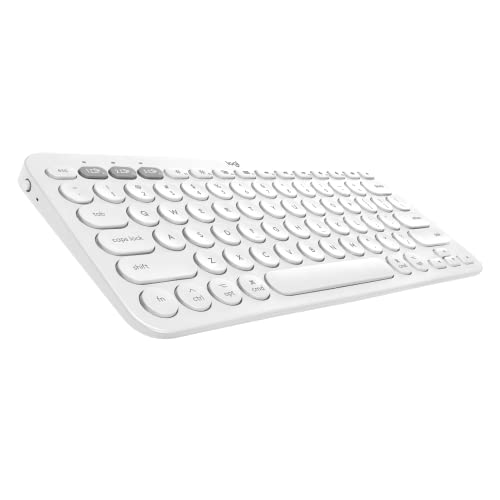
Logitech K380 Multi-Device Bluetooth Keyboard for Mac with Compact Slim Profile, Easy-Switch, 2 Year Battery, MacBook Pro/MacBook Air/iMac/iPad Compatible – Off White
- Best for: MacBook, iMac, and iPad owners who want one board for every Apple device.
- Bluetooth multi-device pairing with Easy-Switch for up to 3 devices
- 2-year battery life on 2 AAA batteries, preinstalled
- Mac layout with iOS shortcut keys
- Compatible with macOS, iOS, and iPadOS
MacBook, iMac, and iPad owners who want one board for every Apple device.
The round keys feel different from a laptop keyboard, so give yourself a day to adjust.
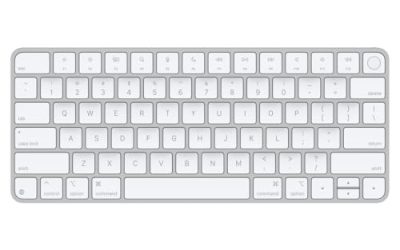
The K380 for Mac is the board to pick when Apple devices are your daily tools. Its Mac layout puts Command, Option, and Mission Control keys in the right places, and Easy-Switch pairs it with up to three devices at once, so a MacBook, an iPad, and an iPhone can all stay connected. The round keys have a soft, scooped feel that suits long writing sessions, and the compact slim profile leaves room on a crowded desk. Two AAA cells power it for up to two years, so there is no cable to manage and no charging routine to remember.
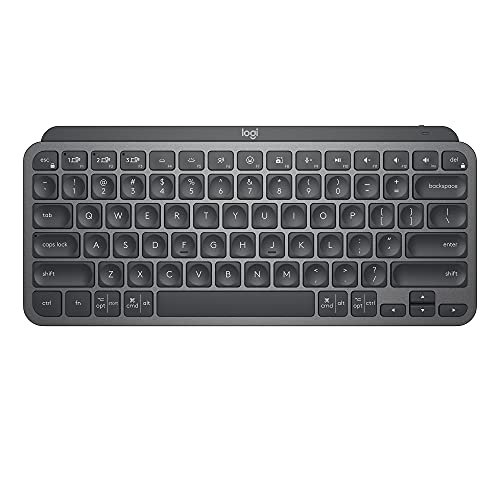
Logitech MX Keys Mini Minimalist Wireless Illuminated Keyboard, Compact, Bluetooth, Backlit, USB-C, Compatible with Apple macOS, iOS, Windows, Linux, Android, Metal Build – Graphite
- Best for: Desk typing with backlighting and a solid metal build.
- USB-C rechargeable LiPo battery, up to 10 days with backlight on, up to 5 months with backlight off
- Backlit, spherically dished keys
- Bluetooth pairing with up to 3 devices
- Compatible with Apple macOS, iOS, Windows, Linux, and Android
Desk typing with backlighting and a solid metal build.
The backlight drains the cell sooner, so keep the USB-C cable handy.
The MX Keys Mini is the most desk-ready board in this guide, with a metal build, backlit keys, and a USB-C rechargeable cell that runs for up to 10 days with the backlight on, or up to 5 months with it off. The keys are spherically dished to fit your fingertips, and the board pairs with up to three devices over Bluetooth, switching between a Mac, a Windows laptop, and a tablet with one key. It is the heaviest pick here, so it stays planted on a desk rather than riding in a bag, and the backlight makes it the natural choice for late-evening work.
Logitech Pebble Keys 2 K380s, Multi-Device Bluetooth Wireless Keyboard with Customizable Shortcuts, Slim and Portable, Easy-Switch for Windows, macOS, iPadOS, Android, Chrome OS – Tonal Graphite
- Best for: Everyday typing across a laptop, tablet, and phone.
- Bluetooth multi-device pairing with Easy-Switch for up to 3 devices
- Customizable shortcut keys
- Slim and portable, 279 x 124 x 16 mm, 415 g with batteries
- Compatible with Windows, macOS, iPadOS, Android, and Chrome OS
Everyday typing across a laptop, tablet, and phone.
It runs on AAA cells, so a spare pair of cells is worth keeping in your bag.
The Pebble Keys 2 K380s is the everyday board for people who move between a laptop, a tablet, and a phone. Its rounded, scooped keys feel soft under the fingers, and customizable shortcut keys open the apps and functions you use most with one press. Easy-Switch pairs it with three devices, and it works across Windows, macOS, iPadOS, Android, and Chrome OS, so it fits almost any mix of hardware. At 279 x 124 x 16 mm and 415 grams with batteries, it is small enough for a bag yet roomy enough for all-day typing, and the tonal graphite finish looks at home on any desk.
Arteck Universal Backlit 7-Colors Ultra Light Slim Portable Wireless Bluetooth 3.0 Keyboard for iOS iPad Pro, Air, Mini, Android, Windows Tablets PC Smartphone Built in Rechargeable 6-Month Battery
- Best for: Backlit typing in dim rooms on a featherweight board.
- 7-colors backlit keys with adjustable brightness
- Ultra light slim portable design, 9.7 x 5.9 x 0.24 inches, about 0.37 lb
- Bluetooth 3.0 wireless connection
- Built-in rechargeable battery, up to 6 months per charge
Backlit typing in dim rooms on a featherweight board.
Bluetooth 3.0 is an older standard, so pairing takes a moment longer than on newer boards.
The Arteck HB030B is the featherweight of this guide, with a stainless, ultra-slim body that measures 9.7 x 5.9 x 0.24 inches and weighs about 0.37 pounds. A seven-color backlight with adjustable brightness makes it easy to type in a dim room, and the rechargeable cell lasts up to 6 months on a charge. It connects over Bluetooth 3.0 and works with iOS, iPadOS, Android, macOS, and Windows tablets and phones, so it covers nearly every small screen you own. The 78-key layout keeps the board tiny while leaving the keys large enough for comfortable typing.
Logitech Keys-to-GO 2 Portable Bluetooth Tablet Keyboard with Built-in Cover, Slim & Compact Wireless Keyboard for Windows, Android, Linux, iPad, iPhone, Mac, Apple TV – Graphite
- Best for: Carrying a keyboard flat against a tablet with no case to lose.
- Built-in cover that folds over the keys
- Slim compact design, 250 x 105 x about 8.8 mm, 222 g
- Bluetooth pairing with up to 3 devices with Easy-Switch
- 2 CR2032 coin cells, up to 36 months of battery life
Carrying a keyboard flat against a tablet with no case to lose.
There is no backlight and no built-in stand, and changing the coin cells means opening a screwed compartment.
The Logitech Keys-to-Go 2 is built for life in a bag. A built-in cover folds over the keys, and the whole board measures just 250 x 105 mm, under 9 mm thick, and 222 grams, so it slips flat against a tablet without a separate case. Under the cover are scissor keys with 1 mm of travel and a full shortcut row, and Easy-Switch pairs it with three devices across Windows, Android, Chrome OS, iPadOS, and macOS. Two CR2032 coin cells power it for up to 36 months, so there is nothing to charge before a trip, and the cover keeps the keys safe on the move.
Which One Fits Your Situation
You type mostly on a Mac or iPad
Pick the K380 for Mac. Its Mac layout, Command and Option keys, and iOS shortcuts match Apple hardware out of the box, and Easy-Switch keeps a MacBook, an iPad, and an iPhone connected at once. The two-year battery means you can leave the cable at home. If backlighting matters more than the Mac layout, the MX Keys Mini is the better desk pick.
You work at a desk and type after dark
Pick the MX Keys Mini for a desk, or the Arteck HB030B for a smaller footprint. Both have backlighting, and both pair with three devices, so a laptop and a tablet can share one board. The MX Keys Mini has the sturdier metal build and the nicer key feel, while the Arteck is far lighter and easier to move between rooms. Either one keeps you typing comfortably when the lights go down.
You carry a keyboard in a bag every day
Pick the Keys-to-Go 2. Its built-in cover protects the keys, and at 222 grams it adds almost nothing to a bag already holding a tablet and a charger. The Pebble Keys 2 is the roomier alternative if you want fuller key spacing and customizable shortcuts, while the Arteck HB030B is the pick if you want backlighting in a featherweight package. All three run for months without charging.
You want one board for a phone, a tablet, and a laptop
Pick the Pebble Keys 2 or the K380 for Mac. Both pair with three devices and switch between them with a dedicated key, so a phone, a tablet, and a laptop can all stay connected. The Pebble Keys 2 fits the widest mix of systems, from Windows to Chrome OS, while the K380 for Mac suits an all-Apple setup. Either one turns a phone into a workable typing station in seconds.
Common Mistakes
- Buying a board with the wrong layout for your devices, then living with keys that do the wrong thing.
- Ignoring battery type and finding out too late that a board needs cells you do not carry.
- Choosing the smallest board available and then struggling with shrunken keys on long documents.
- Forgetting to check that every device you own is on the board’s compatibility list.
- Leaving backlighting on all day and wondering why a rechargeable board runs flat sooner than expected.
Frequently Asked Questions
Do mini Bluetooth keyboards work with phones and tablets?
Yes. Every board in this guide pairs over Bluetooth with phones, tablets, and laptops, and most pair with up to three devices at once. Check the listing for your exact system, since a few shortcut keys behave differently across iOS, iPadOS, Android, and Windows. Once paired, switching between devices takes a single key press.
Do I need a USB receiver to use a Bluetooth mini keyboard?
No. Bluetooth boards pair directly with a phone, tablet, or laptop that has Bluetooth built in, so no receiver or cable is needed for typing. Some boards charge over USB-C, and a few include a receiver for older machines, but the Bluetooth connection itself needs nothing plugged in.
How long does the battery last on a mini Bluetooth keyboard?
It depends on the power source. Rechargeable boards in this guide run for up to 10 days with the backlight on, or months with it off, while the Arteck lasts up to 6 months per charge. Battery boards last far longer: the K380 runs for up to two years on AAA cells, and the Keys-to-Go 2 runs for up to 36 months on coin cells.
Are backlit mini keyboards worth it?
Yes, if you type in dim rooms, on evening flights, or in a dark office. Backlighting makes the keys easy to find without a lamp, and the boards here let you adjust the brightness or switch it off. Keep in mind that the lights drain a rechargeable cell sooner, so turn them off when you do not need them.
FAQ
Do mini Bluetooth keyboards work with phones and tablets?
Do I need a USB receiver to use a Bluetooth mini keyboard?
How long does the battery last on a mini Bluetooth keyboard?
Are backlit mini keyboards worth it?
More from Amazon
Programs that pair well with the guide above. Offers and eligibility are set by Amazon and may change.
Free shipping on eligible items, Prime Video and more. Eligible new members can start with a free trial.
Start a Prime free trialAd-free music streaming. Eligible new subscribers can start with a free trial.
Try Music Unlimited freeA Prime membership for ages 18-24 with a trial period. Eligibility is set by Amazon.
See Prime for Young AdultsAudiobooks and podcasts to listen to on the go. Eligible new members can start with a free trial.
Try Audible freeAs an Amazon Associate we earn from qualifying purchases.