Our Short List of 3
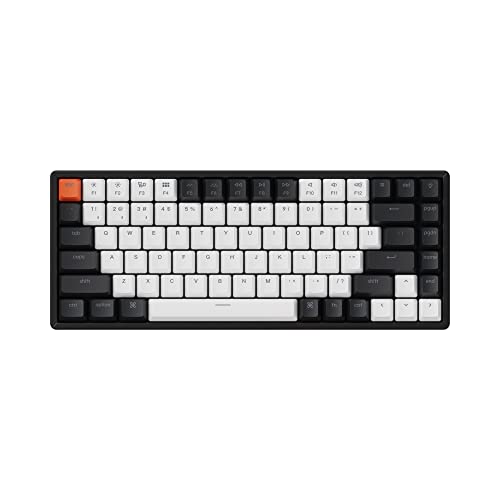
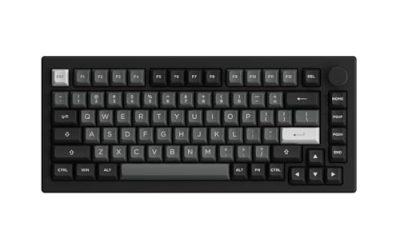
- Best for: Everyday typing at a desk where you want a familiar layout with room to customize later.
- 75 percent layout with 84 keys
- Hot-swappable with Keychron Super Red switches
- Double-shot keycaps
- RGB backlight
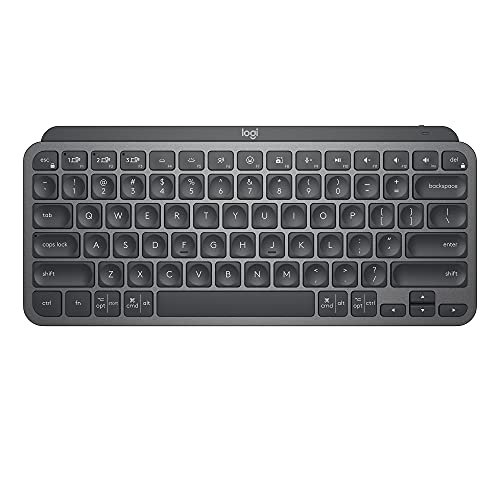
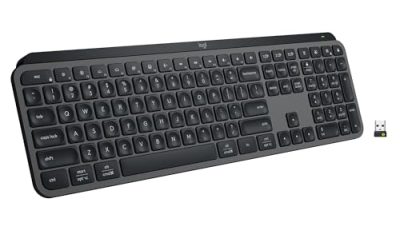
- Best for: Quiet typing across a laptop, tablet, and desktop in a shared office or home workspace.
- Compact minimalist wireless illuminated keyboard
- Bluetooth connectivity with USB-C charging
- Backlit keys with Perfect Stroke key shape
- Pairs with up to three devices

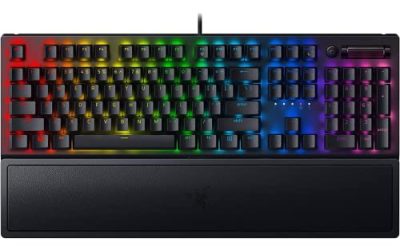
- Best for: Travel, tiny desks, and anyone who wants the smallest mechanical board that still types well.
- 60 percent layout with 61 keys
- Hot-swappable Brown switches
- Bluetooth, 2.4GHz, and wired connections
- RGB backlighting
All 5 Picks at a Glance
| Product | Specs | Action |
|---|---|---|
| Keychron K2 Version 2 |
| Check price on Amazon |
| Logitech MX Keys Mini |
| Check price on Amazon |
| Royal Kludge RK61 |
| Check price on Amazon |
 HyperX Alloy Origins 65 |
| Check price on Amazon |
 Keychron K3 Version 2 |
| Check price on Amazon |
Our Top Picks
- Keychron K3 Version 2 QMK 75% Wireless Low-Profile12.05 x 4.57 x 0.87 inches1.1 poundsCheck on Amazon
A compact keyboard can change how a desk feels during a long writing day. Dropping the number pad and the extra navigation cluster pulls the mouse closer, shortens the reach to every key, and leaves more room for a notebook, a coffee mug, or simply your forearms. The catch is that a smaller board has to earn its place with every keystroke, because there is nowhere for a mushy switch or a cramped layout to hide.
This guide compares five compact keyboards built for typing first: a low-profile wireless board for quiet offices, a tactile 75 percent mechanical board, a tiny 60 percent board for travel, a sturdy 65 percent board with dedicated arrow keys, and an ultra-slim low-profile board for laptop-style typing. Each pick keeps its layout at 75 percent or smaller, and every specification below comes from its Amazon listing.
Quick Picks
As an Amazon Associate we earn from qualifying purchases.
| Product | Best for | Key spec from title |
|---|---|---|
| Keychron K2 Version 2 | Everyday typing with room to customize | 75 percent layout, 84 keys |
| Logitech MX Keys Mini | Quiet wireless typing across devices | Bluetooth, backlit, USB-C |
| Royal Kludge RK61 | Small desks and travel | 60 percent layout, 61 keys |
| HyperX Alloy Origins 65 | A solid board with dedicated arrow keys | 65 percent layout, HyperX Red Linear switches |
| Keychron K3 Version 2 | Low-profile laptop-style typing | 75 percent layout, 84 keys, low-profile Brown switches |
How to Choose
Pick the layout that fits your hands and desk
Compact keyboards come in a few sizes, and the differences matter more for typing than for anything else. A 75 percent board keeps the function row and arrow keys, so it feels closest to a normal keyboard. A 65 percent board drops the function row but keeps dedicated arrows, which typists often miss. A 60 percent board drops the arrows too, putting them on a function layer, which saves the most space but needs new key combinations. A TKL board keeps everything except the number pad. Think about how often you reach for arrows and function keys, and choose the smallest layout that still keeps the keys you use every day within easy reach.
Choose a switch for feel, not for speed
Switches decide how each keystroke feels under your fingers, and typing comfort comes from matching the switch to your habits. Linear switches press straight down with no bump, which suits fast, light typing and quiet rooms. Tactile switches add a small bump partway down, signalling clearly that the key has actuated, which many writers prefer for accuracy. Clicky switches add an audible click on top of the bump, which can disturb anyone sharing the room. Low-profile switches shorten the travel distance, so the board feels closer to a laptop keyboard. Try the switch type in a store first, because feel is personal and no specification sheet can settle it for you.
Keycaps, build, and typing comfort
The parts you touch all day deserve as much attention as the switches underneath them. Double-shot PBT keycaps resist shine and keep their legends readable after months of heavy use, while thinner ABS caps tend to develop a glossy wear pattern sooner. A heavier frame, especially one with an aluminum plate, keeps the board planted instead of sliding around while you type. Gasket-mounted designs and foam layers can soften the sound and the landing of each key, which helps during long sessions. Adjustable tilt feet matter too, because the wrong typing angle strains wrists over time. Look for a board that feels stable, sounds pleasant to you, and lets you set a comfortable angle.
Connectivity and everyday practicality
A typing keyboard has to fit the way you actually work, not just the way you type. Bluetooth lets one board serve a desktop, a laptop, and a tablet, and multi-device pairing makes switching between them a single keypress. A 2.4GHz wireless connection avoids Bluetooth lag and pairing quirks on a main desktop, while a wired USB-C connection never needs charging and works anywhere. Battery life matters most for wireless boards, so check how long the listed battery lasts with the backlight on, since lighting drains power quickly. Hot-swappable sockets are a practical bonus: they let you change switches later without soldering, so a board you like today can grow with your preferences.
The 5 Best Options
Keychron K2 Version 2
- Best for: Everyday typing at a desk where you want a familiar layout with room to customize later.
- 75 percent layout with 84 keys
- Hot-swappable with Keychron Super Red switches
- Double-shot keycaps
- RGB backlight
Everyday typing at a desk where you want a familiar layout with room to customize later.
The Super Red linear switches feel smooth but offer little tactile feedback, so touch typists who rely on a bump may prefer a tactile switch. Confirm it is still sold before buying.
The Keychron K2 Version 2 is the most versatile typing board in this guide, and its 75 percent layout is the reason it works for so many people. You keep the function row, the arrow keys, and a familiar stagger, so there is almost nothing to relearn when you switch from a full-size board. The hot-swappable sockets accept different switches later, and the aluminum frame gives the board a planted feel that lighter plastic boards lack. It connects over Bluetooth or USB, and it works with both Mac and Windows, which makes it an easy shared-desk or home-office choice.
Watch out for: The Super Red linear switches feel smooth but offer little tactile feedback, so touch typists who rely on a bump may prefer a tactile switch. Confirm it is still sold before buying.
Logitech MX Keys Mini
- Best for: Quiet typing across a laptop, tablet, and desktop in a shared office or home workspace.
- Compact minimalist wireless illuminated keyboard
- Bluetooth connectivity with USB-C charging
- Backlit keys with Perfect Stroke key shape
- Pairs with up to three devices
Quiet typing across a laptop, tablet, and desktop in a shared office or home workspace.
The low-profile keys suit laptop typists best, and mechanical keyboard fans may find the travel too short. Battery life drops sharply with the backlight on. Confirm it is still sold before buying.
The Logitech MX Keys Mini is the quietest and most office-ready board here, built around low-profile scissor-style keys with a short, precise travel that laptop typists will recognize at once. Its compact frame drops the number pad entirely, yet it keeps a full function row and sensibly placed arrow keys. Bluetooth pairing covers up to three devices, and the backlit keys adjust to ambient light, which helps in dim rooms. The metal build feels solid for a board this slim, and USB-C charging keeps it simple to top up between workdays.
Watch out for: The low-profile keys suit laptop typists best, and mechanical keyboard fans may find the travel too short. Battery life drops sharply with the backlight on. Confirm it is still sold before buying.
Royal Kludge RK61
- Best for: Travel, tiny desks, and anyone who wants the smallest mechanical board that still types well.
- 60 percent layout with 61 keys
- Hot-swappable Brown switches
- Bluetooth, 2.4GHz, and wired connections
- RGB backlighting
Travel, tiny desks, and anyone who wants the smallest mechanical board that still types well.
Arrow keys live on a function layer, so heavy spreadsheet or text-editing work takes adjustment. Confirm it is still sold before buying.
The Royal Kludge RK61 is the smallest board in this guide, and it earns its place by being genuinely portable rather than merely narrow. With 61 keys and no function row, arrows, or navigation cluster, it fits in a laptop sleeve and leaves a small desk almost entirely free. The Brown switches give a gentle tactile bump without a loud click, which is a sensible middle ground for typing in shared spaces. Triple-mode connectivity covers Bluetooth, 2.4GHz wireless, and wired use, and the hot-swappable sockets let you change switches without tools or soldering.
Watch out for: Arrow keys live on a function layer, so heavy spreadsheet or text-editing work takes adjustment. Confirm it is still sold before buying.
HyperX Alloy Origins 65
- Best for: Typists who want a heavy, durable board with dedicated arrow keys and a smooth linear feel.
- Compact 65 percent form factor
- HyperX Red Linear switches
- Double-shot PBT keycaps
- RGB LED backlighting
Typists who want a heavy, durable board with dedicated arrow keys and a smooth linear feel.
It is wired only, so it suits a fixed desk better than a multi-device or travel setup. The linear switches give no tactile bump. Confirm it is still sold before buying.
The HyperX Alloy Origins 65 is the sturdiest board in this lineup, with an aluminum body and double-shot PBT keycaps that stand up to years of daily typing. Its 65 percent layout is a smart compromise: the number pad and function row are gone, but dedicated arrow keys stay right where your thumb expects them. The HyperX Red Linear switches press smoothly with no bump, which suits fast typists who like an even, quiet stroke. RGB backlighting and NGENUITY software handle lighting and key remapping, and the board connects over USB-C.
Watch out for: It is wired only, so it suits a fixed desk better than a multi-device or travel setup. The linear switches give no tactile bump. Confirm it is still sold before buying.
Keychron K3 Version 2
- Best for: Laptop typists moving to a mechanical board without giving up a low, flat typing angle.
- 75 percent layout with 84 keys
- Ultra-slim low-profile design with Brown switches
- White LED backlight
- Bluetooth and USB wired connections
Laptop typists moving to a mechanical board without giving up a low, flat typing angle.
Low-profile switches and keycaps limit your replacement options compared with standard-height boards. Confirm it is still sold before buying.
The Keychron K3 Version 2 is the thinnest mechanical board in this guide, and that low profile is exactly why laptop typists tend to love it. At 75 percent with 84 keys, it keeps the function row and arrows while sitting far lower than a standard mechanical board, so your wrists stay flatter without a rest. The low-profile Brown switches add a soft tactile bump to an otherwise laptop-like stroke, and the white LED backlight keeps the legends readable without turning the desk into a light show. Bluetooth and USB connections cover Mac and Windows alike.
Watch out for: Low-profile switches and keycaps limit your replacement options compared with standard-height boards. Confirm it is still sold before buying.
Which One Fits Your Situation
You type all day at one desk
Pick the Keychron K2 Version 2 or the HyperX Alloy Origins 65. Both sit firmly on the desk, keep the keys you reach for most within easy range, and use keycaps that hold up to heavy daily use. The K2 is the better choice if you want wireless freedom and switch-swapping later, while the Alloy Origins 65 suits typists who prefer a heavier frame, dedicated arrow keys, and a simple wired connection that never needs charging.
You work across a laptop, tablet, and desktop
Pick the Logitech MX Keys Mini. Its three-device Bluetooth pairing lets you switch machines with one keypress, and its quiet low-profile keys will not disturb anyone nearby. The backlit keys help in dim rooms, and USB-C charging means the same cable that charges your laptop can top up the keyboard. If you prefer a mechanical feel, the Keychron K3 Version 2 is the closest alternative, with Bluetooth pairing and a slim profile that travels well.
You travel or share a small desk
Pick the Royal Kludge RK61. At 60 percent it takes up barely more space than a paperback, fits easily in a bag, and still gives you a real mechanical typing feel with tactile Brown switches. Triple-mode connectivity means it works wired on a desktop, over 2.4GHz at a shared workstation, or over Bluetooth with a tablet. Just be ready to learn the function layer for arrows, since there are no dedicated arrow keys on a board this small.
You want a mechanical feel without a tall board
Pick the Keychron K3 Version 2. Standard mechanical boards can feel tall and tiring if you are used to a laptop, and the K3 closes that gap with low-profile switches and a slim chassis. You still get hot-swappable sockets, a full 75 percent layout with arrows and a function row, and the tactile feedback of Brown switches, all in a board that keeps your wrists close to flat on the desk.
Common Mistakes
- Choosing the smallest layout available without checking whether you actually use arrow keys, function keys, or a number pad every day.
- Picking clicky switches for a shared office or a late-night setup, then finding the noise bothers everyone nearby.
- Ignoring keycap material, so a board that feels great on day one develops shiny, slippery caps within a few months.
- Buying a wireless-only board without checking battery life with the backlight on, which is usually far shorter than the headline figure.
- Forgetting to check operating system support, since Mac and Windows layouts differ in the bottom row and in shortcut placement.
Frequently Asked Questions
Are compact keyboards good for typing all day?
Yes, provided the layout keeps the keys you use most. A 75 percent board feels almost identical to a full-size board for most typists, while a 65 percent board only asks you to relearn the function row. The main adjustment is a 60 percent board, where arrows move to a function layer. Comfort depends more on switch feel, typing angle, and keycap quality than on the size of the board.
Do I need arrow keys on a compact keyboard?
It depends on how you work. Writers and coders who move through text constantly will miss dedicated arrows, so a 65 percent or 75 percent board is the safer choice. If you mostly type straight prose and rarely edit mid-sentence, a 60 percent board with a function layer works fine once the combinations become muscle memory. Try editing a document with a function-layer layout before committing if you are unsure.
Are low-profile switches better for typing?
Low-profile switches suit typists coming from laptops, because the shorter travel and flatter angle feel familiar and keep wrists level. Standard-height switches offer more key travel, a wider choice of replacement switches and keycaps, and often a more satisfying depth to each keystroke. Neither is objectively better, so the deciding factor is which height your hands already prefer after years of typing.
Can I use a compact keyboard with a Mac and a Windows PC?
Yes, most compact keyboards in this guide support both systems, including the Keychron boards and the Logitech MX Keys Mini. Check the listing for a Mac and Windows compatibility note and for any physical switch on the board that changes the layout mode. The bottom-row modifier keys differ between systems, so a board with Mac-specific keycaps or a mode switch will save you from remapping keys yourself.
FAQ
Are compact keyboards good for typing all day?
Do I need arrow keys on a compact keyboard?
Are low-profile switches better for typing?
Can I use a compact keyboard with a Mac and a Windows PC?
More from Amazon
Programs that pair well with the guide above. Offers and eligibility are set by Amazon and may change.
Free shipping on eligible items, Prime Video and more. Eligible new members can start with a free trial.
Start a Prime free trialAd-free music streaming. Eligible new subscribers can start with a free trial.
Try Music Unlimited freeA Prime membership for ages 18-24 with a trial period. Eligibility is set by Amazon.
See Prime for Young AdultsAudiobooks and podcasts to listen to on the go. Eligible new members can start with a free trial.
Try Audible freeAs an Amazon Associate we earn from qualifying purchases.