Our Short List of 3

- Best for: A first backup drive, laptop overflow and console game storage.
- Capacity: 2TB mechanical hard disk
- Interface: USB 3.0
- Model: STGX2000400
- Cable: 18-inch USB 3.0 cable included
- Best for: Windows users who want simple, software-free storage at a useful size.
- Capacity: 4TB mechanical hard disk
- Interface: USB 3.0, backward compatible with USB 2.0
- Form factor: 2.5 inch
- Rotational speed: 5400 RPM
- Best for: The biggest pocketable game and media library without a power brick.
- Capacity: 5TB mechanical hard disk
- Interface: USB 3.0
- Model: STGX5000400
- Form factor: 2.5 inch portable
All 5 Picks at a Glance
| Product | Specs | Action |
|---|---|---|
| Seagate Portable 2TB External Hard Drive (STGX2000400) |
| Check price on Amazon |
| Toshiba Canvio Basics 4TB Portable External Hard Drive |
| Check price on Amazon |
| Seagate Portable 5TB External Hard Drive (STGX5000400) |
| Check price on Amazon |
 Seagate Expansion 8TB External Hard Drive (STKP8000400) |
| Check price on Amazon |
 WD My Book 8TB Desktop External Hard Drive |
| Check price on Amazon |
Our Top Picks
Choosing an external hard disk drive comes down to one decision most listings bury: where will this drive actually live? A drive that rides in a laptop bag gets knocked around, runs off USB power and needs to survive being plugged into whatever machine is nearby. A drive that never leaves the desk can be bigger, cheaper per terabyte and always on. Pick the wrong home for it and you end up with a pocket drive doing archive duty or a mains-powered brick you never take anywhere.
This roundup is for PC gamers whose internal storage filled up, home users setting up a first real backup, and anyone archiving photos, video or a growing game library. Every pick below is a spinning mechanical hard drive chosen from the capacity, interface and model details on its Amazon listing, split between bus-powered portables and desktop drives.
Quick Picks
As an Amazon Associate we earn from qualifying purchases
| Product | Best for | Key spec from title |
|---|---|---|
| Seagate Portable 2TB External Hard Drive | First backup drive and console overflow | 2TB, USB 3.0 |
| Toshiba Canvio Basics 4TB Portable External Hard Drive | No-fuss Windows storage that just works | 4TB, 5400 RPM |
| Seagate Portable 5TB External Hard Drive | The largest library that still fits a pocket | 5TB, USB 3.0 |
| Seagate Expansion 8TB External Hard Drive | A desk archive for media collections | 8TB, desktop |
| WD My Book 8TB Desktop External Hard Drive | Backup that locks itself with a password | 8TB, 256-bit AES encryption |
How to Choose
Portable or desktop: decide where the drive lives
Portable 2.5-inch drives draw all their power from the USB cable, so they work with laptops, consoles and any spare port, and they slip into a bag without a second thought. Desktop 3.5-inch drives need a wall adapter and a permanent spot, but they reach 8TB and beyond in a single unit and cost less for each terabyte. If the drive will travel weekly, go portable. If it will sit beside a tower PC holding a media archive, the desktop format is the honest fit.
Capacity: buy for the library you are building
Game installs, phone photo backups and video projects grow faster than most people plan for. A 2TB drive suits documents, photos and a modest game overflow shelf. At 4TB to 5TB you can hold a serious game library plus years of photos. The 8TB desktop class is archive territory: full system images, raw video and a whole household’s backups. Whatever size you pick, keep the working rule in mind that a drive kept nearly full is a drive you will replace sooner than expected.
Interface and format: the plug is only half the story
Nearly every external hard drive still uses USB 3.0, which is fast enough that the spinning disk inside, not the cable, sets the real transfer pace. The bigger trap is the factory format. A drive pre-formatted NTFS works instantly on Windows but needs reformatting before a Mac can write to it, and reformatting erases everything already stored. exFAT drives work across Windows and Mac out of the box. Check the format line on the listing against the machines you actually own before ordering.
One drive is storage, not a backup strategy
An external hard drive holds copies; it becomes a backup only when the same files also exist somewhere else. Any single drive can fail, get dropped or be stolen, portable ones most of all. Some models soften that risk with extras worth having: Seagate bundles Rescue data recovery services on several drives here, and the WD My Book adds password protection with hardware encryption for files that should not be readable if the drive walks away. Match the safety net to how painful losing the data would be.
The 5 Best Options
Seagate Portable 2TB External Hard Drive (STGX2000400)
- Best for: A first backup drive, laptop overflow and console game storage.
- Capacity: 2TB mechanical hard disk
- Interface: USB 3.0
- Model: STGX2000400
- Cable: 18-inch USB 3.0 cable included
A first backup drive, laptop overflow and console game storage.
2TB fills quickly once several large game installs land on it, so heavy libraries should start at 4TB instead.
This is the drive to hand someone who has never owned external storage. It plugs into a PC, Mac, PlayStation or Xbox over USB 3.0, runs entirely off the cable and starts saving files with simple drag-and-drop, no software detour. Two terabytes will not hold a modern game collection for long, but it swallows a laptop backup, a photo library and a rotating shelf of game installs comfortably. The included Rescue service adds a recovery safety net that drives at this level rarely offer.
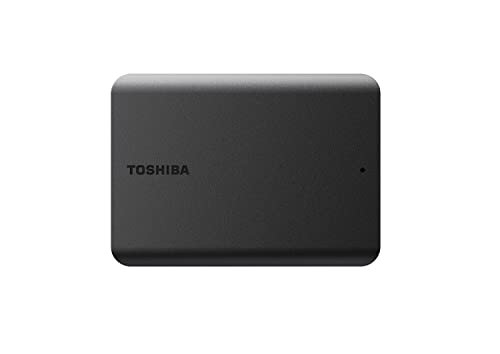
Toshiba Canvio Basics 4TB Portable External Hard Drive
- Best for: Windows users who want simple, software-free storage at a useful size.
- Capacity: 4TB mechanical hard disk
- Interface: USB 3.0, backward compatible with USB 2.0
- Form factor: 2.5 inch
- Rotational speed: 5400 RPM
Windows users who want simple, software-free storage at a useful size.
Mac owners must reformat it before writing files, and reformatting wipes anything already on the drive.
The Canvio Basics strips the idea down to its essentials: a matte black 2.5-inch drive, a USB 3.0 connection and nothing to install. It arrives pre-formatted NTFS, so a Windows PC sees it the moment it is plugged in and you can start dragging folders across. Four terabytes is the capacity sweet spot for a household drive, enough for system backups, photos and a working game library in one unit. There is no bundled software suite and no password feature, which is exactly the point for buyers who distrust both.
Seagate Portable 5TB External Hard Drive (STGX5000400)
- Best for: The biggest pocketable game and media library without a power brick.
- Capacity: 5TB mechanical hard disk
- Interface: USB 3.0
- Model: STGX5000400
- Form factor: 2.5 inch portable
The biggest pocketable game and media library without a power brick.
The listing sells several capacities under one page, so confirm the 5TB variant is selected before ordering.
Five terabytes is as large as a bus-powered portable hard drive gets, and this Seagate puts that capacity in the same grab-and-go format as its 2TB sibling. It suits the gamer who rotates a big installed library between a PC and a PlayStation or Xbox, and the photographer whose archive outgrew smaller drives but still travels. Everything runs off the single USB 3.0 cable, so there is no adapter to forget. The Rescue data recovery service is included here as well, which matters more as the only copy of more files ends up on one drive.
Seagate Expansion 8TB External Hard Drive (STKP8000400)
- Best for: A stay-at-home archive for media collections and multi-PC backups.
- Capacity: 8TB mechanical hard disk
- Interface: USB 3.0
- Model: STKP8000400
- Form factor: desktop, mains powered
A stay-at-home archive for media collections and multi-PC backups.
It needs wall power and desk space, so it is the wrong choice for storage that travels with a laptop.
The Expansion is built for one job: sitting on a desk and quietly holding everything. Eight terabytes covers a full media server library, years of video projects or backups for several computers in the house. Setup is deliberately plain, with drag-and-drop saving for Windows and Mac over USB 3.0 once the power adapter is plugged in. Because it is a desktop unit it stays put, stays powered and stays available, which is what an archive drive should do. Seagate includes its Rescue data recovery services with this model too.
WD My Book 8TB Desktop External Hard Drive
- Best for: Whole-home backup that should stay unreadable if the drive is lost or stolen.
- Capacity: 8TB mechanical hard disk
- Interface: USB 3.0
- Model: WDBBGB0080HBK-NESN
- Security: 256-bit AES hardware encryption with password protection
Whole-home backup that should stay unreadable if the drive is lost or stolen.
Forget the password and the encrypted data is locked for good, so store the password somewhere separate and safe.
The My Book matches the Expansion on capacity and adds the thing the Seagate lacks: real security. Its 256-bit AES hardware encryption with password protection means a stolen or resold drive does not hand over your tax records, photos and documents. It ships formatted exFAT, so Windows and Mac machines can both use it straight away, and WD includes backup and device management software for scheduled, automatic copies. For a drive whose whole purpose is holding your most important files in one place, that lock is a meaningful difference.
Which One Fits Your Situation
Your laptop drive is full and you need relief today
Start with the Seagate Portable 2TB. It needs no setup, no power brick and no decisions, and it clears a photo library, documents and a few game installs off your internal drive in one sitting. If you already know the overflow is mostly games, skip straight to the 4TB Toshiba so you are not repeating this purchase within the year.
You want one drive for the whole game library
The Seagate Portable 5TB is the practical ceiling for storage that still travels. It holds a large installed library, moves between PC and console, and runs off the same single cable. Players who keep games on a shelf beside the TV instead can trade portability for room and take the 8TB Expansion, which never needs to be unplugged to make space.
You are building a home archive that just sits there
Desktop drives earn their keep here. The Seagate Expansion 8TB is the straightforward archive: plug it in, point your backup software or media folders at it, and leave it. Choose the WD My Book 8TB instead when the archive includes financial documents, family photos or work files you would not want a stranger reading, because its hardware encryption keeps the contents sealed.
You split time between Windows and Mac
Format decides this one. The WD My Book arrives in exFAT and works with both systems immediately. The Toshiba Canvio Basics arrives in NTFS, which Windows loves and Mac can only read until you reformat it. The Seagate portables sit in between and may need a one-time reformat for Time Machine duty, so set the drive up for the machine that will use it most.
Common Mistakes
- Buying a portable drive for an archive job, then leaving it loose in a drawer where it gets knocked, lost or forgotten between backups.
- Treating one external drive as a complete backup, when the files exist nowhere else and a single failure takes everything with it.
- Ignoring the factory format and discovering, mid-transfer, that your Mac cannot write to an NTFS drive without reformatting it first.
- Choosing capacity for today’s library instead of next year’s, then daisy-chaining half-full drives with no record of what lives where.
- Forgetting that desktop drives need wall power, and planning to use one on the road with a laptop and no spare outlet.
Frequently Asked Questions
Is an external hard drive fast enough for playing games?
For older titles and console game storage, yes, and hard drives remain a cheap way to hold a big installed library. Loading times will trail an internal SSD, and some current PC games effectively require SSD storage. Many players keep actively played games on the internal drive and park the rest of the library on an external hard disk.
What is the difference between a portable and a desktop external drive?
Portable drives use a 2.5-inch mechanism and run entirely off USB power, so they travel easily and top out at 5TB. Desktop drives use a larger 3.5-inch mechanism, need a wall adapter and stay in one place, but reach much higher capacities. Pick based on where the drive will spend its life, not on the interface, which is USB 3.0 on both.
Can I use one external hard drive with both a PC and a Mac?
Yes, if the file system allows it. A drive formatted exFAT, like the WD My Book here, can be written by both Windows and Mac out of the box. An NTFS drive works fully on Windows but is read-only on a Mac until reformatted, and reformatting erases the contents, so settle the format before loading files onto it.
How long do external hard disk drives last?
Mechanical drives are wear items, and lifespan varies with handling more than age. A desk-bound desktop drive that stays cool and unmoved usually outlasts a portable that rides in bags daily. The safer assumption is that any drive can fail without warning, which is why important files should exist on at least two separate devices.
FAQ
Is an external hard drive fast enough for playing games?
What is the difference between a portable and a desktop external drive?
Can I use one external hard drive with both a PC and a Mac?
How long do external hard disk drives last?
More from Amazon
Programs that pair well with the guide above. Offers and eligibility are set by Amazon and may change.
Free shipping on eligible items, Prime Video and more. Eligible new members can start with a free trial.
Start a Prime free trialAd-free music streaming. Eligible new subscribers can start with a free trial.
Try Music Unlimited freeA Prime membership for ages 18-24 with a trial period. Eligibility is set by Amazon.
See Prime for Young AdultsAudiobooks and podcasts to listen to on the go. Eligible new members can start with a free trial.
Try Audible freeAs an Amazon Associate we earn from qualifying purchases.