Our Short List of 3
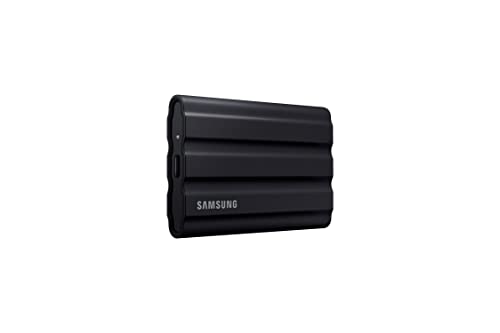
- Best for: Rugged recording on location and in busy studios.
- Model: MU-PE2T0S/AM
- Capacity: 2TB solid state drive
- Interface: USB 3.2 Gen 2, PCIe NVMe
- Speed: Up to 1,050 MB/s read, 1,000 MB/s write

- Best for: The smallest drive for carrying sessions between rooms.
- Model: CT2000X9PROSSD902
- Capacity: 2TB solid state drive
- Interface: USB-C 3.2
- Speed: Up to 1,050 MB/s read and write

- Best for: The fastest drive for big sessions and sample streaming.
- Model: MU-PG2T0B/AM
- Capacity: 2TB solid state drive
- Interface: USB 3.2 Gen 2×2, 20Gbps
- Speed: Up to 2,000 MB/s read, 1,950 MB/s write
All 3 Picks at a Glance
| Product | Specs | Action |
|---|---|---|
| Samsung T7 Shield 2TB |
| Check price on Amazon |
| Crucial X9 Pro 2TB |
| Check price on Amazon |
| Samsung T9 2TB |
| Check price on Amazon |
Key takeaways
- Find the best hard drives for audio recording sessions. Compare three fast portable SSDs with sustained write speed, rugged builds and USB-C for DAW work.
Audio recording asks more from storage than almost any other desktop job. A drive must write many audio tracks at once without a hiccup, stay silent beside a microphone, and survive being carried between a studio, a rehearsal room, and home. Spinning hard drives struggle on all three counts: their moving parts hum, they slow down under sustained writes, and a knock can ruin a session. That is why the three drives below are portable SSDs, chosen for the sustained write speed, silence, and rugged builds that recording sessions demand. A drive that drops a take is worse than no drive at all.
This guide is for home studio owners, podcasters, musicians tracking live sessions, and engineers who carry projects between rooms. Each drive below was chosen from the name and specifications shown on its Amazon product page, with attention to write speed, interface, ruggedness, and capacity. The three drives below cover rugged location work, pocket portability, and maximum speed.
Quick Picks
As an Amazon Associate we earn from qualifying purchases
| Product | Best for | Key spec from title |
|---|---|---|
| Samsung T7 Shield 2TB | Rugged recording on location | 1,050 MB/s, IP65, USB 3.2 Gen 2 |
| Crucial X9 Pro 2TB | The smallest drive in your pocket | 1,050 MB/s, IP55, 65 x 50 mm |
| Samsung T9 2TB | The fastest drive for big sessions | 2,000 MB/s, USB 3.2 Gen 2×2 |
How to Choose
Choose sustained write speed over peak speed
Peak speed figures describe short bursts, while recording needs steady writing for minutes or hours at a time. A drive that starts fast and slows down mid-take can drop audio or corrupt a session file. The T9 lists up to 2,000 MB/s read and 1,950 MB/s write, while the T7 Shield and X9 Pro list up to 1,050 MB/s read and 1,000 MB/s write. Look for sustained-write evidence in the listing, and favour drives with thermal management, since a drive that overheats will throttle exactly when a long session needs it most. A large cache can mask a slowdown until it fills.
Pick silence and no moving parts
A recording room punishes noise, and a spinning hard drive hums, clicks, and vibrates through a desk. Solid state drives have no moving parts, so they run silent and ignore vibration that would disturb a mechanical drive. That silence matters most beside an open microphone, where even a faint hum can end up on a track. All three drives here are SSDs with no fans and no platters, which keeps the recording space quiet and the drive safe from knocks that would damage a spinning disk. A fanless design also means one less part that can fail mid-session.
Match the interface to your computer
A fast drive only reaches its listed speed on a port that supports its interface. The T7 Shield and X9 Pro use USB 3.2 Gen 2 at 10Gbps, which most modern computers provide over USB-C. The T9 uses USB 3.2 Gen 2×2 at 20Gbps, which needs a matching port and a cable that supports it, plus UASP mode enabled. Check the ports on your recording computer before choosing, since a 20Gbps drive on a 10Gbps port still works but runs at the lower speed. Carry a spare cable, since a lost cable can end a session as surely as a dead drive.
Plan capacity around sessions and samples
A 2TB drive holds a large library of sessions, sample packs, and project backups, but recording fills space faster than most buyers expect. Multitrack sessions with many takes, high sample rates, and long recordings add up quickly, and sample libraries grow with every new pack. All three drives here offer 2TB, which suits a working library plus room for new projects. Keep finished sessions on a separate archive drive and leave headroom on the working drive, since a nearly full SSD writes more slowly than one with space to spare. Leave clear headroom for new sessions and sample packs.
The 3 Best Options
Samsung T7 Shield 2TB
- Best for: Rugged recording on location and in busy studios.
- Model: MU-PE2T0S/AM
- Capacity: 2TB solid state drive
- Interface: USB 3.2 Gen 2, PCIe NVMe
- Speed: Up to 1,050 MB/s read, 1,000 MB/s write
Rugged recording on location and in busy studios.
The listed speeds need a USB 3.2 Gen 2 port, so check your computer’s ports before ordering.
The Samsung T7 Shield 2TB is the rugged pick in this group, pairing sustained 1,050 MB/s read and 1,000 MB/s write speeds with an IP65 rating for water and dust resistance. Its rubberised body survives falls, and Dynamic Thermal Guard manages heat during long recording sessions so the drive holds its speed. The PCIe NVMe design works over USB 3.2 Gen 2, and the 98g body slips into a pocket beside a field recorder. It suits studios, rehearsal rooms, and location recording alike. The rubberised body also damps vibration from a busy desk.
Watch out for: The listed speeds need a USB 3.2 Gen 2 port, so check your computer’s ports before ordering.
Crucial X9 Pro 2TB
- Best for: The smallest drive for carrying sessions between rooms.
- Model: CT2000X9PROSSD902
- Capacity: 2TB solid state drive
- Interface: USB-C 3.2
- Speed: Up to 1,050 MB/s read and write
The smallest drive for carrying sessions between rooms.
The tiny body is easy to misplace, so keep it in a case or a dedicated pocket when travelling.
The Crucial X9 Pro 2TB is the pocket pick in this group, measuring 65 by 50 mm in a slim aluminium enclosure that disappears into a jacket pocket. Its Micron TLC NAND delivers up to 1,050 MB/s read and write over USB-C, which covers multitrack recording and fast session transfers. An IP55 rating guards against water and dust, and drop-proof durability up to 7.5 feet protects the drive when a bag hits the floor. A USB-C cable and a Mylio Photos offer come in the box. The aluminium body sheds heat during long transfers.
Watch out for: The tiny body is easy to misplace, so keep it in a case or a dedicated pocket when travelling.
Samsung T9 2TB
- Best for: The fastest drive for big sessions and sample streaming.
- Model: MU-PG2T0B/AM
- Capacity: 2TB solid state drive
- Interface: USB 3.2 Gen 2×2, 20Gbps
- Speed: Up to 2,000 MB/s read, 1,950 MB/s write
The fastest drive for big sessions and sample streaming.
Full speed needs a USB 3.2 Gen 2×2 port with UASP mode enabled, so confirm your computer supports it.
The Samsung T9 2TB is the fastest drive in this group, listing up to 2,000 MB/s read and 1,950 MB/s write over USB 3.2 Gen 2×2. That speed suits large multitrack sessions, high sample rates, and sample libraries that stream directly from the drive. Dynamic Thermal Guard keeps the drive cool during long writes, and drop resistance up to 3 metres protects it on busy desks. At 122g with USB-C to C and USB-C to A cables included, it moves between a studio computer and a laptop without fuss. The included cables cover both USB-C and USB-A ports.
Watch out for: Full speed needs a USB 3.2 Gen 2×2 port with UASP mode enabled, so confirm your computer supports it.
Which One Fits Your Situation
You record multitrack sessions live
Pick the Samsung T9 2TB. Its 2,000 MB/s read and 1,950 MB/s write speeds give the most headroom for many tracks recording at once, and the 20Gbps interface keeps large session files moving quickly. Dynamic Thermal Guard holds the speed steady through long takes. Confirm your computer has a USB 3.2 Gen 2×2 port first, since the drive needs one to reach its listed speed. The 5-year warranty backs long studio use.
You record on location
Pick the Samsung T7 Shield 2TB. Its IP65 rating and rubberised body handle dust, rain, and knocks that would end a session on a fragile drive. The sustained 1,000 MB/s write speed covers live multitrack capture, and the 98g body fits a pocket beside a field recorder. It works over standard USB 3.2 Gen 2, so it plugs into almost any modern computer without adapter worries. The IP65 rating shrugs off dust and rain.
You want the smallest drive in your pocket
Pick the Crucial X9 Pro 2TB. At 65 by 50 mm it is the smallest drive here, slipping into a pocket or a small case between studio visits. Its 1,050 MB/s read and write speeds cover recording and fast transfers, while the IP55 rating and 7.5-foot drop protection suit a drive that travels daily. The aluminium enclosure stays cool and looks at home beside a laptop.
You carry sessions between studio and home
Pick the Crucial X9 Pro 2TB. Its pocket size and USB-C connection make it the easiest drive to move between machines, and the 2TB capacity holds active sessions plus sample libraries. The IP55 rating protects it in transit, and the included USB-C cable works with most modern laptops. Keep a backup copy at home, since a drive that travels daily faces more risk than one that stays on a desk.
Common Mistakes
- Buying on peak speed alone and discovering the drive slows down halfway through a long recording session.
- Using a spinning hard drive beside an open microphone, then finding hum and clicks on every track.
- Plugging a 20Gbps drive into a 10Gbps port and wondering why it never reaches its listed speed.
- Filling the working drive to the brim, which slows writes and leaves no room for the next session.
- Keeping the only copy of a session on a portable drive with no backup anywhere else.
Frequently Asked Questions
Why SSDs instead of hard drives for recording?
SSDs have no moving parts, so they run silent, ignore vibration, and survive knocks that would damage a spinning disk. They also sustain high write speeds far longer than a mechanical drive, which matters when many audio tracks record at once. The working drive for live recording should be an SSD. Keep a second copy of every session on another drive.
How much speed does multitrack recording need?
Less than the headline figures suggest, but more than a slow drive provides. A dozen tracks at standard sample rates need only a fraction of what these drives offer. The T7 Shield and X9 Pro at up to 1,000 MB/s write cover most sessions, while the T9 at up to 1,950 MB/s write suits large sessions and heavy sample streaming together.
Does the USB port limit the drive speed?
Yes. A drive only reaches its listed speed on a port that supports its interface, with the right cable. The T7 Shield and X9 Pro need USB 3.2 Gen 2 at 10Gbps, while the T9 needs USB 3.2 Gen 2×2 at 20Gbps. A faster drive on a slower port still works, but it runs at the port’s speed.
How should I back up recording sessions?
Keep three copies: the working copy on the portable SSD, a second copy on a separate drive at home, and a third copy elsewhere, such as a different drive stored off site. Copy finished sessions off the working drive promptly, since a portable drive that travels daily faces more risk than one that stays put.
FAQ
Why SSDs instead of hard drives for recording?
How much speed does multitrack recording need?
Does the USB port limit the drive speed?
How should I back up recording sessions?
More from Amazon
Programs that pair well with the guide above. Offers and eligibility are set by Amazon and may change.
Free shipping on eligible items, Prime Video and more. Eligible new members can start with a free trial.
Start a Prime free trialAd-free music streaming. Eligible new subscribers can start with a free trial.
Try Music Unlimited freeA Prime membership for ages 18-24 with a trial period. Eligibility is set by Amazon.
See Prime for Young AdultsAudiobooks and podcasts to listen to on the go. Eligible new members can start with a free trial.
Try Audible freeAs an Amazon Associate we earn from qualifying purchases.