
Key takeaways
- Independent reviews. Look for reviews from outlets that publish load testing, ripple and transient results, and compare them to the maker’s claims.
- Protections. Overcurrent, overvoltage, undervoltage and short-circuit protections are listed on spec sheets for decent units.
- Warranty. A longer warranty reflects maker confidence; read its terms.
- Fan behaviour. A high-power PSU runs warm; a quiet fan curve is nice, but cooling matters more.
- Cable length and layout. Check the cable reaches the GPU socket without strain, and leaves a straight run before any bend at the plug.
To choose a power supply for a high-end GPU, start with the card maker’s stated minimum wattage, add headroom for your CPU and the rest of the system, then pick a unit with the right plugs (a native 12V-2×6 cable or enough 8-pin outputs), an ATX 3.x design built to handle short power spikes, and a reputable maker’s warranty.
Our top picks
 be quiet! Pure Power 13 M 1000W
- 80 PLUS Gold, Cybenetics Platinum, and Cybenetics A++…
- Pure Power 13 M 1000W is an ATX…
- For massive transient loads Pure Power 13 M…

As an Amazon Associate we earn from qualifying purchases at no extra cost to you.
Step 1: Read The Card Maker’s Requirements
Every graphics card lists a total graphics power (TGP) and a recommended PSU. NVIDIA’s page for the RTX 5090 lists 575 watts TGP, a minimum 850 watt power supply, and either three 8-pin PCIe cables or one 600 watt PCIe Gen 5 cable. Other cards list different figures, so open the page for your exact model, whether it is a reference or a board-partner design, since partner cards can ship with higher power limits and different recommendations.
| Card class | Typical plug | How to size the PSU |
|---|---|---|
| Mid-range | One or two 8-pin | Maker’s minimum plus modest headroom |
| High-end | Two or three 8-pin, or one 16-pin | Maker’s minimum, then add for CPU and overclocking |
| Flagship | 16-pin 12V-2×6 (up to 600 W rated) | Maker’s minimum or higher, native cable preferred |
Step 2: Add Up The Rest Of The System
The maker’s recommendation usually assumes a typical system. If you run a high-power CPU, several drives, many fans or custom cooling, you may want more capacity than the minimum. Check the CPU maker’s listed power figures (for example the processor’s maximum turbo power on its spec page) and add them to the card’s TGP, then add something for the board, memory, storage and fans. Do not guess: use the maker figures and a margin you are comfortable with.
Efficiency also affects choice. A public summary of 80 Plus levels lists Gold at 87 percent efficiency at full load and Platinum at 90 percent, with efficiency peaking at 50 to 75 percent load and falling at very low loads. A PSU that is neither barely coping nor wildly oversized tends to sit in a good range.
Step 3: Choose The Standard: ATX 3.x And 12V-2×6
Modern GPUs can spike well above their average power for a very short time. According to public references, ATX 3.0 introduced a requirement for PSUs to tolerate power excursions: a 100 microsecond draw at three times the sustained maximum, decreasing to one times at one second. For a flagship card, a PSU that is certified to ATX 3.0 or 3.1 is the safer fit, and the same sources describe the 12V-2×6 plug as a backward-compatible revision of 12VHPWR aimed at being safer.
The 16-pin plug is described as having twelve power pins and four sense pins, rated up to 600 watts. Many PSUs include a native cable for it. That avoids the bulky multi-plug adapter shipped in the card box.
Step 4: Match The Plugs
| Your card has | Your PSU needs |
|---|---|
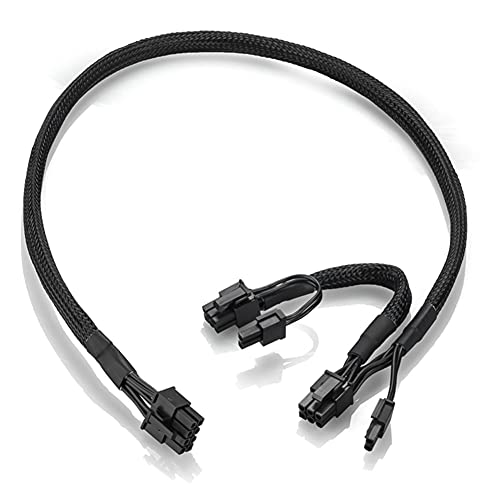
| Two or three 8-pin sockets | Enough PCIe 8-pin outputs, ideally with separate cables for each socket |
| One 16-pin socket | A native 12V-2×6 cable, or enough 8-pin outputs for the supplied adapter |
| Wide mixed needs (card plus CPU 8-pin) | Separate CPU and PCIe connectors; do not confuse the two kinds of 8-pin |
Use only the cables made for your PSU model. Modular pinouts differ between brands, and mixing them can damage components.
Step 5: Judge Build Quality
- Independent reviews. Look for reviews from outlets that publish load testing, ripple and transient results, and compare them to the maker’s claims.
- Protections. Overcurrent, overvoltage, undervoltage and short-circuit protections are listed on spec sheets for decent units.
- Warranty. A longer warranty reflects maker confidence; read its terms.
- Fan behaviour. A high-power PSU runs warm; a quiet fan curve is nice, but cooling matters more.
- Cable length and layout. Check the cable reaches the GPU socket without strain, and leaves a straight run before any bend at the plug.
Step 6: Check Physical Fit
High-wattage units tend to be larger. Compare the PSU depth to the space in your case and check the clearance between the card’s plug and the side panel. A cramped plug that is bent sharply can come loose or overheat, so choose a case or cable arrangement that allows a gentle path.
Wattage Versus Quality: Which To Prioritise
| Priority | Pick |
|---|---|
| Running a flagship GPU with a high-power CPU | A higher-wattage ATX 3.x unit from a reputable maker with a native 16-pin cable |
| Balanced gaming build, one high-end card | The maker’s recommended wattage with some headroom and a good warranty |
| Upgrading an older PSU | Check it has the right plugs and is not near end of warranty; consider replacing if it is old |
| Tight case | A compact unit with flexible cables, verified for clearance |
Common Mistakes
- Choosing by wattage alone and ignoring quality, protections and transient handling.
- Reusing old modular cables from another PSU.
- Overestimating the benefit of a huge oversized unit; extremely low load can reduce efficiency.
- Skipping the check on how many separate PCIe outputs the PSU actually provides.
- Leaving the plug half inserted or sharply bent.
- Treating a vague online “wattage calculator” as authoritative. Use the card maker’s page first.
Frequently Asked Questions
How many watts do I need for a high-end GPU?
Start from the card maker’s recommended PSU. For the RTX 5090, NVIDIA lists a minimum of 850 watts with a 575 watt TGP. Systems with demanding CPUs or overclocks may need more.
Do I need an ATX 3.1 power supply?
It is not mandatory for every card, but ATX 3.x designs are built to tolerate the short spikes modern GPUs produce and include the 12V-2×6 plug. It is a sensible choice for new high-end builds.
Can I use an adapter instead of a native 16-pin cable?
Yes, if it is the one supplied for the card and every 8-pin input is connected to its own PSU output. A native cable is tidier and has fewer joints.
Is a modular PSU better?
Modular units make routing easier, but quality depends on the design, not the cable style. Use only the cables supplied for that model.
Will a bigger PSU use more electricity?
The system draws what it needs. A larger PSU only changes efficiency at low loads, which is why oversizing by a large margin is not usually helpful.
How long should a high-end PSU last?
Lifespan depends on build quality, operating temperature and load, so read the maker’s warranty length as the clearest stated signal. A unit used well below its rated capacity in a cool, dust-free case generally ages more gently than one run near its limit.
Should I replace my PSU when I upgrade the GPU?
Only if it falls short of the new card’s stated minimum wattage, lacks the right plugs, or is old and out of warranty. Compare your unit’s rating and available cables against the maker’s requirements page, and if it already meets them with margin, there is no need to replace it.
Does the 12V-2×6 plug need a special case?
No special case is needed, but there must be room for the cable to leave the socket in a fairly straight line. Check the maker’s guidance on minimum bend distance and make sure the side panel does not press on the plug.
FAQ
How many watts do I need for a high-end GPU?
Do I need an ATX 3.1 power supply?
Can I use an adapter instead of a native 16-pin cable?
Is a modular PSU better?
Will a bigger PSU use more electricity?
How long should a high-end PSU last?
Should I replace my PSU when I upgrade the GPU?
Does the 12V-2×6 plug need a special case?
More from Amazon
Programs that pair well with the guide above. Offers and eligibility are set by Amazon and may change.
Free shipping on eligible items, Prime Video and more. Eligible new members can start with a free trial.
Start a Prime free trialAd-free music streaming. Eligible new subscribers can start with a free trial.
Try Music Unlimited freeA Prime membership for ages 18-24 with a trial period. Eligibility is set by Amazon.
See Prime for Young AdultsAudiobooks and podcasts to listen to on the go. Eligible new members can start with a free trial.
Try Audible freeAs an Amazon Associate we earn from qualifying purchases.




