
Key takeaways
- Check that the power supply has the GPU connectors your card needs: several 8-pin PCIe plugs, or a 12V-2×6 (12VHPWR) cable on cards that use it.
- Do not rely on a chain of adapters. A native cable from the power supply is preferred; follow the GPU and PSU maker guidance for the 16-pin connector and stop using it if you see heat damage.
- ATX 3.x supplies are built for higher short-term power peaks. Many 750 W models offer them, and many 650 W models do too, so check the specification sheet.
- Look at the number of CPU 8-pin connectors if you use a high-end processor.
Pick 650 W if your system is a mid-range graphics card with an efficient processor, and pick 750 W if you have a stronger card, a power-hungry CPU or plans to upgrade. The best rule is to start from the graphics card maker’s recommended power supply rating, then add margin for your CPU and any future upgrade.
Our top picks
 MSI MAG A750GL PCIE5
- 80 PLUS GOLD CERTIFIED
- 10-year limited warranty, guaranteeing long term reliable operation
- Fully modular design
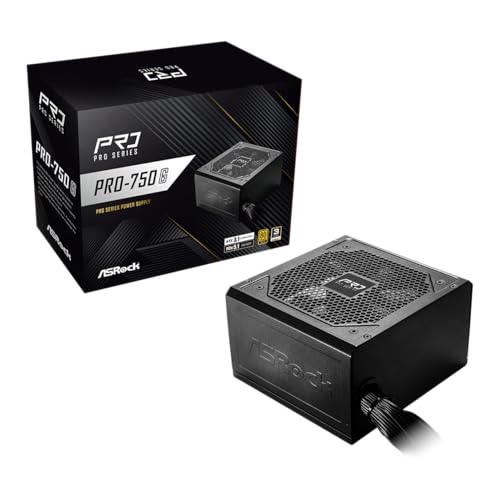 ASRock PRO 750G Power Supply
- 80 PLUS Gold Certified: Achieves up to 90%…
- ATX 3.1 & PCIe 5.1 Compliant: Ready for…
- Native 12V-2x6 Connector: Dual-color design supports up to…
| Product | Key specs | |
|---|---|---|
| MSI MAG A750GL PCIE5 | 80 PLUS GOLD CERTIFIED 10-year limited warranty, guaranteeing long term reliable operation Fully modular design | Check price |
| ASRock PRO 750G Power Supply | 80 PLUS Gold Certified: Achieves up to 90%… ATX 3.1 & PCIe 5.1 Compliant: Ready for… Native 12V-2x6 Connector: Dual-color design supports up to… | Check price |
 MSI MAG A650GN II Gaming Power Supply | Check price | |
 be quiet! Pure Power 13 M 750W | 80 PLUS Gold, Cybenetics Platinum, and Cybenetics A++… Pure Power 13 M 750W is an ATX… Pure Power 13 M offers 750W of continuous… | Check price |
As an Amazon Associate we earn from qualifying purchases at no extra cost to you.
Quick comparison
| Point | 650 W | 750 W |
|---|---|---|
| Best for | Mainstream gaming builds with a mid-range GPU | Upper mid-range and high-end GPUs, or upgrade headroom |
| Typical match | Cards that the maker rates for around 550 to 650 W | Cards the maker rates for around 700 to 750 W |
| Headroom for upgrades | Limited | More room for a larger GPU later |
| Transient power spikes | Fine for modest cards, tighter for large ones | More margin |
| Cost tier | Budget to mid-range | Mid-range, a small step up |
| Efficiency | Depends on the 80 Plus rating, not the wattage | Same |
What the graphics card makers list
The most useful figure is the system power the GPU maker recommends. NVIDIA lists a recommended power supply for each GeForce card on its product pages, and AMD does the same for Radeon. From those pages, the RTX 5060 Ti and RTX 5060 sit in the 550 to 600 W range, the RTX 5070 around 650 W, the RTX 5070 Ti around 750 W, and the RTX 5080 and RTX 5090 higher still. AMD’s Radeon RX 9070 is listed near 650 W and the RX 9070 XT near 750 W. These figures are the makers’ own numbers and can change by board model, so read the specification sheet for your exact card.
The practical takeaway is that the 650 W versus 750 W decision often follows the card tier: a 650 W unit suits cards up to roughly the RTX 5070 or RX 9070 class, while 750 W matches the RTX 5070 Ti and RX 9070 XT class.
How wattage is actually used
Your PC rarely draws the label value
A power supply’s rating is its maximum continuous output. A gaming PC draws less than that most of the time. The graphics card and processor together make up most of the load, and the rest of the system is comparatively small.
Transient spikes
Modern GPUs can briefly draw more than their average board power. Power supplies built to the newer ATX 3.x design are specified to handle such excursions, which is one reason makers recommend more wattage than the graphics card’s typical draw. A 750 W unit gives extra margin against these spikes.
Efficiency and noise
A supply is usually most efficient in the middle of its load range, and fan noise tends to rise at higher load. A bigger unit may run quieter at the same system load, but quality of the design matters more than wattage alone. Compare the 80 Plus tier, the warranty length and independent reviews of the exact model.
Decision table
| Pick this | If your build is |
|---|---|
| 650 W | Mid-range GPU in the class the maker rates around 650 W or below, and a modest CPU |
| 650 W | Compact build where you do not plan to upgrade the graphics card |
| 750 W | GPU the maker rates around 750 W, such as the RTX 5070 Ti or RX 9070 XT class |
| 750 W | High-core-count CPU or a processor that you will tune for extra power |
| 750 W | You intend to move to a stronger GPU in the next couple of years |
| Larger than 750 W | Top-end cards that the maker rates at 850 W or more |
Connectors matter as much as wattage
- Check that the power supply has the GPU connectors your card needs: several 8-pin PCIe plugs, or a 12V-2×6 (12VHPWR) cable on cards that use it.
- Do not rely on a chain of adapters. A native cable from the power supply is preferred; follow the GPU and PSU maker guidance for the 16-pin connector and stop using it if you see heat damage.
- ATX 3.x supplies are built for higher short-term power peaks. Many 750 W models offer them, and many 650 W models do too, so check the specification sheet.
- Look at the number of CPU 8-pin connectors if you use a high-end processor.
Worked comparison
Take two sample builds. Build one has a card in the RTX 5070 or RX 9070 class and a mid-range processor. The makers list around 650 W for those cards, so a quality 650 W supply matches the recommendation but has little spare room, while a 750 W unit adds margin. Build two has a card in the RTX 5070 Ti or RX 9070 XT class. The makers list about 750 W, so 750 W is the minimum comfortable choice and 650 W would fall below the stated recommendation.
Common mistakes
- Buying a high wattage from a low-quality brand rather than a reputable 650 W unit.
- Ignoring the GPU maker’s recommended rating and using only a generic online calculator.
- Assuming a 750 W supply wastes electricity. It uses what the system needs.
- Overlooking connector types and cable lengths in small cases.
- Opening or modifying a power supply. Never open a PSU; leave repairs to the maker.
Frequently Asked Questions
Is 650 W enough for an RTX 5070?
The maker lists a recommended power supply of around 650 W for that card, so a quality unit meets the stated figure. Check the specification of your exact board and the demands of your CPU.
Is 750 W overkill for a mid-range build?
Not really. It costs a little more, gives headroom for upgrades and transient peaks, and may run cooler and quieter. It simply will not be fully used most of the time.
Does a higher wattage use more electricity?
No. The computer draws what it needs, and the supply provides it. Efficiency ratings and the load level affect wasted energy, not the label wattage.
Can I use a 650 W supply with a 750 W recommended card?
The maker advises against going below its recommendation, since a heavy CPU load alongside the GPU could cause shutdowns. Follow the stated rating.
Do I need an ATX 3.1 power supply?
It is not required for every card, but it is useful for cards that use the 16-pin connector and for power-spike tolerance. Read the card and PSU manuals for the connector arrangement.
How long should a power supply last?
Makers back quality units with warranties that are often long, and the warranty length is a good indicator of the design. Replace a supply that shows swelling, odd smells or repeated shutdowns, and contact the maker for support.
FAQ
Is 650 W enough for an RTX 5070?
Is 750 W overkill for a mid-range build?
Does a higher wattage use more electricity?
Can I use a 650 W supply with a 750 W recommended card?
Do I need an ATX 3.1 power supply?
How long should a power supply last?
More from Amazon
Programs that pair well with the guide above. Offers and eligibility are set by Amazon and may change.
Free shipping on eligible items, Prime Video and more. Eligible new members can start with a free trial.
Start a Prime free trialAd-free music streaming. Eligible new subscribers can start with a free trial.
Try Music Unlimited freeA Prime membership for ages 18-24 with a trial period. Eligibility is set by Amazon.
See Prime for Young AdultsAudiobooks and podcasts to listen to on the go. Eligible new members can start with a free trial.
Try Audible freeAs an Amazon Associate we earn from qualifying purchases.




