Key takeaways
- Only fit what you use. A build with one GPU cable and a single SSD does not need spare SATA and Molex leads dangling behind the tray.
- Easier routing in tight cases. The 24-pin cable is the stiffest, thickest cable. On a fully modular PSU it can be removed and routed before the PSU is installed, which helps in small-form-factor and compact cases.
- Easy cable replacement. Makers sell replacement or custom-length cable sets for their own models. Some builders use shorter or sleeved cables for appearance.
- Troubleshooting flexibility. If a cable is damaged, a maker-approved replacement can be fitted without replacing the supply.
Pick a fully modular PSU if you want the cleanest possible cable routing and don’t mind paying more for it, and pick a semi-modular unit if you want most of the tidiness at a lower cost. The two differ in one practical way: on a semi-modular supply the main motherboard cable (24-pin) and usually the CPU power cable are permanently attached, while on a fully modular supply every cable detaches. Electrically both deliver the same power, so the choice is about build convenience, case size and budget.
Our top picks

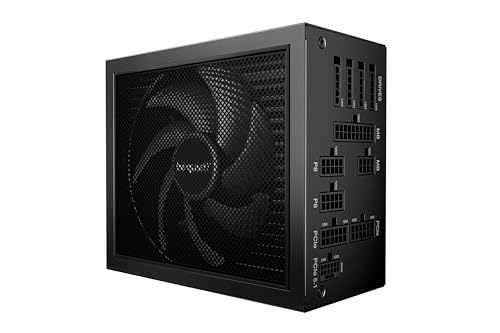
As an Amazon Associate we earn from qualifying purchases at no extra cost to you.
Quick comparison
| Feature | Fully modular | Semi-modular |
|---|---|---|
| Detachable cables | All, including 24-pin and CPU cables | Most; 24-pin and often the CPU cable are fixed |
| Cable clutter | Lowest; only fit what you need | Low; one or two fixed cables remain |
| Cost tier | Usually mid-range to premium | Usually budget to mid-range |
| Custom or sleeved cables | Easy to swap in a maker-approved set | Possible for detachable cables only |
| Extra connectors | More connection points on the PSU side | Fewer connection points |
| Best for | Small cases, showpiece builds, frequent upgrades | Mainstream gaming builds |
What each type means
Computer-hardware references describe three layouts. A non-modular unit has every cable fixed to the housing. A semi-modular one has some fixed cables, typically the ATX motherboard cable and the 8-pin CPU cable, while the rest, such as PCIe, SATA and Molex, plug in. A fully modular unit has a socket for every cable, including the motherboard and CPU leads. The reasoning behind the semi-modular layout is simple: almost every build uses the motherboard and CPU cables, so fixing them cuts connector count and cost.
Advantages of full modularity
- Only fit what you use. A build with one GPU cable and a single SSD does not need spare SATA and Molex leads dangling behind the tray.
- Easier routing in tight cases. The 24-pin cable is the stiffest, thickest cable. On a fully modular PSU it can be removed and routed before the PSU is installed, which helps in small-form-factor and compact cases.
- Easy cable replacement. Makers sell replacement or custom-length cable sets for their own models. Some builders use shorter or sleeved cables for appearance.
- Troubleshooting flexibility. If a cable is damaged, a maker-approved replacement can be fitted without replacing the supply.
Advantages of semi-modular
- Lower cost. Fewer connectors and PCB sockets generally mean a lower price tier.
- Fewer connection points. Each modular connector adds a small amount of electrical resistance, which is a point noted in standard hardware references. The effect is minor in a good design, but the fixed cables skip it for the main power paths.
- Nothing to lose. The main cables are always there, which removes the chance of leaving one in a box.
Does modularity affect performance or airflow?
Not directly. Output voltage quality, efficiency and protections depend on the PSU’s internal design, not on whether the cables detach. What modularity changes is what the case interior looks like: fewer stray cables mean fewer obstructions between fans and components. In a well-ventilated mid-tower the airflow gain from removing unused leads is small. In a compact case, packing excess cables can make a noticeable difference to how air moves around the GPU and CPU cooler.
The cable compatibility warning
This point trips up many upgraders. Detachable cables are only standardised at the device end, meaning the connector that plugs into the motherboard or graphics card. The pin assignment at the PSU end is not standardised between brands, or sometimes between models from the same brand. Hardware references warn that using a cable from a different modular supply can put the wrong voltage on a pin and damage components. Always use the cables supplied with that exact PSU or cables that the maker lists as compatible with that exact model. When replacing a PSU, do not carry the old cables over.
Case size and build style
| Build type | Better fit | Reason |
|---|---|---|
| Mini-ITX or small-form-factor | Fully modular (often an SFX unit) | Space is tight and every cable counts |
| Standard mid-tower with a cable-management channel | Semi-modular is usually enough | Fixed cables are easy to hide behind the tray |
| Glass-sided showpiece build | Fully modular | Allows custom-length or sleeved sets |
| Basement-budget build | Semi-modular | More budget to the GPU or CPU |
| Frequently rebuilt test bench | Fully modular | Easy to add and remove cables |
Pick fully modular if… pick semi-modular if…
- Pick fully modular if the case is compact, has a tinted glass panel, or you plan to change cable lengths.
- Pick semi-modular if the case is spacious, the power supply sits in a shroud, and spending less on the PSU leaves more for the GPU.
- Pick fully modular if you often rebuild or move parts between cases.
- Pick semi-modular if you build once and rarely open the case.
If two models share the same wattage, efficiency tier, warranty and independent review results, the fully modular one is the nicer unit to build with. If the fully modular option comes with a worse platform, pick the better platform and manage the cables.
Common mistakes
- Choosing modular over quality. A fully modular supply on a weak platform is no better than a basic one. Protection circuits, ripple control and fan quality matter more than cable detachability.
- Mixing cables between models. See the warning above. Even identical-looking plugs can be wired differently.
- Using an adapter without checking. For high-end GPUs that use the 12V-2×6 connector, follow the GPU and PSU makers’ guidance and make sure the plug is fully seated. Stop using the cable if you see heat damage or discolouration.
- Buying wattage you don’t need. Modularity doesn’t change sizing. Use the GPU maker’s recommended PSU rating as a starting point.
- Working with power on. Switch off and unplug before touching cables. Never open the PSU case.
Cable length and case fit
Before buying, check the length of the main cables against your case. Full-tower cases need longer EPS and 24-pin cables to reach around the motherboard tray, and rear-routed cables in a dual-chamber case may need extra reach. Fully modular supplies from some makers offer length-matched replacement cables. On semi-modular units the fixed cables are what they are, so measure first. Also check that the PSU’s depth fits the case’s PSU bay, since some modular models are long and can clash with drive cages or radiators.
Frequently Asked Questions
Is fully modular worth the extra cost over semi-modular?
It is worth it in small or showpiece builds where cable routing and appearance matter. In a roomy case with a cable cover, semi-modular is usually enough, and the saved money can go to the GPU or a better platform.
Does a modular PSU run cooler or quieter?
The modular design does not change internal heat or fan noise. Any improvement comes from cleaner case airflow when fewer cables sit in the airflow path.
Can I use cables from my old modular PSU on a new one?
Do not do this unless the new maker states the cables are compatible with that exact model. Pin assignments at the PSU end are not standardised, and a mismatch can damage components.
Which cables are fixed on a semi-modular PSU?
Usually the 24-pin motherboard cable and the CPU power cable, though this varies. The maker’s product page lists exactly which are detachable.
Do modular connectors reduce reliability?
Each connector adds a small amount of resistance and one more contact point. In reputable units this has no meaningful effect when plugs are seated fully, but a loose modular connector can cause problems, so click each one in firmly.
Is semi-modular good enough for a high-end gaming PC?
Yes, provided the platform, wattage and connectors suit the GPU. Cable style does not limit performance.
FAQ
Does modularity affect performance or airflow?
Is fully modular worth the extra cost over semi-modular?
Does a modular PSU run cooler or quieter?
Can I use cables from my old modular PSU on a new one?
Which cables are fixed on a semi-modular PSU?
Do modular connectors reduce reliability?
Is semi-modular good enough for a high-end gaming PC?
More from Amazon
Programs that pair well with the guide above. Offers and eligibility are set by Amazon and may change.
Free shipping on eligible items, Prime Video and more. Eligible new members can start with a free trial.
Start a Prime free trialAd-free music streaming. Eligible new subscribers can start with a free trial.
Try Music Unlimited freeA Prime membership for ages 18-24 with a trial period. Eligibility is set by Amazon.
See Prime for Young AdultsAudiobooks and podcasts to listen to on the go. Eligible new members can start with a free trial.
Try Audible freeAs an Amazon Associate we earn from qualifying purchases.