Choosing the right power supply for a gaming PC has never been more confusing. With the arrival of ATX 3.1 and PCIe 5.1 standards, modern graphics cards are demanding more power and using entirely new connectors, leaving many builders wondering whether their current PSU will even survive a GPU upgrade. Factor in the rising power draws of flagship cards and the notorious risks of cheap, no-name units, and the power supply becomes one of the most critical decisions in any new build.
Our top picks
 MSI MAG A750GL PCIE5
- 80 PLUS GOLD CERTIFIED
- 10-year limited warranty, guaranteeing long term reliable operation
- Fully modular design
 CORSAIR RM750e ATX 3.1 PCIe 5.1 Ready
- Fully Modular PSU: Reliable and efficient, low-noise power…
- Intel ATX 3.1 Certified: Compliant with the ATX…
- Keeps Quiet: A 120mm rifle bearing fan with…
 Segotep 650W ATX Power Supply
- 80+ Gold Certified: The power supply boasts an…
- Non-Modular Design: This power supply eliminates clutter and…
- Single 12V Output for Higher Power Usage: Power…
| Product | Key specs | |
|---|---|---|
| MSI MAG A750GL PCIE5 | 80 PLUS GOLD CERTIFIED 10-year limited warranty, guaranteeing long term reliable operation Fully modular design | Check price |
| CORSAIR RM750e ATX 3.1 PCIe 5.1 Ready | Fully Modular PSU: Reliable and efficient, low-noise power… Intel ATX 3.1 Certified: Compliant with the ATX… Keeps Quiet: A 120mm rifle bearing fan with… | Check price |
| Segotep 650W ATX Power Supply | 80+ Gold Certified: The power supply boasts an… Non-Modular Design: This power supply eliminates clutter and… Single 12V Output for Higher Power Usage: Power… | Check price |
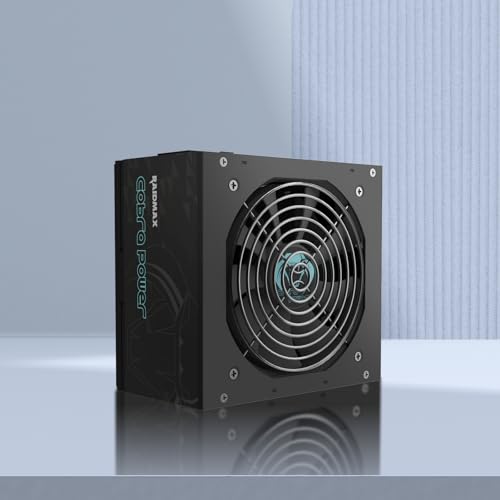 RAIDMAX Cobra ATX 3.1 PCIe Gen 5 RAIDMAX Cobra ATX 3.1 PCIe Gen 5 | Flat Cables: Not only eliminate cable clutter within… 80+ Gold Certified Efficiency: Achieves 90% efficiency under… PCIe Gen 5 Ready for Next-Gen GPUs: Equipped… | Check price |
 be quiet! Pure Power 13 M 750W be quiet! Pure Power 13 M 750W | 80 PLUS Gold, Cybenetics Platinum, and Cybenetics A++… Pure Power 13 M 750W is an ATX… Pure Power 13 M offers 750W of continuous… | Check price |
 Thermaltake Toughpower GT 850W ATX 3.1 Standard Thermaltake Toughpower GT 850W ATX 3.1 Standard | ATX 3.1 and PCIe 5.1 Support: Fully compatible… 80 PLUS Gold Efficiency: Provides up to 90%… Smart Zero Fan Technology: Automatically adjusts fan speed… | Check price |
 CORSAIR RM850x ATX 3.1 PCIe 5.1 Ready CORSAIR RM850x ATX 3.1 PCIe 5.1 Ready | Fully Modular: Reliable and efficient low-noise power supply… Cybenetics Gold-Certified: Rated for up to 91% efficiency,… ATX 3.1 Compliant: Compliant with the ATX 3.1… | Check price |
 MSI MAG A650BN MSI MAG A650BN | Low Noise Fan DC-DC Circuit Design Active PFC design | Check price |
As an Amazon Associate we earn from qualifying purchases at no extra cost to you.
This guide cuts through the noise to help you determine exactly what PSU you need for gaming in 2026. We focus on units that meet the latest ATX 3.1 and PCIe 5.1 standards, ensuring native support for high-wattage 12V-2×6 cables without awkward adapters. Whether you are building a budget rig or a high-end powerhouse, these are the most reliable, future-proof power supplies worth your money right now.
🛒 Best Price Today on Amazon
Prime members get fast, free shipping on everything above, plus member-only deals. New members get a 30-day free trial — cancel anytime.
Watch: What PSU Do I Need for Gaming? (2026 Guide) — Video Review
How to Choose a What PSU Do I Need for Gaming? (2026 Guide)
- Wattage Headroom: Always aim for a PSU that exceeds your system’s total power draw by 30 to 50 percent. This headroom ensures stable voltage regulation under peak loads and allows room for future component upgrades.
- ATX 3.1 and PCIe 5.1 Compliance: Prioritize units carrying these modern standards. They guarantee native support for the 12V-2×6 connector required by the newest GPUs, eliminating the fire risks associated with cheap adapter dongles.
- 80 PLUS Gold Certification: Gold-rated power supplies strike the best balance between price and efficiency. They generate less heat and waste less electricity than Bronze units, leading to quieter operation and longer component lifespans.
- Modularity and Cabling: Fully modular PSUs let you connect only the cables your build requires, dramatically improving airflow and simplifying cable management. Flat black cables are also far easier to route cleanly behind a motherboard tray.
- Warranty and Protections: A 10-year warranty is the industry standard for premium units, signaling the manufacturer’s confidence in the internal components. Ensure the PSU also features active power factor correction and robust over-current and over-voltage protections.
The Best What PSU Do I Need for Gaming? (2026 Guide)s Reviewed
MSI MAG A750GL PCIE5
This 750W fully modular unit delivers 80 PLUS Gold efficiency and native ATX 3.1 support, making it a compact, highly reliable choice for mainstream gaming builds utilizing the newest high-end graphics cards.
CORSAIR RM750e ATX 3.1
Corsair’s RM750e is a consistently top-tier pick thanks to its modern standby mode, 105-degree-rated capacitors, and included 12V-2×6 cable. It remains one of the safest and quietest bets for 750W builds.
Segotep 650W 80 Plus Gold
For budget-focused builders, this non-modular 650W Segotep unit provides surprising stability and Gold efficiency for entry to mid-tier gaming PCs. It includes standard 6+2 pin connectors for versatile legacy GPU support.
RAIDMAX Cobra ATX 3.1
The RAIDMAX Cobra offers solid Gold-certified power delivery with flat black cables and active PFC. It is a strong value option for gamers wanting modern ATX 3.1 compliance without breaking the bank.
be quiet! Pure Power 13 M 750W
With up to 94.4 percent efficiency and a semi-passive 120mm fan, this fully modular PSU provides near-silent operation. The 10-year warranty and native 600W 12V-2×6 cable make it a premier choice for quiet, high-performance rigs.
Frequently Asked Questions
How do I calculate the wattage I need for my gaming PC?
Add the TDP of your CPU and GPU, then add approximately 100W for your motherboard, memory, storage, and cooling fans. Multiply that total by 1.5 to find your ideal power supply wattage, which ensures optimal efficiency and headroom.
Is ATX 3.1 necessary for gaming in 2026?
Yes, if you plan to upgrade your GPU in the near future. ATX 3.1 and PCIe 5.1 compliance ensures your power supply comes with a native 12V-2×6 cable, which is required to safely power the newest generation of high-wattage graphics cards.
Can a cheap power supply damage my other components?
Absolutely. Low-quality power supplies often lack proper over-voltage and over-current protections. When they fail under load, they can send massive power spikes through your motherboard, destroying your CPU, GPU, and storage drives instantly.
Is a fully modular PSU worth the extra cost?
For most builders, yes. Fully modular units allow you to remove unnecessary cables entirely, which vastly improves internal airflow, lowers system temperatures, and makes building and upgrading significantly less frustrating.
Final Thoughts
Finding the right power supply comes down to matching wattage to your components while ensuring modern ATX 3.1 and PCIe 5.1 compliance. The CORSAIR RM750e and be quiet! Pure Power 13 M are our top picks for mid-to-high-tier builders thanks to their premium components and native 12V-2×6 support. For builders working with a tighter budget, the Segotep 650W delivers dependable Gold-rated performance without compromising the safety of your core components.