
Key takeaways
- PCIe 5.0 cards: a Gen 5 riser is needed for full Gen 5 speed. Sunbeam recommends a cable explicitly certified for Gen 5, ideally double-shielded and of moderate length. A Gen 4 cable will drop the link to Gen 4, and the gaming performance cost of that is small, according to GPUSPOINT.
- PCIe 3.0 risers with newer cards: this combination can cause crashes or black screens unless the slot is set to Gen 3 in the BIOS. BIOS names vary by motherboard, so use your board’s manual, and note that BIOS changes carry some risk.
- Cable stiffness: Gen 5 cables are stiff and can be awkward to route in tight cases.
Horizontal mounting, with the card plugged straight into the motherboard slot, is the better choice for most gamers because it is simplest and has no performance trade-off, while a vertical mount is mainly a display choice that can cost cooling and needs the right case and riser. Choose vertical if you want the card’s face visible through the glass and your case has space between the fans and the side panel.
Our top picks
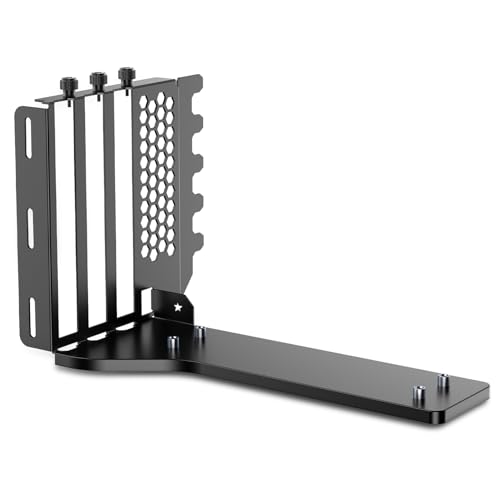
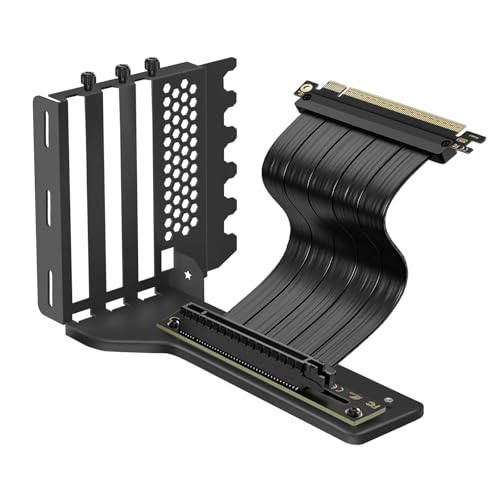


As an Amazon Associate we earn from qualifying purchases at no extra cost to you.
Quick comparison
| Point | Horizontal (standard) | Vertical (riser mount) |
|---|---|---|
| Installation | Plug into the PCIe slot, secure with screws | Mount on a bracket and connect via a riser cable |
| Looks | Side of the card faces the top | Card face visible through the side panel |
| Airflow | Designed for typical layouts | Fans may sit close to the panel, which can restrict intake |
| Extra hardware | None | Bracket and riser cable |
| Compatibility | Works in nearly every case | Depends on case and slot layout |
| Cable and PCIe risk | None | Poor risers can cause link problems |
| Weight support | Often needs a support stay for heavy cards | Bracket supports the card |
Does vertical mounting hurt temperatures?
It can. The main risk is the gap between the GPU fans and the side panel. Sunbeam reports that a sealed tempered-glass case with no side mesh can raise GPU junction temperatures by roughly 5 to 15 degrees Celsius under sustained load, while another guide puts the range at 3 to 10 degrees when the fans are less than about 2 to 3 cm from the glass. Recommended clearance numbers vary by source; one guide suggests at least 35 mm between fans and panel, while another says 25 to 30 mm. Treat these as rules of thumb, not guarantees.
It can also help in some layouts. One review reports a possible improvement of 2 to 5 degrees in cases that have strong bottom-to-top airflow, because the card sits in the airstream. In cases built around front-to-back airflow, a vertical card may restrict the flow. Cases with perforated side ventilation tend to suit vertical mounting better than sealed glass.
Performance and PCIe riser issues
A vertical mount adds a riser cable between the slot and the card. The riser must match the card’s PCIe generation to run at full speed:
- PCIe 5.0 cards: a Gen 5 riser is needed for full Gen 5 speed. Sunbeam recommends a cable explicitly certified for Gen 5, ideally double-shielded and of moderate length. A Gen 4 cable will drop the link to Gen 4, and the gaming performance cost of that is small, according to GPUSPOINT.
- PCIe 3.0 risers with newer cards: this combination can cause crashes or black screens unless the slot is set to Gen 3 in the BIOS. BIOS names vary by motherboard, so use your board’s manual, and note that BIOS changes carry some risk.
- Cable stiffness: Gen 5 cables are stiff and can be awkward to route in tight cases.
With a decent riser at the right generation, frame rates are typically the same as a standard install. Problems tend to come from low-quality cables or mismatched generations.
Case compatibility
Not every case supports vertical mounting. Some cases include a vertical slot arrangement and riser from the maker, while others need a third-party bracket. NZXT’s guide lists its older kit as fitting the H5, H6, H7 and H9 series but not the H510, H710 or H3 Flow, and notes that kit has been discontinued; the H2 Flow ships with a Gen 5.0 x16 riser. Generic brackets can need a case with plenty of expansion slots and an open structure. Always check the bracket’s compatibility list against your exact case model and revision.
Also consider GPU thickness. A three-slot card may collide with the side panel on some mounts, and heavy cards need secure bracket support. Cable clearance for power connectors, especially angled or 12V-2×6 connectors, must be checked; follow the GPU and PSU maker guidance, and stop use if there is any heat damage.
Which to pick: decision table
| If you… | Choose |
|---|---|
| Want the simplest, most compatible setup | Horizontal |
| Value showing off the card’s design | Vertical, in a case with ventilated side panel |
| Have a sealed glass panel and tight fan-to-glass gap | Horizontal, or choose a case with more clearance |
| Use a high-power PCIe 5.0 card | Horizontal, or vertical with a certified Gen 5 riser |
| Own a case designed for vertical mounting | Vertical, using the maker’s kit |
| Are worried about sag | Vertical bracket or a horizontal support stay |
Common mistakes
- Buying the cheapest riser. Poor shielding or a wrong generation can cause instability.
- Ignoring fan-to-glass clearance. Too small a gap chokes intake.
- Assuming any bracket fits any case. Read the supported case list.
- Forgetting power connector clearance. Cables need room to bend gently.
- Expecting a performance boost. The main reasons for vertical mounting are looks, and sometimes sag support.
Alternatives
- Horizontal with a support stay: prevents sag without extra cabling.
- A case with a built-in vertical slot: removes bracket compatibility guesswork.
- A different case: choose one with perforated side ventilation if you want vertical mounting.
Step-by-step: if you go vertical
- Power off and unplug the PC before touching any internals.
- Confirm your case and bracket are listed as compatible, and note the riser’s PCIe generation and length.
- Install the bracket following the maker’s manual, then fit the riser to the motherboard slot first.
- Seat the GPU on the riser, secure it to the bracket and route power cables with gentle bends.
- Boot, then check in the BIOS or a monitoring tool that the link runs at the expected generation and width.
- Run a game for a while and watch temperatures; if they climb noticeably, consider more panel clearance or a ventilated panel.
If you see black screens or crashes, a riser generation mismatch is a common cause. Contact the bracket or riser maker if the problem persists, and treat BIOS changes cautiously since they can cause instability and affect warranty terms.
Frequently Asked Questions
Is a vertical GPU mount worth it?
It is worth it mainly for appearance, if your case and riser support it. Performance benefits are not guaranteed, and cooling can get worse with sealed glass panels. For function over looks, horizontal is simpler.
Does vertical mounting reduce FPS?
Not by itself. A proper riser at the right PCIe generation gives results similar to a direct install. Poor cables or mismatched generations can cause instability, and heat can reduce boost clocks.
Do I need a PCIe 5.0 riser?
For full Gen 5 speed with a Gen 5 card, yes. A Gen 4 riser will drop the link to Gen 4, with a small gaming impact according to some guides. Avoid Gen 3 risers with newer cards.
How much space should be between GPU fans and the side panel?
Guides vary, with figures from about 25 mm to 35 mm. More space is generally better for airflow. Check your case’s measurements and the card’s thickness.
Which cases suit vertical mounting?
Cases with ventilated side panels or built-in vertical slots are easier. Some makers publish supported-case lists for their brackets. Always match your exact case model.
FAQ
Does vertical mounting hurt temperatures?
Is a vertical GPU mount worth it?
Does vertical mounting reduce FPS?
Do I need a PCIe 5.0 riser?
How much space should be between GPU fans and the side panel?
Which cases suit vertical mounting?
More from Amazon
Programs that pair well with the guide above. Offers and eligibility are set by Amazon and may change.
Free shipping on eligible items, Prime Video and more. Eligible new members can start with a free trial.
Start a Prime free trialAd-free music streaming. Eligible new subscribers can start with a free trial.
Try Music Unlimited freeA Prime membership for ages 18-24 with a trial period. Eligibility is set by Amazon.
See Prime for Young AdultsAudiobooks and podcasts to listen to on the go. Eligible new members can start with a free trial.
Try Audible freeAs an Amazon Associate we earn from qualifying purchases.




