Key takeaways
- Find the best 4000Hz gaming mouse with listed 4K polling specs, including how each model reaches 4000Hz, which receiver it needs, sensor, weight and shape.
A 1000Hz gaming mouse reports its position to the PC 1,000 times per second, roughly once every millisecond. A 4000Hz gaming mouse reports four times as often, roughly once every 0.25 milliseconds according to the published polling figures. That shorter interval is the whole reason this category exists: competitive players who play fast first-person shooters want the cursor update chain as short as possible, and they want the step from 1000Hz without jumping straight to the battery cost and system load that come with even higher polling rates.
The catch is that 4000Hz is not always available in every mode. On some models it works only in 2.4GHz wireless mode and drops sharply in Bluetooth or wired mode. On others, a booster or dongle has to sit between the mouse and the PC before the higher rate becomes available. This guide only includes mice whose published listing supports 4000Hz, and for each pick it states exactly how that rate is reached, in which mode, and with which receiver hardware, based on what the listing itself says. Shape, weight, sensor and grip fit still matter as much as the polling figure, so each pick is also matched to the hand and play style it suits best.
Disclosure: As an Amazon Associate, we earn from qualifying purchases made through links in this article, at no additional cost to you.
Quick Picks
- Keychron M3 Mini 4K Metal Edition — Best metal-shell 4000Hz pick: magnesium alloy body at 64 grams, PixArt PAW 3395 sensor up to 26,000 DPI, and 4000Hz polling in 2.4GHz mode as listed.
- Keychron M3 Mini 4K — Best lighter 4000Hz pick: the same PAW 3395 sensor family and 4000Hz 2.4GHz polling in a lighter 55-gram body, according to its listing.
- ASUS ROG Keris II Ace — Best ergonomic 4000Hz pick: right-handed 54-gram shape, ROG AimPoint Pro sensor up to 42,000 DPI, and up to 4000Hz wireless polling with the included ROG Polling Rate Booster.
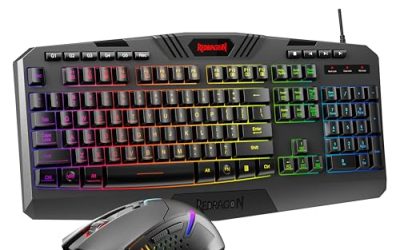
- Redragon M916 PRO 4K — Best ultralight 4000Hz pick: 49-gram ergonomic body, up to 26,000 DPI, 4000Hz report rate and three connection modes as listed.
1. Keychron M3 Mini 4K Metal Edition

The Keychron M3 Mini 4K Metal Edition is the most distinctive pick in this group because its shell is magnesium alloy rather than plastic. Keychron lists the mouse at 64 grams with a holey metal shell design, which keeps the weight in the same range as plastic ultralight mice while giving the body a different, more rigid feel in the hand. For players who like a compact mini shape but find very light plastic shells slightly hollow, this is the version of the 4000Hz formula built for them.
Polling is where the listing needs careful reading, and Keychron states the figures clearly. The listed polling rate is 4000Hz in 2.4GHz mode, 1000Hz in wired mode and 125Hz in Bluetooth mode. That means the 4000Hz performance this guide is about is a wireless feature of this mouse, not a wired one. A player who plugs the cable in for charging and keeps playing should understand that the wired connection is listed at 1000Hz. Bluetooth, as on most gaming mice, is a convenience mode for office use and travel rather than a mode for competitive play.
Tracking comes from a PixArt PAW 3395 sensor with a listed DPI range of 100 to 26,000 and 650 IPS. The listed click switch is a Huano micro switch with a lifespan figure of 80 million clicks, and motion sync is listed as supported. The battery is listed at 600 mAh, the connection options are Bluetooth 5.1, 2.4GHz and wired over a detachable Type-C cable, and Keychron Engine software is listed for adjusting DPI, polling rate, lift-off distance, macros and lighting. The small symmetrical shape suits fingertip and claw grips best, and small to medium hands will get the most from the mini footprint.
Specifications
- Sensor: PixArt PAW 3395
- DPI range: 100 to 26,000, with 650 IPS as listed
- Polling rate: 4000Hz in 2.4GHz mode, 1000Hz wired, 125Hz Bluetooth, as listed
- Weight: 64 grams, as listed
- Connectivity: 2.4GHz wireless, Bluetooth 5.1 and wired Type-C
- Switches: Huano micro switches, listed at 80 million clicks
- Battery: 600 mAh, as listed
- Body material: Magnesium alloy, as listed
Pros
- True 4000Hz polling in 2.4GHz mode, stated directly in the listing specifications
- Magnesium alloy shell offers a rigid feel at a still-light 64 grams
- PAW 3395 sensor with a wide 100 to 26,000 DPI range covers low and high sensitivity play
- Three connection modes make it easy to move between a gaming PC and a laptop
Cons
- Wired mode is listed at 1000Hz, so the cable does not deliver the headline rate
- Mini shell can feel cramped for large hands or a full palm grip
- Bluetooth mode at 125Hz is unsuitable for competitive gaming
Check the Keychron M3 Mini 4K Metal Edition on Amazon
2. Keychron M3 Mini 4K

The standard Keychron M3 Mini 4K takes the same basic formula as the Metal Edition and puts it in a lighter body. Its listing describes an ultra-lightweight 55-gram mouse with a PixArt 3395 sensor up to 26,000 DPI and 650 IPS, aimed at Windows, Mac and Linux users who want a small mouse that can still play at a competitive polling rate. For fingertip players who count every gram, the roughly nine-gram saving over the metal version is the main reason to choose this one.
The polling story matches its sibling. The listing describes a 4K polling rate on 2.4GHz mode, communicating movements and clicks to the PC up to 4,000 times per second. As with the Metal Edition, buyers should treat 4000Hz as the 2.4GHz figure and check the listing for the rates in the other modes before assuming the same speed over a cable or Bluetooth. Keeping the 2.4GHz receiver close to the desk, ideally on an extension rather than behind a metal PC case, is the standard way to keep a high polling wireless link stable.
Beyond the headline rate, this is a small mouse for claw and fingertip grips, with programmable buttons and a shape that travels well between a desktop setup and a laptop bag. Players with large hands, or palm grip players who want a shell that fills the hand, should look at the ergonomic picks further down this list instead.
Specifications
- Sensor: PixArt 3395, as listed
- Maximum DPI: 26,000, with 650 IPS as listed
- Polling rate: 4000Hz in 2.4GHz mode, as listed
- Weight: 55 grams, as listed
- Connectivity: 2.4GHz wireless, Bluetooth 5.1 and wired, as listed
- Compatibility: Windows, Mac and Linux, as listed
Pros
- Lightest straightforward route to 4000Hz in this guide at 55 grams
- PAW 3395 sensor is a proven flagship-class tracking specification on paper
- Small shell suits fingertip and claw grips and smaller hands
- Wireless, Bluetooth and wired modes cover gaming and everyday use
Cons
- Small shell is a poor match for large hands and relaxed palm grips
- 4000Hz applies to the 2.4GHz mode, so mode choice matters
- Fewer ergonomic contours than the right-handed picks in this guide
Check the Keychron M3 Mini 4K on Amazon
3. ASUS ROG Keris II Ace

The ASUS ROG Keris II Ace is the ergonomic flagship in this group. It is a right-handed mouse listed at 54 grams, developed for esports and first-person shooter play, with a ROG AimPoint Pro optical sensor listed up to 42,000 DPI and track-on-glass capability. Where the Keychron models are small symmetrical mice, the Keris II Ace is shaped for a right hand, with contours that support palm and claw grips over long sessions.
Its polling arrangement is the one that most needs explaining, because the booster is part of the system. Listing information for this model states that the included ROG Polling Rate Booster allows a wireless polling rate of up to 4000Hz, and that polling reaches 8000Hz wired and 4000Hz wireless using that included booster, with 1000Hz as the default. In practical terms, a buyer who wants 4000Hz wirelessly should plan to use the booster that comes in the box, connected as the instructions describe, rather than expecting the standard receiver alone to deliver that rate. The good news in the listing is that the booster is included with this model rather than described as a separate purchase.
The rest of the listed package is built around competitive play: tri-mode connectivity over 2.4GHz RF, Bluetooth and USB-C wired, ROG optical micro switches listed at 100 million clicks, and a long listed battery figure for the wireless modes. The right-handed shape is the deciding factor. Players who want an ergonomic shell and are willing to set up the booster correctly get the highest listed sensor ceiling in this guide and a true 4000Hz wireless mode. Left-handed players and fingertip players who prefer a flat symmetrical mouse should choose one of the other picks.
Specifications
- Sensor: ROG AimPoint Pro optical sensor, as listed
- Maximum DPI: 42,000, as listed
- Polling rate: up to 4000Hz wireless and 8000Hz wired with the included ROG Polling Rate Booster, 1000Hz default, as listed
- Weight: 54 grams, as listed
- Connectivity: 2.4GHz RF, Bluetooth and USB-C wired tri-mode, as listed
- Switches: ROG optical micro switches, listed at 100 million clicks
- Shape: Right-handed ergonomic, as listed
Pros
- 4000Hz wireless polling available with the booster included in the box, as listed
- Highest listed sensor ceiling in this guide at 42,000 DPI
- Light 54-gram ergonomic shell suits right-handed palm and claw grips
- Tri-mode connectivity covers competitive and everyday use
Cons
- Reaching 4000Hz wirelessly depends on using the included booster correctly
- Right-handed shape excludes left-handed players
- Default polling is listed at 1000Hz, so the higher rate must be set up deliberately
Check the ASUS ROG Keris II Ace on Amazon
4. Redragon M916 PRO 4K

The Redragon M916 PRO 4K is the ultralight option in this group, listed at 49 grams, which makes it the lightest mouse here. Its listing describes a three-mode wireless gaming mouse with a 4000Hz polling rate, an ergonomic natural grip build, redefinable macro buttons and software support. For players who want the 4000Hz specification in a very light ergonomic body without moving up to flagship product lines, this is the pick structured for them.
The sensor specification is listed up to 26,000 DPI, and listing information identifies a Nordic flagship chip handling the 4000Hz report rate in this 4K version. Connectivity is listed as three modes, covering Bluetooth, 2.4GHz wireless with a nano receiver and a wired connection. The ergonomic grip build suits right-handed claw and palm players, and at 49 grams it asks very little effort to flick and stop. Players who prefer a heavier feel, or a symmetrical shell, will be better served by the Keychron models above. As with every pick here, the listing should be checked for how the other modes are specified.
Specifications
- Maximum DPI: 26,000, as listed
- Polling rate: 4000Hz report rate, as listed
- Weight: 49 grams, as listed
- Connectivity: Bluetooth, 2.4GHz wireless and wired three-mode, as listed
- Buttons: Programmable macro buttons with software support, as listed
- Shape: Ergonomic natural grip build, as listed
Pros
- Lightest pick in this guide at a listed 49 grams
- 4000Hz report rate is the headline specification of this 4K version
- Three connection modes suit a gaming desk and a laptop with one mouse
- Ergonomic build gives palm and claw players more support than a flat mini shell
Cons
- Simple button layout is not designed for MMO-style keybind grids
- Very light body can feel less planted for players who prefer heavier mice
- Mode-by-mode polling figures should be confirmed on the listing before buying
Check the Redragon M916 PRO 4K on Amazon
How to Choose a 4000Hz Gaming Mouse
Start by confirming how the mouse actually reaches 4000Hz. The four patterns in this guide cover most of the market: 4000Hz in 2.4GHz mode with lower rates wired and over Bluetooth, as on the Keychron models; 4000Hz wirelessly only with an included booster in the chain, as on the ROG Keris II Ace; and a headline 4000Hz report rate on a dedicated 4K version of a mouse, as on the Redragon M916 PRO 4K. If a listing also offers a standard 1000Hz version of the same mouse, check the style or version name carefully before ordering, because the model names are often nearly identical.
Next, think about battery and system load. Higher polling rates ask the mouse to transmit more often and the PC to process more reports, so a mouse will generally not run as long at 4000Hz as at 1000Hz. Many players use the highest rate for competitive sessions and a standard rate for desktop use. Shape and weight should be decided before polling rate: match the shell to your grip first, since fingertip and claw players usually do well with small symmetrical shapes, while palm players usually need an ergonomic right-handed shell. Finally, plan the receiver setup: a high polling wireless link works best with the receiver or booster close to the mouse, on the desk, away from large metal obstructions and other busy wireless devices.
FAQs
Is 4000Hz noticeably different from 1000Hz?
On paper the report interval drops from about one millisecond at 1000Hz to about 0.25 milliseconds at 4000Hz, based on the polling figures themselves. Whether an individual player notices that difference depends on the game, the display and the player, so it is best treated as a measurable specification improvement rather than a guaranteed change in results. Players who compete in fast shooters are the audience most likely to value it.
Does 4000Hz work over Bluetooth or a cable?
It depends on the model, and the listings in this guide show why the mode matters. The Keychron M3 Mini Metal Edition, for example, lists 4000Hz for its 2.4GHz mode, 1000Hz wired and 125Hz over Bluetooth. Always read the per-mode polling figures for the exact mouse you are buying instead of assuming the headline rate applies everywhere.
Do I need a separate dongle for 4000Hz?
Sometimes. The ASUS ROG Keris II Ace lists an included ROG Polling Rate Booster as the hardware that enables its higher polling rates, including up to 4000Hz wirelessly. Other models in this guide build the 4000Hz rate into their 2.4GHz mode. The listing for the exact model is the source that decides which arrangement you are getting.
Does 4000Hz drain the battery faster?
A higher polling rate means more frequent transmission, so in general terms a mouse set to 4000Hz will use its battery faster than the same mouse set to 1000Hz. Listed battery figures are usually quoted for standard settings, so treat them as a guide to the standard mode and expect shorter runs at the highest polling rate.
Is 4000Hz or 8000Hz the better choice?
4000Hz is the middle step: four times the report rate of a standard gaming mouse, without going to the highest setting some flagships offer. Some models here also list an 8000Hz wired mode. For most players, a correctly set up 4000Hz wireless mouse is the balanced choice, and shape, weight and sensor fit will matter more to daily play than the step beyond it.
Conclusion
The best 4000Hz gaming mouse is the one whose 4000Hz mode you will actually use, in a shell that fits your hand. Choose the Keychron M3 Mini 4K Metal Edition for a rigid magnesium mini mouse with clearly listed per-mode polling figures, the standard M3 Mini 4K for the lighter version of that formula, the ASUS ROG Keris II Ace for a right-handed flagship that reaches 4000Hz wirelessly with its included booster, or the Redragon M916 PRO 4K for the lightest ergonomic body in this group. Check the listing for the exact version, set the polling rate deliberately in the software, place the receiver close, and the specification on the box becomes the setup on your desk.
FAQ
Is 4000Hz noticeably different from 1000Hz?
Does 4000Hz work over Bluetooth or a cable?
Do I need a separate dongle for 4000Hz?
Does 4000Hz drain the battery faster?
Is 4000Hz or 8000Hz the better choice?
More from Amazon
Programs that pair well with the guide above. Offers and eligibility are set by Amazon and may change.
Free shipping on eligible items, Prime Video and more. Eligible new members can start with a free trial.
Start a Prime free trialAd-free music streaming. Eligible new subscribers can start with a free trial.
Try Music Unlimited freeA Prime membership for ages 18-24 with a trial period. Eligibility is set by Amazon.
See Prime for Young AdultsAudiobooks and podcasts to listen to on the go. Eligible new members can start with a free trial.
Try Audible freeAs an Amazon Associate we earn from qualifying purchases.