Our Top Picks
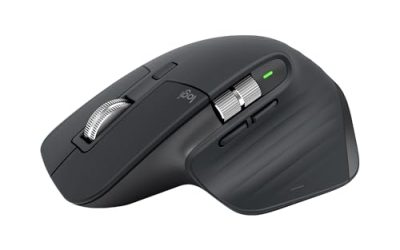
 Logitech MX Vertical Wireless Mouse Ergonomic Design1 Pack4.7 x 3.11 x 3.09 inches0.5 poundsCheck on Amazon
 Anker 2.4G Wireless Ergonomic Mouse4.72"L x 2.94"W3.98 x 3.23 x 3.15 inches0.28 poundsCheck on Amazon
 Razer DeathAdder V3 Pro Wireless Gaming Mouse1000 Hz5.01 x 2.65 x 1.69 inches0.1 poundsCheck on Amazon

Choosing a gaming mouse when your hands are uncomfortable is a design problem before it is a sensor problem. The shape decides how your hand rests, how far your fingers reach, how much force a click needs in practice, and how much of the movement comes from your fingers, your wrist or your arm. This guide therefore compares mice by the ergonomic design features stated in their own listings: a vertical angle, a contoured right-handed shell, a thumb rest, quiet clicks, a lighter weight, or a trackball-style alternative in spirit — a mouse that asks less travel from the hand.
One boundary matters, and this guide keeps it throughout. Nothing here claims that a mouse can treat, cure, prevent or reduce arthritis or any other medical condition, and no product below is described as doing so. What the listings describe are physical design features — angles, shapes, weights, button styles and connection types. Some players find one of those designs more comfortable to hold for their own sessions, and some do not. Comfort is personal, it can change from day to day, and a shape that suits a friend may not suit you. If you have persistent pain, numbness, weakness or a diagnosed condition, a clinician or a qualified professional is the right source of advice about your hands; a buying guide can only help you compare shapes carefully and use a return window wisely.
With that clear, decide which movement you want to change. A vertical mouse changes the angle of the whole hand. A contoured gaming mouse keeps a familiar flat orientation but supports the palm. A lighter mouse reduces the effort of starting and stopping movement. Click force figures are rarely published, so do not assume a quiet click is automatically a light click. The four picks below cover those different design answers, with specifications taken from their listings.
Disclosure: As an Amazon Associate, we earn from qualifying purchases made through links in this article, at no extra cost to you.
Quick Picks
- Best vertical design for small to medium hands: Logitech Lift Vertical Ergonomic Mouse — a 57-degree vertical shape, quiet clicks, a thumb rest and a softly textured grip, sized for small to medium right hands in the listing.
- Best vertical design for larger hands: Logitech MX Vertical — the same 57-degree angle in a larger rechargeable body, with a 4,000 DPI sensor, a cursor speed switch and a thumb rest.
- Best simple vertical option: Anker 2.4G Wireless Vertical Ergonomic Optical Mouse — a vertical handshake-style shape with five buttons, three DPI settings and a basic 2.4GHz USB receiver connection.
- Best ergonomic gaming-first design: Razer DeathAdder V3 Pro (white version) — a contoured right-handed gaming shell at 64 grams, with a 30K optical sensor and optical switches, for players who want a conventional orientation with a supported shape.
1. Logitech Lift Vertical Ergonomic Mouse — Vertical, for Small to Medium Hands
The Lift is the vertical mouse Logitech sized for the hands that larger vertical mice often miss. Its listing describes a vertical ergonomic mouse crafted for small to medium right hands, with a unique 57-degree angle, a softly textured grip and a thumb rest, plus quiet clicks and a SmartWheel. In design terms, the 57-degree angle means the hand sits in a more upright, handshake-like position rather than flat over the mouse, with the buttons and wheel turned to face the side. The thumb rest gives the thumb a place to settle instead of gripping the side of the shell to hold the mouse in place.
For gaming, be realistic: the listing gives tracking up to 4,000 DPI, plenty for strategy, RPG, simulation and turn-based games and for desktop use. It is not a high-polling esports mouse, and fast shooters that depend on rapid flat swipes are the weakest fit for any vertical shape. Many vertical-mouse users keep it for slower-paced games and desktop time while they adjust.
Connection is flexible: Bluetooth Low Energy or the included Logi Bolt USB receiver, with a stated range of 10 metres and up to 24 months from a single AA battery. Check the button layout in the listing images if you rely on side buttons. A left-handed Lift exists as a separate listing — the version linked here is the right-handed graphite model.
Specifications (from the listing):
- Shape: vertical, 57-degree angle, right-handed
- Fit: small to medium hands, as described in the listing
- Weight: 125 g
- Dimensions: 108 x 70 x 71 mm
- Sensor: up to 4,000 DPI, adjustable
- Connection: Bluetooth Low Energy or Logi Bolt USB receiver
- Battery: 1 AA battery, up to 24 months stated in the listing
- Features: quiet clicks, SmartWheel, thumb rest, softly textured grip
- Model number: 910-006466
View the Logitech Lift Vertical Ergonomic Mouse on Amazon
Pros:
- Upright 57-degree design changes the whole hand position, not just the shell curve
- Sized specifically for small to medium hands, which larger vertical mice often overlook
- Quiet clicks and a thumb rest are clearly described design features in the listing
- Very long stated battery life and two connection options
Cons:
- Vertical grip takes adjustment time and suits fast shooters poorly
- Right-handed version linked here; left-handed buyers need the separate version
- Heavier than lightweight gaming mice at 125 grams
2. Logitech MX Vertical — Vertical, for Medium to Large Hands
The MX Vertical is Logitech’s larger vertical design. Its listing describes an advanced ergonomic mouse with a natural handshake position and the same 57-degree vertical angle as the Lift, in a bigger body with a thumb rest and a textured rubber surface. Where the Lift is the pick for smaller hands, the MX Vertical is the version to look at if your hand is medium to large and the Lift’s dimensions sound cramped. Hand size is the first filter between these two mice; choosing the wrong size in a vertical design matters more than any sensor difference.
The listing names a 4,000 DPI sensor and a cursor speed switch on top, useful when moving between a game, a desktop and a large monitor. It connects to up to three computers via Bluetooth or the included receiver. The built-in battery is rechargeable over USB-C, with up to four months stated per charge and about three hours from a one-minute quick charge.
For gaming, the same limits apply as with the Lift: this is a comfort-led design for slower and moderate-paced play and mixed desktop use, not a competitive shooter mouse.
Specifications (from the listing):
- Shape: vertical, 57-degree angle, right-handed
- Sensor: 4,000 DPI high-precision
- Feature: cursor speed switch for adjusting DPI with a button
- Connection: Bluetooth or included USB receiver, up to three computers
- Battery: built-in rechargeable, up to four months stated; about three hours from a one-minute quick charge
- Charging: USB-C
- Surface: textured rubber, with thumb rest
- Model number: 910-005447
View the Logitech MX Vertical on Amazon
Pros:
- Larger vertical body suits medium to large hands better than the Lift
- Cursor speed switch is practical across games and desktop work
- Rechargeable battery with a very fast top-up stated in the listing
- Connects to up to three computers
Cons:
- Right-handed only in this design
- Vertical shape is a poor match for fast competitive shooters
- Larger body can feel oversized for smaller hands
3. Anker 2.4G Wireless Vertical Ergonomic Optical Mouse — Simple Vertical Option
The Anker vertical mouse is the straightforward entry into vertical shapes. Its listing describes a wireless vertical ergonomic optical mouse with a design intended to encourage a handshake-style hand and wrist position, five buttons, and optical tracking with three resolution settings: 800, 1,200 and 1,600 DPI. There is no software suite to learn and no Bluetooth pairing to manage; it connects through a 2.4GHz USB receiver, which the listing notes is stored in the bottom of the mouse.
That simplicity defines its appeal and its limits. The 1,600 DPI ceiling is low by gaming standards, so this mouse belongs in turn-based, strategy and adventure games and desktop work, not shooters. Its design features are an upright shape, page forward and back buttons, and a power-saving mode described as turning the mouse off after eight minutes of inactivity.
Two AAA batteries are required and not included, according to the listing. Because Anker has sold this design for a long time, double-check the listing title and model number AK-98ANWVM-UBA before buying.
Specifications (from the listing):
- Shape: vertical ergonomic, right-handed
- Sensor: optical, 800 / 1,200 / 1,600 DPI settings
- Buttons: 5
- Connection: 2.4GHz wireless via USB receiver
- Battery: 2 AAA batteries required, not included as stated in the listing
- Feature: automatic power-saving sleep after eight minutes of inactivity, as described for this model
- Model number: AK-98ANWVM-UBA
View the Anker 2.4G Wireless Vertical Ergonomic Mouse on Amazon
Pros:
- Simple vertical shape with no software to install or learn
- Receiver stores inside the mouse for travel and tidy storage
- Three DPI settings cover slow-paced games and desktop use
- Five buttons include page forward and back functions
Cons:
- 1,600 DPI maximum is limiting for fast games and large multi-monitor setups
- Batteries are not included, according to the listing
- No Bluetooth, so USB-C-only laptops may need an adapter for the receiver
4. Razer DeathAdder V3 Pro — Contoured and Light, Gaming First
Not everyone wants to change to a vertical angle. The DeathAdder V3 Pro keeps the familiar flat orientation of a gaming mouse but uses a contoured right-handed ergonomic form, which its listing describes as an iconic shape refined with input from esports professionals for handling and comfort. The version checked here is the white model, listed at 64 grams, which makes it by far the lightest mouse in this guide. A lighter mouse needs less effort to start, stop and lift, and that is a concrete design property you can compare on paper before you ever hold it.
Unlike the vertical picks, this is a full gaming specification: a Focus Pro 30K optical sensor, Gen-3 optical switches, up to 90 hours of battery life and USB Type-C charging. This guide does not claim a specific click force for those switches, because the listing does not publish one.
This is the pick for staying in fast-paced games with a supported right-handed shape rather than changing hand angle. Its limits are the mirror image of the vertical mice: a flat orientation, right-handed only, and a fuller shell that suits palm and relaxed claw grips better than pure fingertip grip.
Specifications (from the listing):
- Shape: right-handed ergonomic, contoured
- Weight: 64 g for the white version in the listing checked
- Sensor: Focus Pro 30K optical
- Switches: optical mouse switches Gen-3
- Battery life: up to 90 hours stated in the listing
- Charging: USB Type-C rechargeable
- Controls: programmable controls as described in the listing title for this version
- Model number: RZ01-04630200-R3U1 (white version)
View the Razer DeathAdder V3 Pro on Amazon
Pros:
- Lightest option here, at 64 grams in the version checked
- Contoured shape supports palm and relaxed claw grips in a familiar orientation
- Full gaming sensor and wireless specification for fast-paced titles
- Optical switches and USB-C charging keep the design modern
Cons:
- Flat orientation does not change hand angle the way a vertical mouse does
- Right-handed shape only
- Fuller shell is less suited to pure fingertip grip
How to Choose
Choose the design change you actually want. Vertical mice — the Lift, MX Vertical and Anker here — rotate the hand into an upright position. Contoured mice like the DeathAdder V3 Pro keep a flat position and add support. These are different answers, and neither is automatically better; the right one is the one whose shape you can hold relaxed, without gripping tightly to keep control.
Fit the mouse to your hand size. The Lift is listed for small to medium hands and the MX Vertical for larger hands, and that difference should decide between them before anything else. A mouse that is too large makes you reach for buttons; a mouse that is too small makes you pinch. Measure your hand, compare the listed dimensions, and be honest about your grip style.
Match the mouse to your games. Vertical mice suit strategy, RPG, simulation, adventure and turn-based games, plus desktop time. Fast shooters and action games that rely on rapid flat swipes are better served by a contoured gaming mouse like the DeathAdder V3 Pro. Many players keep two mice and swap by game, which is a practical option worth considering.
Pay attention to weight and clicks, from the listing only. Weight is comparable: 64 grams for the DeathAdder V3 Pro version here against 125 grams for the Lift. Quiet clicks, as listed for the Lift, describe sound, not force, so if click feel is decisive, plan to use a return window.
Plan the adjustment period. Any new shape feels strange at first. Start with short sessions, keep your old mouse nearby, and judge it after a fair trial. Stop and seek professional advice if you notice persistent pain, numbness or weakness.
Check the listing before ordering. Confirm handedness, size version, colour, connection type and what batteries or receivers are included.
FAQs
Can a gaming mouse help with arthritis?
This guide does not make that claim for any mouse, and you should be cautious of any guide that does. What can be compared honestly are design features: a vertical angle, a contoured shell, a thumb rest, a lighter weight or a particular button layout. Some players find a given design more comfortable for their own sessions. Questions about a medical condition belong with a clinician who knows your hands.
Is a vertical mouse good for gaming?
For slower-paced games, yes, a vertical mouse can be a workable gaming mouse: strategy, RPG, simulation, adventure and turn-based titles do not demand rapid flat swipes, and the listings here include sensors up to 4,000 DPI on the Logitech models. For fast competitive shooters, a vertical shape changes your aiming position significantly, and a contoured gaming mouse is usually the more practical choice.
What is the difference between the Logitech Lift and the MX Vertical?
Size and power. The Lift is listed for small to medium hands, runs up to 24 months on a single AA battery and includes quiet clicks. The MX Vertical is a larger body for medium to large hands, is rechargeable over USB-C with up to four months stated per charge, and adds a cursor speed switch. Both use a 57-degree vertical angle and a 4,000 DPI sensor in their listings.
Why include a non-vertical mouse like the DeathAdder V3 Pro?
Because changing the hand angle is not the only design answer, and it is not the right one for every player or every game. The DeathAdder V3 Pro offers a contoured, supported right-handed shape at a low 64 gram weight with a full gaming specification. For a player who wants to keep a familiar flat orientation and play faster games, that combination is a legitimate ergonomic-design choice to compare.
How long does it take to get used to a vertical mouse?
Expect an adjustment period rather than instant comfort. Start with short sessions, use the mouse for desktop tasks and slower games first, and keep your previous mouse available while you adapt. If discomfort increases or you notice numbness or weakness, stop and seek professional advice instead of pushing through.
Conclusion
There is no single best gaming mouse for arthritis, because the useful question is narrower: which design features fit your hand, your grip and your games? Choose the Logitech Lift for a 57-degree vertical shape sized for small to medium hands, the MX Vertical for the same angle in a larger rechargeable body, the Anker vertical mouse for a simple and basic upright option, or the Razer DeathAdder V3 Pro if you want a light, contoured gaming shape in a familiar flat orientation. Compare the listed dimensions and weights, order the correct handed version, use the return window to judge the shape honestly — and treat any ongoing symptoms as a question for a professional, not for a product page.
FAQ
Can a gaming mouse help with arthritis?
Is a vertical mouse good for gaming?
What is the difference between the Logitech Lift and the MX Vertical?
Why include a non-vertical mouse like the DeathAdder V3 Pro?
How long does it take to get used to a vertical mouse?
More from Amazon
Programs that pair well with the guide above. Offers and eligibility are set by Amazon and may change.
Free shipping on eligible items, Prime Video and more. Eligible new members can start with a free trial.
Start a Prime free trialAd-free music streaming. Eligible new subscribers can start with a free trial.
Try Music Unlimited freeA Prime membership for ages 18-24 with a trial period. Eligibility is set by Amazon.
See Prime for Young AdultsAudiobooks and podcasts to listen to on the go. Eligible new members can start with a free trial.
Try Audible freeAs an Amazon Associate we earn from qualifying purchases.