Our Top Picks
An RGB gaming mouse in this band has to make its compromises in the right places. The lighting is the headline, but the mouse still has to track properly in a shooter, click consistently, and survive daily use — a glowing shell around a poor sensor is a desk ornament, not a gaming mouse. So the decision here is about which models keep a real gaming sensor, programmable buttons, and software-controlled lighting while staying inside the band, and which lighting systems are genuinely customizable rather than a fixed rainbow loop. Zone count matters: a single lit logo is a different product from a mouse with an illuminated strip, wheel, and logo you can set independently. Our top pick: Logitech G203 Wired Gaming Mouse, 8,000 DPI, Rainbow Optical Effect LIGHTSYNC RGB, 6 Programmable Buttons, On-Board Memory, Screen Mapping, PC/Mac Computer and Laptop Compatible – Black. Runner-up: Redragon M711 Cobra Gaming Mouse with 16.8 Million RGB Color Backlit, 10,000 DPI Adjustable, Comfortable Grip, 7 Programmable Buttons.
This guide is for players building or refreshing a gaming setup in this price band who want coordinated RGB lighting without giving up gaming-grade tracking. The 4 gaming mice below were chosen from the names and specifications on their Amazon product pages, with priority given to lighting customization, sensor range, button count, and the software behind the effects.
Quick Picks
As an Amazon Associate we earn from qualifying purchases.
| Product | Best for | Key spec from title |
|---|---|---|
| Logitech G203 LIGHTSYNC Wired Gaming Mouse – Black | Players who want polished software-driven RGB | 8,000 DPI, LIGHTSYNC RGB, 6 programmable buttons |
| Redragon M711 Cobra Gaming Mouse | Players who want the highest DPI ceiling in the band | 10,000 DPI adjustable, 16.8 million RGB backlight, 7 buttons |
| Redragon M602 RGB Wired Gaming Mouse – Griffin | Players who want lighting modes without any software | Up to 7,200 DPI, RGB spectrum backlight, 7 backlight modes |
| HyperX Pulsefire Core – RGB Gaming Mouse | Players who want per-button macros with their RGB | Pixart 3327 sensor up to 6,200 DPI, 7 programmable buttons |
How to Choose
Count the lighting zones, then check the software
RGB quality in this band is decided by zones and software, not by the phrase “16.8 million colors,” which nearly every listing claims. The G203’s LIGHTSYNC system runs through Logitech G HUB, where you can set color wave effects, fixed colors, and screen or audio sampling that reacts to what is on your monitor. The Pulsefire Core ties its lighting to HyperX NGENUITY, which also stores macros. The two Redragon mice take the opposite approach: the M711 works with Redragon software for its backlight and buttons, while the M602 cycles its seven backlight modes from the mouse itself, which suits players who refuse to install another app. Decide whether you want deep software effects or simple on-device modes before you buy.
Expect a wired mouse — and treat that as a feature here
Every pick in this guide is wired, and at this level that is the right trade. The money in a wired mouse goes into the sensor, switches, and lighting instead of a battery and wireless electronics, and you never charge anything. A cable does demand management: route it with slack, keep it off the desk edge, and consider a mouse bungee if you play low-sensitivity shooters. The Pulsefire Core’s braided cable and the light shells of the G203 and Rival-class designs make cable drag manageable for most desks.
Judge the sensor by its range and steps, not its ceiling alone
The DPI ceilings here run from 6,200 on the Pulsefire Core’s Pixart 3327 to 10,000 on the M711 Cobra, with the G203 at 8,000 and the M602 at 7,200. All four cover the 400–3,200 range where most people actually play. More useful than the ceiling is how the steps are set: the G203 stores up to five DPI levels you can cycle with its top button, and the M602 offers five fixed steps from 800 to 7,200. Smooth, predictable tracking at your chosen step is what you are buying; the ceiling is headroom, not a promise.
Buttons and build decide how long it stays on your desk
Six to nine programmable buttons is generous for this band. The M602 lists nine programmable buttons and the M711 and Pulsefire Core list seven, which covers side buttons for games plus DPI and lighting controls. Look at the grip finish too: the M711’s textured grip and the M602’s ergonomic shell are shaped for longer sessions, while the G203’s simple symmetrical shell suits smaller hands and claw grips. A mouse in this band that fits your hand and grip will outlast a fancier one that does not, every time.
The 4 Best Options
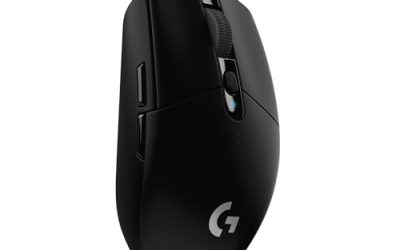
Logitech G203 Wired Gaming Mouse, 8,000 DPI, Rainbow Optical Effect LIGHTSYNC RGB, 6 Programmable Buttons, On-Board Memory, Screen Mapping, PC/Mac Computer and Laptop Compatible – Black

OUR TOP PICK
The G203 LIGHTSYNC earns the top spot because its lighting system is the most polished in the band. LIGHTSYNC RGB runs a color wave across the mouse’s light strip and logo, and through G HUB you can set fixed colors, animations, and effects that sample your screen or react to in-game audio. Under the lighting sits a proper gaming specification: an 8,000 DPI sensor with a 1,000 Hz polling rate, six programmable buttons, and on-board memory that keeps your settings on the mouse itself.
At 85 grams the shell is light and maneuverable, and the symmetrical shape suits claw and fingertip grips and smaller hands. The G203 is also the safe long-term pick in this guide: the software is mature, the settings are stored on the device, and the lighting integrates with other LIGHTSYNC gear if your keyboard or headset comes from the same family. For a first RGB gaming mouse, nothing else in the band is this complete.
Specs
- Sensor: gaming-grade optical sensor
- DPI range: 200–8,000 DPI
- Polling rate: 1,000 Hz
- Connection: wired USB
- Buttons: 6 programmable buttons
- Lighting: LIGHTSYNC RGB, customizable in Logitech G HUB
- Memory: on-board memory for stored profiles
- Weight: 85 g
Best for: players who want software-driven RGB effects that can sync with the rest of a Logitech setup.
Watch out for: the shell is compact and the cable is a plain rubber cable, so large-handed palm players may prefer the bigger Redragon shells below.
ASIN: B07YN82X3B
View on Amazon
Redragon M711 Cobra Gaming Mouse with 16.8 Million RGB Color Backlit, 10,000 DPI Adjustable, Comfortable Grip, 7 Programmable Buttons

RUNNER-UP
The M711 Cobra is the specification maximalist of the band: an adjustable sensor reaching 10,000 DPI, seven programmable buttons, and a 16.8 million color RGB backlight with multiple lighting effects built into the shell’s strips and logo. The ergonomic right-handed shape and textured grip are designed for longer sessions, and the buttons can be assigned through Redragon’s software along with the lighting patterns.
Where the G203 is about software polish, the Cobra is about hardware per mouse: more DPI headroom, more buttons, and a larger, grippier shell. Players with medium-to-large hands who play a mix of shooters and button-heavy games will feel at home here, and the lighting is bright and genuinely customizable rather than a single fixed pattern.
Specs
- Sensor: optical sensor, adjustable DPI
- DPI range: up to 10,000 DPI
- Connection: wired USB
- Buttons: 7 programmable buttons
- Lighting: 16.8 million color RGB backlight with multiple effects
- Shape: ergonomic right-handed with textured comfort grip
Best for: players who want the most buttons and DPI headroom in the band, with a larger ergonomic shell.
Watch out for: the software experience is more basic than Logitech G HUB, and the shell size suits medium-to-large hands better than small ones.
ASIN: B0751D11BL
View on Amazon
Redragon M602 RGB Wired Gaming Mouse RGB Spectrum Backlit Ergonomic Mouse Griffin Programmable with 7 backlight modes up to 7200 DPI for Windows PC Gamers

The M602 Griffin takes the simplest possible approach to RGB: everything happens on the mouse. Its RGB spectrum backlight offers seven backlight modes you can cycle without installing software, the sensor adjusts across five steps up to 7,200 DPI, and the listing counts nine programmable buttons — the most in this guide. The ergonomic shell is sculpted for right-handed comfort over long sessions.
This is the pick for a shared PC, a work-and-play desk, or any setup where adding another settings app is out of the question. Plug it in, pick a lighting mode and a DPI step from the mouse, and play. The trade is depth: you get modes rather than per-zone custom colors, and the sensor ceiling is the second-lowest here, though it still covers ordinary gaming sensitivities with room to spare.
Specs
- Sensor: optical sensor, adjustable DPI
- DPI steps: 800 / 1,200 / 1,600 / 2,400 / 7,200 (up to 7,200 DPI)
- Connection: wired USB
- Buttons: 9 programmable buttons
- Lighting: RGB spectrum backlight with 7 backlight modes, switched on the mouse
- Shape: ergonomic right-handed
Best for: players who want RGB modes and plenty of buttons with zero software to install.
Watch out for: lighting control is mode-based rather than per-zone, and the fixed DPI steps are coarser than the fully adjustable ranges on the G203 and M711.
ASIN: B011HMDZ0Q
View on Amazon
HyperX Pulsefire Core – RGB Gaming Mouse, Software Controlled RGB Light Effects & Macro Customization, Pixart 3327 Sensor up to 6,200DPI, 7 Programmable Buttons, Mouse Weight 87g
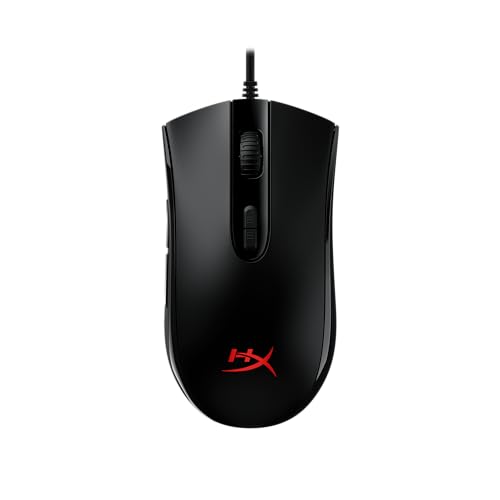
The Pulsefire Core is the tinker’s pick in this band. Its RGB lighting is fully software-controlled through HyperX NGENUITY, where the same app also records macros and assigns all seven programmable buttons — a combination the Redragon models split between simpler tools. The Pixart 3327 sensor reaches 6,200 DPI, which is the lowest ceiling in this guide and still far beyond the settings most players use day to day.
At 87 grams with large skates and a flexible braided cable, it glides smoothly and feels a step more premium in the hand than its band-mates. If your games benefit from macros — building keys, push-to-talk chains, or MMO rotations — the Pulsefire Core gives you that software depth and a clean, single-zone RGB glow to match the rest of a HyperX desk.
Specs
- Sensor: Pixart 3327 optical sensor
- DPI range: up to 6,200 DPI
- Connection: wired USB, braided cable
- Buttons: 7 programmable buttons
- Lighting: software-controlled RGB light effects via HyperX NGENUITY, with macro customization
- Weight: 87 g
Best for: players who want macros and software-controlled RGB in one app.
Watch out for: the lighting is a single zone rather than multi-zone, and the 6,200 DPI ceiling gives the least headroom here if you later move to very high sensitivities.
ASIN: B07H3GFJJ2
View on Amazon
Which One Fits Your Situation
You want RGB that syncs with your whole desk
Choose the Logitech G203 LIGHTSYNC. G HUB effects, screen sampling, and on-board memory make it the most complete lighting system in the band, and it plays nicely with other LIGHTSYNC gear.
You have larger hands and play mixed genres
Choose the Redragon M711 Cobra. The bigger ergonomic shell, seven programmable buttons, and 10,000 DPI ceiling cover shooters and button-heavy games in one mouse.
You share the PC or hate installing software
Choose the Redragon M602 Griffin. Seven backlight modes and five DPI steps are all controlled from the mouse itself, and its nine programmable buttons are the most here.
You rely on macros in your games
Choose the HyperX Pulsefire Core. NGENUITY combines RGB control, button assignment, and macro recording in one place, and the braided cable and large skates make it feel composed in play.
Common Mistakes
- Assuming every “RGB” mouse is customizable — some models in this band run fixed effects, so check whether the lighting is software-controlled before buying.
- Judging by the color count in the listing title; zones and software decide what the lighting can actually do.
- Forgetting cable management on a wired mouse, then blaming the mouse for drag that a bungee or better routing would fix.
- Chasing the highest DPI ceiling in the band while ignoring shell size and grip fit.
- Leaving the mouse at its factory DPI step instead of spending two minutes setting a sensitivity that suits your games.
Safety Notes
All four mice here are wired, so the safety basics are about your desk and posture: keep cables routed where they cannot be yanked or tripped over, and leave enough slack that the mouse never pulls against the cable at full reach. Take breaks during long sessions and keep your wrist neutral to avoid strain. If you use lighting effects that react to sound or screen content, avoid rapid flashing patterns if anyone using the desk is sensitive to flashing lights, and clean the mouse only while it is unplugged, with a dry or slightly damp cloth.
Frequently Asked Questions
Is the RGB on these mice actually customizable?
On three of them, yes, through software: the G203 uses Logitech G HUB, the Pulsefire Core uses HyperX NGENUITY, and the M711 Cobra uses Redragon’s software for its backlight effects. The M602 Griffin is the exception — it offers seven built-in backlight modes switched on the mouse, with no per-zone color editing.
Can a mouse in this band handle competitive shooters?
Yes, within reason. The G203 pairs an 8,000 DPI sensor with a 1,000 Hz polling rate, and the M711 reaches 10,000 DPI — both track properly at the sensitivities shooter players use. What you give up versus flagship mice is mainly the ultralight shells, higher polling rates, and optical switches, not basic accuracy.
Why are all the picks wired?
In this band, a wired design lets the maker spend on the sensor, switches, and lighting instead of a battery and wireless electronics. You also never charge anything. With decent cable routing, a wired mouse covers every genre, and the Pulsefire Core’s braided cable is a good example of how manageable a modern cable can be.
What DPI should I set on one of these mice?
Start between 800 and 1,600 for shooters and up to about 3,200 for fast-paced strategy or desktop work, then adjust by feel. Every mouse here can store or step through several DPI levels — the M602 has five fixed steps and the G203 can hold five levels in memory — so experiment until tracking feels precise rather than fast.
FAQ
Is the RGB on these mice actually customizable?
Can a mouse in this band handle competitive shooters?
Why are all the picks wired?
What DPI should I set on one of these mice?
More from Amazon
Programs that pair well with the guide above. Offers and eligibility are set by Amazon and may change.
Free shipping on eligible items, Prime Video and more. Eligible new members can start with a free trial.
Start a Prime free trialAd-free music streaming. Eligible new subscribers can start with a free trial.
Try Music Unlimited freeA Prime membership for ages 18-24 with a trial period. Eligibility is set by Amazon.
See Prime for Young AdultsAudiobooks and podcasts to listen to on the go. Eligible new members can start with a free trial.
Try Audible freeAs an Amazon Associate we earn from qualifying purchases.