Key takeaways
- The best webcams for telehealth bring clear video, natural color and steady focus to video visits. Compare four cameras built for remote care calls today.
A telehealth visit lives or dies on the picture: the clinician needs to see skin tone, breathing, and movement clearly, and the patient needs to look and sound like themselves, not a blurry silhouette in a dark room. A webcam built for video calls handles that job better than a laptop’s built-in camera, with a wider lens, faster autofocus, and a microphone that picks up a normal speaking voice without the echo of a room. The four cameras below were chosen from the names and specs on their Amazon pages, and each one covers a different kind of telehealth setup, from a quiet home office to a shared clinic desk.
This guide is for patients who join video visits from home, clinicians who run virtual appointments from an office, caregivers who help a relative connect to a doctor, and small clinics setting up a dedicated telehealth station. It explains how to judge resolution, low-light performance, framing, and microphone quality, and which camera fits each kind of visit.
Quick Picks
As an Amazon Associate we earn from qualifying purchases.
| Product | Best for | Key spec from title |
|---|---|---|
| Logitech C922x Pro | Reliable everyday video visits | 1080p at 30fps, autofocus |
| Razer Kiyo Pro | Sharp video in dim rooms | 1080p at 60fps, HDR |
| OBSBOT Tiny 2 | Hands-free movement on camera | 4K PTZ, AI tracking |
| Anker PowerConf C200 | Clear voice and easy privacy | 2K, AI-noise canceling mics |
How to Choose
Look for a sharp picture in real room light
A telehealth camera has to work in ordinary rooms, not studios, so resolution is only half the story. Look for a camera with autofocus that locks onto a face quickly and holds it, plus light correction that brightens a dim corner without washing out skin tone. A 1080p camera with good light handling beats a 4K camera that goes dark in a shaded room, because the clinician needs to see detail, not count pixels. Check whether the camera adjusts exposure on its own as clouds pass or lamps switch on, and whether it keeps the image steady when you lean closer to show a rash or a swollen joint.
Check the microphone and the privacy cover
The microphone matters as much as the lens, because a visit fails if the doctor cannot hear a quiet voice or a child’s answers. Look for a camera with stereo microphones and some form of noise reduction that cuts fan hum and keyboard clicks without clipping speech. A built-in privacy cover is worth having in a shared home or a clinic, since it lets you block the lens between appointments with a slide instead of unplugging the camera. If a camera has no microphone at all, budget for a separate one, and test the whole setup before the first real visit.
Match the field of view to the room
Field of view decides how much of the room the clinician sees, and the wrong width causes trouble in both directions. A narrow view keeps a single patient centered and private, which suits a one-person visit from a desk. A wider view fits a parent holding a child, a caregiver sitting beside a patient, or a physical therapist watching a patient move across a room. Cameras with an adjustable field of view let you switch between the two, and a pan-tilt camera that follows movement helps when the patient needs to stand, stretch, or walk a few steps during the call.
Confirm it works with your visit platform
Most telehealth visits run on Zoom, Microsoft Teams, Google Meet, or a clinic’s own portal, and the camera should work with all of them without extra drivers. Look for a standard USB connection and plug-and-play setup, so the camera appears in the platform’s camera list the moment it is plugged in. Check the mount as well: a clip that grips a monitor bezel firmly is fine for a desk, while a tripod thread helps when the camera needs to sit on a shelf or a rolling cart. Test the camera in the actual platform before the appointment, not five minutes before it starts.
The 4 Best Options
Logitech C922x Pro

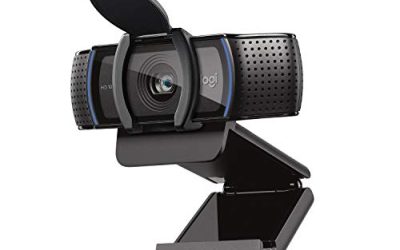
The C922x Pro is the dependable workhorse of this list, a camera that has served video calls for years because it does the basics well. Its autofocus keeps a face sharp as you lean in or sit back, and its light correction lifts a dim room enough for a clinician to see skin tone clearly. The stereo microphones pick up a normal speaking voice from a desk away, and the included tripod gives you a second mounting option when a monitor clip does not fit. It records at 1080p, which is plenty for a video visit, and it works with every major call platform without extra software.
Specs
- 1080p at 30fps or 720p at 60fps video
- Autofocus with HD light correction
- Stereo microphones built in
- Tripod included in the box
- Works with Microsoft Teams, Google Meet, and Zoom
Best for: Patients and clinicians who want a reliable camera for everyday video visits.
Watch out for: The picture is 1080p, so it will not match a 4K camera for fine detail, and the fixed lens cannot pan to follow movement.
Razer Kiyo Pro

The Kiyo Pro is the pick for rooms where the light is never quite right, because its adaptive light sensor and HDR handling keep a face visible when a window sits behind the patient or the only lamp is across the room. It captures uncompressed 1080p video at 60 frames per second, which makes movement look smooth when a patient demonstrates a range of motion or a therapist watches a gait. The wide-angle lens adjusts across three fields of view, so the same camera covers a close-up check and a wider shot of a patient and caregiver together. Its low-light performance is the strongest in this list.
Specs
- Full HD 1080p at 60fps uncompressed video
- Adaptive light sensor with HDR
- Wide-angle lens with adjustable field of view
- Works with OBS, XSplit, Zoom, and Teams
Best for: Video visits from dim rooms or backlit spaces where the picture usually goes dark.
Watch out for: It has no built-in microphone, so you need a separate mic or headset for the call.
OBSBOT Tiny 2

The Tiny 2 is the only camera here that moves on its own, and that makes it the right choice when the patient cannot sit still before a fixed lens. Its motorized head pans and tilts to follow a person around the room, so a therapist can watch a patient stand, walk, or stretch without anyone touching the camera. Voice and gesture controls let you start tracking or zoom in with a raised hand, which helps when the patient is alone. The large sensor and 4K resolution keep the picture crisp even in a shaded corner, and the dual microphones capture speech clearly from across a small room.
Specs
- 4K video with a 1/1.5-inch CMOS sensor
- PTZ head with AI tracking and auto focus
- Voice control and gesture control
- 60fps video with HDR light correction
- Dual omni-directional microphones
Best for: Movement-based visits where the patient stands, walks, or stretches on camera.
Watch out for: The tracking needs a clear view of the person, and the camera is larger and heavier than a standard clip-on webcam.
Anker PowerConf C200

The PowerConf C200 is built for calls where the voice matters most, with AI-noise canceling microphones that cut background hum and keep speech clear even in a busy household. Its 2K resolution gives a sharper picture than a standard 1080p camera, and the adjustable field of view switches between a tight head-and-shoulders shot and a wider frame that fits two people. Low-light correction keeps the image usable in an evening visit, and the built-in privacy cover slides shut between appointments, which matters in a shared clinic room. Setup is a single USB cable with no extra software to install.
Specs
- 2K resolution webcam for PC, laptop, and Mac
- AI-noise canceling microphones with stereo mics
- Adjustable field of view
- Low-light correction
- Built-in privacy cover
Best for: Households and clinics where clear voice and quick privacy matter most.
Watch out for: The 2K resolution is sharper than 1080p but below 4K, and the camera needs good room light for its best picture.
Which One Fits Your Situation
You join visits from a dim home office
Pick the Razer Kiyo Pro if your room has one lamp, a window behind you, or a corner that stays dark. Its adaptive light sensor and HDR handling keep your face visible when other cameras go muddy, and the 60fps video stays smooth when you lean in to show something. Add a headset or desk microphone, since the camera has none built in, and sit facing the brightest part of the room.
You run appointments from a clinic desk
Pick the Anker PowerConf C200 for a shared desk where several clinicians take turns. The noise-canceling microphones keep speech clear over hallway noise, the privacy cover slides shut between patients, and the adjustable field of view fits one patient or a patient with a caregiver. The single USB cable makes it easy to move the camera between rooms, and the 2K picture is sharp enough for a close visual check.
You move around during the call
Pick the OBSBOT Tiny 2 when the visit involves standing, walking, or stretching, because its tracking head follows you without anyone touching the camera. A therapist can watch your full range of motion, and the gesture controls let you zoom in without walking back to the desk. Keep the room clear behind you so the tracker locks onto you, not the furniture, and place the camera at chest height for the steadiest framing.
You want the simplest plug-and-play setup
Pick the Logitech C922x Pro if you want a camera that just works the first time you plug it in. It needs no extra software, appears in every major call platform, and the autofocus and light correction handle ordinary rooms without fiddling. The included tripod is handy when the monitor clip does not fit, and the built-in stereo microphones mean there is nothing else to buy or configure before the visit.
Common Mistakes
- Sitting with a bright window behind you, which turns your face into a silhouette no camera can fix.
- Skipping a test call in the actual visit platform, then discovering the camera or microphone is not selected.
- Choosing a camera with no microphone and forgetting to buy a separate mic or headset.
- Mounting the camera below eye level, which creates an unflattering angle and makes eye contact impossible.
- Leaving the camera plugged in and uncovered between visits in a shared room.
Frequently Asked Questions
Does a telehealth visit need a 4K webcam?
No, a 4K webcam is not required for most video visits. A good 1080p camera with autofocus and light correction shows skin tone, breathing, and movement clearly enough for a clinician to assess you. Choose 4K only if you need fine detail, such as showing a small skin change, or if you move around the room during the visit.
What matters more for telehealth, the camera or the microphone?
Both matter, but the microphone fails visits more often than the camera. A doctor can work with a soft picture, yet a visit stalls if speech is muffled or drowned by fan noise. Pick a camera with clear stereo microphones and noise reduction, or pair a camera without a mic with a headset before the appointment.
Can I use the same webcam for telehealth and work calls?
Yes, the same webcam works for both, since telehealth visits run on the same platforms as work calls. A camera with an adjustable field of view is the most flexible, because it frames one person for a work meeting and widens for a visit with a caregiver. Keep the privacy cover closed when the camera is not in use.
How do I keep my video private between visits?
Use the camera’s built-in privacy cover if it has one, and slide it shut after each appointment. If the camera has no cover, unplug it or point it at a wall between visits. In a shared clinic room, a cover matters more than in a private home office, because anyone passing the desk can see the lens.
FAQ
Does a telehealth visit need a 4K webcam?
What matters more for telehealth, the camera or the microphone?
Can I use the same webcam for telehealth and work calls?
How do I keep my video private between visits?
More from Amazon
Programs that pair well with the guide above. Offers and eligibility are set by Amazon and may change.
Free shipping on eligible items, Prime Video and more. Eligible new members can start with a free trial.
Start a Prime free trialAd-free music streaming. Eligible new subscribers can start with a free trial.
Try Music Unlimited freeA Prime membership for ages 18-24 with a trial period. Eligibility is set by Amazon.
See Prime for Young AdultsAudiobooks and podcasts to listen to on the go. Eligible new members can start with a free trial.
Try Audible freeAs an Amazon Associate we earn from qualifying purchases.