Our Short List of 3

- Best for: Streamers and presenters who move around the room and need the camera to keep up.
- 4K PTZ webcam with 1/1.5-inch CMOS sensor
- AI tracking with multi-mode framing
- Gesture control and voice control
- 60 FPS video with HDR light correction
- Best for: Presenters who walk around while they talk and want the camera to follow smoothly.
- 4K PTZ webcam with 1/2-inch sensor
- AI tracking and gesture control
- HDR video
- Noise-canceling microphones
- Best for: Anyone who wants reliable gimbal tracking on a well-established design.
- 4K PTZ webcam with Sony 1/2.8-inch sensor
- AI tracking with auto framing
- 2-axis gimbal
- 60 FPS video with HDR and low-light correction
All 4 Picks at a Glance
| Product | Specs | Action |
|---|---|---|
| OBSBOT Tiny 2 |
| Check price on Amazon |
| Insta360 Link |
| Check price on Amazon |
| OBSBOT Tiny 4K |
| Check price on Amazon |
 OBSBOT Meet 2 |
| Check price on Amazon |
Key takeaways
- Compare the best face tracking webcams for pc, from gimbal cameras that follow you around the room to compact models with AI framing for calls and streams.
A face tracking webcam keeps you in frame while you move, which changes how a call or a stream feels. Instead of sitting frozen in one spot, you can stand, gesture, walk to a whiteboard or lean in to show something, and the camera follows. For teachers, streamers and presenters, that freedom is the whole point; for office calls, it simply means you never drift out of shot mid-sentence. A camera that follows you also keeps the shot steady, so viewers watch you instead of an empty chair.
This guide is for PC users who stream, teach, present or meet on video and want a camera that follows them. We chose the four webcams below from the names and specifications on their Amazon pages, weighing tracking quality, sensor size, video resolution and microphone quality, so you can pick the camera that fits the way you work on camera.
Quick Picks
As an Amazon Associate we earn from qualifying purchases
| Product | Best for | Key spec from title |
|---|---|---|
| OBSBOT Tiny 2 | Streamers who move around the room | 4K PTZ, 1/1.5-inch sensor, AI tracking |
| Insta360 Link | Presenters who want gimbal tracking | 4K PTZ, 1/2-inch sensor, AI tracking |
| OBSBOT Tiny 4K | Reliable tracking on a proven design | 4K, Sony 1/2.8-inch sensor, AI tracking |
| OBSBOT Meet 2 | Small desks and simple video calls | 4K, 1/2-inch sensor, AI framing |
How to Choose
Tracking type: gimbal or digital framing
Face tracking works in two ways, and the difference matters. A gimbal camera physically pans, tilts and zooms to follow you, so the full sensor stays on your face and the picture keeps its quality as you move across the room. Digital framing instead crops into a fixed wide shot, which is simpler and cheaper but loses detail the further you move from the centre. If you walk around while you present, pick a gimbal model; if you mostly sit at a desk and shift in your chair, digital framing is enough. Gimbal cameras also keep the picture sharp when you step to the side of the frame, because the sensor never crops in.
Sensor size and low-light performance
A larger sensor gathers more light, which means a cleaner picture in a dim room. The webcams in this guide use sensors from 1/2.8 inch up to 1/1.5 inch, and bigger ones hold detail and colour far better when the only light is a desk lamp or monitor. Check sensor size on the listing rather than megapixel count, since a small sensor with many pixels still struggles in the dark. A bigger sensor handles mixed light better, such as a bright window behind a dim room, where a small sensor darkens your face. HDR and low-light correction on the listing help, but they cannot replace a sensor that actually sees more light.
Resolution and frame rate
Most face tracking webcams record in 4K at 30 frames per second and drop to 1080p at 60 frames per second, and that combination covers nearly every use. The 4K mode gives a sharper picture and room to crop, while 60 frames per second makes fast hand movements look smooth on a stream. Check what your video app actually uses, because many calls run at 1080p whatever the camera can do. Pick 4K for recorded content and streams, and treat 60 frames per second as the bonus for lively, fast-moving presentations. If you record lessons or streams, 4K also gives you room to crop in post-production without the picture going soft.
Microphones and software
A tracking webcam is only as good as its sound, because viewers forgive a soft picture far sooner than muffled audio. Dual microphones with noise reduction keep your voice clear when a fan or a keyboard is running nearby, so check the listing for microphone details rather than assuming they are good. The companion software matters too: it sets tracking speed, framing zones and gesture controls, and a camera with clumsy software will frustrate you daily. Look for gesture control and a privacy mode that turns the lens away when you step away, since it stops the camera broadcasting an empty room.
The 4 Best Options
OBSBOT Tiny 2
- Best for: Streamers and presenters who move around the room and need the camera to keep up.
- 4K PTZ webcam with 1/1.5-inch CMOS sensor
- AI tracking with multi-mode framing
- Gesture control and voice control
- 60 FPS video with HDR light correction
Streamers and presenters who move around the room and need the camera to keep up.
It is a premium-priced webcam, so check that your PC and video app can use its 4K and 60 FPS modes.
The Tiny 2 is the strongest all-round tracking webcam in this guide, built around a large 1/1.5-inch sensor that holds up in dim rooms where smaller webcams turn grainy. Its two-axis gimbal pans, tilts and zooms to follow you with AI tracking in several modes, from a close-up on your face to a full upper-body shot, and gesture control lets you start tracking or zoom with a hand signal. Voice control, 60 frames per second video and HDR light correction round out a camera that suits streamers and presenters who move while they talk.
Watch out for: It is a premium-priced webcam, so check that your PC and video app can use its 4K and 60 FPS modes.
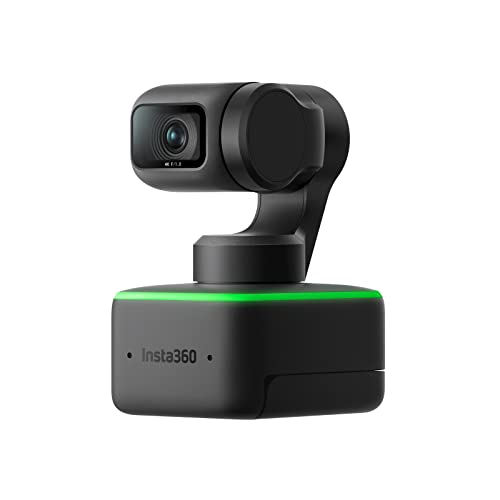
Insta360 Link
- Best for: Presenters who walk around while they talk and want the camera to follow smoothly.
- 4K PTZ webcam with 1/2-inch sensor
- AI tracking and gesture control
- HDR video
- Noise-canceling microphones
Presenters who walk around while they talk and want the camera to follow smoothly.
The gimbal head moves constantly while tracking, so place it where its motion will not distract viewers on a small screen.
The Insta360 Link is a gimbal webcam that turns its whole head to follow you, which makes it a natural fit for presenters who walk to a whiteboard or pace while they talk. Its 1/2-inch sensor records in 4K with HDR, and AI tracking keeps you centred while gesture control starts tracking or zooms without touching the mouse. Noise-canceling microphones cut background hum, and specialised modes cover whiteboard close-ups and overhead desk shots. It works with the video apps most people already use for calls and streams.
Watch out for: The gimbal head moves constantly while tracking, so place it where its motion will not distract viewers on a small screen.
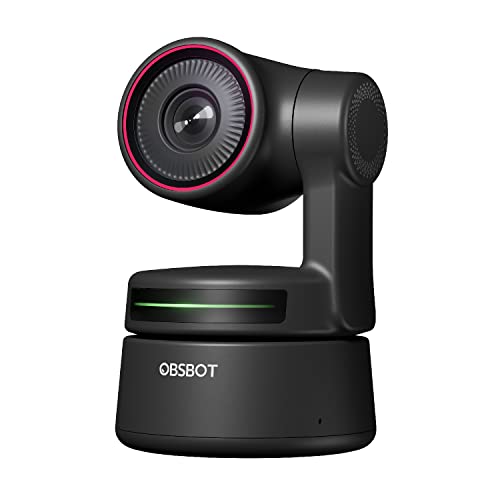
OBSBOT Tiny 4K
- Best for: Anyone who wants reliable gimbal tracking on a well-established design.
- 4K PTZ webcam with Sony 1/2.8-inch sensor
- AI tracking with auto framing
- 2-axis gimbal
- 60 FPS video with HDR and low-light correction
Anyone who wants reliable gimbal tracking on a well-established design.
Its sensor is smaller than the Tiny 2, so it shows more grain in a very dim room.
The Tiny 4K is the proven workhorse of this group, with a Sony 1/2.8-inch sensor and a two-axis gimbal that has been the reference design for AI tracking webcams. It records in 4K at 30 frames per second and 1080p at 60 frames per second, with HDR and automatic low-light correction that keep the picture usable in a room lit only by a monitor. Gesture control starts tracking and zooms in or out, dual omni-directional microphones pick up your voice clearly, and it works as a plug-and-play camera with no app required for basic use.
Watch out for: Its sensor is smaller than the Tiny 2, so it shows more grain in a very dim room.
OBSBOT Meet 2
- Best for: Small desks and simple video calls where a compact camera is enough.
- 4K webcam with 1/2-inch sensor
- AI framing and autofocus
- Gesture control
- 60 FPS video with HDR
Small desks and simple video calls where a compact camera is enough.
Its tracking is digital framing rather than a gimbal, so it cannot follow you across a room.
The Meet 2 is the compact pick for a desk where space is tight and the camera mostly stays put. It packs a 1/2-inch sensor into a small square body, records in 4K at 30 frames per second and 1080p at 60, and uses AI framing to keep you centred as you shift in your chair, without a moving gimbal. Autofocus stays locked on your face, gesture control handles zoom, and dual microphones with noise reduction keep calls clear. A magnetic privacy cover and a foldable mount make it easy to carry between a home desk and an office.
Watch out for: Its tracking is digital framing rather than a gimbal, so it cannot follow you across a room.
Which One Fits Your Situation
A streamer who moves around the room
Pick the OBSBOT Tiny 2. Its large sensor keeps the picture clean in dim streaming light, and the gimbal follows you across the room without losing detail. Gesture control lets you zoom or pause tracking mid-stream without reaching for the mouse, which keeps the flow of a broadcast intact, and the picture stays sharp even when you cross the room.
A teacher presenting at a whiteboard
Pick the Insta360 Link. Its gimbal tracking follows you to the board, and the whiteboard mode frames the board clearly for students watching remotely. Noise-canceling microphones keep your voice ahead of classroom noise, and the camera works with the video apps schools already use. The whiteboard mode keeps the board readable for students at home.
A home office with dim evening light
Pick the OBSBOT Tiny 2 for its large 1/1.5-inch sensor, which gathers far more light than a laptop webcam. If the budget is tighter, the Tiny 4K still beats a built-in camera, but expect more grain when the only light comes from your monitor after dark, and the large sensor keeps the picture usable in that light.
A small desk where size matters
Pick the OBSBOT Meet 2. Its small square body takes almost no desk space, the foldable mount clips onto a monitor or laptop lid, and AI framing keeps you centred without a gimbal that needs room to swing. It is the easiest of the four to pack into a bag when the working day is done.
Common Mistakes
- Buying a fixed webcam and expecting it to follow you around the room.
- Ignoring sensor size and judging a webcam by its resolution number alone.
- Forgetting to check whether your video app uses 4K, then paying for resolution it never shows.
- Placing the camera where a window behind you turns your face into a silhouette.
- Skipping the companion software, which is where tracking speed and framing zones are actually set.
Frequently Asked Questions
What is the difference between AI tracking and auto framing?
AI tracking moves a gimbal camera to follow you physically, so the full sensor stays on your face as you move. Auto framing crops a fixed wide shot digitally to keep you centred, which is simpler but loses detail at the edges. Gimbal tracking suits presenters who walk around, while auto framing suits people who mostly sit at a desk.
Do face tracking webcams work with Zoom and Teams?
Yes. The webcams in this guide appear as standard USB cameras, so Zoom, Teams, Google Meet and OBS recognise them without special setup. Tracking and gesture features run through the maker’s companion software, which works alongside those apps rather than replacing them.
Do I need special software for face tracking?
Basic tracking works out of the box on most of these cameras, but the companion software unlocks the useful controls: tracking speed, framing zones, gesture settings and privacy modes. Install it once, set your preferences, and the camera remembers them for later calls.
Is 4K worth it for video calls?
For live calls, often not, since most call apps run at 1080p whatever the camera can do. 4K earns its keep for recorded lessons, streams and content where viewers watch in full resolution, and it gives digital framing room to crop without softening the picture.
FAQ
What is the difference between AI tracking and auto framing?
Do face tracking webcams work with Zoom and Teams?
Do I need special software for face tracking?
Is 4K worth it for video calls?
More from Amazon
Programs that pair well with the guide above. Offers and eligibility are set by Amazon and may change.
Free shipping on eligible items, Prime Video and more. Eligible new members can start with a free trial.
Start a Prime free trialAd-free music streaming. Eligible new subscribers can start with a free trial.
Try Music Unlimited freeA Prime membership for ages 18-24 with a trial period. Eligibility is set by Amazon.
See Prime for Young AdultsAudiobooks and podcasts to listen to on the go. Eligible new members can start with a free trial.
Try Audible freeAs an Amazon Associate we earn from qualifying purchases.