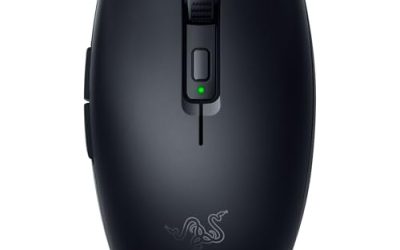
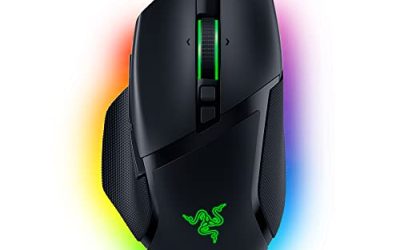
Our Short List of 3

- Best for: Competitive aim with a light shell and a fast sensor during raids.
- Weight: 60 grams
- Sensor: HERO 2 sensor, 44,000 DPI
- Report rate: 8kHz report rate
- Buttons: 5 programmable buttons

- Best for: Right-handed palm players who want a light ergonomic shape for long sessions.
- Weight: 63 grams
- Sensor: Focus Pro 30K optical sensor
- Buttons: 5 programmable buttons
- Switches: Optical Switches Gen-3

- Best for: Players who want eleven buttons and tunable weight for building, farming and combat.
- Sensor: HERO 25K optical sensor, up to 25,600 DPI
- Buttons: 11 programmable buttons
- Scroll wheel: Dual-mode hyper-fast scroll wheel with tilt
- Weight: 121 grams, plus five removable 3.6-gram tuning weights
All 4 Picks at a Glance
| Product | Specs | Action |
|---|---|---|
| Logitech G Pro X Superlight 2 |
| Check price on Amazon |
| Razer DeathAdder V3 Pro |
| Check price on Amazon |
| Logitech G502 HERO |
| Check price on Amazon |
 Razer Viper V3 HyperSpeed |
| Check price on Amazon |
Our Top Picks
- Logitech G Pro X Superlight 2 Lightspeed WirelessClassic1.57 x 2.5 x 4.92 inches0.1 poundsCheck on Amazon
Pros & cons
- 95-hour battery life reduces how often you need to charge
- 60-gram weight suits fast, low-effort mouse movement
- HERO 2 sensor tracks up to 44,000 DPI with no smoothing
- POWERPLAY wireless charging pad is sold separately
- Premium features add a more complex setup than basic mice
- Razer DeathAdder V3 Pro Wireless Gaming Mouse1000 Hz5.01 x 2.65 x 1.69 inches0.1 poundsCheck on Amazon
Pros & cons
- 11 programmable buttons add extensive control customization
- Adjustable weights let you fine-tune balance and feel
- LIGHTSYNC RGB syncs lighting with other Logitech gear
- Wired connection limits cable-free desk setups
- Heavier than typical lightweight esports mice at 0.27 pounds

Rust asks more from a mouse than most shooters, because one session mixes long-range aiming, close-quarters raids, farming, building and inventory work. A player may hold a spray pattern for several seconds, then switch to placing walls, then loot a body while listening for footsteps. That variety creates a real decision: a feather-light mouse excels at flicks yet gives few buttons, while a button-heavy mouse covers every bind yet can feel slow during a raid. Weight, grip and click durability matter as much as sensor figures here, because sessions run long and mistakes cost gathered loot.
This guide suits Rust players who raid bases, farm and build in the same session, solo players who need quick access to meds, tools and weapons without reaching across the keyboard, and group players who switch between combat and support. Picks come from names and specifications on the Amazon product page, including sensor details, weight, button counts, battery life and connectivity, so each option can be compared on what the listing actually states.
Quick Picks
As an Amazon Associate we earn from qualifying purchases
| Product | Best for | Key spec from title |
|---|---|---|
| Logitech G Pro X Superlight 2 | Competitive aim with a light shell and fast sensor | 60g, 44k DPI Sensor, 8kHz Report Rate |
| Razer DeathAdder V3 Pro | Right-handed palm players who want a light ergonomic shape | 63g Lightweight, Focus Pro 30K Sensor |
| Logitech G502 HERO | Players who want eleven buttons and tunable weight | HERO 25K Sensor, 25,600 DPI, 11 Buttons |
| SteelSeries Rival 3 | Steady all-round play with a simple wired setup | 8,500 CPI TrueMove Core Sensor, 6 Buttons |
| Razer Viper V3 HyperSpeed | Claw and fingertip players who want long battery life | 82g Lightweight, 30K DPI Sensor, 280 Hr Battery |
How to Choose
Prioritise recoil control and tracking steadiness
Rust rewards controlled sprays more than single flicks, so the sensor should track cleanly during sustained fire rather than only during fast turns. Listings state a maximum DPI figure, and a higher ceiling gives room to tune sensitivity, although most players settle well below the maximum. Polling rate and connection stability matter in practice, because a missed update during a spray shifts the whole pattern. Choose a mouse that holds a steady line at the sensitivity already in use, then adjust DPI stages in software until recoil control feels repeatable across different weapons.
Balance weight against button needs
Light mice suit fast aim and long sessions, since less mass means less effort per movement, while heavier mice with more buttons suit building, farming and inventory work. Rust sits between those needs, because a raid demands quick aim and a building session demands many binds. Count the actions pressed most in a session, including meds, tools, weapon swaps and building pieces, then match that list to the button layout. A mouse with five or six well-placed buttons often serves Rust better than a crowded grid, since the thumb stays ready for combat instead of hunting for a key.
Check grip, size and comfort for long sessions
Rust sessions stretch for hours, so a shape that feels fine for twenty minutes can ache after two hours. Palm grips suit larger ergonomic shells that support the whole hand, while claw and fingertip grips suit smaller, lighter shells that allow quick repositioning. Hand size matters as well, because a mouse that is too long forces the fingers forward, while one that is too short leaves the palm unsupported. Compare length, width and weight from the listing, and favour the shape that matches the grip used for most of the session rather than the grip used for a quick aim test.
Look at clicks, battery and connection reliability
Click durability matters in Rust, because farming, gathering and sustained fire repeat the same press thousands of times across a wipe. Listings mention switch type and click life, and optical switches aim to reduce double-click issues over time. Wireless mice need a battery plan, since a dead mouse during a raid costs more than a dead mouse during a casual match, so check the battery figure and the charging method. Wired mice remove that worry entirely, while wireless mice remove cable drag and suit players who move the mouse across a large mat.
The 5 Best Options
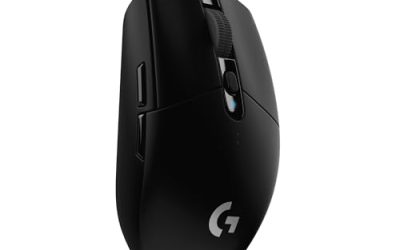
Logitech G Pro X Superlight 2
- Best for: Competitive aim with a light shell and a fast sensor during raids.
- Weight: 60 grams
- Sensor: HERO 2 sensor, 44,000 DPI
- Report rate: 8kHz report rate
- Buttons: 5 programmable buttons
Competitive aim with a light shell and a fast sensor during raids.
Check the listing for the black Superlight 2 model, since white and renewed versions carry different codes and the shape has few side buttons.
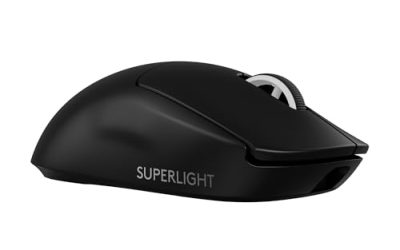
Logitech built the Superlight 2 for competitive aim, and its 60-gram shell suits Rust players who flick between targets during raids and need the mouse to stop exactly where the hand stops. The HERO 2 sensor tracks up to 44,000 DPI with an 8kHz report rate in the listing, which keeps cursor updates frequent during fast movement. Five programmable buttons cover the essentials without crowding the thumb, and LIGHTFORCE hybrid switches aim for crisp clicks over long use. USB-C charging and a long battery life in the listing suit multi-hour sessions, while the symmetrical shape fits claw and fingertip grips well.
Watch out for: Check the listing for the black Superlight 2 model, since white and renewed versions carry different codes and the shape has few side buttons.
Razer DeathAdder V3 Pro
- Best for: Right-handed palm players who want a light ergonomic shape for long sessions.
- Weight: 63 grams
- Sensor: Focus Pro 30K optical sensor
- Buttons: 5 programmable buttons
- Switches: Optical Switches Gen-3
Right-handed palm players who want a light ergonomic shape for long sessions.
Confirm the listing is the standard wireless model without a HyperPolling dongle bundle, since bundled versions carry a different code.
Razer shaped the DeathAdder V3 Pro for right-handed players who want a light ergonomic mouse that supports the palm through long Rust sessions. At 63 grams it stays easy to move during raids, while the Focus Pro 30K sensor tracks cleanly across a wide sensitivity range. Five programmable buttons cover weapon swaps, meds and push-to-talk, and Gen-3 optical switches aim for consistent clicks without the double-click faults that wear out older designs. HyperSpeed wireless keeps the connection steady, and the battery in the listing lasts up to 90 hours, which covers several sessions before charging becomes a concern.
Watch out for: Confirm the listing is the standard wireless model without a HyperPolling dongle bundle, since bundled versions carry a different code.
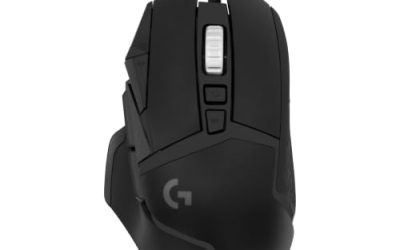
Logitech G502 HERO
- Best for: Players who want eleven buttons and tunable weight for building, farming and combat.
- Sensor: HERO 25K optical sensor, up to 25,600 DPI
- Buttons: 11 programmable buttons
- Scroll wheel: Dual-mode hyper-fast scroll wheel with tilt
- Weight: 121 grams, plus five removable 3.6-gram tuning weights
Players who want eleven buttons and tunable weight for building, farming and combat.
Check the listing for the wired HERO model and confirm the seller, since similar G502 names cover wireless and newer variants.
Logitech designed the G502 HERO for players who want many binds in one hand, and its eleven programmable buttons suit Rust well, because tools, meds, building pieces and weapon swaps all sit within thumb reach. A dual-mode scroll wheel adds tilt inputs for cycling items, while five removable tuning weights let the balance shift toward the palm or toward the front for steadier sprays. The HERO 25K sensor tracks up to 25,600 DPI, and onboard memory stores profiles for use on another machine. The wired connection removes battery worries entirely, which matters during long wipes where a dead mouse costs gathered loot.
Watch out for: Check the listing for the wired HERO model and confirm the seller, since similar G502 names cover wireless and newer variants.
SteelSeries Rival 3
SteelSeries built the Rival 3 as a simple wired mouse that covers Rust without extra complexity, and its TrueMove Core sensor tracks up to 8,500 CPI with true one-to-one movement. Six programmable buttons cover the regular Rust binds, including meds, tools and weapon swaps, while split trigger switches give a clear click for farming and combat. The 77-gram shell suits steady aim, and brilliant Prism RGB lighting marks the mouse on a dark desk. A wired USB connection keeps the setup ready without charging, which suits players who leave the computer running through long sessions and want no battery routine at all.
Specs
- Sensor: TrueMove Core optical sensor, 8,500 CPI, 300 IPS, 35G acceleration
- Buttons: 6 programmable buttons, split trigger switches
- Switches: 60 million click mechanical switches
- Weight: 77 grams
- Lighting: Brilliant Prism RGB lighting, 3 zones
- Connectivity: Wired USB, 1000Hz polling rate
Best for: Steady all-round play with a simple wired setup and no battery routine.
Watch out for: Confirm the listing is the wired Rival 3 with model 62513, since wireless Rival 3 models share the name and look similar.
Razer Viper V3 HyperSpeed
- Best for: Claw and fingertip players who want long battery life across a full wipe.
- Weight: 82 grams
- Sensor: Focus Pro 30K optical sensor
- Buttons: 8 programmable controls
- Switches: Mechanical Switches Gen-2
Claw and fingertip players who want long battery life across a full wipe.
Confirm the listing is the HyperSpeed model, since the Viper V3 Pro carries a different sensor, weight and code.
Razer aimed the Viper V3 HyperSpeed at claw and fingertip players who want a light symmetrical mouse with a long battery life for Rust wipes. At 82 grams it moves quickly during raids, while the Focus Pro 30K sensor tracks across a wide sensitivity range. Eight programmable controls cover weapon swaps, meds, building and push-to-talk, and Gen-2 mechanical switches aim for durable clicks through farming and combat. The battery in the listing lasts up to 280 hours, which covers many sessions before a battery change, and HyperSpeed wireless keeps the connection steady without a cable dragging across the mat.
Watch out for: Confirm the listing is the HyperSpeed model, since the Viper V3 Pro carries a different sensor, weight and code.
Which One Fits Your Situation
You raid bases and need fast, precise aim
Choose the Logitech G Pro X Superlight 2, because its 60-gram shell and fast sensor suit flicks between defenders and quick repositioning during a breach. Keep sensitivity low enough for controlled sprays, then use the five buttons for weapon swaps and meds only. The Razer DeathAdder V3 Pro suits the same role when a palm grip feels better, since it also stays light and ergonomic.
You play solo and juggle building, farming and combat
Choose the Logitech G502 HERO, because eleven buttons put tools, meds, building pieces and weapon swaps under the thumb without reaching across the keyboard. Tune the weights toward the front for steadier sprays, then set the scroll wheel tilt for item cycling. A wired connection removes battery worries during long solo sessions where every death costs gathered loot.
You want a simple mouse that just works for long wipes
Choose the SteelSeries Rival 3, because its wired connection, six programmable buttons and TrueMove Core sensor cover Rust without software fuss or charging. The 77-gram shell suits steady aim, and the clear click suits farming as well as combat. Keep the mouse on a clean mat and the cable routed behind the desk to avoid drag during wide sweeps.
You play with a claw grip and hate charging
Choose the Razer Viper V3 HyperSpeed, because its symmetrical 82-gram shell suits claw and fingertip grips, while the battery in the listing lasts up to 280 hours. That span covers a full wipe without a battery change, and HyperSpeed wireless removes cable drag during fast movement. Check the grip tape position if the shell feels slick during long sessions.
Common Mistakes
- Choosing the lightest mouse without checking whether it has enough buttons for tools, meds and building.
- Setting sensitivity too high for recoil control, then blaming the sensor for a spray that drifts.
- Buying a wireless mouse without a charging plan, so the battery dies during a raid.
- Ignoring grip shape, then finding a mouse that aches the hand after two hours in Rust.
- Binding every action to the mouse at once, which causes misclicks during tense combat.
Frequently Asked Questions
What makes a mouse good for Rust specifically?
A good Rust mouse balances steady tracking for recoil control, enough buttons for tools, meds and building, and a comfortable shape for long sessions. Light mice suit fast aim during raids, while button-heavy mice suit solo play where many actions sit under the thumb. Choose the balance that matches the role played most, then tune sensitivity until sprays feel repeatable.
How many buttons do I need for Rust?
Most Rust players use between five and eight buttons in regular play, since that range covers weapon swaps, meds, tools, building pieces and push-to-talk. Solo players often want more, because they handle every role alone, while group players can keep fewer binds and rely on teammates. Count the actions pressed every session, then match the layout to that list.
Is wireless reliable enough for Rust raids?
Wireless mice with a dedicated low-latency link suit Rust raids well, since modern wireless connections update quickly and avoid cable drag. Battery life matters more than the link itself, so check the figure on the listing and keep a charging routine or spare batteries ready. Wired mice remove that worry entirely, which suits players who leave the computer running through long wipes.
Should I use a high DPI setting in Rust?
Most Rust players settle well below the maximum DPI figure on the listing, because lower sensitivity gives finer control over recoil and long-range aim. A higher ceiling gives room to tune, yet it does not improve tracking on its own. Start at a comfortable sensitivity, practise spray patterns, then adjust in small steps until recoil control feels steady.
FAQ
What makes a mouse good for Rust specifically?
How many buttons do I need for Rust?
Is wireless reliable enough for Rust raids?
Should I use a high DPI setting in Rust?
More from Amazon
Programs that pair well with the guide above. Offers and eligibility are set by Amazon and may change.
Free shipping on eligible items, Prime Video and more. Eligible new members can start with a free trial.
Start a Prime free trialAd-free music streaming. Eligible new subscribers can start with a free trial.
Try Music Unlimited freeA Prime membership for ages 18-24 with a trial period. Eligibility is set by Amazon.
See Prime for Young AdultsAudiobooks and podcasts to listen to on the go. Eligible new members can start with a free trial.
Try Audible freeAs an Amazon Associate we earn from qualifying purchases.