Key takeaways
- The best keyboards for every desk in 2026: quiet office boards, premium mechanical picks and gaming flagships compared by feel, features, and value for money.
As an Amazon Associate, we earn from qualifying purchases.
The best keyboards are the ones you stop noticing. A great board disappears under your fingers, whether you are writing all day, playing late into the night, or switching between a laptop and a tablet. The wrong one, on the other hand, announces itself with every keystroke: mushy keys, a layout that fights you, or a connection that drops at the worst moment. This guide rounds up the best keyboards you can buy right now, covering the four boards that matter most — a quiet all-rounder for work, a premium mechanical board for enthusiasts, a full-size gaming flagship, and a slim budget pick for travel. Every pick below is a keyboard only, verified as selling on Amazon US, and chosen for a different kind of desk. Before you buy, think about how you actually type: switch feel matters more than brand, layout matters more than looks, and wireless freedom is only useful if the battery keeps up. The sections below explain what to prioritise, then compare each board in detail so you can match one to the way you work and play.
Quick Picks
Our Short List of 3

- Best for: Anyone who types all day and wants the most complete, fuss-free wireless keyboard.

- Best for: Typists and enthusiasts who want a premium mechanical board they can customise for years.

- Best for: Gamers who want a full-size flagship with macros, media controls, and the best RGB on this list.
All 4 Picks at a Glance
| Product | Specs | Action |
|---|---|---|
| 1. Logitech MX Keys S |
| Check price on Amazon |
| 2. Keychron Q1 Max |
| Check price on Amazon |
| 3. Razer BlackWidow V4 Pro |
| Check price on Amazon |
 4. Logitech Pebble Keys 2 K380s |
| Check price on Amazon |
How We Chose
We judged every board on the things that decide whether a keyboard is pleasant to live with, not on the spec sheet alone. Switch feel came first: a board should give a clear, consistent keystroke with the right amount of travel, whether it uses low-profile scissor switches or full mechanical ones. Layout came second, because a missing number pad, a cramped arrow cluster, or a non-standard bottom row changes how fast you can work. Connectivity mattered next — the best keyboards offer more than one way to connect, switch between several devices, and keep working when one link drops. Build quality was the fourth test: a board that flexes, rattles, or slides around the desk will not survive a year of heavy use, so we favoured solid frames and stable feet. Battery life was fifth, since a wireless board that needs charging every few days is worse than a wired one. Finally, we weighed extras honestly: backlighting, programmable keys, and software only count when they solve a real problem, such as working in a dark room or automating repetitive tasks. We also checked that each board is a current model still selling on Amazon US, so every recommendation here can actually be bought today. Boards that failed on the basics were cut no matter how many features they listed.
The Best Keyboards
1. Logitech MX Keys S
- Best for: Anyone who types all day and wants the most complete, fuss-free wireless keyboard.
Anyone who types all day and wants the most complete, fuss-free wireless keyboard.
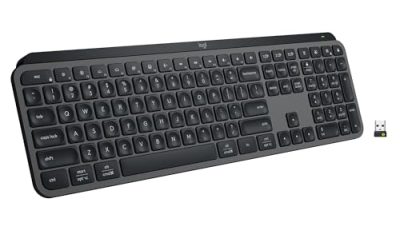
The Logitech MX Keys S is the best keyboard for most people, and the easiest recommendation on this list. It is a full-size, low-profile wireless board built around spherically dished keys that cup your fingertips and keep mistypes down during long typing sessions. The typing action is quiet and stable, with short, precise travel that feels closer to a good laptop keyboard than to a mechanical board, which makes it ideal for shared offices and late-night work. Smart backlighting lights the keys as your hands approach and dims to suit the room, and the Logi Options+ software lets you assign Smart Actions that automate repetitive steps with one keystroke. It connects over Bluetooth or the included Logi Bolt receiver, pairs with up to three devices, and works with Windows, macOS, Chrome OS, Linux, and iPadOS. Flow support lets you move text and files between computers when paired with an MX Master mouse. At 810 grams it stays planted on the desk, and the aluminium plate inside gives it a solid, premium feel without making it heavy to move.
Key specs:
– Low-profile scissor switches with spherically dished keys
– Bluetooth Low Energy plus Logi Bolt receiver, up to 3 devices
– Smart backlighting with proximity and ambient sensors
– USB-C rechargeable, 1500 mAh battery, up to 10 days per charge with backlighting on
– 104 keys, full-size layout, 810 g
Pros:
– Quiet, comfortable typing feel that suits all-day work
– Excellent multi-device switching and cross-computer Flow support
– Smart backlighting and programmable Smart Actions
Cons:
– Short key travel will feel flat to mechanical keyboard fans
– No 2.4 GHz gaming-grade wireless mode
2. Keychron Q1 Max
- Best for: Typists and enthusiasts who want a premium mechanical board they can customise for years.
Typists and enthusiasts who want a premium mechanical board they can customise for years.
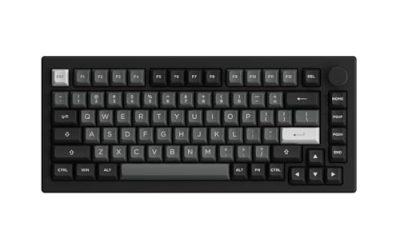
The Keychron Q1 Max is the best mechanical keyboard for people who care about how a board feels and want to make it their own. It is a 75 percent board machined from a solid block of aluminium, with a gasket-mounted plate that gives each keystroke a soft, deep sound instead of the hollow rattle cheaper boards produce. The hot-swappable sockets accept Gateron Jupiter switches and most other 3- and 5-pin MX-style switches, so you can change the feel without soldering, and the open-source QMK and VIA firmware lets you remap any key or the rotary knob from a browser. It connects three ways — 2.4 GHz wireless at a 1000 Hz polling rate, Bluetooth 5.1 for up to three devices, or wired USB-C — and the 4000 mAh battery is rated for up to 180 hours with the backlight off. The 75 percent layout keeps the function row and arrow keys while saving desk space, and the double-shot PBT keycaps resist shine far longer than ABS caps. At over 1.7 kg it is a desk fixture rather than a travel board, but that weight is exactly what keeps it from sliding during fast typing.
Key specs:
– 75% layout with rotary knob, CNC-machined aluminium case
– Hot-swappable Gateron Jupiter switches, gasket mount
– QMK/VIA remapping, 2.4 GHz + Bluetooth 5.1 + USB-C
– 4000 mAh battery, up to 180 hours with backlight off
– Double-shot PBT keycaps, south-facing RGB, 1,724 g
Pros:
– Superb typing feel and sound from the gasket-mounted aluminium case
– Full hot-swap and QMK/VIA customisation with no soldering
– Three connection modes with fast 2.4 GHz wireless
Cons:
– Heavy and expensive for a first mechanical board
– No dedicated number pad
3. Razer BlackWidow V4 Pro
- Best for: Gamers who want a full-size flagship with macros, media controls, and the best RGB on this list.
Gamers who want a full-size flagship with macros, media controls, and the best RGB on this list.
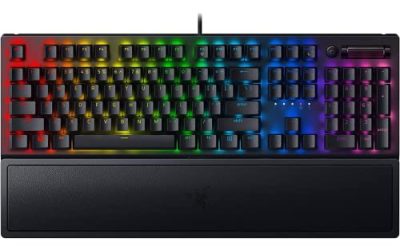
The Razer BlackWidow V4 Pro is the best gaming keyboard for players who want every feature in one board. This full-size wired mechanical keyboard pairs Razer Green tactile and clicky switches with doubleshot ABS keycaps, a Command Dial, eight dedicated macro keys, and per-key Chroma RGB with underglow, so the board doubles as the lighting centrepiece of a gaming setup. The Green switches give a crisp, audible click with a clear tactile bump, which suits players who want unmistakable feedback on every press, and Snap Tap lets the board prioritise the most recent input when two opposing movement keys are pressed — a small edge in fast competitive games. A magnetic leatherette wrist rest is included for long sessions, and USB passthrough keeps a spare port within reach for a mouse or headset dongle. It connects over a wired USB-C cable, which means no battery anxiety and no wireless latency to think about. The board is large and unapologetically feature-heavy, so it suits a dedicated gaming desk rather than a cramped workspace, but for players who use macros and media controls daily, nothing else on this list packs as much in.
Key specs:
– Full-size layout with Razer Green Gen-3 tactile and clicky switches
– Command Dial and 8 dedicated macro keys
– Per-key Chroma RGB plus underglow, doubleshot ABS keycaps
– Magnetic leatherette wrist rest, USB passthrough
– Wired USB-C connection, Snap Tap support
Pros:
– The most complete feature set of any board here
– Crisp, satisfying Green switches with clear tactile feedback
– Command Dial and macro keys are genuinely useful daily
Cons:
– Large and heavy, with a premium price tier
– Wired only, and the clicky switches are loud in shared rooms
4. Logitech Pebble Keys 2 K380s
- Best for: Budget buyers, travellers, and anyone who types across a laptop, tablet, and phone.
Budget buyers, travellers, and anyone who types across a laptop, tablet, and phone.
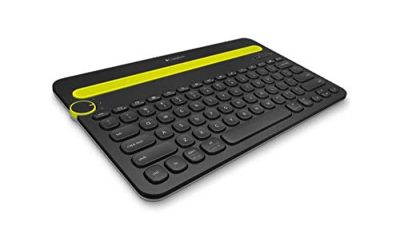
The Logitech Pebble Keys 2 K380s is the best budget keyboard on this list, and the one to buy if you type on more than one device. It is a slim, compact Bluetooth keyboard that pairs with up to three devices — Windows, macOS, iPadOS, Android, or Chrome OS — and switches between them with the Easy-Switch keys, so the same board can serve a laptop, a tablet, and a phone. The round, low-profile keys are quiet and comfortable for their size, and the board is small and light enough to slip into a bag, which makes it a natural partner for tablets and travel. Customisable shortcuts through the Logi Options+ app let you assign your most-used actions to the function keys, and the two AAA batteries are rated for up to 36 months of use, so it is almost never the thing that needs charging. There is no backlighting and no number pad, and the compact layout takes a day to get used to if you are coming from a full-size board, but for the lowest price tier on this list it covers the essentials better than anything else we found.
Key specs:
– Compact Bluetooth keyboard, Easy-Switch for up to 3 devices
– Customisable shortcuts via Logi Options+ app
– Works with Windows, macOS, iPadOS, Android, Chrome OS
– 2 AAA batteries, rated up to 36 months of battery life
– Slim, lightweight, portable design
Pros:
– Excellent value with true multi-device switching
– Tiny and light, ideal for travel and tablet use
– Outstanding battery life from two AAA batteries
Cons:
– No backlighting and no number pad
– Compact layout needs an adjustment period
Buying Guide
Start with switch feel, because it decides whether you enjoy the board. Low-profile scissor switches, like those on the MX Keys S and Pebble Keys 2, are quiet with short travel and suit fast, light typists and shared spaces. Mechanical switches travel further and give more feedback; tactile switches bump partway down, clicky switches add sound, and linear switches press smoothly with no bump. If you share a room, avoid clicky switches. Next, choose your layout: full-size boards include a number pad for spreadsheets and data entry, tenkeyless boards drop it to save space, and 75 percent boards keep the function row and arrows in a compact frame. Compact boards suit small desks and travel but ask you to relearn a few key positions. Then check connectivity. Bluetooth is convenient for tablets and phones, a 2.4 GHz receiver gives the most reliable link for gaming, and wired USB-C removes batteries and latency entirely. Multi-device pairing is worth having if you switch between a work laptop and a personal machine. Battery life matters for wireless boards: look for weeks or months per charge rather than days, and check whether the board charges over USB-C. Build quality is easy to judge — a heavier board with a metal plate or frame flexes less and sounds better. If you work in a dark room, backlighting is worth paying for; if you never type after dark, skip it and put the money toward better switches. Finally, treat extras as tie-breakers: backlighting helps in dark rooms, hot-swappable switches let you change the feel later, and programmable keys only matter if you will actually program them.
Frequently Asked Questions
What is the best keyboard for most people?
The Logitech MX Keys S is the safest choice for most people because it combines quiet, comfortable typing with smart backlighting, multi-device switching, and a full-size layout. It suits office work, writing, and everyday use, and it works with Windows, macOS, Chrome OS, Linux, and iPadOS. Buy a mechanical board instead if you want a deeper keystroke and customisation, or a gaming board if macros and RGB matter to you.
Are mechanical keyboards better than membrane keyboards?
Mechanical keyboards are better for feel and longevity, because each key has its own switch with a consistent, tactile press, and many boards let you swap switches without soldering. Membrane and scissor-switch keyboards are quieter, slimmer, and cheaper, and they suit fast typists and shared offices. Neither is better for everyone — choose mechanical for feel and customisation, and scissor-switch for quiet, portable typing.
Do I need a number pad on my keyboard?
You need a number pad if you enter numbers often, such as spreadsheets, accounting, or data entry. If you mostly write, browse, and game, a tenkeyless or 75 percent board saves desk space and keeps your mouse closer to your body, which is more comfortable. Compact boards without a pad are also easier to carry, so travellers usually prefer them.
Is a wireless keyboard as good as a wired one?
For typing and everyday work, a modern wireless keyboard is as good as a wired one, and Bluetooth or 2.4 GHz links are stable for most users. Competitive gamers still prefer wired boards or 2.4 GHz wireless with a high polling rate, because Bluetooth can add a small amount of latency. If you choose wireless, check the battery rating and whether it charges over USB-C.
How much should I spend on a keyboard?
Spend in the lowest tier if you need a simple, portable board for everyday typing, the middle tier for a comfortable full-size wireless keyboard, and the highest tier for a premium mechanical or gaming board with a metal case, hot-swappable switches, and extra controls. A more expensive board is worth it only if you type for hours daily or use the extra features — otherwise the mid-range picks on this list are the better value.
Conclusion
The best keyboards on this list cover four different desks, and the right one depends on how you type. The Logitech MX Keys S is our top pick overall: quiet, comfortable, and complete, it is the board most people should buy. The Keychron Q1 Max is the runner-up for enthusiasts, with a superb gasket-mounted aluminium build and full hot-swap and QMK customisation that no other board here matches. The Razer BlackWidow V4 Pro takes the gaming crown with its macro keys, Command Dial, and the best RGB of the group, while the Logitech Pebble Keys 2 K380s proves that a budget board can still switch between three devices and last for years on two batteries. Pick the board that matches your desk, check the current price before ordering, and you will end up with a keyboard you stop thinking about — which is exactly the point.
FAQ
What is the best keyboard for most people?
Are mechanical keyboards better than membrane keyboards?
Do I need a number pad on my keyboard?
Is a wireless keyboard as good as a wired one?
How much should I spend on a keyboard?
More from Amazon
Programs that pair well with the guide above. Offers and eligibility are set by Amazon and may change.
Free shipping on eligible items, Prime Video and more. Eligible new members can start with a free trial.
Start a Prime free trialAd-free music streaming. Eligible new subscribers can start with a free trial.
Try Music Unlimited freeA Prime membership for ages 18-24 with a trial period. Eligibility is set by Amazon.
See Prime for Young AdultsAudiobooks and podcasts to listen to on the go. Eligible new members can start with a free trial.
Try Audible freeAs an Amazon Associate we earn from qualifying purchases.