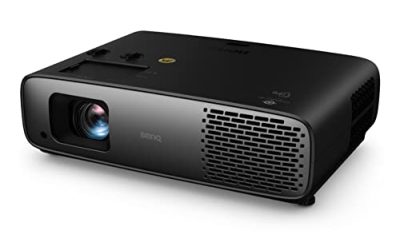
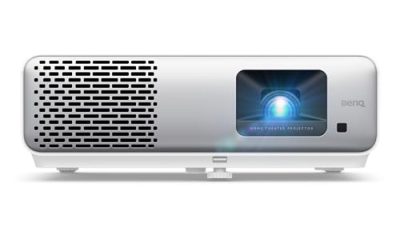
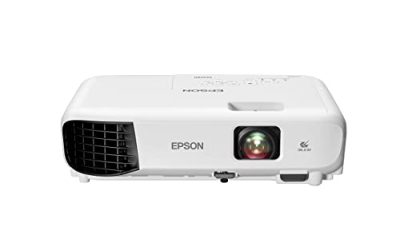
Our Short List of 3

- Best for: Movies in a dark room.
- 4K PRO-UHD 3-chip projection
- HDR support for richer color
- 3,000 lumens brightness
- Three-chip design avoids rainbow artifacts

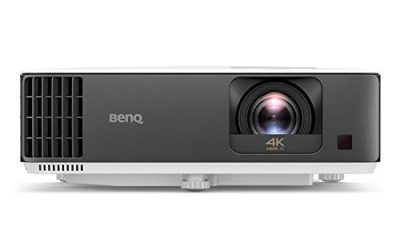
- Best for: Gaming on a big screen in a smaller room.
- 4K resolution with short-throw lens
- Android TV built in for streaming
- 3,000 lumens brightness
- Gaming-tuned low input lag
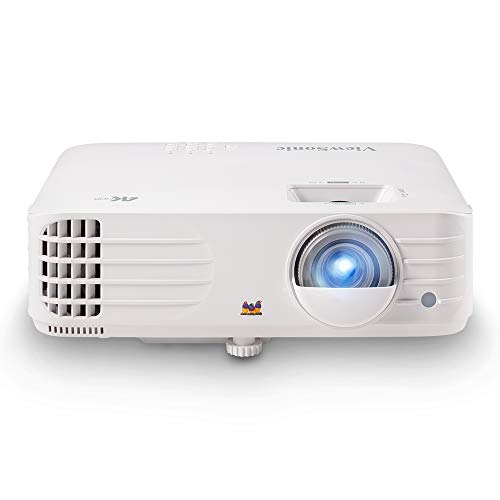
- Best for: Home theater and gaming in one projector.
- 4K UHD resolution with HDR
- 3,200 lumens brightness
- 240Hz refresh rate with 4.2ms response time
- Auto keystone correction
All 4 Picks at a Glance
| Product | Specs | Action |
|---|---|---|
| Epson Home Cinema 3800 |
| Check price on Amazon |
| BenQ TK700STi |
| Check price on Amazon |
| ViewSonic PX701-4K |
| Check price on Amazon |
 Optoma UHD38 |
| Check price on Amazon |
Key takeaways
- Our guide to the best 4k uhd projectors compares four true 4K models for movies and gaming, covering brightness, throw distance, input lag, and streaming.
A 4K UHD projector turns a plain wall into a cinema screen, but the wrong model can leave you with a dim image, a washed-out picture in daylight, or a setup that only works from one exact spot in the room. Brightness, throw distance, and input lag matter as much as resolution, and a projector built for a dark theater behaves very differently from one built for a bright living room or a gaming session.
This guide is for movie lovers setting up a first home theater, and for gamers who want a huge screen without giving up fast response times. Every projector below was chosen from the names and specifications on its Amazon product page, with attention to true 4K resolution, brightness, throw distance, and the features that decide whether a projector fits your room. A bright room needs a different projector than a dark theater, and this guide covers both.
Quick Picks
As an Amazon Associate we earn from qualifying purchases
| Product | Best for | Key spec from title |
|---|---|---|
| Epson Home Cinema 3800 | Movies in a dark room | 4K PRO-UHD 3-chip projection with HDR |
| BenQ TK700STi | Gaming on a big screen | 4K short-throw projector with Android TV built in |
| ViewSonic PX701-4K | Home theater and gaming in one | 3,200 lumens with 240Hz refresh and 4.2ms response |
| Optoma UHD38 | Bright rooms and fast gaming | 4,000 lumens with 4.2ms response at 1080p |
How to Choose
True 4K resolution and image quality
Not every projector sold as 4K shows a true 4K image, so check how the resolution is produced. The models in this guide use pixel-shifting or three-chip designs that display a full 3840 by 2160 image, which is what the 4K UHD label should mean. Look for HDR support as well, since HDR expands the range between bright highlights and dark shadows and makes movies look richer even on a modest screen. Contrast matters too, because a projector with weak contrast turns dark scenes into grey fog. Read the listing for the exact resolution and HDR formats rather than trusting the headline alone. Higher contrast also helps dark scenes hold detail.
Brightness for your room
Brightness decides whether a projector works in your room or only in total darkness. Lumens measure the light output, and a brighter projector holds up better with lamps on or curtains open. The Optoma UHD38 leads this group at 4,000 lumens, which suits living rooms with ambient light, while the ViewSonic and BenQ models sit lower and suit darker rooms. A dedicated theater with blackout curtains can use a dimmer projector happily, but a bright room needs every lumen it can get. Match the brightness to the room first, because no amount of resolution fixes a washed-out image. A gain screen can help a dimmer projector in a bright room.
Throw distance and placement
Throw distance decides where the projector must sit to fill your screen. A standard-throw model needs several meters of space, which suits a long room or a ceiling mount, while a short-throw model like the BenQ TK700STi fills a large image from close to the wall, which suits smaller rooms and coffee-table setups. Measure your room before buying, and check the throw ratio on the listing against your screen size. Lens shift and keystone correction help when the projector cannot sit dead center, but a model placed square to the screen always looks sharper than one corrected heavily. Ceiling mounts free up floor space and keep the projector safe.
Gaming lag and extra features
Gamers should check input lag before anything else, since a slow projector makes fast games feel unresponsive. The ViewSonic and Optoma models in this guide list a 4.2ms response time, which keeps controls feeling direct even in competitive play. A high refresh rate helps too, and the ViewSonic lists 240Hz for smooth motion. Built-in streaming, like the Android TV on the BenQ, removes the need for a separate streaming stick, while dual HDMI ports let you connect a console and a streaming box at the same time without swapping cables. A remote with direct input buttons saves fumbling through menus in the dark.
The 4 Best Options
Epson Home Cinema 3800
- Best for: Movies in a dark room.
- 4K PRO-UHD 3-chip projection
- HDR support for richer color
- 3,000 lumens brightness
- Three-chip design avoids rainbow artifacts
Movies in a dark room.
The 3,000-lumen output suits dim rooms best, so bright living rooms may wash the image out.
The Epson Home Cinema 3800 is the movie-first pick, built around a 4K PRO-UHD 3-chip design that produces a full 4K image with rich color and strong contrast. Its three-chip layout avoids the rainbow artifacts some single-chip projectors show during fast motion, which matters in action scenes and sports. HDR support deepens the picture further, and the 3,000-lumen output suits a dark or dimmed room. It is the projector to choose when film nights matter more than gaming sessions. Lens shift makes placement flexible without a ceiling mount in place.
Watch out for: The 3,000-lumen output suits dim rooms best, so bright living rooms may wash the image out.
BenQ TK700STi
- Best for: Gaming on a big screen in a smaller room.
- 4K resolution with short-throw lens
- Android TV built in for streaming
- 3,000 lumens brightness
- Gaming-tuned low input lag
Gaming on a big screen in a smaller room.
The short-throw lens needs a flat, clear wall space close to the projector.
The BenQ TK700STi is the gaming pick, with a short-throw lens that fills a large screen from close to the wall and a 4K image that stays sharp during fast play. Android TV is built in, so streaming apps run without a separate stick, and the 3,000-lumen output keeps the picture visible in a dim room. The short throw makes it the easiest projector here to fit in a smaller room, and the gaming-tuned response keeps controls feeling direct when the action speeds up. The built-in streaming also means fewer boxes and cables around the projector.
Watch out for: The short-throw lens needs a flat, clear wall space close to the projector.
ViewSonic PX701-4K
- Best for: Home theater and gaming in one projector.
- 4K UHD resolution with HDR
- 3,200 lumens brightness
- 240Hz refresh rate with 4.2ms response time
- Auto keystone correction
Home theater and gaming in one projector.
The fan is audible in quiet scenes, so place the projector behind the seating if possible.
The ViewSonic PX701-4K is the all-rounder, pairing a true 4K image with a 240Hz refresh rate and a 4.2ms response time that suits both movies and competitive gaming. Its 3,200-lumen output is a step up from the Epson and BenQ models, which helps in rooms that cannot go fully dark. HDR support adds depth to films, while auto keystone correction straightens the image when the projector sits off-center. Dual HDMI ports connect a console and a streaming box at once, so the setup stays simple. The 240Hz refresh rate also keeps fast motion smooth in sports and games.
Watch out for: The fan is audible in quiet scenes, so place the projector behind the seating if possible.
Optoma UHD38
- Best for: Bright rooms and fast gaming.
- True 4K UHD resolution
- 4,000 lumens brightness
- 4.2ms response time at 1080p with enhanced gaming mode
- 240Hz refresh rate
Bright rooms and fast gaming.
The bright output can overwhelm a very small screen, so match it to a large image.
The Optoma UHD38 is the brightness leader, with 4,000 lumens that keep the picture vivid in rooms where other projectors fade. Its 4.2ms response time at 1080p with enhanced gaming mode makes it the fastest-feeling projector here for competitive play, while the 240Hz refresh rate keeps motion smooth. HDR10 and HLG support add color depth to films and streaming, and the true 4K UHD image holds up on very large screens. It is the pick when the room cannot go dark or the gaming comes first. The bright output also suits daytime sports viewing with friends and family.
Watch out for: The bright output can overwhelm a very small screen, so match it to a large image.
Which One Fits Your Situation
A dedicated movie room
Choose the Epson Home Cinema 3800. Its 3-chip 4K PRO-UHD design delivers the richest color and strongest contrast in a dark room, and the absence of rainbow artifacts keeps long films comfortable to watch. It is built for the theater experience first, and it shows in every dark scene. Deep blacks and strong contrast make night scenes easy to follow.
Gaming in a smaller room
Pick the BenQ TK700STi. The short-throw lens fills a big screen from close to the wall, so it fits rooms where a standard projector would need more distance than you have. Android TV is built in, the response stays quick, and the setup takes minutes rather than a weekend of mounting. A coffee table is often enough, since the throw is so short.
One projector for movies and games
Go with the ViewSonic PX701-4K. Its 240Hz refresh rate and 4.2ms response keep games feeling direct, while HDR and 3,200 lumens keep films looking rich. Auto keystone correction forgives imperfect placement, and dual HDMI ports handle a console and a streaming box together. The fan stays quiet enough for dialogue-heavy films in a small room.
A bright living room
Take the Optoma UHD38. Its 4,000 lumens hold the picture together with lamps on or curtains open, which is where dimmer projectors give up. The fast response and 240Hz refresh rate also make it the strongest gaming pick when the room stays lit. A large screen suits the bright output, so pair it with a proper screen.
Common Mistakes
- Buying a projector by resolution alone and ignoring brightness, which decides whether the image survives ambient light in a bright living room today.
- Forgetting to measure throw distance, then finding the projector must sit in the middle of the room to fill the screen before the first film night at home.
- Ignoring input lag, which makes fast games feel sluggish even on a beautiful 4K image during daily competitive online play sessions.
- Projecting onto a textured or colored wall instead of a proper screen, which dulls color and softens detail across the whole projected image badly.
- Skipping HDR support, which adds more visible depth to films than a small bump in brightness on dark scenes and bright highlights.
Frequently Asked Questions
What does 4K UHD mean for a projector?
It means the projector displays an image of 3840 by 2160 pixels, either through a native panel or through pixel-shifting that produces a full 4K frame. Check the listing for the exact method, since some models advertise 4K support while only accepting a 4K signal and displaying a lower resolution. Pixel-shifting models show a full 4K frame from a lower-resolution chip.
How many lumens do I need for a living room?
A living room with lamps on or daylight coming in needs a brighter projector, and the 4,000-lumen Optoma UHD38 in this guide is built for that. A dedicated dark theater can use a dimmer model happily, while a room that only dims partly suits something around 3,000 to 3,200 lumens. A gain screen stretches a dimmer projector further.
Can I use a 4K projector for gaming?
Yes, and the ViewSonic PX701-4K and Optoma UHD38 are built for it, with a 4.2ms response time and a 240Hz refresh rate. Check input lag before buying, since a projector with slow response makes fast games feel unresponsive even when the image looks sharp. A low-lag mode on the projector can cut response time further.
Do I need a screen, or can I use a wall?
A proper screen gives a brighter, sharper image with truer color, because its surface is designed to reflect light evenly. A smooth white wall works as a starting point, but textured paint or off-white colors dull the picture, and a screen is worth adding once the setup is settled. A screen also frames the image cleanly.
FAQ
What does 4K UHD mean for a projector?
How many lumens do I need for a living room?
Can I use a 4K projector for gaming?
Do I need a screen, or can I use a wall?
More from Amazon
Programs that pair well with the guide above. Offers and eligibility are set by Amazon and may change.
Free shipping on eligible items, Prime Video and more. Eligible new members can start with a free trial.
Start a Prime free trialAd-free music streaming. Eligible new subscribers can start with a free trial.
Try Music Unlimited freeA Prime membership for ages 18-24 with a trial period. Eligibility is set by Amazon.
See Prime for Young AdultsAudiobooks and podcasts to listen to on the go. Eligible new members can start with a free trial.
Try Audible freeAs an Amazon Associate we earn from qualifying purchases.