Key takeaways
- Find the best blue keyboards with our guide to shades, switch types, layouts, keycaps, and matching a blue keyboard to your gaming or office setup today.
As an Amazon Associate we earn from qualifying purchases.
The best blue keyboards do more than add a splash of colour to a desk. They turn a plain setup into something personal, whether that means a deep navy board that looks smart in an office, a bright sky-blue keyboard that stands out on stream, or a pastel blue design that softens a gaming rig. Blue pairs well with black, white, silver, and wood, and it suits both gaming and work setups.
There is one point worth clearing up first. When keyboard fans say “blue”, they can mean two different things: a keyboard coloured blue, or a keyboard with blue mechanical switches. This guide covers blue-coloured keyboards, but it also explains blue switches, so you can choose the right combination of colour and feel. A blue keyboard with quiet linear switches feels very different from a blue keyboard with clicky blue switches, even though both are blue in name.
What Counts as a Blue Keyboard
A blue keyboard is any keyboard where blue is the main colour of the case, the keycaps, or both. Some boards are blue all over, with a blue case and matching blue keycaps. Others use a black or white case with blue keycaps, or a blue case with white, grey, or black keys for contrast. All of these count, and the best choice depends on how bold you want the result to be.
Full blue keyboards make the strongest statement. They look best when the shade is consistent across the case and keys, and when the legends on the keys are easy to read. A navy board with white legends looks classic and is easy to read in any light. A bright blue board with white legends looks playful and modern. A pastel blue board with darker blue legends looks soft, but check the contrast carefully, because pale legends on pale keys can be hard to read.
Two-tone blue keyboards mix shades of blue, often with a darker blue on the main keys, a lighter blue on the function row, and a white or grey spacebar as an accent. This style is popular in the custom keyboard community, and it gives a board a designed, finished look without needing extra decoration. If you like the style but do not want to build a keyboard yourself, many ready-made boards now come in two-tone blue colourways.
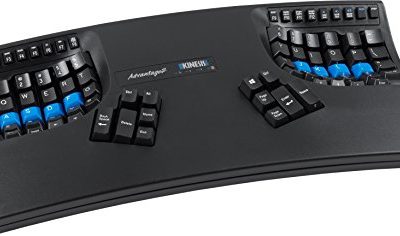
Blue accent keyboards keep the main body neutral and use blue for a few keys, a strip, or the lighting. A black keyboard with blue escape, enter, and arrow keys, or a white keyboard with blue underglow, can add colour without dominating the desk. This is a good option if you share a workspace, if your setup already has a strong colour theme, or if you want a board that will still look right if you change your desk theme later.
Shades of Blue and How to Choose One
Blue is not one colour, and the shade you choose changes the whole feel of your setup. Navy and dark blue look professional and pair well with black monitors, dark wood desks, and silver laptops. They show dust and fingerprints less than very light colours, and they age well as a long-term choice. If you work in an office or on video calls, navy is the safest shade.
Royal blue and bright blue are bolder and more energetic. They suit gaming setups, streaming rooms, and anyone who wants the keyboard to be a feature rather than a background object. Bright blue pairs well with white desks, black cases, and RGB lighting, but it can clash with warm wood tones or a red-themed setup, so look at your whole desk before committing.
Sky blue and pastel blue feel light, calm, and friendly. They are popular for cosy desk setups, pastel-themed gaming rigs, and workspaces that use white, cream, or light wood. Pastel boards look beautiful in photos, but they show dirt more easily, and pale keycaps can pick up shine from regular use. If you choose pastel, look for keycaps made from durable PBT plastic, which resists shine better than cheaper ABS plastic.
Blue Keyboards and Blue Switches: Do Not Confuse Them
This is the most common source of confusion when shopping for a blue keyboard, so it is worth a clear explanation. The colour of a keyboard and the type of switch inside it are separate choices. You can have a blue keyboard with any switch type, and you can have a black keyboard with blue switches.
Blue switches, in the mechanical keyboard world, are clicky switches. They make a clear click sound and give a noticeable bump when you press a key. Many typists love them because the click and bump make it obvious when a key has registered, and they can make typing feel precise and satisfying. They are loud, however, and that matters. In a shared office, a library, a bedroom shared with a sleeping partner, or on a voice call, clicky blue switches can be distracting for everyone nearby. They are best for a private room where noise is not a problem.
If you want a blue keyboard but need it to be quiet, choose linear switches or tactile switches instead. Linear switches press down smoothly with no bump and no click, and they are popular for gaming because they feel fast and consistent. Tactile switches give a small bump without a loud click, which many typists prefer for long writing sessions. Brown switches are the most common tactile option, and red switches are the most common linear option, although names vary between brands.
Layouts: Full Size, Tenkeyless, and Compact Blue Boards
Layout decides how much desk space your blue keyboard takes up and which keys you have within reach. Full-size keyboards include a number pad, which suits data entry, accounting, and anyone who types numbers often. They are wide, however, and they push the mouse further to the right, which can strain the shoulder during long gaming sessions.
Tenkeyless keyboards, often called TKL, drop the number pad but keep the function row, arrow keys, and navigation keys. They are the most popular layout for gaming and general use, because they save desk space while keeping all the keys most people use daily. A blue tenkeyless board is a good default choice if you are unsure which layout to buy.
Compact layouts go further. A 75 percent keyboard keeps most keys in a tighter arrangement, while a 65 percent board drops the function row, and a 60 percent board drops the arrow keys and function row as well. Compact blue keyboards look neat, leave plenty of room for the mouse, and travel well. They need a little learning, because some keys are reached through a function layer, but most users adapt within a week.
Keycaps, Materials, and How Blue Holds Up
Keycaps are the part of the keyboard you touch and look at most, and their material affects both feel and appearance. ABS keycaps are smooth, light, and common on cheaper boards. They can look bright and sharp when new, but they develop a shine with use, and printed legends can wear away. PBT keycaps are denser, slightly textured, and far more resistant to shine and wear. For a blue keyboard that you use every day, PBT keycaps are worth the extra cost, because the colour stays even and the texture stays pleasant for longer.
Legends, the letters and symbols on the keys, matter for readability. Double-shot keycaps have legends moulded into the plastic in a second colour, so they never wear off. Dye-sublimated legends are printed into the surface and also last well. Pad-printed legends sit on the surface and can fade with heavy use. For a blue board, white or light grey legends on dark blue keys are easiest to read, while dark legends on light blue keys work well in bright rooms.
Backlighting changes how a blue keyboard looks at night. RGB backlighting lets you set the glow to any colour, including blue to match the board, white for a clean look, or a rainbow effect for gaming. A blue keyboard with white backlighting looks crisp and professional, while blue backlighting on a blue board can make the legends harder to read if the shades are too close. Single-colour white backlighting is a safe choice, and it uses less power than full RGB.
Wired, Wireless, and Connectivity
Most blue keyboards are available in wired, wireless, or both forms. A wired keyboard connects by USB cable, never needs charging, and has no wireless delay, which is why competitive gamers still prefer it. A detachable cable is a useful feature, because you can replace the cable if it frays and you can choose a coiled or coloured cable to match the blue theme.
Wireless keyboards connect by Bluetooth or by a small USB receiver using a 2.4 GHz connection. Bluetooth is convenient for laptops, tablets, and switching between devices, while a 2.4 GHz receiver usually gives a faster, more stable connection for gaming. Many modern boards offer both, plus a wired mode, so you can use wireless for work and wired for gaming. Check battery life if you choose wireless: a board with backlighting turned off can last weeks, while full RGB lighting can drain the battery in days.
Matching a Blue Keyboard to Your Setup
A blue keyboard looks best when it fits the rest of your desk, rather than fighting it. With a black setup, almost any shade of blue works, from navy to bright blue, and the keyboard becomes a clear accent. With a white setup, pastel blue and sky blue look soft and coordinated, while navy gives a stronger contrast. With a wood desk, navy and teal look natural, while bright blue can look out of place unless the rest of the setup uses the same accent colour.
Blue Keyboards for Gaming, Work, and Typing
For gaming, the priorities are a fast, consistent switch feel, a layout that leaves room for the mouse, and a board that does not flex during intense play. Linear switches are the usual choice, and a tenkeyless or compact layout suits most gamers. RGB backlighting is useful for finding keys in a dark room, and a detachable cable makes the board easier to take to a friend’s house or a tournament.
For office work, the priorities are comfort, quiet switches, and readable legends. A full-size or tenkeyless board with tactile or linear switches, PBT keycaps, and a navy or muted blue colourway will look professional and feel good through a long day. Avoid clicky blue switches in a shared office, and choose white backlighting or no backlighting if RGB would look out of place at work.
For typing and writing, the priorities are a satisfying key feel, a stable board, and a layout that keeps your hands comfortable. Many writers like tactile switches for the feedback they give, and a tenkeyless board with a slight tilt can reduce wrist strain. A blue keyboard can make a writing desk feel more inviting, which is a small but real benefit when you write for hours.
For streaming and content creation, appearance matters as much as feel, because the keyboard is often visible on camera. A bright or pastel blue board with clean lighting photographs well, and a quiet switch type keeps keyboard noise out of the microphone. If you stream, test the board with your microphone before a live session, because even quiet switches can be picked up by a sensitive microphone placed close to the desk.
Caring for a Blue Keyboard
Blue keyboards need a little care to keep their colour looking fresh. Dust shows up more on dark blue boards, while dirt and shine show up more on light blue boards. A quick wipe with a dry microfibre cloth once a week keeps the case clean, and a soft brush can remove dust from between the keys. Avoid harsh cleaning products, which can fade the colour or damage the legends.
Comparison Table
| Feature | Gaming Blue Board | Office Blue Board | Typing Blue Board |
|---|---|---|---|
| Best layout | Tenkeyless or compact | Full size or tenkeyless | Tenkeyless |
| Switch feel | Linear, fast and smooth | Tactile or linear, quiet | Tactile, clear feedback |
| Keycaps | PBT, readable legends | PBT, navy or muted blue | PBT, comfortable texture |
| Lighting | RGB for dark rooms | White or none | White or none |
| Connection | Wired or 2.4 GHz wireless | Wired or Bluetooth | Wired or Bluetooth |
| Key priority | Speed and mouse room | Comfort and quiet | Feel and stability |
Common Mistakes to Avoid
The most common mistake is buying a blue keyboard for the colour and ignoring the switches. A board that looks perfect but uses loud clicky switches in a shared office, or stiff switches that tire your fingers, will be replaced quickly. Check the switch type before you buy, and if you cannot try the board in person, read descriptions of the switch feel carefully.
Another mistake is choosing a layout that does not fit your habits. A compact board looks neat, but if you use arrow keys constantly and they are hidden behind a function layer, you will be frustrated every day. A full-size board gives you every key, but if you never use the number pad, it wastes desk space. Match the layout to what you actually press.
A third mistake is buying cheap keycaps that fade or shine within months. A blue keyboard lives or dies by how its keys look after a year of use, so PBT keycaps and durable legends are worth paying for. If a board you love comes with ABS keycaps, you can often replace the keycaps later with a PBT set in a matching shade of blue.
Finally, do not assume that a blue keyboard will match your setup from a product photo alone. Colours vary between screens, lighting changes how blue looks, and a shade that looks perfect online can look different on your desk. Read reviews that show the board in a real room, and keep the packaging until you have seen it in your own lighting.
Frequently Asked Questions
Are blue keyboards just keyboards with blue switches?
No. A blue keyboard is usually a keyboard coloured blue, while blue switches are a type of clicky mechanical switch. The two are separate: a blue keyboard can have linear, tactile, or clicky switches, and a black keyboard can have blue switches. Check both the colour and the switch type before you buy.
Are blue switches too loud for an office?
For most shared offices, yes. Blue switches make a clear click with every press, which can distract colleagues and carry on voice calls. If you like the feel of blue switches but work near other people, use them in a private room, or choose quiet tactile switches for the office and keep a clicky board at home.
What is the best blue keyboard layout for gaming?
A tenkeyless layout suits most gamers, because it keeps the keys you use while freeing desk space for the mouse. Compact 75 percent and 65 percent boards suit players who want even more mouse room and do not mind using a function layer for some keys.
Do blue keycaps fade or wear out faster than black keycaps?
Not if they are made well. PBT keycaps in blue hold their colour and resist shine as well as black PBT keycaps. Cheap ABS keycaps in any colour can shine and fade with use, so the material matters more than the colour. Look for PBT keycaps with double-shot or dye-sublimated legends.
Can I change the colour of a keyboard I already own?
Yes, in many cases. You can replace the keycaps with a blue set, add blue accent keys, use a blue cable, or add a blue desk mat. Changing the case colour is harder, but a new set of blue keycaps is often enough to change the whole look of a board without buying a new keyboard.
Conclusion
The best blue keyboards balance colour, feel, and layout. Start by choosing a shade that fits your desk, then pick a switch type that suits your noise level and typing style, and choose a layout that matches the keys you actually use. Look for durable PBT keycaps, readable legends, and a connection type that fits your computer. Do that, and a blue keyboard will be more than a colourful accessory: it will be a comfortable, reliable board that makes your desk feel like your own, whether you are gaming late at night, working through a long day, or writing for hours.
FAQ
Are blue keyboards just keyboards with blue switches?
Are blue switches too loud for an office?
What is the best blue keyboard layout for gaming?
Do blue keycaps fade or wear out faster than black keycaps?
Can I change the colour of a keyboard I already own?
More from Amazon
Programs that pair well with the guide above. Offers and eligibility are set by Amazon and may change.
Free shipping on eligible items, Prime Video and more. Eligible new members can start with a free trial.
Start a Prime free trialAd-free music streaming. Eligible new subscribers can start with a free trial.
Try Music Unlimited freeA Prime membership for ages 18-24 with a trial period. Eligibility is set by Amazon.
See Prime for Young AdultsAudiobooks and podcasts to listen to on the go. Eligible new members can start with a free trial.
Try Audible freeAs an Amazon Associate we earn from qualifying purchases.