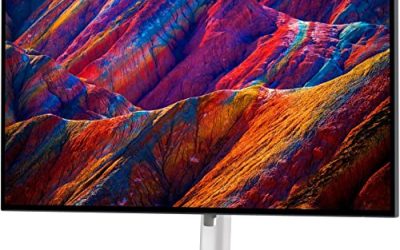
Our Short List of 3

- Proven 34-inch 3440 by 1440 IPS panel with accurate color
- Screen Split software makes window layouts fast to set up
- USB-C with 60-watt power delivery for single-cable laptop use
- Slim bezels work well in dual-monitor setups

- Massive 5120 by 1440 workspace replaces two or three monitors
- 1000R curve keeps the whole width within comfortable view
- Picture-by-picture supports two computers on one screen
- DisplayHDR 1000 and strong contrast for long sessions

- Same 5120 by 1440 workspace as the gaming G9 models
- USB-C and built-in speakers suit a clean office setup
- 120Hz refresh rate with eye-care features for long days
- Picture-by-picture for two computers
All 3 Picks at a Glance
| Product | Specs | Action |
|---|---|---|
| 2. LG 34WN80C-B UltraWide Monitor — Best Value 34-Inch Ultrawide |
| Check price on Amazon |
| 3. Samsung 49-Inch Odyssey G9 G95C — Best Super-Ultrawide for a Full Trading Desk |
| Check price on Amazon |
| 4. Samsung 49-Inch Business Curved Ultrawide S95UA — Best Business-Focused Super-Ultrawide |
| Check price on Amazon |
Our Top Picks
- Samsung 49” Odyssey G9 Series DQHD 1000R Curved240Hz Refresh Rate16.6 x 45.2 x 22.4 inches34.4 poundsCheck on Amazon
- Samsung 49” Business Curved Ultrawide Dual QHD Computer49 inch22.38 x 45.18 x 16.56 inches32.19 poundsCheck on Amazon
The best monitors for stocks give you room to watch several charts, a watchlist, news, and an order ticket at the same time, without constantly switching windows. Trading is a screen-real-estate problem before it is anything else. A cramped laptop display forces you to flip between tabs at exactly the moment a position moves, and that is how entries get missed and stops get placed late.
A good trading monitor is not the same as a good gaming monitor. Refresh rates above 120Hz and aggressive response times matter far less here than text sharpness, screen width, color accuracy, and the ability to sit in front of the panel for eight hours without eye strain. This guide explains what to look for, then compares four monitors that fit real trading desks, from a single ultrawide that replaces two screens to a massive 49-inch panel that holds an entire workspace.
How to Choose a Monitor for Stock Trading
Screen Size and Resolution
Width matters more than height for trading. A 34-inch ultrawide at 3440 by 1440 resolution fits three or four chart windows side by side, roughly the same working area as two standard 24-inch monitors with no bezel in the middle. A 49-inch super-ultrawide at 5120 by 1440 goes further, replacing a dual- or triple-monitor array with a single continuous canvas.
Resolution decides how much you can actually read. At 3440 by 1440, text stays crisp enough for small chart labels and order-book numbers. Lower resolutions on very wide panels make text fuzzy, which causes fatigue over a long session. For a 27-inch or larger standard 16:9 monitor, look for at least 2560 by 1440; for a 32-inch or larger panel, 4K is the safer choice.
Panel Type
IPS panels are the default recommendation for trading. They keep colors and contrast consistent when you view the screen from a slight angle, and their text rendering is generally cleaner than VA panels. IPS Black, found on newer Dell UltraSharp models, improves contrast noticeably over standard IPS, which helps dark-mode charting apps look deeper and easier on the eyes.
VA panels offer stronger native contrast and deeper blacks, and they dominate the 49-inch super-ultrawide market. Their main weakness is narrower viewing angles and occasional smearing on fast-moving content, neither of which is a serious problem for mostly static charts. OLED panels look spectacular but cost more and carry a small risk of burn-in from static trading interfaces left on screen all day, so they are a luxury rather than a necessity here.
Text Clarity and Eye Comfort
You will read numbers all day, so prioritize sharp text and low eye strain. A pixel density around 109 pixels per inch, typical of a 34-inch 3440 by 1440 panel, is a good baseline. Anti-glare coatings matter if your desk faces a window, and flicker-free backlighting plus a low blue light mode help during long sessions. A height-adjustable stand is not optional for a full trading day; your eyes should sit roughly level with the top third of the screen.
Connectivity and Multi-Monitor Support
Count your inputs before you buy. A trading desk often connects a desktop, a laptop, and sometimes a second machine. USB-C with power delivery lets a laptop dock with a single cable, charging the machine while driving the display. Picture-by-picture mode is valuable on ultrawides because it lets two computers share one screen, each with its own input, which is ideal for separating a trading terminal from research and email.
One Big Screen or Several Smaller Ones
There is no single right answer. One ultrawide is simpler to cable, easier to position, and eliminates the bezel gap in the middle of your view. Multiple monitors let you dedicate a whole screen to one task and angle each panel independently. If you already own a decent monitor, adding a matching second screen is often the cheapest upgrade. If you are starting from scratch, a single 34-inch or 49-inch ultrawide is usually the cleaner setup.
Top Picks
1. Dell UltraSharp 34 Curved Thunderbolt Hub Monitor U3425WE — Best Overall for Trading
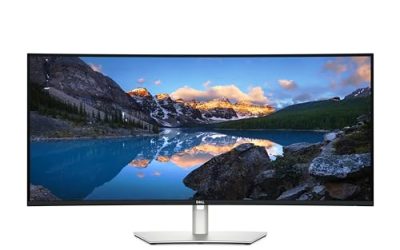
The Dell U3425WE is the most complete single-monitor trading setup in this guide. Its 34.1-inch curved IPS Black panel runs at 3440 by 1440 with a 120Hz refresh rate, and the deeper contrast of IPS Black makes candlestick charts and dark-mode platforms noticeably easier to read than on a standard IPS screen. The 1900R curve wraps the edges of the display slightly toward you, which keeps the far corners of a wide window within comfortable viewing distance.
Where this monitor really earns its place is connectivity. A Thunderbolt 4 hub with 90-watt power delivery, a downstream Thunderbolt port, three USB-C ports, five USB-A ports, and a 2.5 gigabit Ethernet jack turns the display into a docking station. Plug a laptop in with one cable and it charges, connects to the network, and drives the screen. The built-in dual 5-watt speakers handle earnings calls and market news without extra desk clutter, and Dell includes a factory calibration report with color coverage rated at 98 percent DCI-P3 and 100 percent sRGB.
For traders, the practical benefit is focus. You can tile a main chart, a secondary timeframe, a watchlist, and a news feed across one screen and still read every label. The 120Hz refresh rate is overkill for charts, but it makes scrolling through long watchlists and dragging windows feel smooth rather than choppy.
Pros:
- IPS Black panel with strong contrast for dark-mode charting
- Thunderbolt 4 hub with 90-watt charging replaces a separate dock
- 120Hz refresh rate and 3440 by 1440 resolution
- Factory calibrated with excellent color accuracy
- Height, tilt, and swivel adjustable stand
Cons:
- Premium positioning compared with simpler 34-inch ultrawides
- No DisplayPort output for daisy-chaining a second monitor
- Built-in speakers are convenient rather than impressive
Check the Dell UltraSharp U3425WE on Amazon
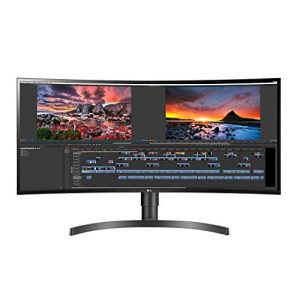
2. LG 34WN80C-B UltraWide Monitor — Best Value 34-Inch Ultrawide
- Proven 34-inch 3440 by 1440 IPS panel with accurate color
- Screen Split software makes window layouts fast to set up
- USB-C with 60-watt power delivery for single-cable laptop use
- Slim bezels work well in dual-monitor setups
The LG 34WN80C-B is the sensible, budget-friendly way into ultrawide trading. Its 34-inch curved IPS panel also runs at 3440 by 1440, with 99 percent sRGB coverage and HDR10 support, so charts, spreadsheets, and research documents all look clean and accurate. A 60Hz refresh rate is perfectly adequate for trading, where the screen content is mostly static, and the 5-millisecond response time keeps window movement free of visible smearing.
LG’s On-Screen Control software and Screen Split feature are genuinely useful for traders. You can snap your trading platform, a watchlist, and a browser into a preset grid with a couple of clicks instead of dragging windows around every morning. USB-C with 60-watt power delivery handles a single-cable laptop connection, and the three-sided virtually borderless design makes this monitor a good candidate if you later add a second identical panel.
The stand adjusts for height and tilt, the panel has an anti-glare coating, and the whole package is lighter and easier to position than the larger monitors in this guide. If your priority is maximum usable screen space for the money, and you do not need a built-in dock or a high refresh rate, this is the pick.
Pros:
Cons:
Check the LG 34WN80C-B on Amazon
3. Samsung 49-Inch Odyssey G9 G95C — Best Super-Ultrawide for a Full Trading Desk
- Massive 5120 by 1440 workspace replaces two or three monitors
- 1000R curve keeps the whole width within comfortable view
- Picture-by-picture supports two computers on one screen
- DisplayHDR 1000 and strong contrast for long sessions
The Samsung Odyssey G9 G95C replaces a multi-monitor array with a single 49-inch panel. Its 32:9 aspect ratio and 5120 by 1440 resolution give you the working area of two 27-inch 1440p monitors side by side, with no bezel splitting the middle. On a trading desk, that means a primary chart, a secondary chart, a watchlist, an order ticket, news, and a scanner can all stay visible at once.
The panel is a VA display with a 1000R curve, which is aggressive enough that the far edges of the screen stay at a consistent viewing distance. It is rated for VESA DisplayHDR 1000 with a 1,000,000 to 1 contrast ratio, so bright chart elements and dark backgrounds both hold up well. A 240Hz refresh rate and 1-millisecond response time are gaming specifications, but they also make scrolling through long lists of tickers and dragging windows across a very wide screen feel fluid.
Picture-by-picture and picture-in-picture modes let you feed the panel from two computers at once, which suits traders who run a dedicated trading machine alongside a general-purpose laptop. The ergonomic stand adjusts for height, tilt, and swivel, and the monitor includes two HDMI ports, a DisplayPort, and a USB hub. The main trade-off is desk space: at over 45 inches wide, it needs a deep, sturdy desk and a monitor arm or a stand that can support its weight.
Pros:
Cons:
Check the Samsung Odyssey G9 G95C on Amazon
4. Samsung 49-Inch Business Curved Ultrawide S95UA — Best Business-Focused Super-Ultrawide
- Same 5120 by 1440 workspace as the gaming G9 models
- USB-C and built-in speakers suit a clean office setup
- 120Hz refresh rate with eye-care features for long days
- Picture-by-picture for two computers
The Samsung S95UA is the business-oriented sibling of the gaming-focused G9, and for many traders it is the more sensible 49-inch choice. It shares the same 5120 by 1440 dual-QHD resolution and 32:9 aspect ratio, so the screen space is identical, but it is tuned for office work: a 120Hz refresh rate, USB-C connectivity, built-in speakers, and eye-care features such as flicker-free operation and reduced blue light.
The USB-C port simplifies a laptop-based trading desk, and the built-in speakers cover video calls, earnings streams, and market news without extra hardware. VESA DisplayHDR 400 keeps the panel bright enough for a well-lit room, and the height-adjustable stand helps you set the screen at a comfortable eye level for long sessions. The picture-by-picture mode again allows two inputs on one screen.
Compared with the G9 G95C, you give up the extreme 240Hz refresh rate and the HDR 1000 peak brightness, neither of which matters much for charts. In return you get a monitor designed for productivity first, with business-friendly connectivity and a calmer feature set. For a trader who wants the biggest possible workspace without paying for gaming features, this is the right balance.
Pros:
Cons:
Check the Samsung 49-Inch Business Ultrawide S95UA on Amazon
Comparison Table
| Monitor | Size | Resolution | Panel | Refresh Rate | USB-C | Best For |
|---|---|---|---|---|---|---|
| Dell UltraSharp U3425WE | 34.1 inch | 3440 x 1440 | IPS Black | 120Hz | Yes, 90W | Best overall trading setup |
| LG 34WN80C-B | 34 inch | 3440 x 1440 | IPS | 60Hz | Yes, 60W | Best value ultrawide |
| Samsung Odyssey G9 G95C | 49 inch | 5120 x 1440 | VA | 240Hz | No | Biggest single-screen workspace |
| Samsung Business S95UA | 49 inch | 5120 x 1440 | VA | 120Hz | Yes | Business-focused super-ultrawide |
Frequently Asked Questions
What size monitor is best for stock trading?
A 34-inch ultrawide at 3440 by 1440 is the sweet spot for most traders because it fits three or four windows side by side and replaces a dual-monitor setup with one screen. If you watch many tickers, scanners, and charts at once, a 49-inch super-ultrawide at 5120 by 1440 gives you roughly double that space. Smaller than 27 inches, you will spend too much time switching windows.
Is an ultrawide monitor better than two monitors for trading?
For most traders, yes. A single ultrawide removes the bezel gap in the middle of your view, needs only one cable and one stand, and makes window management simpler. Two separate monitors still win if you want to angle screens independently or dedicate one display entirely to a single task, such as a full-screen chart. The best choice depends on your desk space and how you like to arrange windows.
Does refresh rate matter for stock trading?
Not much. Charts, watchlists, and order tickets are mostly static, so a 60Hz panel is perfectly usable. A 120Hz or higher refresh rate makes scrolling and dragging windows feel smoother, which is pleasant during a long session, but it will not make you a better trader. Spend your budget on screen size, resolution, and text clarity first.
Is a curved monitor good for trading?
A gentle curve helps on wide screens because it keeps the edges of the display at a similar distance from your eyes as the center, which reduces neck turning and makes the far corners easier to read. On a 34-inch ultrawide the effect is subtle; on a 49-inch super-ultrawide it is genuinely useful. If you are sensitive to curved screens, a flat 34-inch ultrawide is a fine alternative.
Do I need a 4K monitor for trading?
You need sharp text, and 4K delivers it on larger screens, but it is not required. A 34-inch ultrawide at 3440 by 1440 already renders chart labels and numbers crisply. Where 4K shines is on 32-inch and larger 16:9 monitors, and on 43-inch displays used as a single large workspace. For most traders, resolution matters less than having enough width to keep every window visible.
Conclusion
The best monitors for stocks are the ones that let you see everything that matters without juggling windows. For most traders, the Dell UltraSharp U3425WE is the strongest single purchase, combining a sharp IPS Black ultrawide panel with a Thunderbolt 4 hub that can run a whole laptop desk from one cable. The LG 34WN80C-B delivers the same essential screen space at a more accessible level, and it remains the smartest value pick in this guide.
If your workflow demands more room, either 49-inch Samsung covers it. The Odyssey G9 G95C offers the brightest, fastest version of the super-ultrawide idea, while the business-focused S95UA keeps the same enormous workspace with office-friendly connectivity and eye-care features. Whichever you choose, prioritize width, resolution, and text clarity over gaming specifications, and give yourself a height-adjustable stand and a flicker-free panel for the long sessions ahead.
Disclosure: As an Amazon Associate, we earn from qualifying purchases.
FAQ
What size monitor is best for stock trading?
Is an ultrawide monitor better than two monitors for trading?
Does refresh rate matter for stock trading?
Is a curved monitor good for trading?
Do I need a 4K monitor for trading?
More from Amazon
Programs that pair well with the guide above. Offers and eligibility are set by Amazon and may change.
Free shipping on eligible items, Prime Video and more. Eligible new members can start with a free trial.
Start a Prime free trialAd-free music streaming. Eligible new subscribers can start with a free trial.
Try Music Unlimited freeA Prime membership for ages 18-24 with a trial period. Eligibility is set by Amazon.
See Prime for Young AdultsAudiobooks and podcasts to listen to on the go. Eligible new members can start with a free trial.
Try Audible freeAs an Amazon Associate we earn from qualifying purchases.