Our Short List of 3

- Best for: Busy households where the gaming machine needs its own 5 GHz lane away from streaming traffic.
- Wi-Fi standard: Wi-Fi 6, tri-band AX6600
- Combined speeds listed: up to 6,579 Mbps
- Game band listed: dedicated 4.8 Gbps band, from 4,804 Mbps and 1,201 Mbps on 5 GHz plus 574 Mbps on 2.4 GHz
- Gaming feature listed: Game Accelerator for optimising gaming streams

- Best for: Gaming households that want a 2.5G port and a prioritized wired connection for the main PC.
- Wi-Fi standard: Wi-Fi 6, dual-band AX5700
- Wireless speed listed: up to 5,700 Mbps across the bands
- Wired ports: 1 x 2.5G port, 1 x gigabit WAN port, 4 x gigabit LAN ports, including a gaming port
- LAN port bandwidth listed: 2.5 gigabit

- Best for: Homes that want Wi-Fi 7 plus multi-gig wired ports in one standalone router.
- Wi-Fi standard: Wi-Fi 7, tri-band BE9300
- Band speeds: 5,760 Mbps on 6 GHz, 2,880 Mbps on 5 GHz, 574 Mbps on 2.4 GHz
- Wired ports: 1 x 2.5G WAN port, 4 x 2.5G LAN ports
- Antennas: 6 internal antennas
All 5 Picks at a Glance
| Product | Specs | Action |
|---|---|---|
| TP-Link Archer GX90 |
| Check price on Amazon |
| ASUS RT-AX86U Pro |
| Check price on Amazon |
| TP-Link Archer BE550 |
| Check price on Amazon |
 ASUS RT-BE86U |
| Check price on Amazon |
 NETGEAR Nighthawk RS300 |
| Check price on Amazon |
Our Top Picks
A gaming router earns its place by what it does when the house is busy, not by the biggest speed number on the box. The real decision is how your game traffic gets protected: a dedicated band that other devices cannot crowd, a wired port that gets priority, or enough multi-gig Ethernet that the gaming PC never shares a slow lane with a backup job or a big download running in another room.
This guide is for players in shared homes, wired-first desk setups, and households upgrading to Wi-Fi 7 or Wi-Fi 6E devices. Every pick below is a standalone premium router chosen from its Amazon listing name and specifications, with the gaming feature, port layout, and radio setup stated on that listing rather than inferred from the brand family.
Quick Picks
As an Amazon Associate we earn from qualifying purchases.
| Product | Best for | Key spec from title |
|---|---|---|
| TP-Link Archer GX90 | A dedicated wireless lane for gaming | AX6600 tri-band with a dedicated game band |
| ASUS RT-AX86U Pro | Wired gaming with a prioritized port | AX5700 with a 2.5G port and a gaming port |
| TP-Link Archer BE550 | Wi-Fi 7 with multi-gig ports throughout | BE9300 tri-band, 2.5G WAN and LAN ports |
| ASUS RT-BE86U | Desks with several fast wired devices | BE6800 Wi-Fi 7 with a 10G port and four 2.5G ports |
| NETGEAR Nighthawk RS300 | Larger homes with many connected devices | BE9300 Wi-Fi 7, coverage listed up to 2,500 sq. ft. |
How to Choose
Decide how your game traffic gets its own lane
Gaming features differ in kind, not just in name. A dedicated game band, like the extra 5 GHz radio on the Archer GX90, separates wireless gaming from streaming and phones by hardware. A gaming port, like the one listed on the RT-AX86U Pro, prioritizes one wired device over the rest of the LAN. Software prioritization sits between those two: flexible, but dependent on settings staying enabled. Decide which mechanism matches how your PC or console actually connects, then check that the listing names it explicitly instead of settling for a generic gaming label.
Count multi-gig ports, not just the fastest one
One fast port is a headline; the full port map is the product. A single 2.5G socket must choose between feeding the internet connection and serving a fast local device, and it cannot do both at once. Routers like the BE550 put 2.5G speed on the WAN port and every LAN port, while the RT-BE86U goes further with a 10G port plus four 2.5G ports for a PC, a NAS, and a console at the same time. List your wired devices, mark which ones can actually link above gigabit, and buy the port layout that covers them all.
Match the newest band to devices you already own
A 6 GHz band only helps hardware that can see it. Wi-Fi 7 and Wi-Fi 6E laptops, handhelds, and phones get a wide, quiet lane on tri-band models such as the BE550 and RS300, while older gear falls back to 5 GHz and gains nothing from the extra radio. Dual-band Wi-Fi 7 models like the RT-BE86U skip 6 GHz entirely and spend the money on wired ports instead. Check the wireless standard printed on your main devices before paying for a third band, because a band nobody in the house can join is decoration, not capacity.
Weigh coverage and device count against your floor plan
Listings state coverage and device figures that are easy to skim past and expensive to ignore. The RS300 lists coverage up to 2,500 square feet and support for 100 devices, numbers aimed at a house full of phones, televisions, and smart gear sharing one router. A smaller flat with a dozen devices will never touch those ceilings, so port speed and traffic priority matter more there. Measure your space, count what stays connected all day, and be honest about dead spots, because no gaming feature fixes a room the signal barely reaches.
The 5 Best Options
TP-Link Archer GX90
- Best for: Busy households where the gaming machine needs its own 5 GHz lane away from streaming traffic.
- Wi-Fi standard: Wi-Fi 6, tri-band AX6600
- Combined speeds listed: up to 6,579 Mbps
- Game band listed: dedicated 4.8 Gbps band, from 4,804 Mbps and 1,201 Mbps on 5 GHz plus 574 Mbps on 2.4 GHz
- Gaming feature listed: Game Accelerator for optimising gaming streams
Busy households where the gaming machine needs its own 5 GHz lane away from streaming traffic.
The eight-antenna chassis is large, so check shelf space near the desk or television before ordering.
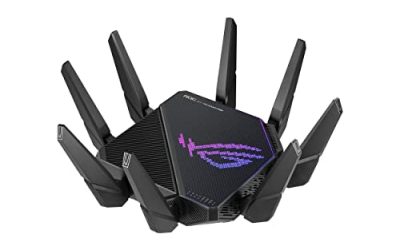
Shared houses are where the GX90 makes its argument. Its tri-band layout reserves one 5 GHz band as a dedicated game band, so a wireless gaming PC or console is not competing with every phone and television for the same airtime, and the listed Game Accelerator feature works on gaming streams once a device sits on that band. The wired side stays generous, with a 2.5 Gbps WAN/LAN port beside gigabit sockets. Eight antennas and a quad-core processor suit homes where gaming traffic runs every evening, not just on weekends.
ASUS RT-AX86U Pro
- Best for: Gaming households that want a 2.5G port and a prioritized wired connection for the main PC.
- Wi-Fi standard: Wi-Fi 6, dual-band AX5700
- Wireless speed listed: up to 5,700 Mbps across the bands
- Wired ports: 1 x 2.5G port, 1 x gigabit WAN port, 4 x gigabit LAN ports, including a gaming port
- LAN port bandwidth listed: 2.5 gigabit
Gaming households that want a 2.5G port and a prioritized wired connection for the main PC.
There is no 6 GHz band, and the single 2.5G port cannot serve WAN and LAN duty at the same time.
This model is the wired player’s pick in the group. The listing names a dedicated gaming port among its LAN sockets, so the main PC gets priority without menu diving, and a separate 2.5G port can serve either the internet connection or a fast local device. The dual-band Wi-Fi 6 radio carries an AX5700 rating, and the listing adds Mobile Game Mode, port forwarding, and VPN support for players who also game on a phone. Subscription-free network security rounds out a router built around one serious gaming desk.
TP-Link Archer BE550
- Best for: Homes that want Wi-Fi 7 plus multi-gig wired ports in one standalone router.
- Wi-Fi standard: Wi-Fi 7, tri-band BE9300
- Band speeds: 5,760 Mbps on 6 GHz, 2,880 Mbps on 5 GHz, 574 Mbps on 2.4 GHz
- Wired ports: 1 x 2.5G WAN port, 4 x 2.5G LAN ports
- Antennas: 6 internal antennas
Homes that want Wi-Fi 7 plus multi-gig wired ports in one standalone router.
Wi-Fi 7 features need Wi-Fi 7 clients to matter; older devices fall back to the shared bands.
The BE550 removes the port ceiling first. Its listing describes full 2.5G speed on the WAN port and all four LAN ports, so a faster internet plan and a wired PC both get headroom beyond a single gigabit. The tri-band Wi-Fi 7 design adds a 6 GHz lane with wide 320 MHz channels and Multi-Link Operation for nearby devices that support them, while six internal antennas keep the unit tidy on a shelf. It fits buyers who want one router to serve several upgrade cycles, with the gaming PC wired fast today and wireless hardware catching up later.
ASUS RT-BE86U
- Best for: Wired-heavy gaming and storage setups that value port speed over a 6 GHz band.
- Wi-Fi standard: Wi-Fi 7, dual-band BE6800
- Wireless speed listed: 6.8 Gbps
- Features listed: 4096-QAM, MLO, AI WAN detection
- Ethernet listed: 10G port x1 and 2.5G port x4
Wired-heavy gaming and storage setups that value port speed over a 6 GHz band.
There is no 6 GHz radio, so Wi-Fi 7 clients connect only on 2.4 GHz and 5 GHz.
The RT-BE86U is the wired-first flagship here, built for a desk where a gaming PC, a NAS, and maybe a small server all compete for fast local transfers. It is a dual-band BE6800 router, so it gives up the 6 GHz band, but the listing counters with a 10G port and four 2.5G ports, plus a gaming focus that includes comprehensive VPN features and Guest Network Pro. AiMesh support lets it join a wider ASUS network later. For buyers whose bottleneck sits on Ethernet rather than in the air, trading a third radio for serious port capacity is the right exchange.
NETGEAR Nighthawk RS300
- Best for: Bigger households that want Wi-Fi 7 reach and a multi-gig internet port.
- Wi-Fi standard: Wi-Fi 7, tri-band BE9300
- Wireless speed listed: up to 9.3 Gbps across the bands
- Internet port: 1 x 2.5 Gig port
- LAN ports: 2 x 2.5G ports, 2 x gigabit ports
Bigger households that want Wi-Fi 7 reach and a multi-gig internet port.
Only two LAN ports run faster than gigabit, so plan which wired devices get them.
The RS300 suits a larger home that wants Wi-Fi 7 coverage without stepping into a multi-unit system. NETGEAR lists coverage up to 2,500 square feet and support for 100 devices, which matches a house where phones, televisions, and smart gear all stay connected at once. Its 2.5 Gig internet port clears a gigabit plan with room to spare, and the LAN side mixes two 2.5G sockets with two gigabit ones, so the gaming PC and console take the faster pair while lighter gear uses the rest. It is the capacity pick rather than the gaming-feature pick.
Which One Fits Your Situation
Your wireless gaming PC shares a house with heavy streamers
Pick the Archer GX90. Its dedicated game band gives the gaming machine a 5 GHz lane that televisions and phones cannot crowd, which is exactly the failure mode in a busy shared house. The 2.5 Gbps WAN/LAN port also leaves a wired upgrade path open if you later run a cable to the desk, so the purchase does not box you into wireless forever.
One wired desk matters more than whole-home wireless
Choose between the RT-AX86U Pro and the RT-BE86U by counting your fast devices. One gaming PC and nothing else above gigabit points to the AX86U Pro and its gaming port. A PC beside a NAS or a second wired machine points to the BE86U, whose 10G and four 2.5G ports keep local transfers off the slow lane entirely.
You are upgrading phones and laptops to Wi-Fi 7 this year
Take the Archer BE550. Its 6 GHz band, 320 MHz channels, and Multi-Link Operation are features your new devices can actually use, and every wired port already runs at 2.5G, so the desk side needs no second upgrade later. Older gear still connects on 5 GHz and 2.4 GHz, which makes it a staged upgrade rather than a clean sweep of the house.
Your home is large and the device count keeps growing
Take the Nighthawk RS300. The listed coverage and 100-device support target exactly your problem, and the two 2.5G LAN ports cover a gaming PC and a console while everything else rides gigabit or Wi-Fi 7. If dead spots remain at the far end of the house, solve placement first, because a stronger router in the wrong corner still leaves weak rooms.
Common Mistakes
- Buying a tri-band router for its 6 GHz band when no device in the house supports Wi-Fi 6E or Wi-Fi 7.
- Counting only the fastest port and discovering the single 2.5G socket cannot feed both the internet connection and a fast NAS.
- Leaving the gaming PC on Wi-Fi while a free LAN port and a short cable sit unused in the same room.
- Assuming a gaming label means traffic priority is active, without enabling the game band, gaming port, or prioritization setting the listing describes.
- Placing a premium router inside a closed cabinet, where heat and blocked antennas undo the hardware you paid for.
Frequently Asked Questions
Does a gaming router lower ping on its own?
Not by magic. A gaming router helps when the delay comes from inside your home, because a dedicated band, a gaming port, or traffic prioritization stops other devices from crowding your game traffic. If the delay sits with your provider or the game server’s location, no router feature on the listing can shorten that path.
Is Wi-Fi 7 worth it if my gaming PC is wired?
It can be, but the wired side decides most of the value. A Wi-Fi 7 model with 2.5G or faster ports, like the BE550 or RT-BE86U, still upgrades your desk connection and local transfers. The new wireless features only pay off once Wi-Fi 7 phones, laptops, or handhelds join the network and start using the 6 GHz band or Multi-Link Operation.
Should I use the dedicated game band or a cable?
Use the cable whenever the run is practical, because a wired connection removes wireless contention entirely. The game band on a router like the Archer GX90 is the fallback for rooms where cabling is not realistic: it isolates gaming traffic from the rest of the household’s wireless load, which is the next best thing to a wire.
Can one of these routers replace a mesh system later?
Some can join one. The RT-BE86U lists AiMesh support and the Archer GX90 lists OneMesh support, so each can grow into its own maker’s mesh ecosystem instead of being replaced outright. Check the listing for the exact mesh system name before buying, because those ecosystems do not mix across brands.
FAQ
Does a gaming router lower ping on its own?
Is Wi-Fi 7 worth it if my gaming PC is wired?
Should I use the dedicated game band or a cable?
Can one of these routers replace a mesh system later?
More from Amazon
Programs that pair well with the guide above. Offers and eligibility are set by Amazon and may change.
Free shipping on eligible items, Prime Video and more. Eligible new members can start with a free trial.
Start a Prime free trialAd-free music streaming. Eligible new subscribers can start with a free trial.
Try Music Unlimited freeA Prime membership for ages 18-24 with a trial period. Eligibility is set by Amazon.
See Prime for Young AdultsAudiobooks and podcasts to listen to on the go. Eligible new members can start with a free trial.
Try Audible freeAs an Amazon Associate we earn from qualifying purchases.