Our Short List of 3
All 5 Picks at a Glance
| Product | Specs | Action |
|---|---|---|
 ASUS ROG Rapture GT-AX11000 Pro | Check price on Amazon | |
 ASUS RT-AX86U Pro | Check price on Amazon | |
 ASUS ROG Rapture GT-AX11000 | Check price on Amazon | |
 TP-Link Archer BE550 | Check price on Amazon | |
 NETGEAR Nighthawk Pro Gaming XR1000 | Check price on Amazon |
Our Top Picks
- NETGEAR Nighthawk Pro Gaming 6-Stream WiFi 6 RouterExtra Large11.61 x 7.87 x 2.51 inches1.32 poundsCheck on Amazon
A virtual private network tunnel is only as fast as the router that carries it. When every packet must be encrypted and decrypted, a weak processor turns a gigabit line into a crawl, and a router with partial VPN support forces compromises such as running the tunnel on one device at a time. That is why shoppers who take privacy seriously look for the best high end routers for openvpn: full-size routers with the processing power to keep an encrypted tunnel moving, firmware to run OpenVPN as both a client and a server, and wireless hardware to serve a whole household at once.
OpenVPN remains one of the most widely used VPN protocols because it is open, well understood, and supported by a huge range of VPN providers and self-hosted setups. Most VPN providers publish OpenVPN configuration files that a compatible router can import directly, and many people also run their own OpenVPN server at home so they can reach their home network safely while travelling. A router that handles OpenVPN natively does all of this for every device on the network at once, including consoles, smart TVs, and streaming boxes that cannot run VPN software themselves.
The five routers in this guide all meet the same bar: a fast multi-core processor, OpenVPN in stock firmware, and wireless hardware well above entry level. They cover Wi-Fi 6, Wi-Fi 6E, and Wi-Fi 7, dual-band and tri-band designs, and a mix of gaming-tuned and general-purpose flagships. Before choosing, read the VPN setup for each pick: some routers run an OpenVPN tunnel alongside a normal connection and choose which devices use it, while others route the whole network through the tunnel or run it as a server for remote access.
What to Look For
The single most important part of a router built for OpenVPN is its processor. OpenVPN encryption is heavy work, and a router with a slow chip will cap tunnel speed far below the speed of the internet line behind it. Look for a modern multi-core processor running at 1.5 GHz or higher, and check whether the maker lists hardware acceleration for encryption. A 2.0 GHz quad-core chip handles encrypted traffic with far less slowdown than older or weaker silicon, and that difference shows up every time you stream, game, or download through the tunnel.
Next, confirm exactly how the router supports OpenVPN. The most flexible routers run OpenVPN as a client, so the whole network can connect out through a VPN provider, and as a server, so you can connect back home while away. Some also support running the tunnel and a normal connection side by side, with rules that send chosen devices through the tunnel and leave the rest on the direct connection. That per-device control matters in a gaming household: a PC or laptop can sit inside the tunnel while a console keeps a direct low-latency path to game servers. Check the firmware description for OpenVPN client, OpenVPN server, and VPN Fusion or policy routing before you buy.
Wireless class matters too, because a VPN tunnel is no help if the Wi-Fi behind it is congested. High-end routers in this guide are tri-band or fast dual-band models with Wi-Fi 6, Wi-Fi 6E, or Wi-Fi 7 radios, which gives the network room to spread devices across separate bands. A tri-band router can put the VPN tunnel traffic on one band and leave the other bands free for streaming and gaming, which keeps the whole household smooth when several people are online at once. Wi-Fi 6E and Wi-Fi 7 add a 6 GHz band with wide channels and less interference, which helps in flats and busy neighbourhoods.
Ports are the next thing to check. A 2.5 Gigabit port is now standard on high-end routers, and it matters for OpenVPN users because it removes a wired bottleneck between the router and a fast modem or a wired gaming PC. Look for at least one 2.5 Gigabit WAN or LAN port, and count the Gigabit LAN ports against the number of wired devices in your home: a gaming PC, a console, a streaming box, and a network storage drive fill four ports quickly. A spare port leaves room for a wired mesh node or a second console later.
Finally, think about the software around the router. A clear phone app makes it easier to import an OpenVPN configuration file, switch the tunnel on and off, and see which devices are connected. Mesh support lets you extend coverage with a second node from the same family instead of replacing the router, and built-in security tools can add another layer of protection on top of the tunnel. None of these extras replace a fast processor or proper OpenVPN support, but they decide how pleasant the router is to live with.
ASUS ROG Rapture GT-AX11000 Pro
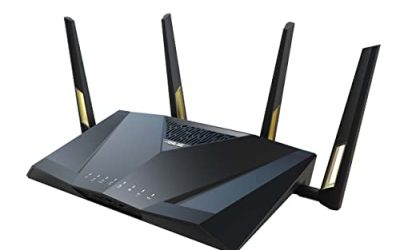
The ASUS ROG Rapture GT-AX11000 Pro is the flagship of this guide and the most complete OpenVPN router here. It is a tri-band Wi-Fi 6 router with an AX11000 class radio setup, which spreads traffic across one 2.4 GHz band and two 5 GHz bands, keeping gaming, streaming, and VPN tunnel traffic away from each other. A 2.0 GHz quad-core processor sits at the heart of the router, and that chip is the reason the GT-AX11000 Pro handles encrypted tunnels better than most routers in its class: the encryption work that slows weaker routers down has ample headroom here.
OpenVPN support is full and flexible. The router runs OpenVPN as a client, so your whole network can connect out through a VPN provider, and as a server, so you can connect back to your home network while away. VPN Fusion takes it further by letting the tunnel and a normal connection run side by side, with rules that decide which devices use the tunnel and which stay direct. That is exactly the setup a gaming household wants: a laptop can sit inside the tunnel while a console keeps a direct path to game servers.
The wired side is equally strong. A 2.5 Gigabit port gives a fast link to a multi-gig modem or a wired gaming PC, and the remaining Gigabit LAN ports cover consoles, streaming boxes, and network storage. RangeBoost Plus and AiMesh support extend coverage across a large home. If you want one router that covers OpenVPN, tri-band Wi-Fi 6, and a serious wired setup in a single box, this is the pick that does it all.
ASUS RT-AX86U Pro
The ASUS RT-AX86U Pro is the most balanced pick in this guide, a dual-band Wi-Fi 6 router that pairs a 2.0 GHz quad-core processor with a 2.5 Gigabit port and full OpenVPN support. Its AX5700 class radios deliver strong throughput on both bands, and the fast processor keeps an OpenVPN tunnel moving at a pace that weaker dual-band routers cannot match. For a household that wants high-end VPN performance without a tri-band flagship, this is the sensible middle ground.
OpenVPN runs here as both a client and a server, and VPN Fusion is included as well, so you can send chosen devices through the tunnel while the rest of the network stays direct. Configuration files import through the router web interface or the ASUS app, and the router can hold more than one VPN profile, which makes it easy to switch between a provider tunnel and a direct connection when a game or a stream needs the lowest latency. The Mobile Game Mode and Adaptive QoS tools help keep gaming traffic smooth while the tunnel is active.
The wired layout is practical: one 2.5 Gigabit port plus four Gigabit LAN ports, enough for a gaming PC, two consoles, and a streaming box with a port to spare. AiMesh support means it can join a mesh with other ASUS routers later, so coverage can grow without replacing the main router. If your home is a typical family setup with a handful of wired devices and a VPN tunnel that runs all day, the RT-AX86U Pro covers it with room to spare.
ASUS ROG Rapture GT-AX11000
The ASUS ROG Rapture GT-AX11000 is the original ROG flagship in this guide, a tri-band Wi-Fi 6 router that has earned its place through a combination of raw wireless capacity and deep VPN controls. Its three bands give the network plenty of room: one 2.4 GHz band for smart home gear and older devices, and two 5 GHz bands that can split gaming, streaming, and tunnel traffic so no single band gets crowded. A 2.5 Gigabit port anchors the wired side, and the quad-core processor keeps both the wireless radios and the VPN encryption running without either one holding the other back.
OpenVPN is supported as a client and as a server, and VPN Fusion is present, so the tunnel can run alongside a direct connection with per-device rules. That flexibility is what sets the GT-AX11000 apart from routers that only tunnel the whole network or nothing at all. A PC can use the tunnel for browsing and downloads, a console can stay direct for online play, and a smart TV can sit in either group depending on which streaming services you use. Game Boost prioritises gaming packets, the gaming dashboard shows live latency and traffic, and AiMesh support extends the network to a second node if coverage needs it.
The GT-AX11000 is a large router with eight external antennas and Aura RGB lighting, so it makes a statement on a gaming desk. It suits a household where gaming is the main use of the network and OpenVPN runs most of the day. If you want flagship wireless capacity with mature VPN controls and you prefer the original ROG design, this is the model to choose.
TP-Link Archer BE550
The TP-Link Archer BE550 is the Wi-Fi 7 pick in this guide, and it brings the newest wireless hardware to an OpenVPN setup. It is a tri-band BE9300 class router with a 6 GHz band, which gives it wide, clean channels for the fastest devices in the house while the 5 GHz and 2.4 GHz bands serve everything else. The 6 GHz band is a real advantage in crowded areas, because it sits away from the interference that slows the older bands down, and the router has the processing power to keep an encrypted tunnel moving alongside that fast wireless.
OpenVPN support covers both directions: the router works as an OpenVPN client for connecting the whole network out through a VPN provider, and as an OpenVPN server for secure remote access back home. Configuration files import through the web interface or the Tether app, and the router also supports WireGuard for households that use both protocols. EasyMesh support lets the BE550 join a mesh with other TP-Link routers, so coverage can be extended without replacing the main unit.
The wired side carries multiple 2.5 Gigabit ports, which is a step up from routers with a single fast port: a multi-gig modem and a wired gaming PC can both run at full wired speed at the same time. HomeShield adds network security tools on top of the tunnel, and the slim tower fits easily on a shelf. If you are buying a router to last several years and you want Wi-Fi 7 radios with full OpenVPN support, the Archer BE550 is the forward-looking pick in this guide.
NETGEAR Nighthawk Pro Gaming XR1000
The NETGEAR Nighthawk Pro Gaming XR1000 is the gaming-focused pick in this guide, a dual-band Wi-Fi 6 router built around the DumaOS gaming dashboard and tuned for low-latency play. Its AX5400 class radios cover a typical gaming household well, and the 1.5 GHz triple-core processor has the headroom to run an OpenVPN tunnel alongside gaming traffic. OpenVPN is supported as a server, so you can connect back to your home network securely while away, which covers the remote-access side of OpenVPN for households that run their own server.
What sets the XR1000 apart is DumaOS. The geo-filter lets you limit matchmaking to servers near you, the ping heatmap shows where latency is coming from, and the QoS controls let you reserve bandwidth for a console or a gaming PC so a download elsewhere in the house never ruins a match. Those tools work alongside the VPN side of the router, so a gaming session stays smooth even while other devices use the network hard. The Nighthawk app gives control from a phone, including seeing connected devices.
The wired layout is generous for a gaming desk: five Gigabit Ethernet ports cover a PC, two consoles, a streaming box, and a network drive, with a port left over. The XR1000 suits a household where gaming comes first and OpenVPN is used for remote access on top of play. If your main concern is keeping latency low in online games while still having OpenVPN available, this is the pick that puts gaming controls first.
Comparison Table
| Router | Wi-Fi | Bands | 2.5G Port | OpenVPN Client | OpenVPN Server | Best For |
|---|---|---|---|---|---|---|
| ASUS ROG Rapture GT-AX11000 Pro | Wi-Fi 6 | Tri-band | Yes | Yes | Yes | Complete flagship with VPN Fusion |
| ASUS RT-AX86U Pro | Wi-Fi 6 | Dual-band | Yes | Yes | Yes | Balanced high-end all-rounder |
| ASUS ROG Rapture GT-AX11000 | Wi-Fi 6 | Tri-band | Yes | Yes | Yes | Gaming-first tri-band flagship |
| TP-Link Archer BE550 | Wi-Fi 7 | Tri-band | Yes | Yes | Yes | Forward-looking Wi-Fi 7 pick |
| NETGEAR Nighthawk Pro Gaming XR1000 | Wi-Fi 6 | Dual-band | No | No | Yes | Gaming controls with DumaOS |
Frequently Asked Questions
Do I need a high-end router for OpenVPN?
Yes, if the tunnel runs all day or serves the whole household. OpenVPN encryption is heavy work for a router processor, and a weak router will slow the tunnel far below the speed of the internet line behind it. A high-end router with a fast multi-core processor keeps the tunnel moving, and it also has the wireless capacity to serve phones, laptops, consoles, and streaming boxes at the same time. A basic router can run OpenVPN for one device, but it will struggle when the whole household is online through the tunnel.
Can I run OpenVPN and a normal connection at the same time?
On the ASUS routers in this guide, yes, through VPN Fusion. VPN Fusion lets the tunnel and a direct connection run side by side, with rules that send chosen devices through the tunnel and leave the rest direct. That is useful when a laptop should sit inside the tunnel while a console keeps a direct path to game servers. The TP-Link pick also supports OpenVPN in both directions, while the NETGEAR pick covers the server side for remote access, so check the VPN settings of the model you choose before you buy.
Will OpenVPN slow down my connection?
Some slowdown is normal, because every packet must be encrypted before it leaves the router and decrypted when it comes back. The size of that slowdown depends on the router processor, the encryption settings, and the distance to the VPN server. A high-end router with a fast multi-core chip and hardware acceleration for encryption keeps the slowdown small, while a weak router makes it large. Choosing a VPN server close to you and using a router from this guide are the two best ways to keep the tunnel fast.
How to Choose
Match the router to the way your household uses the network, not to the longest list of features. If you want one router that does everything, take the ASUS ROG Rapture GT-AX11000 Pro: tri-band Wi-Fi 6, a 2.5 Gigabit port, full OpenVPN support in both directions, and VPN Fusion for per-device rules. If your home is a typical family setup and you want high-end VPN performance in a smaller box, the ASUS RT-AX86U Pro gives you the same processor class and the same VPN tools in a dual-band design.
Gaming-first households should weigh the two ROG flagships and the NETGEAR XR1000. The GT-AX11000 adds tri-band capacity for a house full of gamers and streamers, while the XR1000 trades tri-band radios for the DumaOS dashboard, with its geo-filter and ping heatmap aimed squarely at online play. If you are buying for the next few years, the TP-Link Archer BE550 brings Wi-Fi 7 and a 6 GHz band to the same OpenVPN job, plus multiple 2.5 Gigabit ports.
Whichever model you choose, confirm three things before you buy: OpenVPN support in the direction you need, a modern multi-core processor, and a port count that covers your wired devices with one spare. Get those three right and the router will carry your OpenVPN tunnel for years.
Disclosure: As an Amazon Associate, we may earn a commission from qualifying purchases made through links in this article, at no additional cost to you.
FAQ
Do I need a high-end router for OpenVPN?
Can I run OpenVPN and a normal connection at the same time?
Will OpenVPN slow down my connection?
More from Amazon
Programs that pair well with the guide above. Offers and eligibility are set by Amazon and may change.
Free shipping on eligible items, Prime Video and more. Eligible new members can start with a free trial.
Start a Prime free trialAd-free music streaming. Eligible new subscribers can start with a free trial.
Try Music Unlimited freeA Prime membership for ages 18-24 with a trial period. Eligibility is set by Amazon.
See Prime for Young AdultsAudiobooks and podcasts to listen to on the go. Eligible new members can start with a free trial.
Try Audible freeAs an Amazon Associate we earn from qualifying purchases.