Our Short List of 3
All 5 Picks at a Glance
| Product | Specs | Action |
|---|---|---|
 EVEO Screen Cleaner Spray and Wipe, 2 oz | Check price on Amazon | |
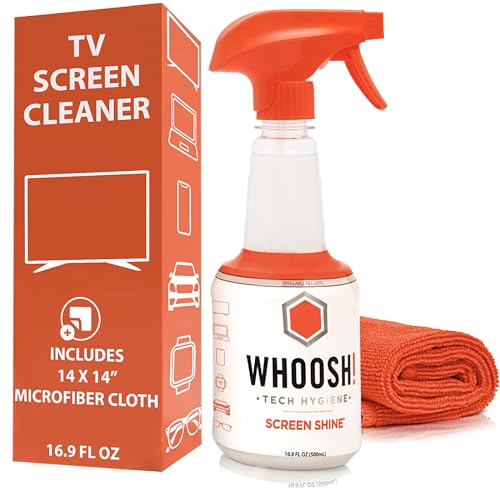 WHOOSH! Pro Screen Cleaner, 16.9 fl oz | Check price on Amazon | |
 Screen Mom Screen Cleaner Spray, 16 oz | Check price on Amazon | |
 Levelplay Screen Cleaner Kit, 240 mL | Check price on Amazon | |
 WHOOSH! Screen Shine Duo | Check price on Amazon |
Our Top Picks
The best cleaner for screens keyboards is a screen-safe spray paired with a clean microfibre cloth, because one kit can handle the monitor, the laptop screen and the keyboard on the same desk. Dust, fingerprints and smudges collect on every surface you touch and look at, and the wrong cleaner can strip a coating, leave streaks that catch the light, or drip into the gaps between keys. This guide compares five cleaning kits, sprays and cloths that suit screens and keyboards together, from a large refillable pro kit to a pocket-size duo for travel. Every pick below is made for electronic screens, with a formula that avoids alcohol and ammonia where stated, and a microfibre cloth that lifts dust without scratching. Read the buying criteria first, then compare the five picks side by side.
A desk with a monitor, a laptop and a mechanical keyboard has three surfaces that need different care but the same cleaner. The screen needs a gentle, streak-free formula and a soft cloth. The keyboard needs the same gentle formula on the keycaps, plus a way to lift crumbs and dust from between the keys without flooding the switches. A single screen-safe spray covers both jobs when you spray it onto the cloth rather than onto the surface, wipe the screen in light passes, then wipe the keycaps with the same damp cloth. For the gaps between keys, a soft brush or a canister of compressed air does the dry work first, and the spray handles the shine afterwards. The five kits below are ranked for that combined desk job, not for screens alone.
How to Choose
Screen-safe formulas
A screen cleaner should be free of alcohol and ammonia where the listing states it, because those chemicals can damage anti-glare and oleophobic coatings over time. Check the label for the screens it suits, such as LCD, LED and OLED, and avoid household glass cleaner entirely. A cleaner that states it is safe for all screens is the safest default for a mixed desk of monitors, laptops and TVs, and the same formula is gentle enough for plastic keycaps. If a listing does not state that it is alcohol-free and ammonia-free, treat that as a gap and pick a kit that does state it.
Spray, wipe or mist
How the cleaner reaches the surface matters as much as the formula. A fine mist spray gives even coverage with very little liquid, which is what you want on a screen and around keyboard switches. A pump spray can deliver too much liquid in one press, so use short presses and spray onto the cloth, never straight onto the screen or the keyboard. Never spray liquid directly into the gaps between keys, where it can sit on the switch plate and attract dust. The method is the same for every pick in this guide: mist the cloth, wipe, then buff dry with a second pass.
Microfibre cloth quality
The cloth does half the work. A dense, lint-free microfibre cloth lifts dust and skin oils without scratching, while a thin or rough cloth smears them around. Look for a cloth with a tight weave and a soft hand, and keep one cloth for screens and a second cloth for keyboards if you can, so grit picked up from keycaps never reaches a screen. Wash microfibre cloths without fabric softener, which coats the fibres and dulls their cleaning power. Every kit below includes at least one cloth, and the better kits include two.
Keyboard-safe use
Keycaps are tougher than screens, but keyboards still need care. Wipe keycaps with a lightly dampened cloth, not a wet one, and dry them with a second pass so no moisture lingers on the legends. For the gaps between keys, clear loose dust first with a soft brush or compressed air before you wipe, because wiping dusty keys drags grit across the caps. Remove the keycaps for a deep clean only if your board allows it, and wipe the plate with a barely damp cloth. A screen spray is safe for keycaps when used this way, and it leaves the legends readable and the caps free of shine from skin oils.
Bottle size and value
Bottle size decides how long a kit lasts and where it fits. A two-ounce bottle suits a single desk and a bag, while a sixteen-ounce bottle suits a household with several screens and keyboards and lasts far longer. Refillable bottles and large formats suit shared desks, classrooms and offices, where several people clean several screens. Small bottles suit travel and a tidy desk drawer. Match the size to the number of screens and keyboards you clean, and remember that a little spray goes a long way when you mist the cloth instead of the surface.
Streak-free results
A good cleaner leaves nothing behind. Streaks come from too much liquid, a dirty cloth, or a formula that dries too fast in a warm room. Wipe in slow, overlapping passes, then buff with a dry section of the cloth while the surface is still slightly damp. If streaks persist, the cloth is the usual cause, so switch to a clean one. The kits below are chosen for formulas that dry clean on glass and coated screens, and the same light touch keeps keycaps free of smears.
What never to use
Some cleaners should never touch a screen or a keyboard. Household glass cleaner, all-purpose sprays, disinfectant wipes and paper towels are all too harsh: glass cleaner can attack coatings, disinfectant wipes can leave residue on keycap legends, and paper towels can scratch. Acetone, nail polish remover and abrasive pads are out entirely. If a product does not state that it is made for electronic screens, do not use it on a monitor, and do not use it on a keyboard you care about either.
Top Picks
EVEO Screen Cleaner Spray and Wipe, 2 oz
EVEO Screen Cleaner Spray and Wipe, 2 oz
The EVEO Screen Cleaner Spray and Wipe is the compact pick for a single desk with a monitor and a keyboard. The two-ounce bottle is small enough for a drawer or a bag, and the included cloth is sized for quick daily wipes rather than deep cleans. The formula is made for electronic screens, so it suits monitors, laptops, tablets and TVs, and the same spray on the same cloth wipes keycaps clean without leaving residue on the legends. For a keyboard, mist the cloth, wipe the caps in rows, then use a dry section of the cloth for a second pass, and clear the gaps between keys with a soft brush first so dust does not get dragged across the caps.
Who it is for: anyone who wants one small kit for a monitor and a keyboard, and anyone who cleans a desk daily and wants a bottle that travels well. The small size is also a good fit for a laptop bag, so the same kit covers a home desk and a work desk. The main caveat is capacity: two ounces runs out faster than a large bottle in a household with several screens, so heavy users should look at the larger kits below. Confirm the listing shows the two-ounce spray and wipe kit, since EVEO sells the same cleaner in other sizes.
WHOOSH! Pro Screen Cleaner, 16.9 fl oz
WHOOSH! Pro Screen Cleaner, 16.9 fl oz
The WHOOSH! Pro Screen Cleaner is the large-format pick for a household or a shared desk with several screens and keyboards. The 16.9-fluid-ounce bottle lasts far longer than the pocket-size kits, and the formula is made for screens of all kinds, including monitors, laptops, phones and TVs. On a keyboard, the same formula wipes keycaps clean and lifts the shine that skin oils leave on the most-used keys, and a light mist on the cloth is enough for a full row of caps. The large bottle suits a family desk, a classroom, or an office where several people share screens, and the refillable format keeps the cost per clean low over time.
Who it is for: households with several screens and keyboards, and anyone who cleans daily and is tired of small bottles running out. The main caveat is size: the big bottle is not a travel pick, so pair it with a small kit for a bag if you clean away from home. Confirm the listing shows the 16.9-fluid-ounce Pro size, since WHOOSH! sells smaller bottles and bundles under similar names.
Screen Mom Screen Cleaner Spray, 16 oz
Screen Mom Screen Cleaner Spray, 16 oz
The Screen Mom Screen Cleaner Spray is the large-bottle pick for screens and keyboards that need a thorough wipe. The sixteen-ounce bottle covers a monitor, a laptop and a keyboard for a long time, and the formula is made for electronic screens, so it suits LCD, LED and OLED panels as well as plastic keycaps. On a keyboard, the spray works best with the cloth method: mist the cloth, wipe the caps, then buff dry, and clear crumbs from between the keys before you wipe so the cloth stays clean. The big bottle is a good fit for a desk that gets cleaned often, and for a household where one kit serves several rooms.
Who it is for: anyone who wants a large bottle for regular cleaning across screens and keyboards, and anyone who prefers a simple spray-and-cloth kit without extra parts. The main caveat is that the kit is built around the spray and cloth, so keyboard gaps still need a brush or compressed air for the dry work first. Confirm the listing shows the sixteen-ounce spray, since Screen Mom sells the cleaner in other sizes and bundles.
Levelplay Screen Cleaner Kit, 240 mL
Levelplay Screen Cleaner Kit, 240 mL
The Levelplay Screen Cleaner Kit is the kit-format pick for a desk with a monitor, a laptop and a keyboard. The 240-millilitre bottle is a middle size between the pocket bottles and the large household bottles, and the kit includes cloths for the wipe and buff steps. The formula is made for screens, so it suits monitors and laptops, and the same spray on a cloth cleans keycaps without leaving a film on the legends. The kit format is handy for a keyboard because it encourages the two-cloth method: one cloth for the damp wipe and a second cloth for the dry buff, which is what keeps both screens and keycaps streak-free.
Who it is for: anyone who wants a complete kit in one box for a gaming desk or a work desk with a monitor and a keyboard. The main caveat is that the kit is still a spray-and-cloth system, so the gaps between keys need a brush or compressed air before wiping. Confirm the listing shows the 240-millilitre kit, since Levelplay sells the cleaner in other formats.
WHOOSH! Screen Shine Duo
The WHOOSH! Screen Shine Duo is the travel pick for screens and keyboards on the move. The duo pairs a small spray bottle with a cloth in a format that fits a bag, a drawer or a laptop sleeve, so the same kit covers a home desk, an office desk and a laptop on a trip. The formula is made for electronic screens, so it suits monitors, laptops, phones and tablets, and the same spray wipes keycaps clean on a laptop keyboard or a compact board. For a keyboard away from home, mist the cloth, wipe the caps, and buff dry, and keep the cloth in its sleeve so it stays clean between uses.
Who it is for: anyone who cleans screens and keyboards in more than one place, and anyone who wants a small kit that lives in a bag. The main caveat is capacity: the duo is built for travel and light daily use, so a household with several screens should keep a large bottle at home as well. Confirm the listing shows the Screen Shine Duo, since WHOOSH! sells the same cleaner as a single bottle and in larger Pro sizes.
Comparison Table
| Product | Bottle size | Best for | Keyboard use | Cloths included |
|---|---|---|---|---|
| EVEO Screen Cleaner Spray and Wipe | 2 oz | Single desk, travel | Wipe keycaps with damp cloth | Yes |
| WHOOSH! Pro Screen Cleaner | 16.9 fl oz | Households, shared desks | Wipe keycaps, lifts skin-oil shine | Yes |
| Screen Mom Screen Cleaner Spray | 16 oz | Regular cleaning, several rooms | Wipe caps, buff dry | Yes |
| Levelplay Screen Cleaner Kit | 240 mL | Gaming and work desks | Two-cloth wipe and buff | Yes |
| WHOOSH! Screen Shine Duo | Duo, travel size | Travel, multiple desks | Wipe laptop and compact keyboards | Yes |
Which One Is Right for You?
Choose the EVEO Screen Cleaner Spray and Wipe if you want one small kit for a single desk with a monitor and a keyboard, and you clean daily. Choose the WHOOSH! Pro Screen Cleaner if your household has several screens and keyboards and you want a large bottle that lasts. Choose the Screen Mom Screen Cleaner Spray if you want a large bottle for regular cleaning across rooms. Choose the Levelplay Screen Cleaner Kit if you want a complete kit for a gaming desk or a work desk with a monitor and a keyboard. Choose the WHOOSH! Screen Shine Duo if you clean screens and keyboards in more than one place and want a kit that travels. For the gaps between keys, add a soft brush or a canister of compressed air to any of these kits, and always spray the cloth, never the screen or the keyboard.
Frequently Asked Questions
What is the best cleaner for screens and keyboards?
The best cleaner for screens and keyboards is a screen-safe spray with a microfibre cloth, used by misting the cloth and wiping in light passes. The same formula cleans a monitor, a laptop screen and plastic keycaps, and the cloth method keeps liquid out of the gaps between keys. Pick the bottle size that matches how many screens and keyboards you clean, and keep a second cloth for the dry buff.
Can I use screen cleaner on a keyboard?
Yes, a screen-safe spray is safe for keycaps when you spray it onto a cloth and wipe the caps lightly, then buff dry. Do not spray liquid directly onto the keyboard or into the gaps between keys, and clear loose dust with a soft brush or compressed air before you wipe. Avoid household glass cleaner and disinfectant wipes on keycaps, since they can harm the legends and leave residue.
Should I spray cleaner directly onto the screen?
No. Spray the cleaner onto the microfibre cloth, then wipe the screen in slow, overlapping passes and buff dry with a clean section of the cloth. Spraying directly onto a screen lets liquid run into the edges and leaves too much liquid in one spot, which causes streaks. The same rule applies to a keyboard: spray the cloth, never the keys.
How often should I clean my monitor and keyboard?
A light wipe once a week keeps a monitor and a keyboard free of dust and fingerprints, and a deeper clean once a month handles the gaps between keys and any buildup on the caps. Clean more often if the desk sits near a window, if pets share the room, or if several people use the same keyboard. Keep the cloth clean between uses, since a dirty cloth is the most common cause of streaks.
Disclosure: As an Amazon Associate, we may earn from qualifying purchases.
FAQ
Which One Is Right for You?
What is the best cleaner for screens and keyboards?
Can I use screen cleaner on a keyboard?
Should I spray cleaner directly onto the screen?
How often should I clean my monitor and keyboard?
More from Amazon
Programs that pair well with the guide above. Offers and eligibility are set by Amazon and may change.
Free shipping on eligible items, Prime Video and more. Eligible new members can start with a free trial.
Start a Prime free trialAd-free music streaming. Eligible new subscribers can start with a free trial.
Try Music Unlimited freeA Prime membership for ages 18-24 with a trial period. Eligibility is set by Amazon.
See Prime for Young AdultsAudiobooks and podcasts to listen to on the go. Eligible new members can start with a free trial.
Try Audible freeAs an Amazon Associate we earn from qualifying purchases.