Our Short List of 3
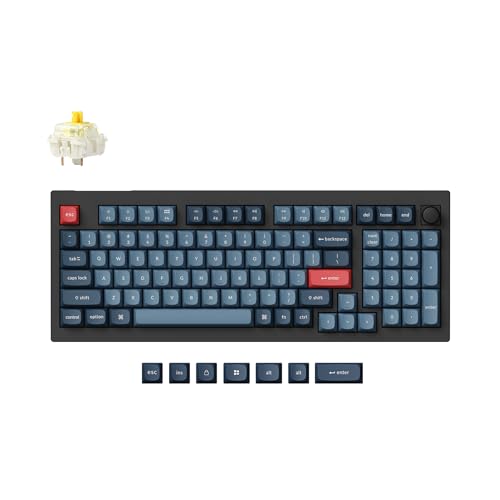
- Best for: Buyers who want a customisable 96% board for daily office work across Mac and Windows machines.
- Layout: 96% with number pad
- Connectivity: 2.4 GHz, Bluetooth 5.1 and USB-C wired
- Switches: Hot-swappable Gateron Jupiter Banana
- Programming: QMK, via Keychron Launcher

- Best for: Gamers who want a compact board with a number pad, linear switches and three connection routes.
- Layout: 96% full-size with number pad
- Connectivity: Tri-mode, Bluetooth, 2.4 GHz ROG SpeedNova and USB wired
- Switches: Hot-swappable, pre-lubed ROG NX Snow linear
- Keycaps: PBT, with RGB lighting

- Best for: Buyers who want a straightforward 96% board with tactile switches for a Mac or Windows desk.
- Layout: 96%, 100 keys
- Connectivity: Bluetooth 5.1 and wired USB
- Switches: Keychron Super Brown
- Backlight: White LED
All 5 Picks at a Glance
| Product | Specs | Action |
|---|---|---|
| Keychron V5 Max |
| Check price on Amazon |
| ASUS ROG Strix Scope II 96 Wireless |
| Check price on Amazon |
| Keychron K4 Version 2 |
| Check price on Amazon |
 RK ROYAL KLUDGE RK96 |
| Check price on Amazon |
 EPOMAKER TH99 |
| Check price on Amazon |
Our Top Picks
- ASUS ROG Strix Scope II 96 Wireless MechanicalSnow Linear14.84 x 5.16 x 1.57 inches2.78 poundsCheck on Amazon
The real decision here is not whether to shrink your keyboard, but what you refuse to give up while shrinking it. A compact full keyboard in the 96%, or 1800-compact, sense keeps a physical number pad, a function row and arrow keys, then pulls those clusters tight against the main block so the case ends up noticeably narrower than a standard full-size board. Nothing moves to a layer, and your mouse gains room on the right.
This guide is for spreadsheet users, data-entry workers, programmers and players who type numbers daily but sit at desks where a full-width board crowds the mouse. Every pick below was chosen from its Amazon listing name and specifications, and each listing states the 96% or 1800-compact layout for the exact variant shown, so check that layout line before ordering.
Quick Picks
As an Amazon Associate we earn from qualifying purchases
| Product | Best for | Key spec from title |
|---|---|---|
| Keychron V5 Max | Customisable everyday work with a number pad | 96% layout with number pad, 2.4 GHz and Bluetooth 5.1 |
| ASUS ROG Strix Scope II 96 Wireless | Gaming desks that still enter numbers | 96% full-size, tri-mode connectivity, ROG NX Snow switches |
| Keychron K4 Version 2 | A proven 96% board for Mac and Windows desks | 96% layout, 100 keys, Bluetooth 5.1 and wired USB |
| RK ROYAL KLUDGE RK96 | Wireless number entry with a bundled wrist rest | 96 keys, triple mode BT5.0, 2.4G and USB-C |
| EPOMAKER TH99 | A gasket-mounted board with a large battery | 96% layout, 8000mAh battery, tri-mode wireless |
How to Choose
Confirm the layout really keeps every cluster
Start by counting clusters, not percentages printed in marketing copy. A genuine 96% or 1800-compact board carries four things as physical keys: the main alphanumeric block, a function row, an arrow cluster and a full number pad. Some boards sold as compact quietly drop the pad or fold navigation keys into a layer, which changes daily work completely. Open the listing photos and find the pad on the right edge, then check where Insert, Delete and Page Up landed, because those keys often move into the tightened navigation column and can sit one position away from where your fingers expect them.
Decide how the compressed right side will feel
Squeezing a full layout into a shorter case means the arrow keys, navigation keys and number pad touch each other with little or no gap between clusters. Many people adapt within days, while others keep hitting the neighbouring key during fast data entry, especially around the shortened zero key found on several 96% designs. If your work is mostly number entry, look for listings that show offset arrow keys or a full-width zero. If you mostly type prose and only visit the pad for occasional figures, the tighter spacing rarely matters after the first week.
Match the connection set to your machines
Most boards in this class offer three routes: a 2.4 GHz receiver, Bluetooth and a wired USB-C cable. The receiver suits a gaming PC or a work laptop where low-latency wireless matters, Bluetooth handles a second laptop, tablet or phone, and the cable covers charging and firmware updates. Check how many Bluetooth devices the listing says the board remembers, because switching between a work laptop and a personal machine is painless on a three-device board and annoying on a single-pairing one. Also confirm the cable connection type, since a detachable USB-C lead is far easier to replace than a fixed one.
Pick switches and keycaps you can live with
Switch choice shapes noise and finger fatigue more than the case does. Linear switches such as the ROG NX Snow travel smoothly and suit shared rooms, tactile switches give a bump you can feel during long entry sessions, and hot-swappable sockets let you change that decision later without buying another board. Keycap material matters over years rather than weeks: PBT caps resist shine and keep legends readable, while basic caps can polish smooth under heavy use. If you type in low light, confirm whether the backlight shines through the legends or only glows around the keys.
The 5 Best Options
Keychron V5 Max
- Best for: Buyers who want a customisable 96% board for daily office work across Mac and Windows machines.
- Layout: 96% with number pad
- Connectivity: 2.4 GHz, Bluetooth 5.1 and USB-C wired
- Switches: Hot-swappable Gateron Jupiter Banana
- Programming: QMK, via Keychron Launcher
Buyers who want a customisable 96% board for daily office work across Mac and Windows machines.
The compressed number pad uses a shortened zero key, so heavy spreadsheet users should study the listing photos before ordering.
The V5 Max is the easiest recommendation for a mixed work desk because it pairs the 96% layout with proper custom-keyboard features. QMK programming through the Keychron Launcher lets you remap the tightened right-side keys until the compressed navigation column matches your habits, and the gasket mount softens the bottom-out feel during long sessions. Hot-swappable Gateron Jupiter Banana switches give a tactile response that suits data entry, while the Mac and Windows support covers households and offices that split time between both systems.
ASUS ROG Strix Scope II 96 Wireless
- Best for: Gamers who want a compact board with a number pad, linear switches and three connection routes.
- Layout: 96% full-size with number pad
- Connectivity: Tri-mode, Bluetooth, 2.4 GHz ROG SpeedNova and USB wired
- Switches: Hot-swappable, pre-lubed ROG NX Snow linear
- Keycaps: PBT, with RGB lighting
Gamers who want a compact board with a number pad, linear switches and three connection routes.
At 1225 g this is a desk-bound board rather than one to carry between rooms or offices.
ASUS built this board for players who refuse to surrender the number pad when they move to a smaller gaming desk. The listing describes a 96% full-size layout that keeps the pad while staying close to tenkeyless width, and the pre-lubed ROG NX Snow linear switches are hot-swappable, so the feel can change later. Tri-mode connectivity covers a gaming PC on the fast wireless link, a laptop over Bluetooth and a wired fallback, and the PBT keycaps should hold their texture through long seasons of play and work.
Keychron K4 Version 2
- Best for: Buyers who want a straightforward 96% board with tactile switches for a Mac or Windows desk.
- Layout: 96%, 100 keys
- Connectivity: Bluetooth 5.1 and wired USB
- Switches: Keychron Super Brown
- Backlight: White LED
Buyers who want a straightforward 96% board with tactile switches for a Mac or Windows desk.
There is no 2.4 GHz receiver in this listing, so a low-latency wireless link for gaming is not part of the package.
The K4 takes a simpler route to the same layout idea. Its listing states a 96% layout with 100 keys, so the number pad, function row and arrows all remain physical, and the Keychron Super Brown switches give a tactile bump without the programming depth of the newer Max models. Bluetooth 5.1 and wired USB cover most two-machine desks, and the white backlight keeps legends visible in a dim room without colour effects. For buyers who want the compact full layout and little else to configure, that restraint is the appeal.
RK ROYAL KLUDGE RK96
- Best for: Number-entry users who want wireless freedom, offset arrows and a wrist rest included in the box.
- Layout: 96 keys with number pad and offset arrow keys
- Connectivity: Triple mode, Bluetooth 5.0, 2.4 GHz and USB-C
- Switches: Hot-swappable
- Backlight: Blue backlight on this variant
Number-entry users who want wireless freedom, offset arrows and a wrist rest included in the box.
Backlight colour and switch type vary by variant, so confirm the exact option selected matches the listing title before ordering.
The RK96 leans into comfort and convenience. The listing describes 96 keys with a full number pad and offset arrow keys, a layout detail that helps fingers find the arrows by touch. Triple-mode connectivity spans Bluetooth 5.0, a 2.4 GHz receiver and USB-C, hot-swappable sockets allow later switch changes, and the magnetic wrist rest in the box supports the palms during long entry sessions. Software support adds remapping for buyers who want to move the navigation keys that the compact frame has squeezed together on the right side.
EPOMAKER TH99
- Best for: Shared-desk and home-office users who want a gasket-mounted 96% board with long gaps between charges.
- Layout: 96% with number pad
- Battery: 8000mAh
- Connectivity: Tri-mode wireless and wired
- Switches: Hot-swappable
Shared-desk and home-office users who want a gasket-mounted 96% board with long gaps between charges.
This ASIN is the Blue and White variant, so check the colourway and switch option shown on the listing before ordering.
The TH99 suits buyers who like a softer, quieter-feeling board for shared spaces. The listing presents a 96% layout with a number pad, a gasket structure and hot-swappable switches, plus an 8000mAh battery that reduces charging stops for wireless users. Tri-mode connectivity covers a PC, a Mac and a tablet without cable swaps, and the RGB backlight with PBT keycaps keeps the board readable and durable through daily work. In its Blue and White finish it also brings some colour to desks that are tired of plain black hardware.
Which One Fits Your Situation
You enter figures all day at a small desk
Choose the Keychron V5 Max or the RK96. Both keep a full number pad in the tighter frame, and the RK96 adds offset arrows and a wrist rest that help during repetitive entry. The V5 Max answers with remapping, so you can move any key the compression displaced. Either board frees mouse room that a standard full-size case would take, which matters when a second monitor already crowds the desk.
You game first but still need the pad
Take the ASUS ROG Strix Scope II 96 Wireless. Its linear ROG NX Snow switches, fast 2.4 GHz link and compact 96% frame are built for play, while the retained number pad covers game bindings, streaming tools and the occasional spreadsheet. The wired mode is there for sessions where you want the simplest possible connection, and Bluetooth handles a second machine without another keyboard.
You split the week between Mac and Windows
The Keychron V5 Max and the Keychron K4 Version 2 both list Mac and Windows support, so the choice comes down to features. Pick the V5 Max for a 2.4 GHz receiver, remapping and PBT keycaps, or the K4 Version 2 for a simpler Bluetooth and wired setup with a white backlight. Check the listing for the system toggle and the extra keycaps your operating system needs before ordering either board.
You share a desk and type for long stretches
Look at the EPOMAKER TH99. The gasket structure and large battery suit a home office where the board stays wireless for weeks of mixed work, and the number pad remains available for household budgets and admin tasks. If palm support matters more than mounting style, the RK96 and its included magnetic wrist rest make the stronger case instead.
Common Mistakes
- Assuming every board labelled compact keeps the number pad, when many 75% and tenkeyless models remove it entirely.
- Ignoring the shortened zero key and merged navigation column on 96% layouts, then blaming the switches for early typing errors.
- Buying a Bluetooth-only board for a gaming PC and missing the lower-latency 2.4 GHz receiver option listed on rival models.
- Ordering the wrong variant, because switch type, backlight colour and colourway all change between options under one listing.
- Measuring only the desk width and forgetting that the wrist rest and cable route also need clear space in front of the board.
Frequently Asked Questions
What does a 96% or 1800-compact layout actually keep?
It keeps nearly everything a full-size board offers: the main typing block, a function row, arrow keys, navigation keys and a full number pad. The difference is spacing. Clusters sit tight against each other with the gaps removed, so the case is shorter while every function remains a physical key rather than a layer combination.
Will a compact full keyboard feel cramped to type on?
The letter keys keep standard spacing, so ordinary typing feels familiar from the first session. The adjustment lives on the right side, where arrows, navigation keys and the number pad sit closer together and the zero key is often narrower. Most people settle within a week, although very fast number entry can take a little longer to become automatic again.
Is a 2.4 GHz receiver better than Bluetooth for these boards?
For gaming and fast-paced work, the 2.4 GHz receiver generally gives the more responsive wireless link, and several listings state higher polling on that route. Bluetooth earns its place when you switch between a laptop, tablet and phone, because one board can remember several paired devices. Many buyers simply use the receiver at the main desk and Bluetooth everywhere else.
Can I change the switches on a 96% keyboard later?
You can on any model whose listing states hot-swappable sockets, which covers most boards in this guide. The switches pull out and replacements press in without soldering, letting you move from linear to tactile or replace a single faulty switch. Confirm the socket type and pin count in the listing if you already own spare switches you plan to reuse.
FAQ
What does a 96% or 1800-compact layout actually keep?
Will a compact full keyboard feel cramped to type on?
Is a 2.4 GHz receiver better than Bluetooth for these boards?
Can I change the switches on a 96% keyboard later?
More from Amazon
Programs that pair well with the guide above. Offers and eligibility are set by Amazon and may change.
Free shipping on eligible items, Prime Video and more. Eligible new members can start with a free trial.
Start a Prime free trialAd-free music streaming. Eligible new subscribers can start with a free trial.
Try Music Unlimited freeA Prime membership for ages 18-24 with a trial period. Eligibility is set by Amazon.
See Prime for Young AdultsAudiobooks and podcasts to listen to on the go. Eligible new members can start with a free trial.
Try Audible freeAs an Amazon Associate we earn from qualifying purchases.