Our Short List of 3

- Weight: 60 grams
- Dimensions: 125 x 63.5 x 40 millimeters
- Sensor: HERO 2, up to 44,000 DPI, 888 IPS
- Polling rate: up to 8,000 Hz wireless

- Weight: 58 grams
- Dimensions: 126.5 x 66.3 x 37.8 millimeters
- Sensor: Focus Pro 30K Optical Sensor, up to 30,000 DPI, 70 G
- Polling rate: 1,000 Hz over HyperSpeed Wireless

- Weight: 99 grams with battery installed
- Dimensions: 116.6 x 62.15 x 38.2 millimeters
- Sensor: HERO, up to 12,000 DPI, 400 IPS
- Polling rate: 1,000 Hz over LIGHTSPEED wireless
All 3 Picks at a Glance
| Product | Specs | Action |
|---|---|---|
| 1. Logitech G PRO X Superlight 2 |
| Check price on Amazon |
| 3. Razer Viper V2 Pro |
| Check price on Amazon |
| 4. Logitech G305 LIGHTSPEED |
| Check price on Amazon |
Our Top Picks
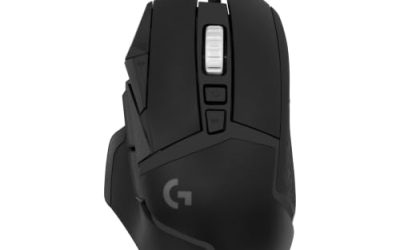
- Logitech G Pro X Superlight 2 Lightspeed WirelessClassic1.57 x 2.5 x 4.92 inches0.1 poundsCheck on Amazon
Pros & cons
- 95-hour battery life reduces how often you need to charge
- 60-gram weight suits fast, low-effort mouse movement
- HERO 2 sensor tracks up to 44,000 DPI with no smoothing
- POWERPLAY wireless charging pad is sold separately
- Premium features add a more complex setup than basic mice
Pros & cons
- Up to 250 hours of play on a single AA battery
- Lightweight 3.4-ounce body aids fast, precise movement
- Built-in receiver storage keeps the dongle from getting lost
- Relies on a AA battery rather than a built-in rechargeable cell
- Endurance mode trade-off needed to stretch battery life further
Fingertip grip is the lightest touch a player can use on a mouse. Only the tips of the fingers rest on the buttons, the palm floats above the shell, and every small movement comes from the fingers and wrist. When the mouse fits, that style gives fast, precise aim with very little effort. When it does not fit, the same style turns into strain, missed flicks, and a hand that tires before the match ends.
Most gaming mice are built for palm grip first: long, tall, and shaped to fill the hand. A fingertip player does not need that bulk. What a fingertip player needs is a short, low shell that the fingers can steer without the palm getting in the way, a weight light enough to lift and reposition without dragging, and a sensor that tracks cleanly at high speed.
This guide covers four gaming mice that suit fingertip grip: small, light mice with shapes that work when only the fingertips touch the shell. The picks range from flagship wireless mice built for competitive play to a compact, long-running wireless mouse that costs far less than the flagships. Use the buying guide below to match a mouse to your hand size and play style.
How to Tell If You Use Fingertip Grip
Before buying, confirm that fingertip grip is actually how you play. Sit at your desk the way you normally play, rest your hand on your current mouse, and look at where your hand makes contact.
In fingertip grip, only the fingertips touch the mouse. The index and middle fingers rest on the left and right buttons near their tips, the thumb and ring finger brace the sides, and the palm hovers above the shell without touching it. The fingers stay fairly straight, with a slight curl, and the wrist does most of the sweeping while the fingers handle fine adjustments.
That is different from claw grip, where the palm rests on the rear of the mouse and the fingers arch high over the buttons, and from palm grip, where the whole hand lies flat across the shell. If your palm touches the mouse at all, you are probably using claw grip, and a mouse built for claw grip will fit you better.
Hand size matters as much as grip style. A large hand can use a slightly longer mouse, because the fingers still reach past the shell without the palm landing on it. A small hand needs a shorter shell, because a long mouse pushes the palm onto the back of the shell and turns fingertip grip into an awkward half-palm hold. Measure your hand from the base of the palm to the tip of the middle finger: under 17 centimeters is small, 17 to 19 is medium, and over 19 is large.
What to Look for in a Fingertip Grip Mouse
Shape: Low, Narrow, and Symmetrical
Shape is the first thing to get right. A fingertip mouse should have a low profile, with no tall hump pressing into the palm, and a narrow waist that the thumb and ring finger can grip from the sides. Symmetrical shells work well because they do not force the hand into a right-handed curve. The mouse should feel like a small object the fingers steer, not a rest the hand sits on. Avoid a high rear hump, a wide ergonomic bulge on the right side, or a long tail that extends past the fingers. Those features are built for palm grip: they push the palm onto the shell, add drag during fast swipes, and make the mouse harder to lift for a quick reposition.
Size: Short Shells Suit Fingertip Hands
Length is the most useful size number for a fingertip player. Most fingertip-friendly mice measure between 115 and 128 millimeters long. Shorter shells suit small hands and aggressive fingertip styles, where the fingers do most of the aiming. Longer shells in that range suit medium and large hands, where the fingers need more room to spread out. A shell around 60 to 66 millimeters wide gives the thumb and ring finger a solid side grip without forcing the fingers apart. Height should stay low, around 38 to 40 millimeters, so the palm can float above the shell without brushing it during downward swipes.
Weight: Light Makes Fingertip Control Easier
Weight is the second thing to get right. Fingertip grip moves the mouse with the fingers, and the fingers are weaker than the arm. A mouse under 60 grams feels almost weightless and responds to the smallest finger movements. A mouse between 60 and 80 grams still works well for most fingertip players. A mouse over 90 grams can work if the shell is small and the balance is centered, but it asks more of the fingers during long sessions. Balance matters as much as total weight: a front-heavy mouse feels sluggish when the fingers lift it, while a mouse with its weight centered under the sensor feels neutral and predictable.
Sensor and Polling: Precision Without Smoothing
Every pick in this guide uses a modern optical sensor with a high maximum sensitivity and no smoothing or acceleration at normal settings. For fingertip play, look for a sensor rated to at least 12,000 DPI, a tracking speed of at least 400 inches per second, and a maximum acceleration of at least 40 G. Those numbers cover fast flicks in competitive shooters without the cursor skipping or lagging. Polling rate is the other number to check. A rate of 1,000 Hz means the mouse reports its position one thousand times per second, which is enough for most players. An 8,000 Hz rate reports eight thousand times per second and gives a small edge in fast, low-latency play, at the cost of shorter battery life.
The 4 Best Gaming Mice for Fingertip Grip
1. Logitech G PRO X Superlight 2
- Weight: 60 grams
- Dimensions: 125 x 63.5 x 40 millimeters
- Sensor: HERO 2, up to 44,000 DPI, 888 IPS
- Polling rate: up to 8,000 Hz wireless
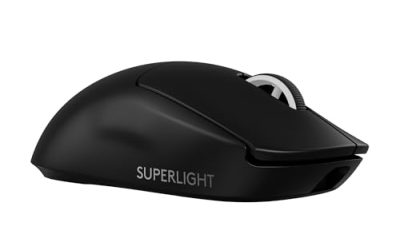
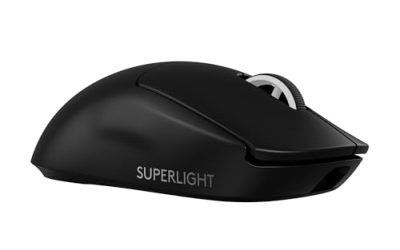
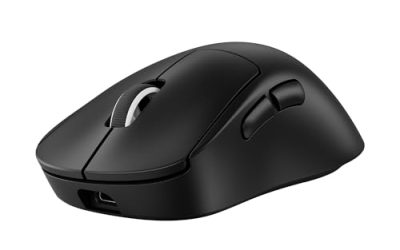
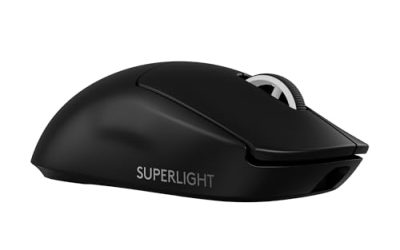
The Logitech G PRO X Superlight 2 is the safest fingertip pick in this guide. Its symmetrical shell measures 125 millimeters long, 63.5 millimeters wide, and 40 millimeters high, which places it in the middle of the fingertip range. The shell is low and narrow enough for the palm to float above it, and the shape suits small, medium, and large hands. At 60 grams, it is light enough for the fingers to steer without effort, and the weight sits centered under the sensor, so the mouse feels neutral during fast flicks and lifts.
The HERO 2 sensor tracks up to 44,000 DPI with a tracking speed of 888 inches per second, which covers the fastest flicks without skipping. The report rate reaches 8,000 Hz over the LIGHTSPEED wireless connection, and the LIGHTFORCE hybrid switches give a crisp click with a long lifespan. Battery life is rated at up to 95 hours, charging runs over USB-C, and the mouse supports POWERPLAY wireless charging for players who want to skip cables entirely. The five programmable buttons keep the layout simple for fingertip hands.
This is the pick for a fingertip player who wants one mouse that does everything well. The only real trade-off is the simple button layout.
2. Razer Viper V3 Pro
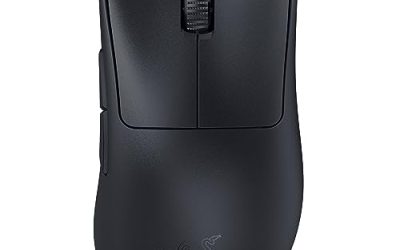
The Razer Viper V3 Pro is the lightest flagship pick in this guide, and the one built most clearly for fingertip and claw players. The black model weighs 54 grams, and the symmetrical shell measures 127.1 millimeters long, 63.9 millimeters wide, and 39.9 millimeters high. The low profile keeps the palm clear of the shell, and the narrow waist gives the thumb and ring finger a firm side grip.
The Focus Pro 35K Optical Sensor Gen-2 tracks up to 35,000 DPI, with a tracking speed of 750 inches per second and up to 70 G of acceleration. The included HyperPolling Wireless Dongle pushes the polling rate to 8,000 Hz, and the Gen-3 optical switches give a fast, clean click with no double-clicking. Battery life is rated at up to 95 hours at a 1,000 Hz polling rate, and it drops when the polling rate rises. The mouse has eight programmable buttons, including a DPI button underneath, and it comes with grip tape in the box for players who want extra hold on the sides.
This is the pick for a fingertip player who competes in fast shooters and wants the lightest possible mouse with the fastest sensor. The trade-off is battery life at the highest polling rate.
- Weight: 54 grams (black model)
- Dimensions: 127.1 x 63.9 x 39.9 millimeters
- Sensor: Focus Pro 35K Optical Sensor Gen-2, up to 35,000 DPI, 750 IPS, 70 G
- Polling rate: up to 8,000 Hz with included HyperPolling Wireless Dongle
- Buttons: 8 programmable buttons
- Battery: up to 95 hours at 1,000 Hz polling
- Model number: RZ01-05120100-R3U1
- View it on Amazon: https://www.amazon.com/s?k=Gaming%20Mouse%20for%20Fingertip%20Grip
3. Razer Viper V2 Pro
- Weight: 58 grams
- Dimensions: 126.5 x 66.3 x 37.8 millimeters
- Sensor: Focus Pro 30K Optical Sensor, up to 30,000 DPI, 70 G
- Polling rate: 1,000 Hz over HyperSpeed Wireless
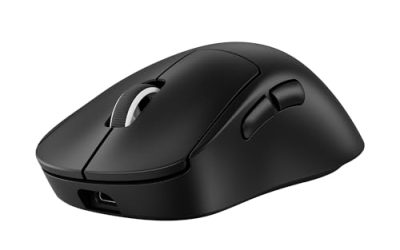
The Razer Viper V2 Pro is the older sibling of the Viper V3 Pro, and it remains a strong fingertip pick. The shell measures 126.5 millimeters long, 66.3 millimeters wide, and 37.8 millimeters high, which makes it one of the lowest mice in this guide. That low height leaves more room for the palm to float above the shell. At 58 grams, it is only slightly heavier than the V3 Pro, and the weight is centered well enough that the difference is hard to feel in play.
The Focus Pro 30K Optical Sensor tracks up to 30,000 DPI with up to 70 G of acceleration, and it tracks cleanly on a wide range of surfaces, including glass. HyperSpeed Wireless keeps latency low, and the Gen-3 optical switches are rated for a 90-million-click lifespan with no double-clicking. Battery life is rated at up to 90 hours, and the mouse charges over USB-C. On-mouse DPI controls let the player switch between five DPI levels without opening software. The mouse has six buttons, five of which are programmable.
This is the pick for a fingertip player who wants flagship shape and sensor quality in a slightly simpler package, with a lower height that suits fingertip hands that found taller mice uncomfortable.
4. Logitech G305 LIGHTSPEED
- Weight: 99 grams with battery installed
- Dimensions: 116.6 x 62.15 x 38.2 millimeters
- Sensor: HERO, up to 12,000 DPI, 400 IPS
- Polling rate: 1,000 Hz over LIGHTSPEED wireless
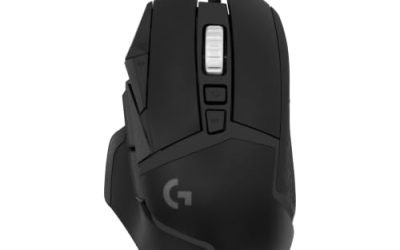
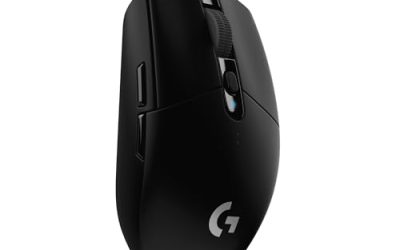
The Logitech G305 LIGHTSPEED is the compact, long-running pick in this guide, and the one that suits small hands best. The shell measures 116.6 millimeters long, 62.15 millimeters wide, and 38.2 millimeters high, which makes it the shortest mouse here. That short shell suits small fingertip hands, because the fingers can reach the buttons without the palm landing on the back of the mouse. At 99 grams with the battery installed, it is the heaviest pick here, but the compact shell and centered balance keep it easy to control, and the weight drops with a lighter lithium AA battery.
The HERO sensor tracks up to 12,000 DPI with a tracking speed of over 400 inches per second and no smoothing or acceleration. LIGHTSPEED wireless gives a 1 millisecond report rate, which matches wired mice for responsiveness. The mouse runs on a single AA battery, with a rated battery life of up to 250 hours in performance mode, and an endurance mode that extends it further. The receiver stores inside the mouse body, which makes the G305 easy to carry. It has six programmable buttons and onboard memory, so settings travel with the mouse between computers.
This is the pick for a fingertip player with small hands, or for a player who wants a reliable wireless mouse with a battery that lasts for months rather than days. The main trade-off is weight.
Comparison: Which Fingertip Mouse Fits Your Hand
| Mouse | Weight | Length | Sensor ceiling | Polling rate | Battery life |
|---|---|---|---|---|---|
| Logitech G PRO X Superlight 2 | 60 grams | 125 mm | 44,000 DPI | Up to 8,000 Hz | Up to 95 hours |
| Razer Viper V3 Pro | 54 grams | 127.1 mm | 35,000 DPI | Up to 8,000 Hz | Up to 95 hours at 1,000 Hz |
| Razer Viper V2 Pro | 58 grams | 126.5 mm | 30,000 DPI | 1,000 Hz | Up to 90 hours |
| Logitech G305 LIGHTSPEED | 99 grams | 116.6 mm | 12,000 DPI | 1,000 Hz | Up to 250 hours |
Small hands should begin with the G305, because its short shell keeps the palm clear of the mouse. Medium hands can use any of the four picks, and the choice comes down to weight and polling rate. Large hands should begin with the Viper V3 Pro or the Superlight 2, because their slightly longer shells give the fingers more room to spread. Fast-shooter players should favor the Viper V3 Pro or the Superlight 2 for the 8,000 Hz polling rate and the lightest weights. Players who want a low, flat shell should favor the Viper V2 Pro, and players who want the longest battery life should favor the G305.
Frequently Asked Questions
What is fingertip grip?
Fingertip grip is a way of holding a mouse where only the fingertips touch the shell. The palm floats above the mouse, the fingers stay fairly straight, and the wrist and fingers share the work of moving the cursor. It gives fast, precise control for small, quick adjustments.
What size mouse is best for fingertip grip?
A mouse between 115 and 128 millimeters long, 60 to 66 millimeters wide, and 38 to 40 millimeters high suits most fingertip players. Shorter shells suit small hands, and longer shells in that range suit medium and large hands. The key is that the shell should end before the palm.
How light should a fingertip grip mouse be?
A mouse under 60 grams suits fingertip grip well, because the fingers do the moving and tire faster than the arm. Mice between 60 and 80 grams still work well. A mouse over 90 grams can work if the shell is small and the weight is centered, but it asks more of the fingers during long sessions.
Is a symmetrical or ergonomic mouse better for fingertip grip?
A symmetrical mouse is usually better for fingertip grip, because it does not push the hand into a fixed curve. Ergonomic mice are shaped for palm grip, with a high hump and a right-side bulge that support the whole hand. A fingertip player does not need that support.
Does fingertip grip cause hand strain?
Any grip can cause strain if the mouse does not fit the hand or if the player grips too hard. Fingertip grip uses the small muscles of the fingers, so a mouse that is too heavy or too long can tire the hand. Choose a light mouse that fits your hand size and keep the grip relaxed.
Final Thoughts
Fingertip grip rewards a mouse that gets out of the way: short, low, light, and precise, with a sensor that tracks cleanly and a shape that lets the fingers do the steering.
The Logitech G PRO X Superlight 2 is the most balanced pick, with a middle-of-the-range shape, a 60 gram weight, and a sensor that covers any game. The Razer Viper V3 Pro is the lightest flagship pick, built for competitive fingertip players who want the fastest response. The Razer Viper V2 Pro is the lowest pick, with a flat shell that suits fingertip hands that found taller mice uncomfortable. The Logitech G305 LIGHTSPEED is the compact pick, with the shortest shell and the longest battery life, and the best fit for small hands.
Match the mouse to your hand size first, then to your games. A mouse that fits will feel natural within a few days.
Disclosure: As an Amazon Associate, we earn from qualifying purchases.
FAQ
What is fingertip grip?
What size mouse is best for fingertip grip?
How light should a fingertip grip mouse be?
Is a symmetrical or ergonomic mouse better for fingertip grip?
Does fingertip grip cause hand strain?
More from Amazon
Programs that pair well with the guide above. Offers and eligibility are set by Amazon and may change.
Free shipping on eligible items, Prime Video and more. Eligible new members can start with a free trial.
Start a Prime free trialAd-free music streaming. Eligible new subscribers can start with a free trial.
Try Music Unlimited freeA Prime membership for ages 18-24 with a trial period. Eligibility is set by Amazon.
See Prime for Young AdultsAudiobooks and podcasts to listen to on the go. Eligible new members can start with a free trial.
Try Audible freeAs an Amazon Associate we earn from qualifying purchases.