Our Short List of 3

All 5 Picks at a Glance
| Product | Specs | Action |
|---|---|---|
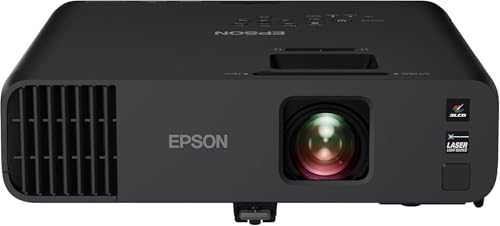 Epson Pro EX11000: The Laser Pick for All-Day Meeting Rooms | Check price on Amazon | |
| Epson Pro EX7280: The Bright Widescreen Pick for Slides and Spreadsheets | Check price on Amazon | |
 ViewSonic PA503HD: Full HD Text Clarity for Business and Education | Check price on Amazon | |
 ViewSonic PA503W: The Widescreen Value Pick for Everyday Decks | Check price on Amazon | |
 Epson EpiqVision Flex CO-FH02: The Portable Pick with Streaming Built In | Check price on Amazon |
Key takeaways
- Compare the best projectors for presentations on brightness, text clarity, keystone and connectivity, with five business picks for meeting rooms and classes.
As an Amazon Associate we earn from qualifying purchases.
A presentation projector has a different job from a movie projector. It does not get a dark room, a fixed screen and an audience that has settled in. It gets a meeting room with the blinds half open, a classroom with the ceiling lights on, a laptop that was connected thirty seconds before the meeting started, and slides full of small text, spreadsheets and charts that have to stay readable from the back row. The specifications that decide success are therefore practical ones: real brightness measured to a standard, native resolution high enough for fine text, keystone correction and zoom that forgive imperfect placement, connections that match the laptops people actually carry, and a built-in speaker loud enough that nobody has to pass a Bluetooth speaker around the table.
The five projectors below were chosen on those meeting-room criteria, and they divide into clear roles. One is a laser model built for rooms used all day, where lamp changes are a maintenance headache. One is a bright widescreen lamp model aimed at slides and spreadsheets. Two are high-brightness DLP models from the same business family, split by resolution so buyers can choose between widescreen convenience and Full HD text clarity. The last is a portable Full HD model with streaming built in, for presenters who move between rooms. None is a pocket projector or a home cinema machine relabelled for work: every pick is a mains-powered business or education projector with the brightness a lit room demands.
How to Choose a Projector for Presentations
Brightness is the first specification, and the standard matters. Meeting rooms and classrooms are lit spaces, so a presentation projector needs output in the region of three thousand lumens or more, measured honestly. Look for ANSI lumens, or for Epson’s colour and white brightness figures, which are measured to the IDMS and ISO standards and published as two separate numbers. That split matters for presentations specifically: a projector can light a white slide brightly while rendering a coloured chart much more dimly, which is exactly the content a business audience stares at. Equal colour and white ratings mean the pie chart is as bright as the title slide behind it. Ignore unqualified lumen claims with five-figure numbers; they are not measured to a comparable standard.
Native resolution decides whether text survives. Slides are mostly text, and text exposes resolution faster than video does. WXGA at 1280 by 800 matches the widescreen shape of most laptops and is genuinely serviceable for headline slides, large charts and video calls. Full HD at 1920 by 1080 is the safer choice when the content is spreadsheets, detailed diagrams, code, design work or small print that people at the back must actually read. What matters is the native resolution of the panel or chip, not the maximum input signal the projector can accept and scale down.
Keystone correction and zoom are what make setup fast. Presentation projectors rarely sit perfectly square to the screen. Vertical keystone correction straightens a picture thrown from a table that sits too low, a horizontal slider or four-corner adjustment fixes an off-centre position, and even a modest optical zoom range lets the presenter fill the screen without moving furniture. Automatic vertical keystone, found on several picks here, removes the most common fiddling from the start of every meeting.
Connectivity should match the room, not the brochure. Dual HDMI inputs let a fixed room PC and a guest laptop stay connected at once. A powered USB port can run a streaming stick or wireless dongle without hunting for another outlet. Wireless screen mirroring, whether built in or through the manufacturer’s app, is what presenters increasingly expect when they walk in with their own device, and it is worth confirming how each model handles it rather than assuming. Legacy VGA still appears in older installed rooms, so buyers replacing an ageing unit should check what the wall plate actually offers.
The built-in speaker is a meeting feature, not a luxury. Presentation audio is mostly voices: a video clip inside a deck, a remote colleague on a hybrid call, a training recording. A small speaker handles speech in a huddle room, while larger rooms and video-heavy use call for the stronger speakers found on the bigger picks here, or an external speaker connected through the audio output. Judge the speaker against the size of the room it has to fill, not against a home cinema standard it was never aiming at.
Lamp or laser is a total-cost decision. Lamp models cost less to buy, but a lamp dims with age and will eventually need replacing, with rated life varying sharply between full-power and eco modes. Laser models hold brightness more consistently, are rated for far longer light-source life and suit rooms used for hours every day, where maintenance visits are disruptive. Neither answer is wrong; the right one depends on how many hours a week the room is actually used.
Epson Pro EX11000: The Laser Pick for All-Day Meeting Rooms
The Pro EX11000 is the most complete presentation specification in this guide, built around the two things busy meeting rooms ask for: brightness that does not fade and setup that does not need attention. Epson rates it at 4,600 lumens of colour brightness and 4,600 lumens of white brightness, the highest figures here, delivered by a laser light source rather than a lamp. That combination means coloured charts and white slides are equally bright on day one, and the laser rating is aimed at keeping them that way across years of daily use without a lamp replacement schedule hanging over the facilities team.
The native resolution is Full HD 1080p through Epson’s 3-chip 3LCD design, so spreadsheet text and detailed diagrams stay crisp at the screen sizes meeting rooms actually use. Connectivity is the strongest in this guide: two HDMI ports, Miracast wireless mirroring built in for compatible laptops and mobile devices, and USB power for a streaming device. The built-in speaker is rated at 16 watts, which is in a different league from the small speakers on the lighter picks here and is genuinely usable for video clips and hybrid calls in a mid-sized room without extra hardware. A generous optical zoom range gives the installer or presenter real freedom over where the unit sits.
The trade-offs are size and commitment. At roughly nine and a half pounds this is a projector that gets installed or carried between nearby rooms on a cart, not one that travels in a laptop bag, and a laser model of this output is a considered purchase rather than an impulse buy for a single small office. Buyers with one lightly used huddle room will not need this much projector. Buyers equipping a room that hosts presentations from morning to evening, where brightness, wireless access and freedom from lamp changes all pay for themselves in avoided friction, are exactly who it is built for.
Epson Pro EX7280: The Bright Widescreen Pick for Slides and Spreadsheets
The Pro EX7280 is the straightforward answer for the most common presentation job: a bright, widescreen picture for slides, spreadsheets and video in a room where the lights stay on. Epson rates it at 4,000 lumens of colour brightness and 4,000 lumens of white brightness, matching the laser pick above for lit-room punch at the lamp end of the range, and the 3LCD design displays the full colour signal for every frame, so saturated chart colours hold up instead of washing toward grey.
Its native WXGA resolution of 1280 by 800 matches the 16:10 shape of many business laptops, which means a typical deck fills the screen without letterboxing or scaling surprises. Setup help is well judged for a shared room: a 1.2x optical zoom, automatic vertical keystone correction and a horizontal keystone slider cover the usual table-too-low and projector-off-to-one-side problems, and the single HDMI input accepts the streaming sticks and adapters presenters commonly carry. The built-in speaker is a modest 2-watt unit, fine for speech and short clips in a small or mid-sized room, with external audio the sensible upgrade for larger spaces.
Two honest notes belong with this pick. First, WXGA is a presentation resolution, not a detail resolution: buyers whose decks are dense spreadsheets or fine technical drawings should step up to one of the Full HD models in this guide. Second, Epson’s own product page currently marks this model as discontinued even though the listing remains widely referenced, so anyone buying should confirm on the live listing that the unit offered is the model described, and weigh that status if long-term manufacturer support matters to their organisation. As a bright, simple, lights-on slide machine, it remains a coherent pick while that listing status is checked.
ViewSonic PA503HD: Full HD Text Clarity for Business and Education
The PA503HD brings Full HD resolution to the value end of the business market, and for presentation work that resolution is its headline argument. Its native 1920 by 1080 DLP image keeps small text, spreadsheet grids and diagram labels sharp in a way widescreen-but-lower-resolution models cannot quite match, while the rated 4,000 ANSI lumens and high native contrast from its DMD chip give that detail enough brightness to survive a lit classroom or meeting room.
The practical details suit shared spaces. Dual HDMI inputs let two sources stay plugged in, a USB-A port can power a wireless HDMI dongle or streaming device so the presenter is not searching for a spare outlet, and the 1.1x optical zoom with vertical keystone correction handles the standard imperfect table placement. ViewSonic quotes lamp life stretching to 15,000 hours in its most economical mode, which softens the usual lamp-model ownership calculation for rooms that run the projector in eco settings, though buyers should remember that the longest lamp-life figures always belong to the dimmer modes rather than full-brightness use.
This is a lamp projector with no built-in smart platform and no wireless mirroring of its own, so the wireless story depends on the dongle or laptop connected to it, and sound for a large room is better handled by external speakers. Within those limits, it is the pick for buyers whose content is text-heavy and whose budget points at a lamp model: Full HD clarity, real rated brightness and dual inputs, without paying for laser hardware or streaming features the room may never use.
ViewSonic PA503W: The Widescreen Value Pick for Everyday Decks
The PA503W is the widescreen sibling in the same business family, and it exists for rooms whose content is the everyday deck rather than the dense document. Its WXGA resolution matches the shape of widescreen laptops, so standard slides, charts and video fill the image cleanly, and its high-brightness rating, listed at 4,000 lumens, is aimed at the same lights-on classrooms and offices as the rest of this guide. For a presenter whose material is headlines, bullet points, photographs and the occasional video clip, that combination covers the job completely.
Setup and connection follow the family pattern that makes these models popular as installed room projectors: HDMI input for the room PC or a guest laptop, vertical keystone correction for table placement, a 1.1x optical zoom for sizing the picture without moving the unit, and an eco mode that stretches lamp life for rooms willing to trade some brightness for longevity. It is a conventional, well-understood design with a long sales history, which is itself a kind of feature for organisations that value known quantities, available lamps and familiar controls over novelty.
Choosing between this model and the Full HD version above is a content question, not a quality question. If the back row must read spreadsheet figures, the sharper model earns its place. If the room shows standard decks and video to a general audience, the PA503W’s widescreen match and value positioning are the rational buy, and the money saved is better spent on a proper screen or room speakers. As with every lamp model here, confirm the exact specification revision on the live listing, because long-running models are sometimes listed with slightly different brightness figures by different sellers.
Epson EpiqVision Flex CO-FH02: The Portable Pick with Streaming Built In
The CO-FH02 answers a different presentation problem: the presenter who moves. At roughly five and three-quarter pounds with a compact, flat body, it is designed to travel between offices, classrooms and client sites, and it arrives with more of the presentation already solved than the installed-room models above. Its 3-chip 3LCD engine is rated at 3,000 lumens of both colour and white brightness with native Full HD 1080p resolution, so a travelling presenter still gets lights-on brightness and text sharp enough for documents, rather than the dim, soft image associated with portable projectors as a class.
The included Android TV streaming player is the convenience headline: presentations and video can be run from streaming apps and cast content without a laptop driving every session, and Bluetooth audio through that player pairs with an external speaker for rooms where the built-in 5-watt speaker is not enough. Automatic vertical keystone correction speeds up the unfamiliar-room setup routine, which is the moment portable presenters actually feel. For hybrid workers splitting time between home office, meeting rooms and training spaces, that combination of brightness, resolution and self-contained streaming is the point of the model.
The limits are placement and power. This is a tabletop projector that runs from mains power; there is no battery, and Epson’s own documentation for the model does not support ceiling or wall mounting, so it should not be bought as a permanent installed unit. Its brightness, while strong for a portable, is the lowest in this guide, so very large rooms and very large screens belong to the brighter picks above. Judged as what it is, a proper business-capable projector that fits in a bag, it has no weak point that its intended user will meet often.
Frequently Asked Questions
How many lumens does a presentation projector actually need? For a typical meeting room or classroom with normal lighting and a moderate screen size, a rating around 3,000 lumens or above, measured as ANSI lumens or as colour and white brightness, is the sensible floor, and the picks here range from that level upward. Larger screens, brighter rooms and windows without blinds all push the requirement up, which is why the brightest models in this guide sit well above the floor.
Is WXGA enough, or should presenters insist on Full HD? WXGA is enough for standard slide decks, large charts and video, and it matches the shape of many laptops exactly. Full HD earns its place when the audience must read small text, spreadsheet detail or technical diagrams from a distance. The honest test is the finest content the room regularly shows, viewed from its furthest seat.
Can these projectors handle wireless presenting? It varies by model, and the difference matters. The laser Epson in this guide includes Miracast mirroring, the portable Epson streams through its included Android TV player, and the ViewSonic models rely on a connected laptop or a powered wireless dongle in their HDMI and USB ports. Buyers for whom walking in and presenting without a cable is the whole point should choose on that basis rather than treating wireless as a universal feature.
Lamp or laser for a meeting room? Laser suits heavily used rooms: consistent brightness, long rated light-source life and no lamp changes. Lamp models cost less to buy and remain the value choice for rooms used a few hours a week, provided the organisation accepts eventual lamp replacement and uses eco modes sensibly. Count the room’s weekly hours before deciding, not just the purchase budget.
Do presentation projectors need a screen? A plain, light, matte wall works, but a proper screen returns noticeably better contrast and colour, especially in lit rooms where the image is already fighting ambient light. In a permanent room, a fixed screen is one of the highest-value upgrades available; for travelling presenters, a portable tripod screen serves the same purpose.
Conclusion
The right presentation projector is the one matched to the room and the content, not the one with the longest feature list. The Epson Pro EX11000 is the choice for busy, permanently used meeting rooms that want laser brightness, wireless mirroring and a speaker that needs no help. The Epson Pro EX7280 covers the classic lights-on slide and spreadsheet job in widescreen, subject to confirming its listing status. The ViewSonic PA503HD is the value route to Full HD text clarity, while its PA503W sibling serves everyday widescreen decks for less demanding content. The Epson CO-FH02 is the presenter’s travelling option, trading some brightness and installation flexibility for portability and built-in streaming. Whichever model fits, confirm the brightness rating, native resolution and included accessories on the live listing before purchase, because business projector listings and revisions change over time.
Disclosure
Disclosure: This article contains affiliate links. If you buy through those links, a commission may be earned at no additional cost to you. Product information was taken from the listings and manufacturer details available at the time of writing, and specifications should be confirmed on the live listing before purchase.
More from Amazon
Programs that pair well with the guide above. Offers and eligibility are set by Amazon and may change.
Free shipping on eligible items, Prime Video and more. Eligible new members can start with a free trial.
Start a Prime free trialAd-free music streaming. Eligible new subscribers can start with a free trial.
Try Music Unlimited freeA Prime membership for ages 18-24 with a trial period. Eligibility is set by Amazon.
See Prime for Young AdultsAudiobooks and podcasts to listen to on the go. Eligible new members can start with a free trial.
Try Audible freeAs an Amazon Associate we earn from qualifying purchases.