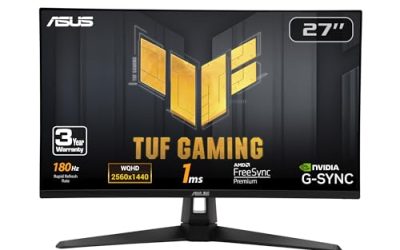
Our Short List of 3
All 4 Picks at a Glance
| Product | Specs | Action |
|---|---|---|
 1. LG UltraGear 27GP950-B — Best Overall 4K 120Hz Monitor | Check price on Amazon | |
 2. Gigabyte M28U — Best Value 4K 120Hz Monitor | Check price on Amazon | |
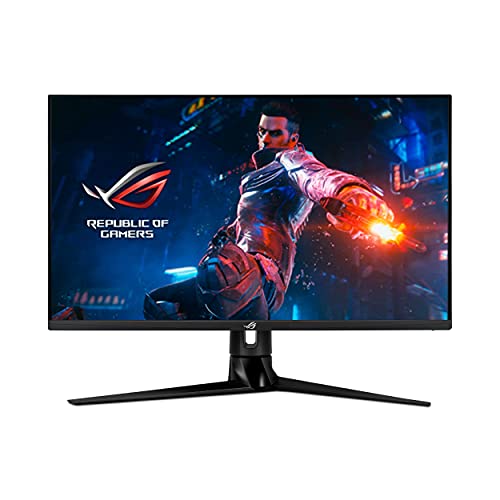 3. ASUS ROG Swift PG32UQ — Best 32-Inch 4K 120Hz Monitor | Check price on Amazon | |
 4. Samsung Odyssey Neo G7 — Best Curved 4K 120Hz Monitor | Check price on Amazon |
Key takeaways
- Find the best 4k 120hz monitors for smooth PC and console gaming, with HDMI 2.1 picks, panel advice, and setup tips to help you choose the right display.
The best 4k 120hz monitors deliver the sharpest picture most gamers will ever need together with the fluid motion that makes fast games feel responsive. A 4K panel packs four times the pixels of a 1080p display, so textures, distant enemies, and on-screen text all look crisp. A refresh rate of 120Hz or higher means the screen redraws twice as often as a standard 60Hz display, cutting motion blur and input lag in a way you can feel the moment you move the mouse or flick the camera. That combination used to demand a flagship budget, but 4K high-refresh panels have become far more attainable, and several excellent models now cover both PC and console play.
This guide explains what actually matters when you shop for one of these displays, from HDMI 2.1 bandwidth and panel type to the graphics hardware needed to drive all those pixels. It then compares four strong picks that cover different sizes, budgets, and priorities, so you can match a monitor to your desk, your console, and your games.
Why 4K at 120Hz Is Worth It
Resolution and refresh rate solve different problems, and a 4K 120Hz monitor solves both at once. The 3840 by 2160 resolution gives you enormous desktop space for work and a dense, detailed image in games. The 120Hz refresh rate keeps that image smooth when the action speeds up. Together they remove the old trade-off where you had to choose between a sharp picture and a fast one.
For console players, the appeal is direct. Modern consoles support 4K output at 120 frames per second in a growing list of titles, but only when the display has an HDMI 2.1 port with enough bandwidth. A monitor with HDMI 2.1 and variable refresh rate support lets a console run its performance modes the way the developers intended, with smoother frame pacing and less screen tearing.
For PC players, a 4K 120Hz panel is a long-term investment. Graphics cards keep getting faster, and a monitor that can already show 120 frames per second at 4K will not hold back your next GPU upgrade. It also doubles as an excellent productivity display, since the high pixel density keeps text razor sharp during long work sessions.
How to Choose a 4K 120Hz Monitor
Panel Type: IPS, VA, or OLED
Most 4K 120Hz monitors use IPS panels, which offer wide viewing angles, accurate colors, and fast pixel response times. IPS is the safest all-round choice for mixed gaming and work. VA panels deliver deeper blacks and stronger contrast, which suits dark, atmospheric games, but some VA models show smearing in fast motion. OLED panels offer near-instant response times and perfect blacks, though they cost more and need sensible care to avoid image retention. For most buyers, a good IPS panel is the right starting point.
Refresh Rate and Response Time
Look for a native refresh rate of at least 120Hz. Many of the best models run at 144Hz or 165Hz, which gives you headroom above the 120 frames per second target and smoother motion on PC. Response time matters too: a quoted 1ms grey-to-grey figure helps keep fast-moving objects sharp, though real-world performance depends on the overdrive implementation. Check independent reviews for measured motion clarity rather than trusting the headline number alone.
HDMI 2.1 and Variable Refresh Rate
If you plan to connect a console, HDMI 2.1 is essential for 4K at 120Hz. Older HDMI 2.0 ports cap 4K at 60Hz, no matter what the panel can do. For PC, DisplayPort 1.4 with Display Stream Compression handles 4K at high refresh rates comfortably. Variable refresh rate support, through FreeSync or G-Sync compatibility, keeps the picture tear-free when frame rates fluctuate, which they will in demanding 4K titles.
HDR and Color
HDR can transform the look of a game, but only if the monitor is bright enough to show it. Look for a DisplayHDR 600 rating or better for a meaningful HDR experience, along with wide color gamut coverage such as 90 percent or more of DCI-P3. A DisplayHDR 400 badge alone usually means modest peak brightness, so treat it as a bonus rather than a headline feature.
Size and Viewing Distance
A 27-inch 4K monitor gives you the highest pixel density and the sharpest image, which suits desks where you sit close to the screen. A 32-inch model is more immersive and easier to read at a normal viewing distance, though individual pixels become slightly more visible. Measure your desk depth before choosing: on a shallow desk, a 27-inch panel often feels more comfortable, while a deeper desk suits 32 inches well.
The GPU Question
Driving 4K at 120 frames per second is demanding. Even powerful graphics cards need help from upscaling technologies or reduced settings in the most demanding games. Before you buy, be honest about your hardware. A high-end current-generation card can push high frame rates in competitive and older titles at 4K, while story-driven games may run closer to 60 frames per second with settings tuned. A 4K 120Hz monitor still makes sense in that case, since variable refresh rate keeps those lower frame rates smooth and the panel is ready when you upgrade your GPU.
Top Picks
1. LG UltraGear 27GP950-B — Best Overall 4K 120Hz Monitor
The LG UltraGear 27GP950-B is a 27-inch 4K monitor built around a Nano IPS panel with a 144Hz refresh rate and a 1ms grey-to-grey response time. It is the most balanced pick in this guide: sharp enough for close-up desk use, fast enough for competitive play, and well equipped for consoles thanks to HDMI 2.1 with variable refresh rate up to 120Hz at 4K.
Color performance is a strength. The Nano IPS panel covers 98 percent of the DCI-P3 color space, so games look vivid without oversaturation, and the VESA DisplayHDR 600 rating means HDR highlights have real punch. The panel also supports an overclock to 160Hz through DisplayPort using Display Stream Compression, which gives PC players extra headroom.
At 27 inches, the pixel density is excellent, and text stays crisp even at 100 percent scaling. The stand offers height, tilt, and pivot adjustment, and the monitor works with VESA mounts if you prefer an arm. For a single display that handles PC gaming, console gaming, and daily work without compromise, this is the pick to beat.
2. Gigabyte M28U — Best Value 4K 120Hz Monitor
The Gigabyte M28U brings 4K high-refresh gaming within reach of a more modest budget. Its 28-inch SuperSpeed IPS panel runs at 144Hz with a 1ms response time, and it includes two HDMI 2.1 ports, so you can connect a PC and a console at full 4K 120Hz without swapping cables. A built-in KVM switch is a genuinely useful bonus, letting one keyboard and mouse control two connected computers.
Image quality is strong for the class. The panel covers 94 percent of DCI-P3, and while its HDR performance is more modest than the LG, with a DisplayHDR 400 rating, the picture stays clean and well balanced in SDR, which is how most games are still played. The 28-inch size sits in a sweet spot between the sharpness of a 27-inch display and the presence of a 32-inch one.
The M28U is the right choice if you want the full 4K 120Hz experience, including console support, without paying for flagship extras. It is also a sensible pick for a mixed-use desk, since the KVM and generous port selection make it easy to share between a gaming PC and a work laptop.
3. ASUS ROG Swift PG32UQ — Best 32-Inch 4K 120Hz Monitor
The ASUS ROG Swift PG32UQ is a 32-inch 4K monitor for players who want a bigger, more cinematic picture. Its IPS panel runs at 144Hz with a 1ms response time, and it supports DisplayHDR 600 with 98 percent DCI-P3 coverage, so HDR games look bright and colorful. HDMI 2.1 ports cover console play at 4K 120Hz, while DisplayPort with Display Stream Compression handles high-refresh PC gaming.
The larger screen makes a real difference in open-world and racing games, where the extra size adds immersion, and it is easier on the eyes during long sessions because interface text renders larger. ASUS includes its Extreme Low Motion Blur Sync technology, which combines variable refresh rate with backlight strobing for clearer motion, along with a color calibration report in the box.
This is the monitor to choose if your desk has the depth for a 32-inch display and you value immersion over maximum pixel density. It is also a strong option for creators who game, since the factory calibration and wide color gamut suit photo and video work as well.
4. Samsung Odyssey Neo G7 — Best Curved 4K 120Hz Monitor
The Samsung Odyssey Neo G7 takes a different approach: a 32-inch curved Mini-LED VA panel with a 165Hz refresh rate and a tight 1000R curve that wraps the image around your field of view. Quantum Matrix technology with 1,196 local dimming zones gives it outstanding contrast and a Quantum HDR 2000 rating, so bright highlights and deep shadows coexist in a way flat IPS panels cannot match.
For dark, atmospheric games, the Neo G7 is a standout. Blacks stay genuinely black, and the high peak brightness makes HDR scenes dramatic. The 165Hz refresh rate and 1ms response time keep motion smooth, and FreeSync Premium Pro plus G-Sync compatibility cover variable refresh rate on both PC and console. HDMI ports support 4K at 120Hz for console play.
The curve is a matter of taste, but at 32 inches with a 1000R radius it feels natural once you adjust, and it helps the edges of the screen stay at a consistent distance from your eyes. Choose this monitor if you play a lot of single-player and horror titles and want the most dramatic HDR picture in this guide.
Comparison Table
| Monitor | Size | Panel | Refresh Rate | HDMI 2.1 | HDR Rating | Best For |
|---|---|---|---|---|---|---|
| LG UltraGear 27GP950-B | 27 inches | Nano IPS | 144Hz | Yes | DisplayHDR 600 | Best overall balance |
| Gigabyte M28U | 28 inches | SuperSpeed IPS | 144Hz | Yes | DisplayHDR 400 | Best value |
| ASUS ROG Swift PG32UQ | 32 inches | IPS | 144Hz | Yes | DisplayHDR 600 | Best 32-inch flat panel |
| Samsung Odyssey Neo G7 | 32 inches | Curved Mini-LED VA | 165Hz | Yes | Quantum HDR 2000 | Best curved HDR picture |
Setting Up Your 4K 120Hz Monitor
Getting the full experience takes more than plugging the monitor in. On PC, use DisplayPort for the highest refresh rates, and check your graphics settings to confirm the display is actually running at 120Hz or above, since Windows sometimes defaults to 60Hz after a new display is connected. Enable variable refresh rate in both the monitor menu and your graphics driver so frame rate dips stay smooth.
On console, use the cable that came with the console or a certified Ultra High Speed HDMI cable, and enable 120Hz output in the console system settings. Then check the video output information screen to confirm the console reports 4K at 120Hz. Some games also need their performance mode selected in the game settings before they will run above 60 frames per second.
For color, most of these monitors look good out of the box, but switching to the sRGB or calibrated picture mode can improve accuracy for desktop work. If you play in a bright room, a small amount of bias lighting behind the monitor can reduce eye strain and improve perceived contrast.
FAQ
Do I need HDMI 2.1 for 4K 120Hz gaming?
Yes, for consoles and for any PC connection over HDMI. HDMI 2.1 provides the bandwidth needed for 4K resolution at 120Hz, while older HDMI 2.0 ports are limited to 4K at 60Hz. On PC, DisplayPort 1.4 with Display Stream Compression is an alternative that also supports 4K at high refresh rates. Every monitor in this guide includes HDMI 2.1, so console players are covered.
Can a mid-range graphics card run 4K at 120Hz?
It depends on the game. Competitive titles and older games can reach high frame rates at 4K on mid-range hardware, especially with upscaling enabled. Demanding story-driven games will usually run at lower frame rates, and that is fine: variable refresh rate keeps the picture smooth, and the monitor is ready for a future GPU upgrade. If your current card struggles at 4K, try upscaling technologies and slightly reduced settings before judging the monitor.
Is a 27-inch or 32-inch 4K monitor better?
A 27-inch 4K monitor has higher pixel density and the sharpest image, which suits close desk setups. A 32-inch monitor is more immersive and easier to read, which suits deeper desks and living-room-style setups. Both sizes work well for gaming; the deciding factors are your desk depth and whether you prefer sharpness or screen presence.
Does 120Hz make a difference over 60Hz?
Yes, and the difference is easy to notice. At 120Hz the screen updates twice as often, so motion looks smoother, camera pans show less blur, and the delay between your input and the on-screen response feels shorter. Once you have played at 120Hz, going back to 60Hz feels sluggish, particularly in fast-paced games.
Are these monitors good for work as well as gaming?
Yes. A 4K display gives you far more usable desktop space than a 1440p monitor, and the high pixel density keeps text sharp during long reading and writing sessions. The IPS models in this guide also have accurate colors, which helps with photo and video work. The curved Samsung model is more gaming-focused, but it still works well as a general-purpose display.
Conclusion
The best 4k 120hz monitors remove the old compromise between image quality and speed. For most buyers, the LG UltraGear 27GP950-B is the strongest all-round choice, pairing a sharp 27-inch Nano IPS panel with 144Hz, HDMI 2.1, and strong HDR. The Gigabyte M28U delivers the same core experience at a friendlier level of investment and adds a handy KVM switch. The ASUS ROG Swift PG32UQ is the pick for a larger, more immersive 32-inch flat panel, while the Samsung Odyssey Neo G7 offers the most dramatic HDR picture thanks to its curved Mini-LED design.
Whichever model fits your desk, check that your graphics card or console can drive it, use the right cable and port, and confirm the refresh rate in your system settings. Do that, and a 4K 120Hz monitor will make every game you play look sharper and feel smoother for years to come.
Disclosure: As an Amazon Associate, we earn from qualifying purchases.
FAQ
Do I need HDMI 2.1 for 4K 120Hz gaming?
Can a mid-range graphics card run 4K at 120Hz?
Is a 27-inch or 32-inch 4K monitor better?
Does 120Hz make a difference over 60Hz?
Are these monitors good for work as well as gaming?
More from Amazon
Programs that pair well with the guide above. Offers and eligibility are set by Amazon and may change.
Free shipping on eligible items, Prime Video and more. Eligible new members can start with a free trial.
Start a Prime free trialAd-free music streaming. Eligible new subscribers can start with a free trial.
Try Music Unlimited freeA Prime membership for ages 18-24 with a trial period. Eligibility is set by Amazon.
See Prime for Young AdultsAudiobooks and podcasts to listen to on the go. Eligible new members can start with a free trial.
Try Audible freeAs an Amazon Associate we earn from qualifying purchases.