Key takeaways
- Keyboards built for osu!: rapid trigger and adjustable actuation in compact 60 and 65 percent layouts, with verified listings from Razer, SteelSeries and DrunkDeer.
osu! is played on two keys more than any other input, and at higher difficulty levels those keys are pressed in streams and bursts where a few milliseconds decide whether a note registers cleanly. That is why the keyboards osu! players now choose look different from ordinary gaming boards: they use magnetic or analog optical switches whose actuation point can be set precisely, and rapid trigger behaviour that resets a key the moment it starts to rise instead of waiting for a fixed release point.


This guide covers three compact boards that meet those criteria on their listings: fast switch technology with adjustable actuation, rapid trigger support, a stated polling rate where the listing provides one, and a numpad-less layout that leaves room for a tablet or a wide mouse sweep. They span three approaches to the same problem, from a mainstream esports brand to a specialist rhythm-game favourite.
Quick Picks
As an Amazon Associate we earn from qualifying purchases.
| Product | Best for | Key spec from title |
|---|---|---|
| Razer Huntsman V3 Pro Mini | Analog optical switches with Snap Tap | 60 percent layout, Rapid Trigger, adjustable actuation |
| SteelSeries Apex Pro Mini Gen 3 | Magnetic switches with per-key presets | OmniPoint 3.0 HyperMagnetic, Rapid Trigger, Rapid Tap |
| DrunkDeer G65 | Rapid trigger tuned for rhythm games | 65 percent layout, 0.2 to 3.8mm actuation, 1000Hz polling |
How to Choose
Prioritise rapid trigger and adjustable actuation
These two features are the core of a modern osu! keyboard. Adjustable actuation lets you set how far a key travels before it registers, down to a fraction of a millimetre on the boards here, which shortens the press needed for fast streams. Rapid trigger goes further: the key resets as soon as it begins to move upward, so repeated taps and alternating patterns register without waiting for the key to return past a fixed point. For osu!, where the same two keys repeat hundreds of times per map, that behaviour is worth more than any lighting or macro feature on the box.
Choose the switch technology you understand
The three boards here use two families of switches. Analog optical switches, as in the Razer, read key position with light and offer very consistent actuation with features such as Snap Tap for prioritising the most recent input. Magnetic Hall effect switches, as in the SteelSeries and DrunkDeer, sense position with magnets and typically allow the finest actuation adjustments, sometimes in 0.1mm steps as the DrunkDeer listing states. Both approaches avoid the fixed contact point of a conventional mechanical switch. Neither is automatically better; what matters is that the actuation range and rapid trigger behaviour are stated on the listing and adjustable in the software.
Keep the layout compact and numpad-less
osu! players sit close to their keyboard, often with a graphics tablet or a mouse taking the space to the right. A 60 or 65 percent layout removes the number pad and navigation cluster, which keeps the two main keys centred in front of you and frees desk space for your other hand. The trade-off is real for everyday use: function keys and arrows sit behind a modifier layer, which slows down spreadsheet and editing work. If the same desk serves study or office tasks, weigh that compromise honestly, or plan to keep the compact board as a dedicated gaming keyboard.
Check polling rate and the details that survive daily play
Polling rate describes how often the keyboard reports to the computer; the DrunkDeer listing states 1000Hz, which is the standard figure for wired esports boards and entirely sufficient for rhythm play. Beyond the headline numbers, look at keycaps and build: PBT keycaps resist the shine and wear that constant tapping produces, and a detachable USB-C cable makes the board easy to move between a desk and events. Software matters as well, because actuation and rapid trigger settings live there; per-game or per-key presets, such as the SteelSeries listing describes, save re-tuning when you switch titles.
The 3 Best Options
1. Razer Huntsman V3 Pro Mini
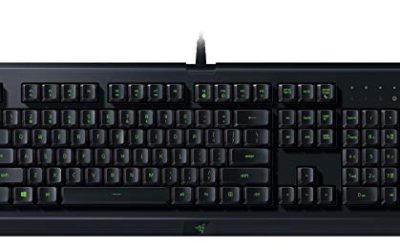
Razer’s entry is a 60 percent board built around its second-generation analog optical switches, and its listing leads with the features osu! players ask for: Rapid Trigger, adjustable actuation and Snap Tap, which prioritises the latest of two opposing inputs. Dual-purpose modifier keys help recover some of the keys the compact layout removes, and the doubleshot PBT keycaps are the right material for keys that will be struck constantly. It is the most mainstream option here, with the polish and software ecosystem that come with that, in a footprint that suits a tablet setup.
Specs
- Layout: 60 percent, numpad-less
- Switches: Razer Analog Optical Switches, second generation
- Features: Rapid Trigger, Snap Tap, adjustable actuation
- Keys: dual-purpose modifier keys
- Keycaps: doubleshot PBT
- Connection: wired
Best for: players who want analog optical switches and a polished software package from a major esports brand.
Watch out for: the 60 percent layout leans on modifier layers for arrows and function keys, which takes adjustment for everyday typing work.
ASIN: B0CG7C1NVP
2. SteelSeries Apex Pro Mini Gen 3
The Apex Pro Mini Gen 3 uses OmniPoint 3.0 HyperMagnetic switches, and its listing emphasises control: adjustable actuation, Rapid Trigger, Rapid Tap for clean alternating inputs, and a Protection Mode that guards against accidental presses on surrounding keys. Game-ready presets are a practical touch for players who move between osu! and other titles, because actuation settings can follow the game rather than being re-entered by hand. PBT keycaps and a detachable USB-C cable round out a specification that reads as deliberately aimed at competitive desks rather than general typing.
Specs
- Layout: 60 percent compact form factor
- Switches: OmniPoint 3.0 HyperMagnetic, adjustable actuation
- Features: Rapid Trigger, Rapid Tap, Protection Mode, game-ready presets
- Keycaps: PBT
- Connection: USB-C, detachable cable
- Model number: 64913
Best for: players who want magnetic switches with presets and protection against stray presses during intense maps.
Watch out for: the depth of the software settings is a strength that still requires time to configure well for your own tapping style.
ASIN: B0F11HCGST
3. DrunkDeer G65
DrunkDeer is a specialist name in rhythm-game circles, and the G65 listing is written for that audience: magnetic Hall effect switches with actuation adjustable from 0.2mm to 3.8mm in 0.1mm steps, rapid trigger, and a stated 1000Hz polling rate. The 65 percent layout keeps dedicated arrow keys, which many players prefer for menu navigation, while staying compact enough for a tablet beside it. The listing also describes a Last Win and Release dual trigger mode for prioritising the most recent press, a feature aimed squarely at alternating patterns in fast maps.
Specs
- Layout: 65 percent, 68 keys
- Switches: magnetic Hall effect switches
- Actuation: adjustable from 0.2mm to 3.8mm, in 0.1mm steps
- Features: Rapid Trigger, Last Win and Release dual trigger mode
- Polling rate: 1000Hz, as stated on the listing
- Keycaps: PBT
- Connection: wired USB
- Model number: G65
Best for: dedicated osu! players who want fine actuation control and a 65 percent layout with arrow keys kept.
Watch out for: it is a wired-only, single-purpose board from a smaller brand, so support and software are narrower than the major names above.
ASIN: B0CHVVWHKL
Which One Fits Your Situation
You play osu! with a graphics tablet
Choose the Razer Huntsman V3 Pro Mini or the SteelSeries Apex Pro Mini Gen 3. Both 60 percent boards leave the most room on the right side of the desk, and both give you rapid trigger with adjustable actuation for your two main keys. The Razer suits players who like Snap Tap behaviour; the SteelSeries suits players who want presets and Protection Mode.
You alternate keys in long streams
Choose the DrunkDeer G65. Its dual trigger mode is designed around last-press priority, and the 0.1mm actuation steps let you tune the exact point where each tap registers. Stream consistency is a tuning problem as much as a hardware one, and this board gives the finest controls of the three for solving it.
You also play other competitive games
Choose the SteelSeries Apex Pro Mini Gen 3. Its game-ready presets mean your osu! actuation settings do not have to be undone when you switch to a shooter or a MOBA, and Rapid Tap is useful well beyond rhythm games. It is the easiest of the three to justify as a single all-purpose competitive keyboard.
You are upgrading from a standard mechanical keyboard
Choose the DrunkDeer G65 if osu! is your main game, because the improvement in repeated-tap behaviour is the most direct. Choose the Razer if you want the gentler transition, with familiar brand software and dual-purpose keys softening the move to a 60 percent layout. Either way, expect a short adjustment period while your fingers learn the new actuation point.
Common Mistakes
- Buying a fast mechanical keyboard without rapid trigger, then wondering why streams still feel inconsistent.
- Setting actuation to the minimum on every key, which causes accidental presses from resting fingers.
- Choosing a full-size board and crowding out the tablet or mouse space the layout was meant to protect.
- Tuning actuation for one map difficulty and never revisiting it as your speed and accuracy improve.
- Ignoring keycap material, when the two main keys will wear smooth long before the rest of the board.
Frequently Asked Questions
Does rapid trigger actually help in osu!?
It addresses the exact action osu! repeats most: pressing the same keys again immediately. With rapid trigger, a key resets as soon as it starts to rise, so the next press registers without waiting for a full release to a fixed point. In streams and bursts that removes a small delay from every note, which is why the feature has become standard on keyboards aimed at rhythm and competitive players.
Is a 60 percent keyboard enough for osu!?
Yes, because the game is played on a small set of keys, and the compact layout keeps those keys centred while leaving room for a tablet or mouse. The compromise appears outside the game, where arrows and function keys sit behind a modifier layer. The DrunkDeer G65 in this guide keeps dedicated arrow keys in a 65 percent layout if that trade-off bothers you.
Should I set the lowest possible actuation point?
Not necessarily. A very shallow actuation point makes taps faster but also makes accidental presses more likely when your fingers rest on the keys between notes. Most players settle slightly above the minimum, where registration still feels immediate but resting contact stays safe. The adjustable ranges on these boards exist so you can find that point by experiment rather than by guesswork.
Can I use one of these keyboards for everyday typing too?
You can, and many players do, but the tuning that suits osu! is not the tuning that suits typing. Deeper actuation and rapid trigger disabled or softened usually feel better for long text work. Boards with presets, such as the SteelSeries here, make that switch painless; on the others, expect to change settings when you change tasks, or keep a second ordinary keyboard for work.
FAQ
Does rapid trigger actually help in osu!?
Is a 60 percent keyboard enough for osu!?
Should I set the lowest possible actuation point?
Can I use one of these keyboards for everyday typing too?
More from Amazon
Programs that pair well with the guide above. Offers and eligibility are set by Amazon and may change.
Free shipping on eligible items, Prime Video and more. Eligible new members can start with a free trial.
Start a Prime free trialAd-free music streaming. Eligible new subscribers can start with a free trial.
Try Music Unlimited freeA Prime membership for ages 18-24 with a trial period. Eligibility is set by Amazon.
See Prime for Young AdultsAudiobooks and podcasts to listen to on the go. Eligible new members can start with a free trial.
Try Audible freeAs an Amazon Associate we earn from qualifying purchases.