Our Short List of 3

- Best for: Calls and switching between a laptop, a phone, and a desktop.
- Configuration: 2.0 stereo
- Connectivity: Bluetooth, 3.5mm input
- Switching: Easy-Switch, 2 Bluetooth devices plus 1 wired
- Power: 5W RMS, 10W peak
- Best for: Simple, clear sound for calls, music, and video without wireless setup.
- Configuration: 2.0 stereo
- Connectivity: Wired, 3.5mm AUX and PC input
- Inputs: Auxiliary input, headphone jack
- Controls: Volume control on the right speaker
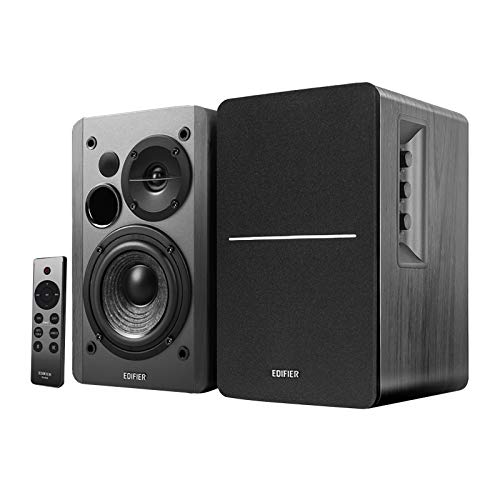
- Best for: Room-filling music and calls from a fixed desk or shelf.
- Configuration: 2.0 powered bookshelf
- Power: 42W RMS, 21W plus 21W
- Connectivity: Bluetooth 5.0, optical, coaxial, dual RCA
- Drivers: 4-inch woofer, 13mm silk dome tweeter per speaker
All 3 Picks at a Glance
| Product | Specs | Action |
|---|---|---|
| Logitech Z207 |
| Check price on Amazon |
| Bose Companion 2 Series III |
| Check price on Amazon |
| Edifier R1280DBs |
| Check price on Amazon |
Our Top Picks
Office speakers live a different life from living-room speakers. They sit an arm’s length away, play at modest volume for hours, and switch between video calls, focus music, and the occasional video. The priorities shift with the setting: clear voices matter more than deep bass, simple controls beat complex menus, and a speaker that annoys the next desk is a bad buy no matter how good it sounds. The three speakers below cover the main office needs, from a compact Bluetooth pair to a bookshelf set that fills a room. The right pair disappears into the workday, while the wrong pair distracts everyone nearby.
This guide is for home workers, small-office teams, and anyone replacing tinny laptop audio with a proper desk setup. Each speaker below was chosen from the name and specifications shown on its Amazon product page, with attention to inputs, voice clarity, size, and controls. The three speakers below cover compact Bluetooth, simple wired, and room-filling bookshelf options.
Quick Picks
As an Amazon Associate we earn from qualifying purchases
| Product | Best for | Key spec from title |
|---|---|---|
| Logitech Z207 | Calls and switching between devices | Bluetooth, Easy-Switch, 5W RMS |
| Bose Companion 2 Series III | Simple, clear sound with no fuss | Wired 2.0 stereo, aux input |
| Edifier R1280DBs | Room-filling music after work | 42W RMS, Bluetooth 5.0, optical |
How to Choose
Match the inputs to your devices
An office speaker earns its place by connecting to everything on the desk without a daily cable swap. The Z207 pairs with two Bluetooth devices plus one wired source and switches between them with a button, which suits a work laptop and a personal phone sharing one pair. The R1280DBs goes further with Bluetooth, optical, coaxial, and dual RCA inputs for a computer, a TV, and a DAC. The Bose pair keeps it simple with wired 3.5mm and PC inputs. Count your devices before choosing, and check that the speaker you pick covers them all. Too few inputs means a daily cable swap that quickly gets old.
Check voice clarity before bass
Office listening is mostly voices: video calls, training videos, podcasts, and lectures. A speaker that renders speech clearly at low volume matters more than one that shakes the desk with bass. Look for a balanced midrange and a tweeter that keeps consonants crisp, and check whether the listing mentions dialogue or vocal clarity. The Bose pair and the R1280DBs both use dedicated tweeters for this reason. Bass still matters for music after work, but a boomy speaker that muddies speech will frustrate you every working day. Test the speaker at low volume before deciding, since office listening rarely goes loud. A harsh speaker at low volume will tire your ears by lunch.
Mind the footprint and the neighbours
Desk space is limited, and office speakers share air with colleagues, housemates, and family. Measure the space beside your monitor before ordering, and check the speaker dimensions on the listing rather than trusting a photo. A volume control within easy reach matters more than it seems, since you will adjust it many times a day. A headphone jack on the speaker, like the one on the Bose pair, lets you switch to private listening without reaching behind the computer. A remote control helps when the speakers sit on a shelf behind the desk. Keep cables short and tidy to avoid a tangle behind the monitor.
Decide whether a subwoofer belongs in the office
Deep bass feels good for music and films, but it carries through walls and floors in a way that voices do not. A 2.0 pair keeps everything on the desk and stays polite in shared spaces, while a 2.1 system adds a subwoofer box that needs floor space. The R1280DBs offers a middle path with a subwoofer line out, so you can add a powered sub later without replacing the speakers. If your office is shared, start with a 2.0 pair and add bass only when you know the room tolerates it. A 2.0 pair also leaves the floor clear for a chair and a bag.
The 3 Best Options
Logitech Z207
- Best for: Calls and switching between a laptop, a phone, and a desktop.
- Configuration: 2.0 stereo
- Connectivity: Bluetooth, 3.5mm input
- Switching: Easy-Switch, 2 Bluetooth devices plus 1 wired
- Power: 5W RMS, 10W peak
Calls and switching between a laptop, a phone, and a desktop.
The 5W output suits near-field desk listening, so it will not fill a large open office on its own.
The Logitech Z207 is the flexible pick in this group, pairing with two Bluetooth devices plus one wired source and switching between them with Easy-Switch technology. That mix suits an office where a work laptop, a personal phone, and a desktop share one pair of speakers. Its 2.0 stereo design delivers 5W RMS with 10W peak power, and touch controls keep volume and switching within reach. At 2.88 lb with a compact footprint, it fits desks where larger bookshelf speakers would crowd the monitor. The 10W peak power gives headroom for louder passages without distortion. The black finish blends into most desks without drawing attention.
Watch out for: The 5W output suits near-field desk listening, so it will not fill a large open office on its own.
Bose Companion 2 Series III
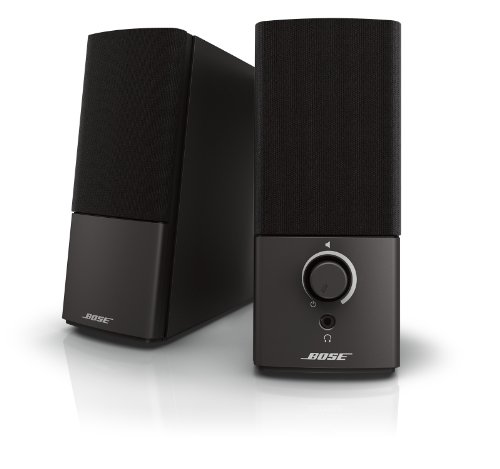
- Best for: Simple, clear sound for calls, music, and video without wireless setup.
- Configuration: 2.0 stereo
- Connectivity: Wired, 3.5mm AUX and PC input
- Inputs: Auxiliary input, headphone jack
- Controls: Volume control on the right speaker
Simple, clear sound for calls, music, and video without wireless setup.
There is no Bluetooth, so a phone needs a cable to connect.
The Bose Companion 2 Series III is the simple pick in this group, with clear sound at any volume and no wireless setup to manage. Its wired 2.0 stereo design connects by 3.5mm aux and PC input, and an auxiliary input on the front brings a phone or tablet into the mix. A volume knob and headphone jack sit on the right speaker, so switching to private listening takes one motion. The compact cabinets fit a crowded desk, and a two-year warranty backs the build. The compact cabinets leave room for a monitor stand and notebook.
Watch out for: There is no Bluetooth, so a phone needs a cable to connect.
Edifier R1280DBs
- Best for: Room-filling music and calls from a fixed desk or shelf.
- Configuration: 2.0 powered bookshelf
- Power: 42W RMS, 21W plus 21W
- Connectivity: Bluetooth 5.0, optical, coaxial, dual RCA
- Drivers: 4-inch woofer, 13mm silk dome tweeter per speaker
Room-filling music and calls from a fixed desk or shelf.
Each speaker is nearly 10 inches deep, so measure your desk or shelf before ordering.
The Edifier R1280DBs is the room-filling pick in this group, pairing 42W RMS of powered bookshelf sound with Bluetooth 5.0, optical, coaxial, and dual RCA inputs. Each wooden cabinet holds a 4-inch woofer and a 13mm silk dome tweeter, which keeps voices clear and music full across a small room. A subwoofer line out with auto crossover leaves room to add bass later, while the included remote and side tone controls make daily adjustments easy. At 5.7 by 7.7 by 9.2 inches per speaker, it needs a deeper desk or a shelf. The wooden cabinets suit a desk or shelf without looking out of place.
Watch out for: Each speaker is nearly 10 inches deep, so measure your desk or shelf before ordering.
Which One Fits Your Situation
You take calls and switch between devices
Pick the Logitech Z207. Its Easy-Switch feature pairs two Bluetooth devices plus one wired source, so a work laptop, a personal phone, and a desktop can share one pair without replugging. Touch controls keep volume and switching within reach during calls. The compact 2.0 design fits a crowded desk, and the 5W output is ample for near-field listening at arm’s length. The touch controls sit within easy reach.
You want simple, clear sound with no fuss
Pick the Bose Companion 2 Series III. Its wired connection works the moment you plug it in, with no pairing, no app, and no battery to manage. The volume knob and headphone jack on the right speaker make daily use effortless, and the aux input covers a phone or tablet when needed. It suits a desk where the speakers should simply work, day after day, without attention.
You want room-filling music after work
Pick the Edifier R1280DBs. Its 42W RMS output and 4-inch woofers fill a small room with music after the workday ends, while the silk dome tweeters keep voices clear during calls. Bluetooth, optical, and coaxial inputs cover a computer, a TV, and a phone, and the subwoofer line out leaves room to add bass later. The remote makes volume changes easy from across the room. The sub-out leaves room to add bass later.
You share a small office
For a shared office, take the Bose Companion 2 Series III. Its wired design avoids Bluetooth pairing conflicts on a shared network, and the headphone jack lets you switch to private listening without disturbing colleagues. The compact cabinets fit a small desk, and the clear sound at low volume keeps calls intelligible without carrying across the room. Keep the volume modest and the whole office stays happy.
Common Mistakes
- Buying a bass-heavy system for a shared office, then discovering the low end carries through every wall. Start with a 2.0 pair and add bass only when the room allows it.
- Choosing speakers with too few inputs, then swapping cables every time a second device needs sound.
- Ignoring speaker dimensions and finding the cabinets crowd the monitor or hang off the desk edge.
- Skipping the headphone jack check and reaching behind the computer every time a private call starts.
- Picking a Bluetooth-only pair for a work laptop that blocks pairing on the company network.
Frequently Asked Questions
Are Bluetooth speakers reliable enough for work calls?
Yes, when the connection is stable. The Z207 and the R1280DBs both use Bluetooth for calls and music, and a short distance between the speaker and the computer keeps the link steady. If your work laptop sits on a managed network that restricts pairing, a wired connection is safer. Move the speaker closer if the link stutters during a call.
Do office speakers need a subwoofer?
No, not for most office work. A good 2.0 pair covers voices, music, and video clearly at desk distance, and a subwoofer adds floor space and bass that can disturb neighbours. The R1280DBs includes a subwoofer line out, so you can add a powered sub later if you want deeper music after work. Add bass only if the room feels thin.
Can I connect speakers to a work laptop and a phone at once?
Yes, with the right model. The Z207 pairs two Bluetooth devices plus one wired source and switches between them with a button, which covers a work laptop and a personal phone together. The R1280DBs covers more inputs still, with Bluetooth, optical, coaxial, and dual RCA. Label the inputs so switching takes seconds.
How loud should office speakers be?
Loud enough to hear clearly at arm’s length, and no louder. A 5W pair like the Z207 suits a single desk, while a 42W pair like the R1280DBs fills a small room. In a shared office, keep the volume low enough that a colleague two desks away cannot follow your calls. Test the level from the next desk before settling on it.
FAQ
Are Bluetooth speakers reliable enough for work calls?
Do office speakers need a subwoofer?
Can I connect speakers to a work laptop and a phone at once?
How loud should office speakers be?
More from Amazon
Programs that pair well with the guide above. Offers and eligibility are set by Amazon and may change.
Free shipping on eligible items, Prime Video and more. Eligible new members can start with a free trial.
Start a Prime free trialAd-free music streaming. Eligible new subscribers can start with a free trial.
Try Music Unlimited freeA Prime membership for ages 18-24 with a trial period. Eligibility is set by Amazon.
See Prime for Young AdultsAudiobooks and podcasts to listen to on the go. Eligible new members can start with a free trial.
Try Audible freeAs an Amazon Associate we earn from qualifying purchases.