Our Short List of 3
- Best for: Warm, full bookshelf sound with flexible inputs for a computer and a console.
- 42W RMS total power output
- Bluetooth, optical, coaxial and dual RCA inputs
- Subwoofer line output
- 4-inch woofers in wooden enclosures

- Best for: Crisp, powerful sound with a phono input for a turntable beside the computer.
- Powered bookshelf speaker pair
- Bluetooth, USB, optical, phono and line RCA, 3.5mm inputs
- Subwoofer output
- 4-inch woofers with 1-inch aluminum tweeter

- Best for: A small desk where a compact pair must sound clear without a wall outlet.
- 2.0 USB-C powered desktop speakers
- Bluetooth 5.0 connectivity
- 8W RMS power, 16W peak power
- Clear Dialog voice processing
All 4 Picks at a Glance
| Product | Specs | Action |
|---|---|---|
| Edifier R1280DBs |
| Check price on Amazon |
| Klipsch R-41PM |
| Check price on Amazon |
| Creative Pebble V3 |
| Check price on Amazon |
 Logitech Z407 |
| Check price on Amazon |
Our Top Picks
Desktop speakers decide how music, games and video calls sound at your desk, and the gap between a good pair and a weak one is obvious within seconds. A powered pair with real drivers fills a room with clear sound, while tiny laptop speakers stay thin and flat no matter how high you turn them. The four pairs below were chosen for the way they sound at a desk, not for the size of the box they arrive in.
This guide is for people who work, game and watch video at a computer and want sound that matches the screen in front of them. It suits home offices, gaming desks and shared rooms where a good pair of speakers beats a headset for long sessions. Every speaker below was chosen from the name and specifications shown on its Amazon page, with driver size, inputs and power details checked against the listing, so the sound you get matches the sound described here.
Quick Picks
As an Amazon Associate we earn from qualifying purchases
| Product | Best for | Key spec from title |
|---|---|---|
| Edifier R1280DBs | Warm bookshelf sound with Bluetooth | 42W RMS, Bluetooth, optical input |
| Klipsch R-41PM | Powerful sound with a subwoofer output | Powered bookshelf, Bluetooth, phono input |
| Creative Pebble V3 | A compact pair for a small desk | USB-C powered, Bluetooth 5.0, 8W RMS |
| Logitech Z407 | Bass-heavy sound with a wireless dial | 2.1 system, Bluetooth, 80W peak |
How to Choose
Driver size sets the sound you get
Larger drivers move more air, which is why a bookshelf pair with four-inch woofers sounds fuller than a compact pair with two-inch drivers. A small pair can still sound clear for voice and casual music, but it will not produce deep bass on its own. If you listen to music with real low end or play games with heavy sound design, pick a larger pair or a system with a subwoofer. Match the driver size to the room and the desk, not to the loudest claim on the box, and remember that a well-tuned small pair can sound clearer than a larger pair built around cheap parts.
Inputs decide what you can connect
A good desktop pair should connect to your computer without a dongle hunt, so check the inputs before you buy. USB and optical inputs keep the signal digital and clean, while a standard 3.5mm jack works with almost anything. Bluetooth lets you play music from a phone without a cable, and a subwoofer output leaves room to add bass later. A pair with several inputs suits a desk shared by a computer, a console and a phone, since switching sources with a button or a remote beats crawling behind the desk to swap cables. Check the rear panel in the listing photos too.
Powered speakers simplify the desk
Powered speakers have the amplifier built in, so you plug them into the wall and connect one cable to the computer. Passive speakers need a separate amplifier, which adds cost, cables and desk space, and the amplifier needs its own shelf or corner. For a computer desk, powered is the simpler choice in nearly every case, since the whole system is one pair and one cable. Check where the volume control sits, since a front knob or a remote is far easier to reach than a dial hidden on the back panel, and a remote saves you from leaning across the keyboard every time a call starts.
Size and placement shape the sound
Speakers sound best when they sit at ear level, angled slightly toward you, with space behind them for the bass port to breathe. A pair that is too large for the desk ends up pushed against the wall, which muddies the bass. A compact pair fits a small desk and a monitor arm setup, while a bookshelf pair suits a deeper desk with room to spread out. Measure the desk before you buy, and leave room for the speakers to sit properly. A pair squeezed into a corner will boom in the low end, while a pair with breathing room around it sounds far more even.
The 4 Best Options
Edifier R1280DBs
- Best for: Warm, full bookshelf sound with flexible inputs for a computer and a console.
- 42W RMS total power output
- Bluetooth, optical, coaxial and dual RCA inputs
- Subwoofer line output
- 4-inch woofers in wooden enclosures
Warm, full bookshelf sound with flexible inputs for a computer and a console.
The wooden cabinets are wide, so measure the desk before ordering.
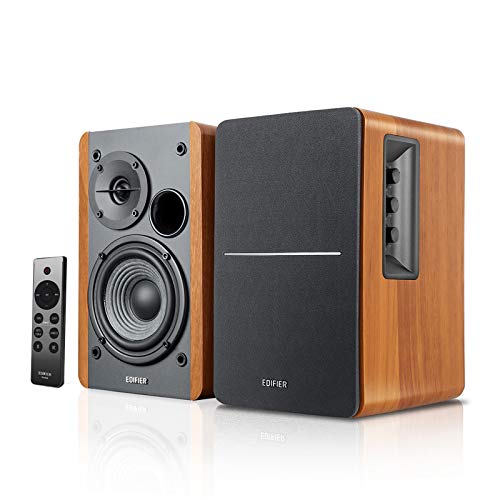
The R1280DBs is a classic powered bookshelf pair with a wooden enclosure, a warm sound and every input a desk setup needs. Bluetooth, optical, coaxial and dual RCA inputs cover a computer, a console and a phone, and a subwoofer output leaves room to add bass later. The four-inch woofers and 42W of RMS power fill a room without strain, and the included remote makes volume and input changes easy from across the desk. The wooden cabinets give the sound a warm character that suits music as well as films, and the pair looks at home on a wooden desk.
Klipsch R-41PM
- Best for: Crisp, powerful sound with a phono input for a turntable beside the computer.
- Powered bookshelf speaker pair
- Bluetooth, USB, optical, phono and line RCA, 3.5mm inputs
- Subwoofer output
- 4-inch woofers with 1-inch aluminum tweeter
Crisp, powerful sound with a phono input for a turntable beside the computer.
The horn tweeter sounds bright, so listeners who prefer soft highs should test the tone first.
The R-41PM is a powered bookshelf pair built around a horn-loaded tweeter that keeps highs crisp and detailed at any volume, even when the room is noisy. Bluetooth, USB, optical, phono and 3.5mm inputs cover nearly every source on a desk, and a subwoofer output lets you add low end later without replacing the pair. The four-inch woofers deliver punchy midrange for games and movies, and the pair works straight out of the box with no separate amplifier needed, so setup takes minutes.
Creative Pebble V3
- Best for: A small desk where a compact pair must sound clear without a wall outlet.
- 2.0 USB-C powered desktop speakers
- Bluetooth 5.0 connectivity
- 8W RMS power, 16W peak power
- Clear Dialog voice processing
A small desk where a compact pair must sound clear without a wall outlet.
Small drivers cannot produce deep bass, so add a subwoofer if low end matters.
The Pebble V3 is a compact USB-C pair that fits a small desk without crowding the monitor, keyboard and mouse. Bluetooth 5.0 lets you stream music from a phone, while the USB-C connection powers the pair and carries audio from the computer. Clear Dialog processing lifts voices in video calls and movies, and the angled drivers point sound up toward your ears. The pair runs on USB power alone, so it needs no wall outlet, The angled shape aims the sound upward, which keeps voices clear even when the speakers sit low beside the keyboard.
Logitech Z407
- Best for: Bass-heavy games and movies with a wireless dial for quick volume changes.
- 2.1 speaker system with dedicated subwoofer
- Bluetooth, micro-USB and 3.5mm inputs
- 80W peak power
- Wireless control dial for volume, bass and mute
Bass-heavy games and movies with a wireless dial for quick volume changes.
The subwoofer needs floor space, so check the room layout before ordering.
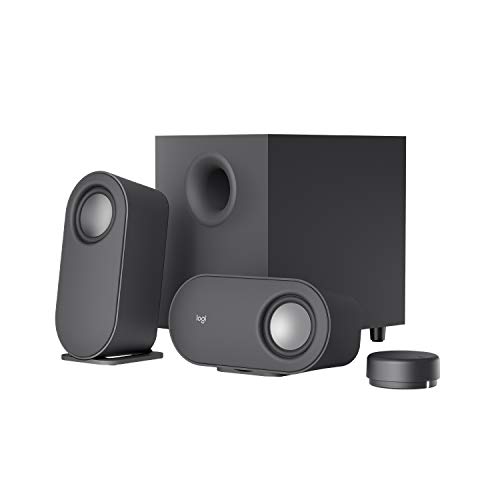
The Z407 is a 2.1 system with a dedicated subwoofer and a wireless control dial, built for listeners who want bass they can feel. Bluetooth, micro-USB and 3.5mm inputs cover a computer and a phone, and the dial controls volume, bass and mute from anywhere on the desk. The satellites handle mids and highs clearly while the subwoofer fills in the low end, which suits games, movies and bass-heavy music at a desk. The wireless dial sits wherever your hand rests, so you can mute a call or turn the bass down without reaching for the speakers themselves.
Which One Fits Your Situation
For music and movies at a desk
Pick the Edifier R1280DBs or the Klipsch R-41PM, since both are powered bookshelf pairs with real drivers and a warm, full sound. The Edifier suits a desk shared with a console, thanks to its optical input, while the Klipsch suits a desk with a turntable, thanks to its phono input. Either pair fills a room without a subwoofer, and both keep voices clear enough for calls as well as music.
For a small desk with little room
Pick the Creative Pebble V3, since its compact USB-C design fits beside a monitor without crowding the keyboard. It powers from the computer alone, so it adds no wall wart or extra cable. The angled drivers point sound toward your ears, which helps voices stay clear in calls and videos, and the USB power means one less cable to route behind the desk.
For games and films with real bass
Pick the Logitech Z407, since the dedicated subwoofer adds low end that a two-speaker pair cannot match. The wireless dial lets you adjust volume and bass without reaching behind the speakers. It suits a desk where games, movies and bass-heavy music are the main use, and the dial lets you tame the bass late at night without opening any settings.
For a desk shared by several devices
Pick the Edifier R1280DBs or the Klipsch R-41PM, since both offer several inputs for a computer, a console and a phone. The Edifier covers optical and dual RCA, while the Klipsch adds USB and phono. Either pair lets you switch sources without unplugging cables, so moving from a game on the computer to music from a phone takes one button press.
Common Mistakes
- Buying the loudest pair available and then finding the bass overwhelms a small room, since a big pair in a tiny space sounds boomy rather than powerful.
- Placing speakers flat on the desk with the drivers pointing at your chest instead of your ears, which dulls the highs and makes voices sound muffled.
- Pushing bookshelf speakers against the wall, which blocks the rear bass port and muddies the sound, so leave a few inches of space behind each cabinet.
- Ignoring the inputs and then discovering the pair cannot connect to a second device, which forces an extra adapter or a new pair entirely.
- Judging a pair by its size alone, when driver design and cabinet quality matter just as much, and a compact pair with good drivers can beat a larger pair built cheaply.
Frequently Asked Questions
Do desktop speakers need a subwoofer?
No, not for most desk listening, since a good bookshelf pair covers music, voice and everyday games well on its own. A subwoofer helps with bass-heavy games, action films or music with deep low end. Both the Edifier and the Klipsch here have a subwoofer output, so you can add one later without replacing the speakers.
Is Bluetooth useful on desktop speakers?
Yes, when you want to play music from a phone without a cable, or when a friend wants to share a track at your desk. It does not replace a wired connection for the computer, since a cable gives a steadier signal for games and calls. Treat Bluetooth as a handy second input, not as the main connection for serious listening.
Can small speakers like the Pebble V3 fill a room?
They fill a small room well for voice and casual music, since their drivers are tuned for clarity at close range. They cannot match a bookshelf pair for bass or volume, and they will distort if pushed too loud. Use them on a small desk in a small room, and step up to a larger pair later.
Where should desktop speakers sit for the best sound?
Set them at ear level, angled slightly toward you, with equal distance from each side of the desk. Leave a few inches behind them so a rear bass port can breathe, and keep them away from corners that boost bass unevenly. A small stand or foam pad under each speaker helps isolate them from the desk and keeps the sound clean.
FAQ
Do desktop speakers need a subwoofer?
Is Bluetooth useful on desktop speakers?
Can small speakers like the Pebble V3 fill a room?
Where should desktop speakers sit for the best sound?
More from Amazon
Programs that pair well with the guide above. Offers and eligibility are set by Amazon and may change.
Free shipping on eligible items, Prime Video and more. Eligible new members can start with a free trial.
Start a Prime free trialAd-free music streaming. Eligible new subscribers can start with a free trial.
Try Music Unlimited freeA Prime membership for ages 18-24 with a trial period. Eligibility is set by Amazon.
See Prime for Young AdultsAudiobooks and podcasts to listen to on the go. Eligible new members can start with a free trial.
Try Audible freeAs an Amazon Associate we earn from qualifying purchases.