Our Short List of 3
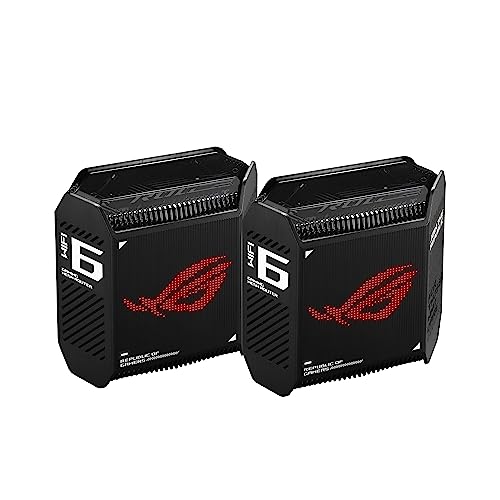
- Wi-Fi: WiFi 6, tri-band AX10000 (2.4 GHz plus two 5 GHz bands)
- Coverage: up to 5,800 sq. ft. with the 2-pack
- Backhaul: dedicated 5 GHz band, Ethernet backhaul supported, UNII-4 support
- Ports per node: one 2.5 Gbps WAN, three Gigabit LAN
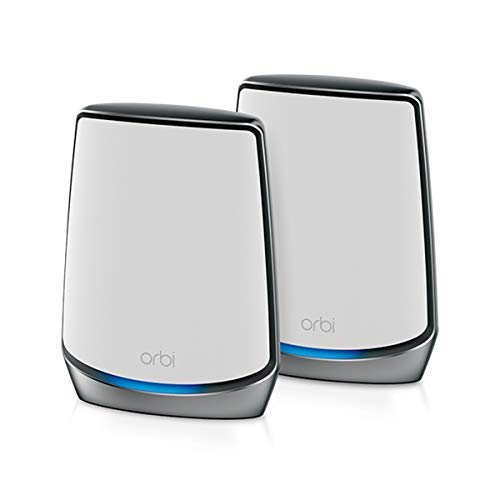
- Wi-Fi: WiFi 6, tri-band AX6000
- Coverage: up to 5,000 sq. ft. with the 2-pack
- Backhaul: dedicated 5 GHz band, Ethernet backhaul supported
- Ports: router one Gigabit WAN plus four Gigabit LAN, satellite four Gigabit LAN

- Wi-Fi: WiFi 6E, tri-band AXE5400 (2.4 GHz, 5 GHz, and 6 GHz)
- Coverage: up to 7,200 sq. ft. with the 3-pack
- Backhaul: 6 GHz band available as backhaul, Ethernet backhaul supported
- Ports per unit: one 2.5 Gbps WAN/LAN, two Gigabit LAN
All 5 Picks at a Glance
| Product | Specs | Action |
|---|---|---|
| ASUS ROG Rapture GT6 (2-Pack) |
| Check price on Amazon |
| NETGEAR Orbi RBK852 (2-Pack) |
| Check price on Amazon |
| TP-Link Deco XE75 Pro (3-Pack) |
| Check price on Amazon |
 Amazon eero Pro 6E (3-Pack) |
| Check price on Amazon |
 TP-Link Deco X55 (3-Pack) |
| Check price on Amazon |
Our Top Picks
A single gaming router is fine when your PC or console sits in the same room as the modem. It is a poor answer when the gaming room is two floors away, on the far side of a brick wall, or in a house where three other people stream video while you play. That is the problem mesh Wi-Fi solves: several nodes spread one network across the whole home, so the node near your setup does the talking instead of a distant router shouting through walls.
Not every mesh kit suits gaming, though. A system built only for coverage can still add latency, drop your connection mid-match when it hands you between nodes, or let a household member’s large download spike your ping. The mesh routers for gaming in this guide were picked on gaming criteria first: a dedicated or wired backhaul path so nodes do not steal bandwidth from your games, Ethernet ports on the satellites so a console or PC can plug straight into a node, and traffic tools such as QoS or SQM that keep game packets moving when the network gets busy. Every pick below is a true mesh system sold as a router and satellite kit, and each one supports Ethernet backhaul if you can run a cable.
As an Amazon Associate, we earn from qualifying purchases.
ASUS ROG Rapture GT6 (2-Pack)
- Wi-Fi: WiFi 6, tri-band AX10000 (2.4 GHz plus two 5 GHz bands)
- Coverage: up to 5,800 sq. ft. with the 2-pack
- Backhaul: dedicated 5 GHz band, Ethernet backhaul supported, UNII-4 support
- Ports per node: one 2.5 Gbps WAN, three Gigabit LAN
The ROG Rapture GT6 is the rare mesh system designed for gamers first and everyone else second. Each node is a tri-band WiFi 6 unit, and the second 5 GHz band works as a dedicated backhaul link, so traffic between the two nodes never competes with the band your devices connect to. ASUS also supports the UNII-4 portion of the 5 GHz spectrum, which widens the channels available for that backhaul link in supported regions.
The gaming feature set is the deepest here. Triple-Level Game Acceleration prioritises a gaming device on your network, favours game traffic as it leaves the house, and includes a mobile game mode in the app. A 2.5 Gbps WAN port means a fast fibre or cable plan is not capped at the router, and each node carries three Gigabit LAN ports, so the satellite in your gaming room can wire a PC, a console, and a capture or streaming box at the same time. AiProtection Pro security is included for the life of the product rather than sold as a subscription.
As a premium pick, the GT6 makes the most sense for a household that games in more than one room and wants the satellite itself to act as a small wired hub. If you can run Ethernet between the nodes, the freed-up wireless backhaul band can be opened to devices for even more headroom.
NETGEAR Orbi RBK852 (2-Pack)
- Wi-Fi: WiFi 6, tri-band AX6000
- Coverage: up to 5,000 sq. ft. with the 2-pack
- Backhaul: dedicated 5 GHz band, Ethernet backhaul supported
- Ports: router one Gigabit WAN plus four Gigabit LAN, satellite four Gigabit LAN
The Orbi RBK852 is NETGEAR’s flagship WiFi 6 mesh kit, built around a dedicated backhaul design. One 5 GHz band is reserved entirely for router-to-satellite traffic, which keeps the two client bands free and helps the system hold steady speeds at the far node. That design is exactly what a gamer wants from a satellite placed in a bedroom or office: the hop back to the main router stays consistent instead of degrading whenever the house gets busy.
Ports are the other reason this kit suits gaming rooms. The router offers a Gigabit WAN port and four Gigabit LAN ports, and the satellite carries four more Gigabit LAN ports. Plugging a console or PC directly into the satellite removes the last wireless hop entirely, which is the single most effective latency step a mesh user can take short of wiring back to the main router. Ethernet backhaul is also supported between the units for homes with in-wall cabling.
The RBK852 is a premium pick aimed at larger homes where the gaming setup cannot move closer to the modem. Its strength is boring reliability: a reserved backhaul, generous wired ports on both units, and coverage that reaches the rooms where a single router gives up.
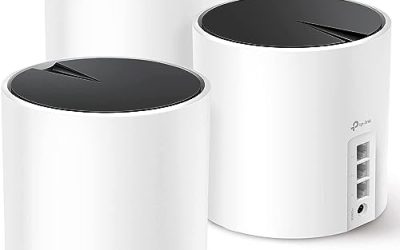
TP-Link Deco XE75 Pro (3-Pack)
- Wi-Fi: WiFi 6E, tri-band AXE5400 (2.4 GHz, 5 GHz, and 6 GHz)
- Coverage: up to 7,200 sq. ft. with the 3-pack
- Backhaul: 6 GHz band available as backhaul, Ethernet backhaul supported
- Ports per unit: one 2.5 Gbps WAN/LAN, two Gigabit LAN
The Deco XE75 Pro moves the backhaul conversation to the 6 GHz band. As a tri-band WiFi 6E system, it can use the wide, lightly used 6 GHz band for node-to-node traffic, leaving the 5 GHz band almost entirely for your devices. In a dense neighbourhood where every house runs its own network on 5 GHz, that cleaner backhaul path is a genuine gaming advantage, and WiFi 6E clients can connect on 6 GHz directly as well.
Each of the three units has a 2.5 Gbps port alongside two Gigabit ports, which matters twice over: the main unit can accept a multi-gig internet plan, and a satellite can feed a wired gaming PC at full speed over Ethernet backhaul. TP-Link’s HomeShield software adds QoS device prioritisation, so you can mark a console or PC as the priority device and let the system favour its traffic when the network is loaded.
This is the mid-range sweet spot of the guide: three nodes for multi-storey coverage, a modern backhaul band, and multi-gig ports where they count. Homes with a 6 GHz capable phone or laptop fleet get extra value, but the backhaul benefit applies even if every client device is still on WiFi 6.
Amazon eero Pro 6E (3-Pack)
- Wi-Fi: WiFi 6E, tri-band
- Coverage: up to 6,000 sq. ft. with the 3-pack
- Internet plans: supports plans up to 2.5 Gbps
- Ports per unit: one 2.5 GbE, one Gigabit Ethernet
The eero Pro 6E takes the opposite design philosophy to the ASUS: almost no settings to manage, and software that handles the network for you. For gaming, its most relevant trick is SQM support, which manages the queue of traffic leaving your home so one large upload or download cannot inflate everyone else’s latency. Bufferbloat from a busy household connection is one of the most common causes of ping spikes, and SQM is the standard fix.
The hardware is tri-band WiFi 6E, with support for internet plans up to 2.5 Gbps and a 2.5 GbE port on each unit. Wired backhaul is fully supported, so nodes connected by Ethernet stop spending wireless capacity on backhaul at all. Each unit also has a second Gigabit port, enough to wire a console or PC into the satellite in the gaming room. The three-pack covers up to 6,000 sq. ft., and the system doubles as a smart home hub with Zigbee and Thread radios built in.
Choose the eero Pro 6E if you want the set-and-forget option in this mid-range tier: automatic updates, an app that stays out of the way, and latency management that works without manual QoS tuning. Advanced users who want deep manual control over every queue and rule should look at the ASUS or TP-Link kits instead.
TP-Link Deco X55 (3-Pack)
- Wi-Fi: WiFi 6, dual-band AX3000
- Coverage: up to 6,500 sq. ft. with the 3-pack
- Backhaul: shared-band wireless, Ethernet backhaul supported
- Ports per unit: three Gigabit Ethernet
The Deco X55 is the budget pick that still respects the gaming basics. It is a dual-band WiFi 6 system, so there is no dedicated backhaul band: the nodes share the same two bands as your devices. The saving grace is that every unit has three Gigabit Ethernet ports and the system supports Ethernet backhaul, so a single cable run between floors turns this affordable kit into a wired-backhaul setup that plays well above its tier.
TP-Link includes HomeShield on the X55, which brings QoS device prioritisation to this price level. Mark the gaming PC or console as the priority device and its traffic gets favoured when someone else starts a big download. The three-pack covers up to 6,500 sq. ft. and handles up to 150 devices, which is plenty of headroom for a family home with a gaming room at one end.
The honest trade-off is the shared backhaul on a purely wireless setup: in a large home with heavy simultaneous use, the tri-band kits above will hold their speeds better. If your gaming room can take a cable, or your home is modest in size, the X55 delivers the mesh gaming essentials for the least commitment.
How to Choose
Start with the backhaul, because it decides how a mesh system behaves under load. A dedicated wireless backhaul band, as on the GT6 and RBK852, reserves a lane for node traffic. A 6 GHz backhaul, as on the XE75 Pro, does the same job on newer spectrum. Wired Ethernet backhaul beats both: if your home has Ethernet runs or you can manage one cable to the gaming room, every kit in this guide can use it, and even the dual-band X55 becomes a strong gaming system.
Next, count the ports on the satellite, not just the router. Wiring your PC or console into the nearest node removes the weakest wireless hop from the chain. A satellite with several LAN ports, like the Orbi’s four, can serve a whole desk or entertainment centre. A 2.5 Gbps port matters if your internet plan is faster than gigabit or if you move large files to a local server or NAS.
Then look at traffic management. QoS device prioritisation, found in the TP-Link HomeShield kits and the ASUS, favours your gaming device when the network is busy. SQM, supported on the eero, attacks the problem from the other side by keeping the internet queue short so latency stays flat during uploads and downloads. Either approach helps; the right one depends on whether your congestion happens inside the house or at the internet connection itself.
Finally, size the kit to the home. A 2-pack suits most single-storey homes and apartments with thick walls, while a 3-pack covers multi-storey houses where the gaming room sits far from the modem. Place nodes within good signal range of each other rather than at the very edge of coverage, and keep the gaming node close enough to your setup that a short Ethernet cable can finish the job.
Frequently Asked Questions
Is mesh Wi-Fi good enough for competitive gaming?
Yes, provided the setup follows the rules in this guide. A mesh node placed in the gaming room, with your PC or console wired into that node, removes most of the penalty of playing away from the main router. The remaining variable is the backhaul: a dedicated band or an Ethernet run keeps latency stable, while a shared-band wireless hop in a busy home can add jitter during peak use.
Does wired backhaul really make a difference for gaming?
It makes the largest single difference of any mesh setting. With Ethernet backhaul, the nodes stop spending wireless capacity talking to each other, the satellite delivers its full speed to your devices, and the connection between rooms stops varying with interference or neighbouring networks. If only one run is possible, wire the node that serves the gaming room first.
Should I plug my console or PC into the satellite node?
Whenever you can, yes. A device wired into a satellite still crosses the home over the backhaul, but it skips the final wireless hop, which is usually the hop most exposed to walls, distance, and interference from nearby devices. It also frees wireless airtime for the devices that cannot be wired, such as phones and handhelds.
WiFi 6, 6E, or 7 for a gaming mesh system?
WiFi 6 tri-band systems with a dedicated backhaul remain a strong gaming choice, and WiFi 6E adds the 6 GHz band for backhaul or for newer clients. WiFi 7 systems push speeds further and add features aimed at lower latency, but they sit in the premium tier and your clients need WiFi 7 hardware to use every advantage. For most gaming homes, backhaul design and port layout matter more than the generation printed on the box.
Final Verdict
For a gaming-first home, the ASUS ROG Rapture GT6 is the standout pick: a dedicated backhaul band, the deepest gaming traffic tools here, and a 2.5 Gbps port make it the mesh system that treats latency as the priority. The NETGEAR Orbi RBK852 is the premium alternative for bigger homes, trading gaming branding for a reserved backhaul and the most wired ports on its satellite.
In the mid-range, the TP-Link Deco XE75 Pro is the balanced choice, with a 6 GHz backhaul and multi-gig ports across three nodes, while the eero Pro 6E suits anyone who wants SQM latency management without manual tuning. On a budget, the TP-Link Deco X55 covers the essentials and rewards anyone who can give it an Ethernet backhaul run. Match the kit to your home’s layout, wire whatever you can, and mesh stops being a compromise for gaming and becomes the fix for it.
Product and ASIN Reference
| Product | ASIN |
|---|---|
| ASUS ROG Rapture GT6 (2-Pack) | B0BQ41N3XP |
| NETGEAR Orbi RBK852 (2-Pack) | B07WNY2WKG |
| TP-Link Deco XE75 Pro (3-Pack) | B0B8B8MCF1 |
| Amazon eero Pro 6E (3-Pack) | B091G64GVK |
| TP-Link Deco X55 (3-Pack) | B09PRB1MZM |
FAQ
Is mesh Wi-Fi good enough for competitive gaming?
Does wired backhaul really make a difference for gaming?
Should I plug my console or PC into the satellite node?
WiFi 6, 6E, or 7 for a gaming mesh system?
More from Amazon
Programs that pair well with the guide above. Offers and eligibility are set by Amazon and may change.
Free shipping on eligible items, Prime Video and more. Eligible new members can start with a free trial.
Start a Prime free trialAd-free music streaming. Eligible new subscribers can start with a free trial.
Try Music Unlimited freeA Prime membership for ages 18-24 with a trial period. Eligibility is set by Amazon.
See Prime for Young AdultsAudiobooks and podcasts to listen to on the go. Eligible new members can start with a free trial.
Try Audible freeAs an Amazon Associate we earn from qualifying purchases.