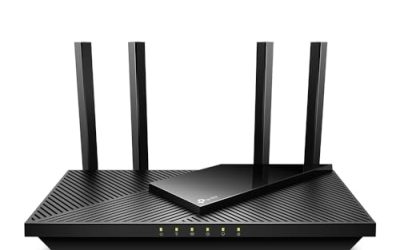
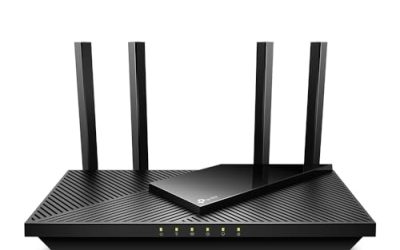
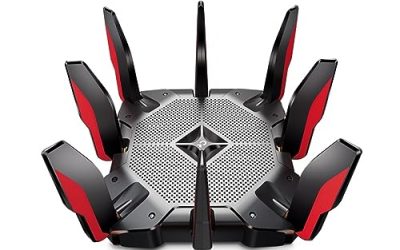
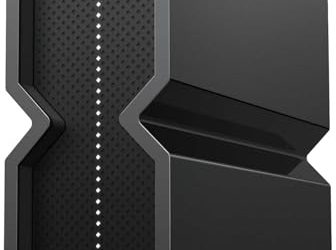
Our Short List of 3

- Wi-Fi standard: Wi-Fi 6 (802.11ax), dual-band
- Speed class: AX5700
- Bands: 5GHz and 2.4GHz
- Ports: 2.5G port, gaming port, gigabit LAN ports, USB ports

- Wi-Fi standard: Wi-Fi 6 (802.11ax), dual-band
- Speed class: AX5400 — up to 4804 Mbps on 5GHz, up to 574 Mbps on 2.4GHz
- Antennas: 6 external antennas
- Processor: 1.5 GHz triple-core CPU

- Wi-Fi standard: Wi-Fi 6 (802.11ax), dual-band
- Speed class: AX4200 — up to 4.2 Gbps combined
- Streams: 5-stream
- Coverage listed: up to 2,500 sq. ft. and 25 devices
All 5 Picks at a Glance
| Product | Specs | Action |
|---|---|---|
| 1. ASUS RT-AX86U Pro (AX5700) — Best for Gaming on 5GHz |
| Check price on Amazon |
| 2. TP-Link Archer AX73 (AX5400) — Best 5GHz Speed for Streaming Households |
| Check price on Amazon |
| 3. NETGEAR Nighthawk RAX43 (AX4200) — Best for Many Connected Devices |
| Check price on Amazon |
 4. TP-Link Archer AX21 (AX1800) — Best All-Round Wi-Fi 6 Starting Point |
| Check price on Amazon |
 5. TP-Link Archer A7 (AC1750) — Best Wi-Fi 5 Option |
| Check price on Amazon |
Our Top Picks
As an Amazon Associate we earn from qualifying purchases.
If your gaming PC, console or streaming box is still sitting on the crowded 2.4GHz band, moving it to 5GHz is one of the simplest network upgrades you can make. The 5GHz band offers wider channels and far less interference from neighbours, Bluetooth devices and household appliances, which translates into higher throughput and more consistent latency in the same room or the next room over. The trade-off is range: 5GHz signals fade faster through walls, so the right router is the one that pairs a strong 5GHz radio with sensible placement and a 2.4GHz band for distant and low-bandwidth devices.
This guide focuses specifically on that 5GHz job. Every router below is at least dual-band, with a listed 5GHz radio, and the picks are separated by Wi-Fi generation, 5GHz speed class and wired ports rather than by headline combined numbers alone. There is a Wi-Fi 6 gaming router with a 2.5G port, two TP-Link Wi-Fi 6 models at different speed classes, a NETGEAR Wi-Fi 6 model built for many devices, and a Wi-Fi 5 model for readers whose internet plan and devices do not yet need Wi-Fi 6. If you mainly need a router for a satellite connection, a mesh system for a large house, or the cheapest gigabit router available, those are different buying questions covered in other guides on this site.
Disclosure: This article contains affiliate links. If you buy through a link on this page, we may earn a commission at no additional cost to you.
Quick Picks
- Best for gaming on 5GHz: ASUS RT-AX86U Pro (AX5700) — the highest 5GHz class here, a dedicated gaming port and a 2.5G port.
- Best 5GHz speed for streaming households: TP-Link Archer AX73 (AX5400) — six antennas, a fast 5GHz band and Wi-Fi 6 features for many simultaneous streams.
- Best all-round value in Wi-Fi 6: TP-Link Archer AX21 (AX1800) — a balanced dual-band Wi-Fi 6 router for apartments and smaller homes.
- Best for many connected devices: NETGEAR Nighthawk RAX43 (AX4200) — five streams, dual-band Wi-Fi 6 and coverage aimed at larger, busier homes.
- Best Wi-Fi 5 option: TP-Link Archer A7 (AC1750) — a proven dual-band design with gigabit ports and OneMesh support for 802.11ac devices.
1. ASUS RT-AX86U Pro (AX5700) — Best for Gaming on 5GHz
- Wi-Fi standard: Wi-Fi 6 (802.11ax), dual-band
- Speed class: AX5700
- Bands: 5GHz and 2.4GHz
- Ports: 2.5G port, gaming port, gigabit LAN ports, USB ports
The RT-AX86U Pro is the gaming-first pick in this list. It is a dual-band Wi-Fi 6 router in the AX5700 class, and most of that capacity sits on the 5GHz band, which is exactly where a gaming PC or console should connect when it is not wired. ASUS lists a dedicated gaming port that prioritises traffic from a connected device, a separate 2.5G port for a fast internet connection or a high-speed local link, and Mobile Game Mode for phone gaming through the ASUS Router app.
For a gaming household, the useful detail is the combination rather than any single feature. The 5GHz band gives wireless gaming headroom in the same room, the gaming port gives a wired device priority without manual rules, and AiMesh support means the router can later work with another compatible ASUS router instead of being replaced when coverage needs grow. Subscription-free AiProtection Pro and VPN support are also listed, which matters for households that want network security features without tying them to the router purchase.
Pros:
Cons:
Check the ASUS RT-AX86U Pro on Amazon
2. TP-Link Archer AX73 (AX5400) — Best 5GHz Speed for Streaming Households
- Wi-Fi standard: Wi-Fi 6 (802.11ax), dual-band
- Speed class: AX5400 — up to 4804 Mbps on 5GHz, up to 574 Mbps on 2.4GHz
- Antennas: 6 external antennas
- Processor: 1.5 GHz triple-core CPU
The Archer AX73 sits one step below the ASUS in gaming extras but is built around raw dual-band throughput. TP-Link lists it as an AX5400 Wi-Fi 6 router, with up to 4804 Mbps on the 5GHz band and up to 574 Mbps on the 2.4GHz band, driven by a 1.5 GHz triple-core CPU. Six high-performance antennas, beamforming, OFDMA and MU-MIMO are listed for coverage and for serving many devices at once.
That profile suits a house where the 5GHz band carries several jobs at the same time: a 4K stream in the living room, a gaming PC in a bedroom, work laptops and phones. The 5GHz headline speed is shared capacity, not a promise to a single device, but a wider, faster 5GHz radio leaves more room before those jobs start competing. TP-Link HomeShield and WPA3 are listed for security, and OneMesh support is not the headline here, so readers planning a mesh expansion should confirm compatibility on the listing before choosing it for that purpose.
Pros:
Cons:
Check the TP-Link Archer AX73 on Amazon
3. NETGEAR Nighthawk RAX43 (AX4200) — Best for Many Connected Devices
- Wi-Fi standard: Wi-Fi 6 (802.11ax), dual-band
- Speed class: AX4200 — up to 4.2 Gbps combined
- Streams: 5-stream
- Coverage listed: up to 2,500 sq. ft. and 25 devices
The Nighthawk RAX43 is a five-stream dual-band Wi-Fi 6 router in the AX4200 class, listed at up to 4.2 Gbps combined wireless speed, with coverage listed for up to 2,500 square feet and up to 25 devices. NETGEAR positions it as a security-focused model, and the listing highlights its dual-band gigabit design for homes where phones, laptops, consoles, TVs and smart home gear all share one network.
Choose this model when device count is the pressure point rather than a single gaming rig. Five streams give the 5GHz and 2.4GHz bands more ways to serve simultaneous clients, and the Nighthawk app handles setup and management for readers who prefer not to work through a browser admin page. Wired devices still get gigabit LAN ports, which remains the most reliable option for a desktop PC that sits near the router. As with every pick here, the coverage figure is a listing claim for favourable conditions, so thick walls and floors will reduce what any single router can reach.
Pros:
Cons:
Check the NETGEAR Nighthawk RAX43 on Amazon
4. TP-Link Archer AX21 (AX1800) — Best All-Round Wi-Fi 6 Starting Point
- Wi-Fi standard: Wi-Fi 6 (802.11ax), dual-band
- Speed class: AX1800 — up to 1200 Mbps on 5GHz, up to 574 Mbps on 2.4GHz
- Antennas: 4 high-gain antennas
- Features: OFDMA, MU-MIMO, beamforming, EasyMesh, VPN server, parental controls, works with Alexa
The Archer AX21 is the sensible first step into Wi-Fi 6 for an apartment or smaller home. TP-Link lists AX1800 speeds of up to 1200 Mbps on the 5GHz band and up to 574 Mbps on the 2.4GHz band, with four high-gain antennas, beamforming, OFDMA and MU-MIMO. That 5GHz figure is well matched to common cable and fibre plans, and it is a clear step up from older Wi-Fi 5 routers when several devices are active at once.
The AX21 also lists EasyMesh support, VPN server options, parental controls and Alexa compatibility. For a gaming reader, the honest framing is this: it will carry a console or gaming laptop on 5GHz comfortably in a compact home, and its gigabit ports handle a wired PC properly, but it does not have the gaming port, 2.5G port or 5GHz headroom of the models above. Buy it for balance and simplicity, not for maximum wireless throughput.
Pros:
Cons:
Check the TP-Link Archer AX21 on Amazon
5. TP-Link Archer A7 (AC1750) — Best Wi-Fi 5 Option
- Wi-Fi standard: Wi-Fi 5 (802.11ac), dual-band
- Speed class: AC1750 — 1300 Mbps on 5GHz, 450 Mbps on 2.4GHz
- Antennas: 3 external antennas
- Ports: 4 gigabit LAN, 1 gigabit WAN, 1 USB 2.0
The Archer A7 is the oldest design in this guide and still earns its place for a specific reader: someone with 802.11ac devices, a modest internet plan, and no need to pay for Wi-Fi 6 features their clients cannot use. TP-Link lists dual-band AC1750 speeds of 1300 Mbps on the 5GHz band and 450 Mbps on the 2.4GHz band, three external antennas, four gigabit LAN ports, one gigabit WAN port and a USB 2.0 port for sharing storage or a printer on the network.
Its 5GHz band remains useful for streaming and casual gaming in the same part of the home, and OneMesh compatibility lets it form a seamless network with compatible TP-Link extenders. The limits are equally clear. There is no OFDMA, no WPA3 headline feature set comparable to the Wi-Fi 6 picks, and its 5GHz radio will feel crowded sooner in a house full of modern laptops and phones. Treat it as a focused Wi-Fi 5 choice, not as a future-proof one.
Pros:
Cons:
Check the TP-Link Archer A7 on Amazon
How to Choose a 5GHz Router
Start with the 5GHz figure, not the combined figure. Router speed classes add both bands together. An AX5400 router cannot deliver 5400 Mbps to one device; the meaningful number for gaming and streaming is the 5GHz portion, such as 4804 Mbps on the Archer AX73 or 1200 Mbps on the Archer AX21. Compare 5GHz to 5GHz.
Match the Wi-Fi generation to your devices. Wi-Fi 6 brings OFDMA and improved MU-MIMO, which help when many devices talk at once. A Wi-Fi 5 router such as the Archer A7 still works well for a few 802.11ac devices, but a house full of Wi-Fi 6 laptops and phones gets more from a Wi-Fi 6 radio.
Respect the range trade-off. The 5GHz band is faster and cleaner but shorter-ranged than 2.4GHz. Place the router centrally and elevated, keep gaming devices within one or two rooms where possible, and use 2.4GHz for distant smart home gear. In a large or multi-storey home, a mesh-capable model or a wired access point will beat simply buying a higher speed class.
Check the wired side. A gigabit WAN port caps internet speeds at gigabit even if the wireless class is higher. Readers on faster plans should look at the RT-AX86U Pro and its 2.5G port. For everyone else, enough gigabit LAN ports for a PC, console and TV box still matters more than wireless headlines, because a cable remains the lowest-latency connection for a fixed gaming desk.
Separate your bands when it helps. Many routers offer band steering under one network name. That is convenient, but gamers sometimes prefer a distinct 5GHz network name so a PC or console never drifts onto 2.4GHz. Either approach works; what matters is confirming that your important devices are actually connected on 5GHz after setup.
Do not expect a router to fix your internet plan. A faster 5GHz band improves the local link between device and router. It cannot raise the speed your provider delivers, and it cannot fix latency problems that start outside your home. If wired speeds at the router are already poor, solve that first.
FAQs
Is 5GHz better than 2.4GHz for gaming?
For most gaming setups, yes, when the signal is strong. The 5GHz band offers wider channels and less interference, which supports higher throughput and steadier latency. The 2.4GHz band travels farther, so a console in a distant room may hold a more stable connection on 2.4GHz, and a wired connection beats both for a fixed desk.
Does a 5GHz router need a special modem or internet plan?
No. These routers connect to a standard modem or provider gateway through the WAN port and broadcast both 2.4GHz and 5GHz networks. Any broadband plan works, although a faster router only improves your local network; your usable internet speed is still limited by your plan.
What does AX5400 or AX1800 actually mean?
The number is the sum of the theoretical maximum speeds across all bands, rounded into a class. AX5400 on the Archer AX73 breaks down into up to 4804 Mbps on 5GHz plus up to 574 Mbps on 2.4GHz. Real-world speeds are lower and depend on the client device, distance, walls and channel conditions.
Can older devices connect to a Wi-Fi 6 5GHz router?
Yes. Wi-Fi 6 routers are backwards compatible with earlier Wi-Fi standards on both bands. Older devices connect at their own maximum speed, while Wi-Fi 6 devices can use the newer capacity features. Smart home devices that only support 2.4GHz simply use that band.
Should I choose mesh instead of a single 5GHz router?
If one centrally placed router cannot cover your home with a usable 5GHz signal, mesh is the better answer, because 5GHz range is the limiting factor. Several picks here, including the AX21 with EasyMesh, the A7 with OneMesh and the ASUS with AiMesh, can form part of an expandable system, but confirm exact compatibility on the listing before mixing models.
How many antennas does a 5GHz router need?
Antenna count alone does not decide performance. Antenna design, radio chains, beamforming and placement matter as much. The six-antenna Archer AX73 and the four-antenna Archer AX21 can both be good choices; match the speed class and features to your home size and device count instead of counting antennas in isolation.
Conclusion
The best 5GHz router is the one whose 5GHz band, wired ports and coverage model fit your home. Gamers who want the strongest feature set should start with the ASUS RT-AX86U Pro, streaming-heavy households with the TP-Link Archer AX73, and busy multi-device homes with the NETGEAR Nighthawk RAX43. The Archer AX21 is the balanced Wi-Fi 6 starting point for smaller homes, while the Archer A7 remains a fair Wi-Fi 5 option for simpler 802.11ac setups. Whichever model you choose, place it well, put gaming and streaming devices on the 5GHz band, and wire the machines that never move.
FAQ
Is 5GHz better than 2.4GHz for gaming?
Does a 5GHz router need a special modem or internet plan?
What does AX5400 or AX1800 actually mean?
Can older devices connect to a Wi-Fi 6 5GHz router?
Should I choose mesh instead of a single 5GHz router?
How many antennas does a 5GHz router need?
More from Amazon
Programs that pair well with the guide above. Offers and eligibility are set by Amazon and may change.
Free shipping on eligible items, Prime Video and more. Eligible new members can start with a free trial.
Start a Prime free trialAd-free music streaming. Eligible new subscribers can start with a free trial.
Try Music Unlimited freeA Prime membership for ages 18-24 with a trial period. Eligibility is set by Amazon.
See Prime for Young AdultsAudiobooks and podcasts to listen to on the go. Eligible new members can start with a free trial.
Try Audible freeAs an Amazon Associate we earn from qualifying purchases.