Our Top Picks



The router a broadband provider hands over is usually the weakest link in a gaming home. It might handle a couple of streams, but once a console starts a big game download, two phones join video calls and a PC queues for a match, the shared airtime runs out and latency spikes at the worst moment. The routers in this class fix that problem directly: every pick below is a standalone dual-band model from a major maker, with gigabit wired ports for the machines that matter most and modern Wi-Fi features that keep a busy household moving. Four of the five picks run Wi-Fi 6 or a well-proven Wi-Fi 5 platform, and all of them publish the details that decide real-world behaviour, from stream counts and band rates to the exact port layout on the back panel.
Disclosure: As an Amazon Associate, we earn from qualifying purchases made through links on this page, at no extra cost to you.
The five routers below were chosen because published roundups and listing records consistently place them in this entry-level class, and because each one is still actively sold with a current listing. TP-Link’s Archer line supplies three of the picks, NETGEAR’s Nighthawk line supplies the fourth, and a higher-speed Wi-Fi 5 Archer rounds out the set for households that would rather have raw band rates than the newest standard. Reading the buying notes first makes the individual picks much easier to place.
What to check before you buy a router in this class
Wi-Fi 6 versus Wi-Fi 5. Wi-Fi 6 (802.11ax) brings OFDMA and more efficient MU-MIMO, which matter most when many devices compete at once: OFDMA lets one transmission serve several devices in a single pass, so game traffic waits less behind downloads and smart-home chatter. Wi-Fi 5 (802.11ac) lacks OFDMA but the stronger models still post high band rates, and every modern console, phone and laptop connects to either standard. If the household is full of newer devices, Wi-Fi 6 is the better long-term seat; if the priority is headline speed on the 5 GHz band for one or two machines, a strong Wi-Fi 5 model remains a rational pick.
Speed class figures. The number in a class name such as AX1800 or AC1900 is the sum of the maximum link rates of every band, quoted by the makers under lab conditions. An AX1800 router splits that total into up to 1,201 Mbps on 5 GHz and 574 Mbps on 2.4 GHz. No single device ever sees the combined figure, and walls, distance and interference trim real throughput further. Treat the class as a comparison ladder between models rather than a promise, and match it to the broadband plan: a gigabit plan deserves at least an AX1500 or AC1750 model so the router is not the bottleneck.
Ports decide the gaming setup. Wireless is for convenience; wired is for ranked matches. Every pick here carries one gigabit WAN port and four gigabit LAN ports, so a PC, a console and a streaming box can all plug in directly and leave the wireless bands to phones, tablets and smart-home gear. One pick adds a USB port for sharing a drive or printer across the network, which the listings state plainly where it applies.
Security and controls. WPA3 is the current encryption standard and appears on the Wi-Fi 6 picks and one of the Wi-Fi 5 models below; WPA2 remains the fallback everywhere else. Parental controls, guest networks and quality-of-service tools vary by maker, and each pick below names the set its listing publishes, so compare those lines rather than assuming a feature is present.
Mesh expansion. Several picks can join the maker’s mesh system later (OneMesh or EasyMesh on the TP-Link side), which turns a single router into the first node of a larger setup. That only helps if the household expects to add nodes; as standalone routers, all five picks are complete on their own.
1. TP-Link Archer AX21
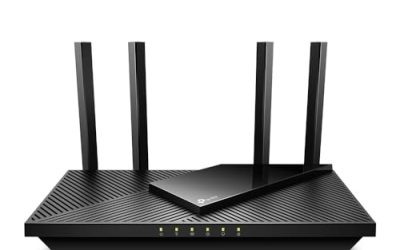
The Archer AX21 is the default recommendation in this class, and its listing shows why: Wi-Fi 6 at AX1800 speeds, four gigabit LAN ports, and the full OFDMA and MU-MIMO pairing that keeps a crowded home network responsive. TP-Link publishes band rates of up to 1,201 Mbps on 5 GHz and 574 Mbps on 2.4 GHz, with beamforming and four external antennas concentrating signal toward connected devices instead of spraying it in every direction at once.
For a gaming home, the wired side does the heavy lifting: plug the PC and console into two of the gigabit LAN ports and the match traffic never touches the wireless bands at all. The wireless side then serves everything else, and OFDMA is the feature that stops a roommate’s download from crowding out a voice call. The listing also publishes WPA3 security, a VPN server, parental controls and Alexa voice support, and the router can join a TP-Link OneMesh setup later if the home outgrows a single unit. Setup and management run through the TP-Link Tether app or a browser, as the maker describes.
Specs
- Wi-Fi standard and speed class: Wi-Fi 6 (802.11ax), AX1800 (up to 1,201 Mbps on 5 GHz + 574 Mbps on 2.4 GHz)
- Bands: Dual-band 2.4 GHz and 5 GHz
- Ethernet ports: 1 x Gigabit WAN, 4 x Gigabit LAN
- Multi-device features: OFDMA and MU-MIMO, beamforming, 4 external antennas
- Security and extras: WPA3, VPN server, parental controls, OneMesh support, works with Alexa, as listed
View the TP-Link Archer AX21 on Amazon
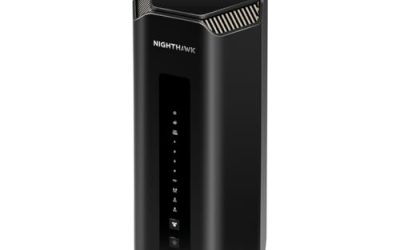
2. NETGEAR Nighthawk R6700AX
The R6700AX carries the Nighthawk name into this class with a four-stream Wi-Fi 6 design. NETGEAR publishes AX1800 speeds up to 1.8 Gbps, coverage of up to 1,500 sq. ft. and support for up to 20 devices, figures the maker states for a typical home layout. Four streams split across the two bands give the router more simultaneous conversations to work with than a two-stream design, which is the specification that matters when several people stream and play at the same time.
The back panel follows the NETGEAR data sheet: five gigabit Ethernet ports in total, four for wired devices and one for the modem, so the gaming PC and both consoles can stay cabled. OFDMA and MU-MIMO are both on the published feature list, along with WPA3 security and voice control through Alexa or Google Assistant as NETGEAR describes them. NETGEAR Armor, the maker’s network security service, is published as available for this model, and setup runs through the Nighthawk app. Households loyal to the NETGEAR ecosystem, or replacing an older Nighthawk, will find the management style familiar, and the published coverage figure suits the apartment and mid-size house layouts this class usually serves.
Specs
- Wi-Fi standard and speed class: Wi-Fi 6 (802.11ax), AX1800 (up to 1.8 Gbps combined)
- Bands: Dual-band 2.4 GHz and 5 GHz, 4 streams
- Ethernet ports: 5 x Gigabit in total (4 x LAN, 1 x WAN), per the maker data sheet
- Published coverage: Up to 1,500 sq. ft. and up to 20 devices, as listed
- Security and extras: WPA3, OFDMA, MU-MIMO, NETGEAR Armor available, works with Alexa and Google Assistant, as published
View the NETGEAR Nighthawk R6700AX on Amazon
3. TP-Link Archer AX10
The Archer AX10 is the step-down Wi-Fi 6 option: an AX1500 class router that keeps the features a gaming home actually uses and trims the headline band rates to do it. TP-Link publishes up to 1,201 Mbps on the 5 GHz band and 300 Mbps on 2.4 GHz, which still covers a gigabit broadband plan on the band that matters and leaves the 2.4 GHz band to smart-home devices, printers and anything far from the router.
The rest of the published sheet reads like the class checklist: four gigabit LAN ports and a gigabit WAN port, OFDMA and MU-MIMO working together to organise traffic between devices, beamforming, parental controls and Alexa support. The AX10 suits a smaller household or a first upgrade away from a provider-supplied box, where the device count is modest and the priority is one strong 5 GHz bubble around the living room and desk. It also works as a tidy answer for a student flat or a spare-room setup that later moves into a bigger home as a secondary unit. Buyers comparing it with the Archer AX21 above are really choosing between the stronger 2.4 GHz band and quad-stream headroom of the AX21 and the simpler AX1500 sheet here; the ports and core Wi-Fi 6 features are shared.
Specs
- Wi-Fi standard and speed class: Wi-Fi 6 (802.11ax), AX1500 (up to 1,201 Mbps on 5 GHz + 300 Mbps on 2.4 GHz)
- Bands: Dual-band 2.4 GHz and 5 GHz
- Ethernet ports: 1 x Gigabit WAN, 4 x Gigabit LAN
- Multi-device features: OFDMA and MU-MIMO, beamforming
- Security and extras: Parental controls, guest network, works with Alexa, as listed
View the TP-Link Archer AX10 on Amazon
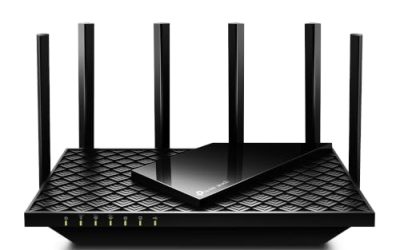
4. TP-Link Archer A7

The Archer A7 is the Wi-Fi 5 veteran of the group, an AC1750 router that has anchored entry-level roundups for years. Its published rates are up to 1,300 Mbps on 5 GHz and 450 Mbps on 2.4 GHz, delivered through three external antennas, and the wired side matches the rest of this list with four gigabit LAN ports and a gigabit WAN port. What separates the A7 from the other Wi-Fi 5 pick below is the extra hardware on the back: a USB 2.0 port that the listing publishes for sharing storage or a printer across the home network.
The software list is complete for the class: MU-MIMO for serving several devices in turn, quality-of-service controls for prioritising a games console or a work laptop, parental controls, a guest network and a VPN server, all as TP-Link publishes them. The A7 also supports the maker’s OneMesh system for later expansion, and it works with Alexa. It makes the most sense for a household whose devices are mostly Wi-Fi 5 era, where the AX features of the newer picks would sit unused, or as a dependable replacement for an ageing router where proven firmware matters more than the newest standard. Buyers with a shelf of Wi-Fi 6 phones and laptops should take one of the AX picks instead and let those devices use the newer radios.
Specs
- Wi-Fi standard and speed class: Wi-Fi 5 (802.11ac), AC1750 (up to 1,300 Mbps on 5 GHz + 450 Mbps on 2.4 GHz)
- Bands: Dual-band 2.4 GHz and 5 GHz
- Ethernet ports: 1 x Gigabit WAN, 4 x Gigabit LAN, plus 1 x USB 2.0 for sharing, as listed
- Multi-device features: MU-MIMO, 3 external antennas
- Security and extras: Quality of service, parental controls, guest network, VPN server, OneMesh support, works with Alexa, as published
View the TP-Link Archer A7 on Amazon
5. TP-Link Archer C80
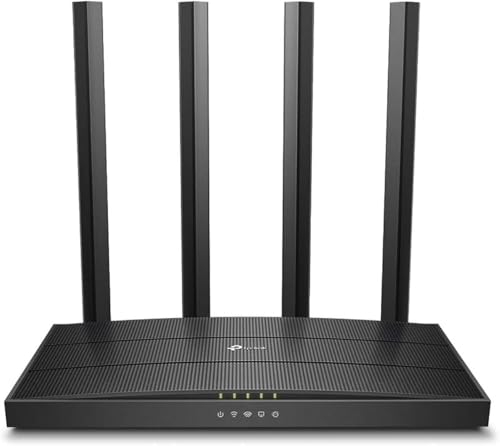
The Archer C80 is the pick for buyers who want the highest Wi-Fi 5 band rates in this class. It is an AC1900 model with published speeds of up to 1,300 Mbps on 5 GHz and 600 Mbps on 2.4 GHz, and its 3×3 MU-MIMO arrangement can transmit and receive on three streams at once, which the maker positions for homes running several demanding devices over wireless rather than cable. Four external antennas and beamforming handle the coverage side of the sheet.
Around the back there is the expected layout of one gigabit WAN port and four gigabit LAN ports, so the wired gaming setup is fully supported even though this model leans wireless. TP-Link publishes WPA3 security for the C80, which is unusual in a Wi-Fi 5 design and worth noting for households that keep routers for many years. Smart Connect merges the two bands under one network name and steers devices between them, parental controls and device prioritisation are on the published list, and the router is EasyMesh-compatible for later expansion. A 1.2 GHz processor, as published in the maker’s hardware sheet, runs the show. Against the Archer A7 above, the C80 trades the USB port for faster bands and an extra stream; against the Wi-Fi 6 picks, it trades OFDMA for those same band rates.
Specs
- Wi-Fi standard and speed class: Wi-Fi 5 (802.11ac), AC1900 (up to 1,300 Mbps on 5 GHz + 600 Mbps on 2.4 GHz)
- Bands: Dual-band 2.4 GHz and 5 GHz
- Ethernet ports: 1 x Gigabit WAN, 4 x Gigabit LAN
- Multi-device features: 3×3 MU-MIMO, beamforming, Smart Connect, 4 external antennas
- Security and extras: WPA3, parental controls, device prioritisation, EasyMesh-compatible, as published
View the TP-Link Archer C80 on Amazon
Which router fits which home?
For most gaming homes the Archer AX21 is the balanced answer: current Wi-Fi 6 features, the stronger 2.4 GHz band, and a full set of gigabit ports. The NETGEAR R6700AX is the alternative for households that prefer the Nighthawk app and Armor ecosystem, with a published coverage figure aimed at mid-size homes. The Archer AX10 trims the class down for smaller households and lighter device counts. The two Wi-Fi 5 Archers split by priority: the A7 adds a USB port and a long-proven platform, while the C80 pushes Wi-Fi 5 band rates and stream count as far as this class goes. Whichever one lands on the shelf, wire the gaming machines in with Ethernet and let the wireless bands serve everything else; that single habit does more for match stability than any feature on these pages.
Frequently asked questions
Is Wi-Fi 6 worth choosing over Wi-Fi 5 in this class?
For a home full of recent phones, laptops and consoles, yes: Wi-Fi 6 adds OFDMA, which lets the router serve several devices inside one transmission and keeps latency steadier when the network is busy. Wi-Fi 5 models such as the Archer A7 and C80 above still post strong band rates and full gigabit port layouts, so they remain sensible for households whose devices are mostly Wi-Fi 5 era or whose priority is one fast 5 GHz link.
Will one of these routers cover a whole house?
Coverage depends on the building more than the box. NETGEAR publishes up to 1,500 sq. ft. for the R6700AX under its own test conditions, and the other makers describe their models in terms of small and medium homes. Brick, concrete and foil-backed insulation all shorten reach. Placement matters most: put the router high, central and out in the open, and pick a model with mesh support, such as the OneMesh or EasyMesh picks above, if a second node might be needed later.
How many wired ports does a gaming setup need?
One for each machine that plays competitively. Every router here provides four gigabit LAN ports plus the WAN port that feeds the modem, which covers a PC, two consoles and a streaming box with nothing left to wireless. Devices beyond that can share the remaining ports through a small network switch, and everything else in the home can stay on Wi-Fi without affecting the wired players.
Can these routers replace the one from a broadband provider?
In most homes, yes, with one condition: the provider box sometimes combines the modem and router in a single unit. These picks are routers only, so the provider unit needs a modem or bridge mode for the router to take over, or a separate modem in front of it. Where the provider supplies a standalone modem, any of the five connects directly through its gigabit WAN port and the setup continues in the maker’s app or browser page.
FAQ
Which router fits which home?
More from Amazon
Programs that pair well with the guide above. Offers and eligibility are set by Amazon and may change.
Free shipping on eligible items, Prime Video and more. Eligible new members can start with a free trial.
Start a Prime free trialAd-free music streaming. Eligible new subscribers can start with a free trial.
Try Music Unlimited freeA Prime membership for ages 18-24 with a trial period. Eligibility is set by Amazon.
See Prime for Young AdultsAudiobooks and podcasts to listen to on the go. Eligible new members can start with a free trial.
Try Audible freeAs an Amazon Associate we earn from qualifying purchases.