Key takeaways
- Compare 5 mesh routers for whole-home coverage, from 6,000 to 7,500 sq. ft., with the bands, backhaul, and ports that decide real range.
A router that covers one room well can still leave a bedroom, a home office, or a gaming setup at the far end of the house with a weak signal. The real decision is not which router looks fastest on paper, but how the signal will travel through your walls, floors, and furniture, and whether one box can reach every spot where people actually use Wi-Fi. Coverage numbers on a box describe open space, not a lived-in home, so the choice comes down to matching the system to the shape of your house.
This guide is for gamers and households in larger or multi-floor homes who are tired of dead zones, buffering in distant rooms, and a connection that drops during a match. Every system below was chosen from its name and specifications on its Amazon listing, including the stated coverage area, the number of units in the pack, the Wi-Fi generation and bands, the device capacity, and the wired ports, so you can compare them on the same terms.
Quick Picks
As an Amazon Associate we earn from qualifying purchases
| Product | Best for | Key spec from title |
|---|---|---|
| NETGEAR Orbi RBK753 | Largest homes with many rooms | Coverage up to 7,500 sq. ft., AX4200, tri-band |
| TP-Link Deco XE75 Pro (3-Pack) | Wi-Fi 6E coverage with a multi-gig port | Covers up to 7,200 sq. ft., AXE5400, 2.5G WAN/LAN |
| Google Nest Wifi Pro (3-Pack, Snow) | Simple whole-home Wi-Fi with smart-home control | Wi-Fi 6E, whole home coverage, mesh router 3-pack |
| TP-Link Deco X55 (3-Pack) | Mid-size homes on a smaller budget | Covers up to 6,500 sq. ft., AX3000, 150 devices |
| Amazon eero Pro 6E (3-Pack) | Easy mesh with a built-in smart-home hub | Coverage up to 6,000 sq. ft., 100+ devices, 2.5 Gbps plans |
How to Choose
Measure the space before trusting a coverage number
A coverage figure describes how far a signal can travel in open air, and your home is not open air. Count the floors, note the rooms farthest from where the main router will sit, and think about brick, concrete, and metal objects that sit between the router and those rooms. A single-floor flat of modest size may be fine with one strong router, while a long house or a home with thick walls usually needs extra nodes. Sketch the floor plan on paper, mark where people game, stream, and work, and treat the stated coverage as a ceiling to discount, not a promise.
Mesh nodes beat one powerful router in long or multi-floor homes
One router, however strong, sends its signal from a single point, and every wall between that point and your device weakens it. A mesh system spreads two or three units around the home, and each one passes the signal on, so the far bedroom talks to a nearby node instead of shouting across the house. Place the main unit near the modem, put the second node about halfway toward the dead zone, and add a third where the signal still struggles. If the home is compact and open plan, a single unit can work, but long hallways and separate floors favour mesh.
Bands and backhaul decide speed at the far node
The bands on a router decide how much wireless room your devices have, and the backhaul decides how fast the nodes talk to each other. A tri-band system keeps one band free for node-to-node traffic, so the far node still has full speed left for your devices, while a dual-band system shares its bands between backhaul and devices. Wi-Fi 6E adds a 6 GHz band that helps newer phones, laptops, and consoles, but only devices that support Wi-Fi 6E can use it. When gaming traffic runs through a distant node, a dedicated backhaul matters more than a headline speed figure.
Ports, device count, and app control for a gaming household
Coverage means little if the system cannot carry everything connected to it. Check how many devices the listing says the system supports, and count your consoles, PCs, phones, televisions, and smart-home gear before you buy. Look at the wired ports on each unit, because a console or gaming PC plugged into a satellite with Ethernet avoids wireless congestion entirely, and a multi-gig port matters if your internet plan runs above gigabit speed. Finally, check the app: parental controls, device pausing, and a guest network are useful in a shared home, and setup should not need a wired PC.
The 5 Best Options
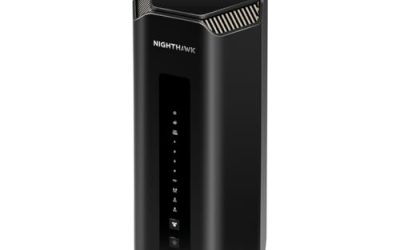
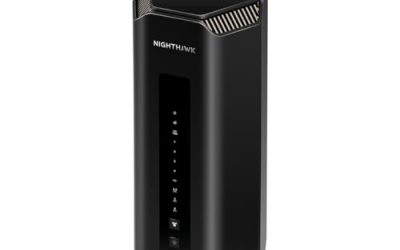
NETGEAR Orbi Whole Home Tri-Band Mesh WiFi 6 System (RBK753) – Router with 2 Satellite Extenders

The Orbi RBK753 leads this list because its stated coverage is the largest here, and its tri-band design gives the satellites a dedicated backhaul band, so the far rooms keep more of the available speed. One router plus two satellites spreads the network across a large home, and the generous number of Ethernet ports means consoles and PCs in different rooms can plug in rather than compete for airtime. It suits households where the gaming setup sits far from the modem and the whole family streams at the same time.
Specs
- Coverage up to 7,500 sq. ft. and 40+ devices
- Tri-band WiFi 6, AX4200, with speeds up to 4.2 Gbps
- 1 router plus 2 satellite extenders in the pack
- Dedicated 5 GHz backhaul band between router and satellites
- 7 Gigabit Ethernet ports in total across router and satellites
- Model RBK753-100NAS
Best for: Large multi-room homes where the farthest bedroom still needs full gaming speed.
Watch out for: The wired ports are Gigabit only, so it cannot take full advantage of an internet plan above gigabit speed.
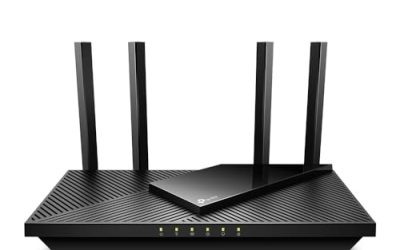
TP-Link Deco XE75 Pro AXE5400 Tri-Band WiFi 6E Mesh System (3-Pack)

The Deco XE75 Pro covers almost as much ground as the Orbi while adding Wi-Fi 6E and a multi-gig port, which makes it the stronger pick for a home with a fast internet plan and newer devices. Three units form one network with AI-driven mesh that steers devices between nodes, and each unit carries a 2.5G WAN/LAN port alongside two Gigabit LAN ports, so a wired console or PC at a satellite still gets a fast connection. Its 6 GHz band gives Wi-Fi 6E devices extra room away from older traffic.
Specs
- Covers up to 7,200 sq. ft. with the 3-pack
- Tri-band Wi-Fi 6E, AXE5400, with a 6 GHz band
- 1 x 2.5G WAN/LAN port and 2 x Gigabit LAN ports per unit
- Supports up to 200 devices
- AI-driven mesh with seamless roaming between units
- Replaces a router and extender with one network
Best for: Large homes with a multi-gig internet plan and Wi-Fi 6E phones, laptops, and consoles.
Watch out for: Only Wi-Fi 6E devices can use the 6 GHz band, so older devices still rely on the 2.4 GHz and 5 GHz bands.
Google Nest Wifi Pro – 6E Mesh Router (3-Pack, Snow)
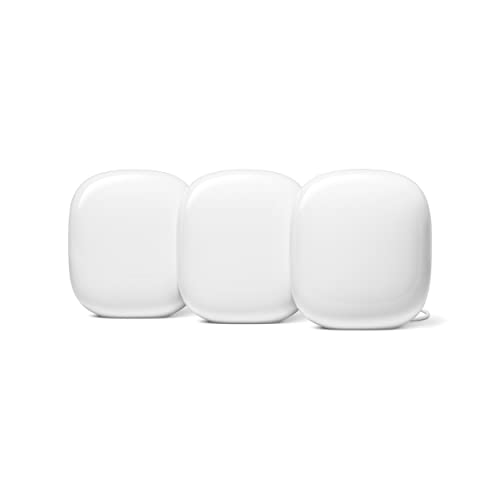
The Nest Wifi Pro takes a simpler approach to coverage, with compact units that blend into a room and a setup that runs through the Google Home app. Its three-pack covers a large home, and the Wi-Fi 6E tri-band radios give newer devices a fast lane while older ones stay connected on the familiar bands. It also works as a Thread border router, so compatible smart-home devices can join the same network without a separate hub, which keeps the setup tidy in a home full of connected gear.
Specs
- Wi-Fi 6E tri-band mesh router, 3-pack in Snow
- Coverage up to 6,600 sq. ft. with the 3-pack
- Whole home coverage with fast speed, per the listing
- Built-in Thread border router for compatible smart-home devices
- Managed through the Google Home app
- Guest network and device controls in the app
Best for: Households that want straightforward mesh coverage plus smart-home control from one app.
Watch out for: Each unit has a single Ethernet port, so wiring several devices at one node needs a separate switch.
TP-Link Deco X55 AX3000 Whole Home Mesh Wi-Fi 6 System (3-Pack)

The Deco X55 is the practical choice when the home is mid-size and the budget matters more than the newest wireless standard. Three units cover a large area for a dual-band Wi-Fi 6 system, and each unit carries three Gigabit ports, which is generous at this level and handy for wiring a console or television near a satellite. Ethernet backhaul is supported, so homes with cabling already in the walls can link the nodes by wire and keep the wireless bands free for devices.
Specs
- Covers up to 6,500 sq. ft. with the 3-pack
- Dual-band Wi-Fi 6, AX3000, with speeds up to 3.0 Gbps
- Connects up to 150 devices
- 3 Gigabit ports per unit
- Supports Ethernet backhaul between units
- 5 GHz speed up to 2402 Mbps and 2.4 GHz speed up to 574 Mbps
Best for: Mid-size homes that need three-node coverage and plenty of wired ports without paying for Wi-Fi 6E.
Watch out for: Dual-band design means the backhaul shares bands with devices, so speed at the far node can dip when many devices are active.
Amazon eero Pro 6E Mesh WiFi System (3-Pack)

The eero Pro 6E rounds out the list with a compact three-pack that is easy to place around a home and quick to set up through its app. Its tri-band Wi-Fi 6E radios cover a large area, and the system supports internet plans up to 2.5 Gbps, which suits households that have upgraded their connection but still fight dead zones. A built-in Zigbee smart-home hub lets compatible lights and sensors connect without extra hardware, and the app keeps network controls, guest access, and device pausing in one place.
Specs
- Coverage up to 6,000 sq. ft. with the 3-pack
- Tri-band Wi-Fi 6E, AXE5400
- Supports internet plans up to 2.5 Gbps
- Connects 100+ devices
- Built-in Zigbee smart home hub
- 1 month of eero Plus included, per the listing
Best for: Homes that want a compact mesh system with smart-home hub features built in.
Watch out for: Some advanced app features need an eero Plus subscription once the included month ends.
Which One Fits Your Situation
A large two-story house with dead zones upstairs
Pick the NETGEAR Orbi RBK753. Its 7,500 sq. ft. stated coverage and dedicated backhaul band are built for exactly this layout, and the two satellites can sit one per floor so the upstairs gaming setup talks to a nearby node. The extra Ethernet ports also let you wire a console upstairs instead of relying on wireless through the ceiling.
A long home where the far bedroom loses signal
Pick the TP-Link Deco XE75 Pro 3-pack. Three units spaced along the length of the house keep the signal strong at the far end, and the 2.5G port means a wired device at the distant node still gets a fast link. Wi-Fi 6E devices gain the extra 6 GHz band, while older devices keep working on the other bands.
A household that wants simple setup and smart-home control
Pick the Google Nest Wifi Pro 3-pack in Snow. Setup and day-to-day control run through the Google Home app, and the built-in Thread border router connects compatible smart-home devices without a separate hub. Its coverage suits a large home, and the compact units sit neatly on a shelf or side table.
A mid-size home on a tighter budget
Pick the TP-Link Deco X55 3-pack. It covers up to 6,500 sq. ft. with three Wi-Fi 6 nodes, and three Gigabit ports per unit give wired options in every room. If the home is smaller still and smart-home hub features appeal, the eero Pro 6E is the alternative, with Wi-Fi 6E and a built-in Zigbee hub in a compact pack.
Common Mistakes
- Buying one router for a long or multi-floor home and expecting a single signal to reach every room.
- Trusting the coverage figure as a guarantee instead of discounting it for walls, floors, and furniture.
- Placing all mesh nodes next to each other instead of spacing them toward the rooms with weak signal.
- Choosing a dual-band system for a busy household and then wondering why the far node slows down under load.
- Ignoring the wired ports, then running every console and PC on wireless when a cable would have fixed the problem.
Frequently Asked Questions
How many mesh units do I need for good coverage?
Count the floors and the distance from the modem to the farthest room you use. A compact single-floor home may manage with one or two units, while a long or two-story home usually needs three. Space the nodes toward the weak rooms rather than clustering them, and add a unit only where the signal still drops.
Is a mesh system better than a single powerful router?
Mesh wins in long, multi-floor, or thick-walled homes because each node repeats the signal close to where it is used. A single powerful router can work in a small open-plan space, but it sends everything from one point, so distance and walls weaken it. Choose mesh when dead zones appear in rooms far from the router.
Does Wi-Fi 6E improve coverage?
Wi-Fi 6E does not extend range by itself, but it adds a 6 GHz band with extra room for newer devices, which reduces congestion on the older bands. Only Wi-Fi 6E devices can use that band, so the benefit depends on your phones, laptops, and consoles. The coverage still depends on node placement and the number of units.
Should I wire my gaming PC or console to a mesh node?
Yes, when the node has a free Ethernet port. A wired connection avoids wireless interference and keeps latency steadier during play, even when the node itself connects wirelessly to the main router. Check the port count on each unit before buying, and prefer a system with a multi-gig port if your plan runs above gigabit speed.
FAQ
How many mesh units do I need for good coverage?
Is a mesh system better than a single powerful router?
Does Wi-Fi 6E improve coverage?
Should I wire my gaming PC or console to a mesh node?
More from Amazon
Programs that pair well with the guide above. Offers and eligibility are set by Amazon and may change.
Free shipping on eligible items, Prime Video and more. Eligible new members can start with a free trial.
Start a Prime free trialAd-free music streaming. Eligible new subscribers can start with a free trial.
Try Music Unlimited freeA Prime membership for ages 18-24 with a trial period. Eligibility is set by Amazon.
See Prime for Young AdultsAudiobooks and podcasts to listen to on the go. Eligible new members can start with a free trial.
Try Audible freeAs an Amazon Associate we earn from qualifying purchases.