Key takeaways
- Compare the best routers for gaming and multiple devices by Wi-Fi band, wired ports and device capacity, and pick the right router for a busy household.
A gaming session rarely gets the network to itself. While one person plays online, someone else streams a film, a phone backs up photos, and a laptop joins a video call, while a smart TV, a console, and more gadgets all ask for bandwidth together. A basic router can cope with one or two of those jobs, but when the household is busy, the game is the first thing to suffer, with lag spikes that arrive when a match turns tense. Pick a router that holds up under a full house, not one with the biggest headline speed figure.
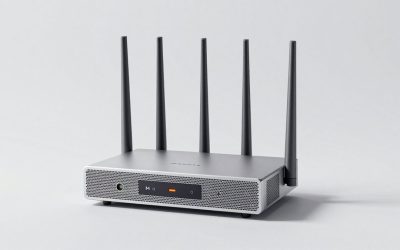
This guide is for households where gaming shares the network with streaming, work calls, and dozens of gadgets, for families with several gamers under one roof, and for players who wire the main rig, while phones and laptops stay connected. The three routers below were chosen from the names and specifications on their Amazon pages, so you can compare Wi-Fi bands, wired ports, device capacity, and gaming features side by side.
Quick Picks
As an Amazon Associate we earn from qualifying purchases
| Product | Best for | Key spec from title |
|---|---|---|
| ASUS ROG Rapture GT-AX11000 Pro | Large households that want a tri-band flagship with fast wired ports | Tri-band WiFi 6 up to 11,000 Mbps, 10G and 2.5G ports |
| NETGEAR Nighthawk WiFi 6E Router (RAXE500) | Homes with many WiFi 6E devices sharing the network | AXE11000 tri-band, up to 10.8 Gbps, 6 GHz band, 60 devices |
| ASUS RT-AX86U Pro (AX5700) | Gamers who want a focused dual-band router with a dedicated gaming port | Dual-band WiFi 6 up to 5700 Mbps, 2.5G port, gaming port |
How to Choose
Tri-band or dual-band, and whether the 6 GHz band helps
A tri-band router adds a second 5 GHz band, or a 6 GHz band on WiFi 6E models, so gaming traffic can sit apart from the traffic of phones, laptops, and streaming boxes. In a home with many gadgets, that separation means one busy band slows nothing else down, and a dedicated gaming band means a download on another device is less likely to interrupt a match. Dual-band routers ask every device to share two bands, which suits a smaller household. If your home has two or more gamers, or a gamer plus heavy streamers, a tri-band model is the safer choice. If only one or two people game and the rest of the household is light, dual-band is enough.
Wired ports and a multi-gig internet connection
A wired connection remains the most reliable way to play, so count the Ethernet ports and check whether any run faster than one gigabit. A 2.5G port, or a 10G port on a flagship model, lets a fast internet connection reach the router without a bottleneck at the WAN port, and gives a wired PC or console a clean path to the network. A gaming PC, a console, a streaming box, and a network drive fill four ports quickly, so eight LAN ports can remove the need for an extra switch. If your internet plan is faster than one gigabit, only a multi-gig WAN port can pass the full speed onward.
Device capacity and processing power
A router built for many gadgets needs a processor and enough memory to track dozens of simultaneous connections without stalling. Look at the device count the listing names, and think about your own home honestly: phones, tablets, laptops, consoles, TVs, speakers, cameras, and smart home gadgets add up faster than most people expect. A router rated for around 60 devices suits a large household, while a smaller home can manage with less headroom. A quad-core processor helps the router juggle traffic shaping, security checks, and gaming prioritisation at the same time. If your current router slows down every evening when everyone comes home, capacity and processing power are the likely weak points, not the headline wireless speed.
Gaming traffic controls and room to expand
Gaming features matter most when the network is busy, so look for controls that put game traffic first and open the ports a game needs. A dedicated gaming port gives a wired console or PC priority without any setup, while a mobile game mode does the same for a phone. Port forwarding and quality-of-service settings let you shape traffic for the games you actually play. Expansion matters too: a mesh router can gain a second node later if a far bedroom or garden office gets weak signal. Buying a router that can grow with the house costs less in the long run than replacing a router that cannot cover the space you already have.
The 3 Best Options
ASUS ROG Rapture GT-AX11000 Pro

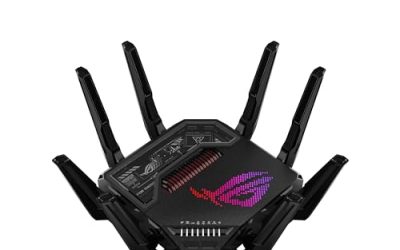
The GT-AX11000 Pro suits a large household that wants one powerful router to handle gaming, streaming, and work at the same time. Its tri-band WiFi 6 design reaches speeds up to 11,000 Mbps across three bands, so a game can use one band while other devices share the rest without crowding each other. The 10G port and the 2.5G port can each work as a WAN or LAN connection, giving a fast plan a clear path in and a wired PC or console a fast path out. RangeBoost Plus is named in the listing as a way to extend coverage, with triple-level game acceleration keeping game traffic first.
Specs
- Wi-Fi standard: tri-band WiFi 6, speeds up to 11,000 Mbps
- Channels: 160 MHz channels for better efficiency and throughput
- Wired ports: one 10G port and one 2.5G port, each configurable for WAN or LAN operation
- Coverage feature: ASUS RangeBoost Plus
- Gaming feature: triple-level game acceleration
- Security: subscription-free network security
- Mesh: AiMesh compatible
- Model number: GT-AX11000 PRO
Best for: Large households that want a tri-band flagship with fast wired ports for gaming and streaming at once.
Watch out for: This is a large, high-end router, so check that you have shelf space for it and that your internet plan is fast enough to use its multi-gig ports.
ASIN: B0BQ41LDQ3
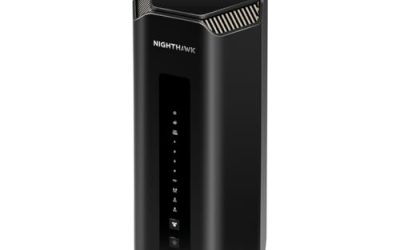
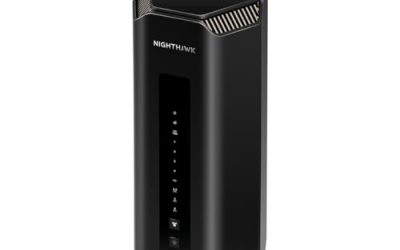
NETGEAR Nighthawk WiFi 6E Router (RAXE500)

The RAXE500 suits a home where many gadgets compete for airtime and several already use WiFi 6E. Its AXE11000 tri-band design reaches combined speeds up to 10.8 Gbps, with a 6 GHz band adding fresh spectrum away from the crowded 2.4 GHz and 5 GHz bands. The listing names coverage up to 3,500 square feet and capacity for 60 devices, fitting a large house with phones, consoles, laptops, TVs, and smart home gadgets connected at once. Twelve streams let the router serve several devices in parallel instead of making them wait in turn, and the wired ports give a gaming PC or console a stable connection when wireless falls short.
Specs
- Wi-Fi standard: AXE11000 tri-band WiFi 6E, speeds up to 10.8 Gbps
- Streams: 12-stream
- Bands: 2.4 GHz, 5 GHz, and a new 6 GHz band
- Coverage: up to 3,500 square feet
- Device capacity: 60 devices
- Wired ports: one 2.5 Gbps port and four Gigabit ports
- Security: security features, including NETGEAR Armor
- Model number: RAXE500-100NAS
Best for: Homes with many WiFi 6E devices that need a 6 GHz band and room for 60 connected gadgets.
Watch out for: Only devices with WiFi 6E radios can use the 6 GHz band, so older phones and laptops will still use the 2.4 GHz and 5 GHz bands.
ASIN: B08R58D9FH
ASUS RT-AX86U Pro (AX5700)

The RT-AX86U Pro suits a gamer who wants a focused router with a dedicated gaming port and no third band. Its dual-band WiFi 6 design reaches speeds up to 5700 Mbps, and its 2.0 GHz quad-core processor handles gaming traffic, security checks, and many connected gadgets at the same time. A dedicated gaming port gives a wired PC or console priority the moment it is plugged in, and Mobile Game Mode does the same for a phone. Port forwarding and VPN support are named in the listing, and AiMesh support lets a second node extend coverage later if a far room needs a stronger signal.
Specs
- Wi-Fi standard: dual-band WiFi 6, speeds up to 5700 Mbps
- Processor: 2.0 GHz quad-core CPU
- Internet support: supports up to a 2 Gbps internet connection
- Wired ports: 2.5G port and a dedicated gaming port
- Gaming features: Mobile Game Mode, port forwarding
- Security: subscription-free network security, VPN, AiProtection Pro
- Mesh: AiMesh compatible
- Model number: RT-AX86U PRO
Best for: Gamers who want a focused dual-band router with a dedicated gaming port and a 2.5G port.
Watch out for: With only two bands, a very busy household may feel the squeeze sooner than with a tri-band model, so count your devices before choosing it.
ASIN: B0BQ417K47
Which One Fits Your Situation
You have a large household with several gamers
Choose the ASUS ROG Rapture GT-AX11000 Pro, because its tri-band design and 10G and 2.5G ports give several gamers room to play while the rest of the house streams and works. Triple-level game acceleration keeps game traffic first when the network is busy, and the extra band keeps downloads on other devices from crowding a match. It is the strongest fit when three or more people game, stream, or work from home at the same time.
You own many WiFi 6E devices and a big house
Choose the NETGEAR Nighthawk RAXE500, because its 6 GHz band adds clean spectrum for newer phones, laptops, and consoles, and the listing names coverage up to 3,500 square feet with room for 60 devices. Twelve streams let it serve many gadgets in parallel, which matters when every room has something connected. It is the best fit for a large home where the newest devices can use the 6 GHz band.
You want one wired gaming rig to always come first
Choose the ASUS RT-AX86U Pro, because its dedicated gaming port gives a wired PC or console priority without any setup, and Mobile Game Mode extends the same idea to a phone. The 2.5G port suits a fast internet plan, and the 2.0 GHz quad-core processor keeps traffic moving when other devices join the network. It is the best fit for a single main rig in a household that is busy but not enormous.
You want room to expand coverage later
Choose either ASUS model, because both are AiMesh compatible and can gain a second node if a far bedroom or a home office gets weak signal. The GT-AX11000 Pro is the better base for a large home, while the RT-AX86U Pro is the better base for a smaller home that may grow. Plan the node position early, keep the main router central and raised, and add the second unit only where the signal actually drops.
Common Mistakes
- Buying on headline wireless speed alone and ignoring device capacity, so the router slows down every evening when the whole household comes online.
- Placing the router inside a cabinet, behind a television, or on the floor, where walls and furniture block the signal before it reaches the far rooms.
- Leaving the gaming PC or console on wireless when a wired port is free, then blaming the router for lag that a cable would have removed.
- Ignoring the WAN port speed, so a multi-gig internet plan is capped at one gigabit before it ever reaches the house.
- Skipping the mesh option and buying a second router instead, which creates two separate networks that devices must jump between by hand.
Frequently Asked Questions
Do I need a tri-band router for gaming and multiple devices?
A tri-band router helps most when several people game, stream, or work at the same time, because the extra band keeps gaming traffic apart from the rest of the household. A dual-band router can still serve a smaller home well, especially if the main gaming rig is wired. Count your devices and your simultaneous users first; if two or more people game while others stream, tri-band is the safer choice.
Is WiFi 6E worth it for a gaming household?
WiFi 6E is worth it when several of your devices already have WiFi 6E radios, because the 6 GHz band adds fresh spectrum away from crowded bands. Older phones, laptops, and consoles cannot use the 6 GHz band, so they still rely on the 2.4 GHz and 5 GHz bands. Check the radios in the devices you actually own before paying for a WiFi 6E model.
Should I wire my gaming PC or console to the router?
Yes, wire the main gaming rig whenever a cable can reach it, because a wired connection avoids wireless interference and keeps latency steady during busy hours. Use the dedicated gaming port if the router has one, and keep a 2.5G or faster port free for the rig when the internet plan supports it. Wireless is fine for phones, tablets, and secondary devices.
Can one router cover a large house with many devices?
One powerful router can cover a large house when it is placed centrally, raised, and clear of thick walls, and when its listing names coverage and device capacity that match the home. The RAXE500 names coverage up to 3,500 square feet and 60 devices, which suits many large homes. If a far room still gets weak signal, add a mesh node from the same system rather than a separate router.
FAQ
Do I need a tri-band router for gaming and multiple devices?
Is WiFi 6E worth it for a gaming household?
Should I wire my gaming PC or console to the router?
Can one router cover a large house with many devices?
More from Amazon
Programs that pair well with the guide above. Offers and eligibility are set by Amazon and may change.
Free shipping on eligible items, Prime Video and more. Eligible new members can start with a free trial.
Start a Prime free trialAd-free music streaming. Eligible new subscribers can start with a free trial.
Try Music Unlimited freeA Prime membership for ages 18-24 with a trial period. Eligibility is set by Amazon.
See Prime for Young AdultsAudiobooks and podcasts to listen to on the go. Eligible new members can start with a free trial.
Try Audible freeAs an Amazon Associate we earn from qualifying purchases.