Key takeaways
- A router that reaches the far bedroom matters more than raw speed. Compare three long-distance routers with strong antennas and wide coverage for large homes.
Buying a long-distance router is really a decision about reach. A fast router that cannot push a steady signal through two walls and a floor leaves the far bedroom, the basement desk, or the backyard office with a weak connection, and no headline speed number fixes that. What matters is how far a usable signal travels: high-gain antennas, stronger radios, and beamforming that aims the signal at your devices instead of spraying it in every direction. Get the reach right first, and the speed you already pay for finally shows up where you actually sit.
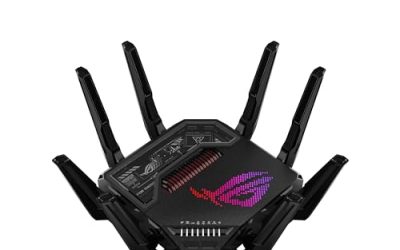
The three routers below suit different homes. The TP-Link Archer AX11000 is the tri-band flagship for large households with many devices, the ASUS RT-AX88U Pro pairs strong dual-band WiFi 6 with dual 2.5G ports for wired gear, and the ASUS RT-AX86U Pro is the smaller gaming pick for a far-end setup. Each one earned its place through its antenna layout, band design, and the coverage its listing promises.
Quick Picks
As an Amazon Associate we earn from qualifying purchases.
| Product | Best for | Key spec from title |
|---|---|---|
| TP-Link Archer AX11000 | Large homes with many devices | Tri-Band WiFi 6, 12 streams |
| ASUS RT-AX88U Pro | Wired setups needing dual 2.5G | AX6000 Dual Band WiFi 6, Dual 2.5G Port |
| ASUS RT-AX86U Pro | Gamers at the far end of the house | AX5700 Dual Band WiFi 6, 2.5G Port |
How to Choose
Antenna count and design
More antennas usually mean better reach, but the design matters as much as the count. High-gain external antennas focus the signal farther than small internal ones, and adjustable antennas let you aim coverage toward the rooms that need it most. Eight antennas on a tri-band flagship can serve many directions at once, while four well-placed antennas on a dual-band router can still cover a large single floor. Look for beamforming in the listing, since it steers the signal toward each connected device instead of broadcasting equally in all directions. Also check whether the antennas detach, because a detachable antenna can be swapped for a higher-gain one later if one corner of the house still struggles.
2.4 GHz reach versus 5 GHz speed
The 2.4 GHz band travels farther and passes through walls better than 5 GHz, while 5 GHz carries more speed over shorter runs. A long-distance router needs both, and it should move devices between bands on its own so a phone in the garden stays on 2.4 GHz while a laptop beside the router uses 5 GHz. Tri-band models add a second 5 GHz band, which helps when many devices compete for airtime. Check the per-band speeds in the listing, because a strong 2.4 GHz radio matters more for distance than a headline total that adds all three bands together. If your farthest rooms need browsing and video calls, the 2.4 GHz band may carry the job.
Router placement and home layout
A long-distance router still needs a sensible home. Place it high, near the centre of the home, and out in the open rather than inside a cabinet or behind a television, because every wall and metal object between the router and your device shortens the usable range. A central spot usually beats a corner, even when that corner feels closer to where you sit. Thick concrete, brick, and plaster block signals far more than drywall, so homes built from heavy materials gain the most from a router with strong antennas and a powerful 2.4 GHz radio. Walk the house after setup, note where the signal fades, then shift the router a metre or two toward the weak side.
Wired ports and mesh expansion
Long-distance coverage is not only about WiFi. A 2.5G port lets a wired gaming PC, a network drive, or a second access point use the full speed of a fast internet line, while extra gigabit LAN ports keep consoles and streaming boxes off WiFi entirely. Every device you wire frees wireless airtime for the rooms that truly need it. Also look for mesh support, such as AiMesh on ASUS routers or OneMesh on TP-Link models, which lets you add a matching node later instead of replacing the router when one unit cannot cover the whole home. A spare node in a far room often beats buying a stronger single router.
The 3 Best Options
TP-Link Archer AX11000

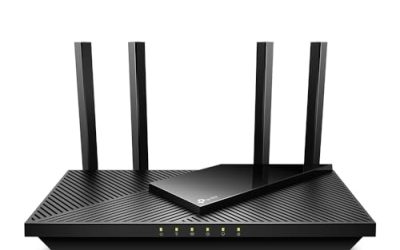
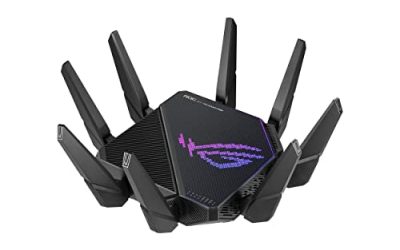
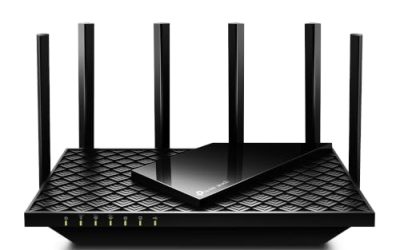
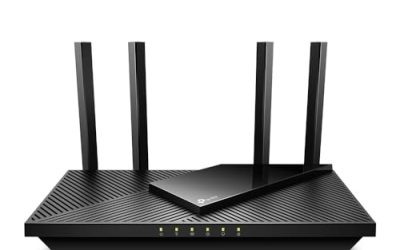
The Archer AX11000 is the range-first flagship in this list, built around eight high-gain antennas and a tri-band WiFi 6 radio that TP-Link markets with an extended range. Its three bands split traffic so gaming, streaming, and everyday browsing stop fighting for the same airtime, and the 12-stream design keeps many devices connected at once in a large household. A 2.5G port handles a fast internet line, eight gigabit LAN ports wire the gear that never moves, and OneMesh support means a compatible extender can join later. It is a big, bold unit, so give it shelf space and open air.
Specs
- Tri-band WiFi 6 with 12 streams
- 1.8GHz quad-core CPU
- 2.5G port and 8 Gigabit LAN ports
- MU-MIMO
Best for: Large households that need one powerful router to reach many rooms and many devices.
Watch out for: It is a large unit that needs open shelf space, and TP-Link now lists this model as end of life, so remaining stock may be limited.
ASUS RT-AX88U Pro
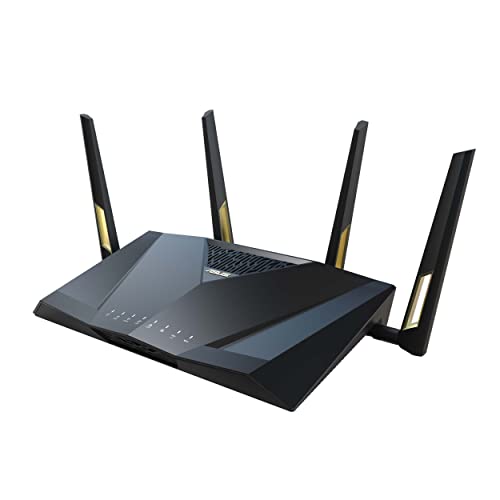
The RT-AX88U Pro is the strongest dual-band pick here, pairing AX6000 WiFi 6 with four antennas and the RangeBoost Plus tuning ASUS uses to push coverage farther. Dual 2.5G ports give wired gaming PCs and network drives a fast lane, while eight gigabit LAN ports cover everything else that stays plugged in. Adaptive QoS keeps gaming traffic ahead of background downloads, and AiMesh support lets a second ASUS router join as a node if one unit cannot reach the farthest room. It suits buyers who want range plus serious wired speed in one box.
Specs
- AX6000 dual-band WiFi 6
- Dual 2.5G ports
- WPA3 security and lifetime internet security
- AiMesh support, Adaptive QoS, port forwarding, WAN aggregation
- Parental controls
Best for: Buyers who want long reach plus fast wired connections for gaming PCs and network drives.
Watch out for: It is a dual-band router, so heavy households may miss the extra 5 GHz band of a tri-band model.
ASUS RT-AX86U Pro

The RT-AX86U Pro is the compact gaming pick of the three, with three antennas and an AX5700 dual-band WiFi 6 radio tuned for a strong, steady signal to the far end of a home. A 2.5G port and a dedicated gaming port give a console or PC first call on the wired connection, while Mobile Game Mode trims lag for phones. Subscription-free network security and VPN support come built in, and AiMesh compatibility means it can pair with another ASUS router later. It fits a gamer whose desk sits far from the modem and who wants range without a giant chassis.
Specs
- AX5700 dual-band WiFi 6
- 2.5G port and dedicated gaming port
- Mobile Game Mode
- Subscription-free network security and VPN
- AiMesh compatible
Best for: Gamers whose desk or console sits far from the modem and who want a compact router.
Watch out for: A Renewed version of this model is also listed, so confirm the listing is the new unit before buying.
Which One Fits Your Situation
A large multi-floor home
Pick the Archer AX11000. Its eight antennas and tri-band radio spread coverage across floors, and the 12-stream design handles the phones, laptops, consoles, and smart TVs a big household runs at once. Put it high and central on the main living floor, wire what you can, and let the 2.4 GHz band carry the farthest rooms. Add a OneMesh extender later if one corner still falls short.
A gamer at the far end of the house
Pick the ASUS RT-AX86U Pro. Its dedicated gaming port and 2.5G port give a far-end PC or console a wired lane, while Mobile Game Mode keeps phone gaming smooth. The AX5700 radio holds a steady signal across the house, and AiMesh support leaves room to add a node if the farthest room still drops. It is the smallest unit here, so it fits a desk setup without taking over the room.
A home with wired gear and a fast line
Pick the ASUS RT-AX88U Pro. Dual 2.5G ports and eight gigabit LAN ports wire a gaming PC, a network drive, and streaming boxes at full speed, while the AX6000 radio reaches the rooms that stay wireless. Adaptive QoS keeps gaming ahead of background downloads, and WAN aggregation can combine two internet lines where the provider allows it. RangeBoost Plus tuning helps the signal hold up at distance.
A smaller home with one stubborn dead zone
Pick the ASUS RT-AX86U Pro and spend the saving on placement. A compact router on a high central shelf often fixes a single dead zone without a flagship, and its 2.4 GHz band reaches through walls better than a 5 GHz-only setup. Try the router in two or three spots before adding hardware, and keep it out of cabinets and away from large metal objects. If the zone survives, AiMesh lets you add a node later.
Common Mistakes
- Hiding the router inside a cabinet or behind a television, which blocks the signal before it leaves the room.
- Judging reach by the headline speed number, which adds all bands together and says nothing about distance.
- Placing the router in a far corner instead of a high central spot, then blaming the hardware for the weak far rooms.
- Forgetting the 2.4 GHz band, which reaches farther through walls than 5 GHz even though it runs slower.
- Buying a mesh system before testing one strong router in a better position, when a single unit may cover the home.
Frequently Asked Questions
What makes a router good for long distance?
Reach comes from the radio, not the headline speed. High-gain external antennas, a strong 2.4 GHz radio, and beamforming that aims the signal at each device matter most. A powerful processor also helps, because it keeps many connections stable while the router serves far rooms. Check the listing for antenna count, band design, and mesh support before judging any router by speed alone.
Is 2.4 GHz or 5 GHz better for distance?
2.4 GHz wins for distance. Its longer waves pass through walls and floors better, so it reaches rooms where 5 GHz fades. The trade is speed: 5 GHz carries more data over short runs, which suits a laptop beside the router. A long-distance router runs both bands and moves each device to the band that fits its distance, so far rooms stay connected while near rooms stay fast.
Do I need a mesh system instead of one long-range router?
Not always. One strong router with high-gain antennas covers many homes, including larger ones, when it sits high and central. Mesh suits very large or awkwardly shaped homes, thick concrete walls, or layouts where one unit cannot reach every room. Begin with a single long-distance router, test every room, and add a mesh node only where the signal still fades.
Where should I place a long-distance router?
Place it high, central, and out in the open, on the main living floor. Keep it away from thick walls, metal cabinets, mirrors, and large appliances that block or reflect the signal. Avoid the basement or a far corner unless most of your devices live there. After setup, walk the house with a phone, note the weak spots, and shift the router a metre or two toward them.
FAQ
What makes a router good for long distance?
Is 2.4 GHz or 5 GHz better for distance?
Do I need a mesh system instead of one long-range router?
Where should I place a long-distance router?
More from Amazon
Programs that pair well with the guide above. Offers and eligibility are set by Amazon and may change.
Free shipping on eligible items, Prime Video and more. Eligible new members can start with a free trial.
Start a Prime free trialAd-free music streaming. Eligible new subscribers can start with a free trial.
Try Music Unlimited freeA Prime membership for ages 18-24 with a trial period. Eligibility is set by Amazon.
See Prime for Young AdultsAudiobooks and podcasts to listen to on the go. Eligible new members can start with a free trial.
Try Audible freeAs an Amazon Associate we earn from qualifying purchases.