Our Top Picks
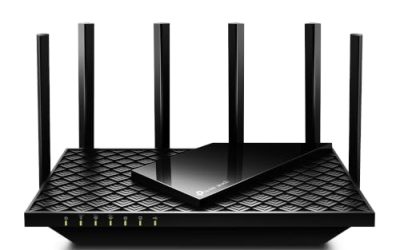
 TP-Link AC1200 WiFi Router Dual Band Wireless Internet5.7 x 9.1 x 1.5 inches5.7 x 9.1 x 1.5 inches1.45 poundsCheck on Amazon


As an Amazon Associate, we earn from qualifying purchases made through links on this page.
A router in the under-50 class is an entry-level machine, and it helps to know exactly what that class means before choosing one. In practice, this tier is made up of dual-band models from the major networking brands: Wi-Fi 5 routers in the AC1200 class and Wi-Fi 6 routers in the AX1800 class, with four antennas, app-based setup and enough capacity for an apartment or a small house. None of them has a 6 GHz band, a multi-gig port or the processing headroom of a flagship gaming router. What they do have is the full set of basics — modern security, guest networks, parental controls and wired ports for the devices that benefit from a cable.
The four routers below were picked to show the real spread inside this tier. Two are Wi-Fi 6 models with gigabit ports throughout, one is a Wi-Fi 5 model that keeps gigabit wired speeds, and one is a lower-rung Wi-Fi 5 model whose wired ports are its main compromise. Every specification is taken from the manufacturer’s own documentation, and each section ends with the limitation that matters most, because at this level the differences between models are mostly about which compromise you accept.
What to look for in a router in this class
Wi-Fi class. Wi-Fi 6 (802.11ax) models carry AX designations and add OFDMA, which lets the router serve many devices in the same transmission window. That matters in homes full of phones, laptops and smart devices. Wi-Fi 5 (802.11ac) models carry AC designations and remain fine for lighter households, but they lack OFDMA and usually have older processors.
Wired port speed. This is the single most important check in this tier. A router with gigabit Ethernet ports can carry a fast cable or fiber plan to wired devices at full speed. A router with 10/100 Mbps Fast Ethernet ports caps every wired connection — and the internet connection itself, if it arrives through the WAN port — below 100 Mbps, no matter how quick the Wi-Fi figures look on the box.
Security and updates. Look for WPA3 support, a guest network for visitors and smart-home gadgets, and a maker that still publishes firmware updates for the model. Basic parental controls and a VPN server are common in this class; advanced security suites, where they exist, are usually subscription services after a trial period.
Coverage figures. Makers state coverage in different ways, and the figures are measured in open conditions. Treat them as a rough guide to the size of home each model is aimed at rather than a promise. Four external antennas with beamforming generally reach further than compact designs with internal antennas, but wall materials and router placement matter more than any single specification.
Modem separation. Every router in this roundup is a router only. Cable and DSL connections still need a modem in front of it, while most fiber services hand off an Ethernet connection from an optical terminal that these routers can use directly.
TP-Link Archer AX21 — the Wi-Fi 6 all-rounder
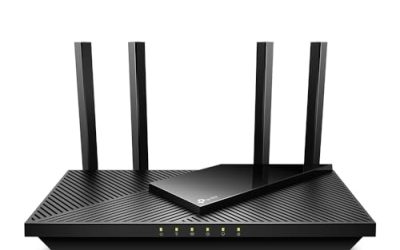
The Archer AX21 is the model that defines the top of this class. It is a dual-band Wi-Fi 6 router in the AX1800 class, rated by TP-Link at up to 1,201 Mbps on the 5 GHz band and 574 Mbps on the 2.4 GHz band. Four high-gain external antennas with beamforming focus the signal toward connected devices, and OFDMA plus MU-MIMO let it hold conversations with many devices at once instead of serving them strictly in turn.
Wired connections are fully gigabit: one gigabit WAN port and four gigabit LAN ports, so a fast internet plan reaches a PC, console or smart TV without a bottleneck. Security coverage includes WPA3, a guest network, parental controls, QoS and a built-in VPN server supporting OpenVPN and PPTP. Setup and management run through the TP-Link Tether app, and the router works with Amazon Alexa for basic voice control. Depending on hardware revision, it also supports TP-Link’s mesh expansion systems, so a compatible extender or satellite can be added later instead of replacing the router.
Who it suits: households that want Wi-Fi 6 and gigabit ports in one box, especially apartments and small homes with a fast cable or fiber plan and a growing count of connected devices.
Limitations: there is no USB port, so it cannot share storage or a printer across the network. It is dual-band only, with no 6 GHz band, and its coverage is aimed at small to mid-sized homes rather than large multi-storey houses.
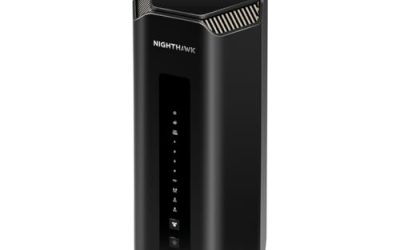
NETGEAR R6700AX — the NETGEAR alternative with a stated coverage figure
The R6700AX is NETGEAR’s entry Wi-Fi 6 router, also in the AX1800 class, rated at up to 1,200 Mbps on 5 GHz and 600 Mbps on 2.4 GHz. NETGEAR is unusually specific about positioning: the company rates it for homes up to 1,500 square feet and up to 20 connected devices, which gives buyers a concrete frame for judging whether it fits their space. Four internal antennas keep the enclosure compact, and the four-stream design with OFDMA handles simultaneous streams from several devices.
Like the AX21, it provides one gigabit WAN port and four gigabit LAN ports, so wired gaming machines and streaming boxes get full-speed connections. Setup and management run through the Nighthawk app, which also handles remote access and pausing individual devices. WPA3 is supported, and NETGEAR’s Armor security suite is available on the router as a subscription service after its introductory period.
Who it suits: buyers who prefer NETGEAR’s app and setup flow, and small homes that match the maker’s stated coverage and device figures.
Limitations: there is no USB port, and the internal antennas give fewer positioning options than external designs. The Armor suite is a paid subscription once the introductory period ends, so buyers who want its protection long-term should factor that ongoing cost into the decision.
TP-Link Archer A6 — gigabit wired speed on a Wi-Fi 5 platform

The Archer A6 shows what the Wi-Fi 5 side of this class still does well. It is an AC1200 router rated at up to 867 Mbps on 5 GHz and 300 Mbps on 2.4 GHz, with MU-MIMO for serving several devices at once and four external antennas with beamforming for coverage. The important detail is underneath: one gigabit WAN port and four gigabit LAN ports, the same wired layout as the Wi-Fi 6 models above. For a household whose demanding devices are wired — a desktop PC, a console, a TV box — that port layout matters more than the wireless generation.
The A6 supports TP-Link’s OneMesh system, so a compatible range extender can turn it into the base of a small mesh network with a single network name. It also has an access point mode for homes that keep an existing router and only need better wireless coverage, plus guest Wi-Fi and parental controls through the Tether app.
Who it suits: households on modest internet plans with several wired devices, and anyone who wants a gigabit-capable router that can later anchor a OneMesh setup.
Limitations: Wi-Fi 5 has no OFDMA, so busy wireless households with many active devices will feel congestion sooner than on the AX models. It is an older platform, which makes checking for current firmware support worthwhile before purchase, and there is no USB port.
TP-Link Archer A54 — the lowest rung, with one clear compromise
The Archer A54 is the simplest router in this roundup: an AC1200 dual-band model rated at up to 867 Mbps on 5 GHz and 300 Mbps on 2.4 GHz, with four external antennas and coverage aimed at small homes and apartments. On the wireless side it covers the essentials, including guest Wi-Fi, parental controls, IPv6 support and an access point mode, and it is compatible with TP-Link’s EasyMesh system for later expansion.
The compromise is the wired side. All five Ethernet ports — one WAN and four LAN — are 10/100 Mbps Fast Ethernet rather than gigabit. That caps the internet connection at under 100 Mbps even if the household pays for a faster plan, and it limits wired transfers between local devices to the same ceiling. For a home on a basic internet plan below that ceiling, with mostly wireless devices, the cap may never be felt. For anyone else, it is the deciding factor against this model.
Who it suits: small households on entry-level internet plans, light users replacing a failing ISP router, and buyers setting up a simple network for a relative.
Limitations: the Fast Ethernet ports are a hard ceiling for both internet speed and local wired transfers. It is also a Wi-Fi 5 design without OFDMA or MU-MIMO capacity on the level of the models above it.
Comparison table
| Model | Wi-Fi class | Rated speeds (5 GHz + 2.4 GHz) | Wired ports | Maker’s positioning | Notable features |
|---|---|---|---|---|---|
| TP-Link Archer AX21 | Wi-Fi 6, AX1800 | 1,201 + 574 Mbps | 1 gigabit WAN, 4 gigabit LAN | Small to mid-sized homes | OFDMA, MU-MIMO, WPA3, VPN server, Tether app |
| NETGEAR R6700AX | Wi-Fi 6, AX1800 | 1,200 + 600 Mbps | 1 gigabit WAN, 4 gigabit LAN | Up to 1,500 sq ft, 20 devices | OFDMA, WPA3, Nighthawk app, Armor available |
| TP-Link Archer A6 | Wi-Fi 5, AC1200 | 867 + 300 Mbps | 1 gigabit WAN, 4 gigabit LAN | General home use | MU-MIMO, OneMesh, access point mode |
| TP-Link Archer A54 | Wi-Fi 5, AC1200 | 867 + 300 Mbps | 1 Fast Ethernet WAN, 4 Fast Ethernet LAN | Small homes, about 1,000 sq ft | EasyMesh compatible, guest Wi-Fi, IPv6 |
FAQ
Can a router in this class handle a gigabit internet plan?
Three of the four can: the Archer AX21, R6700AX and Archer A6 all have gigabit WAN and LAN ports. The Archer A54 cannot — its Fast Ethernet WAN port caps the connection below 100 Mbps regardless of the plan.
Is Wi-Fi 6 worth choosing in this class?
For most households, yes. Wi-Fi 6 models add OFDMA, which keeps many simultaneously connected devices responsive, and they use newer processors. A Wi-Fi 5 model like the Archer A6 still makes sense when the demanding devices are wired and the wireless load is light.
Do any of these routers include a modem?
No. All four are standalone routers. Cable and DSL services need a separate modem in front of the router; most fiber services connect directly through the provider’s optical terminal.
How many devices can these routers handle?
NETGEAR rates the R6700AX at up to 20 devices. The other makers do not publish a single device figure for these models, but the Wi-Fi 6 pair will stay responsive with more simultaneously active devices than the Wi-Fi 5 pair, thanks to OFDMA.
Will these routers work with my internet provider?
They work with any provider that hands the connection over as Ethernet, which covers cable modems, DSL modems in bridge mode and fiber terminals. Each model supports the standard connection types, including dynamic IP, static IP and PPPoE, through its setup app or web interface.
Conclusion
The under-50 class rewards buyers who check two things: the Wi-Fi generation and the speed of the wired ports. The Archer AX21 is the most complete package here, pairing Wi-Fi 6 with full gigabit wiring. The NETGEAR R6700AX matches it on the core specifications and adds a clearly stated coverage figure for buyers who prefer NETGEAR’s ecosystem. The Archer A6 keeps the gigabit ports on a less expensive Wi-Fi 5 platform, and the Archer A54 serves the lightest households as long as its Fast Ethernet ceiling fits the internet plan. Pick by the compromise you can live with, and any of the four will be a clear step up from an aging provider-supplied box.
More from Amazon
Programs that pair well with the guide above. Offers and eligibility are set by Amazon and may change.
Free shipping on eligible items, Prime Video and more. Eligible new members can start with a free trial.
Start a Prime free trialAd-free music streaming. Eligible new subscribers can start with a free trial.
Try Music Unlimited freeA Prime membership for ages 18-24 with a trial period. Eligibility is set by Amazon.
See Prime for Young AdultsAudiobooks and podcasts to listen to on the go. Eligible new members can start with a free trial.
Try Audible freeAs an Amazon Associate we earn from qualifying purchases.