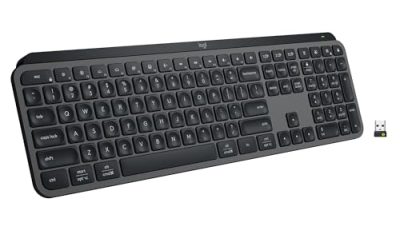
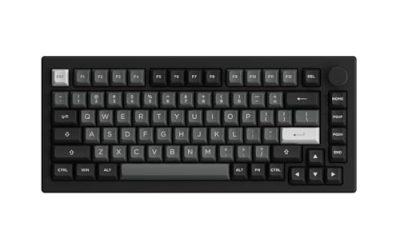
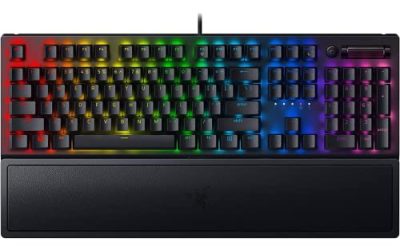
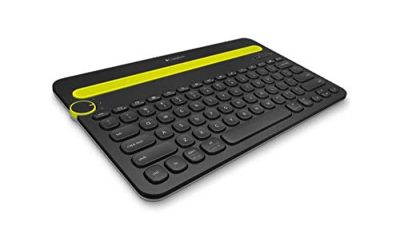
Our Short List of 3

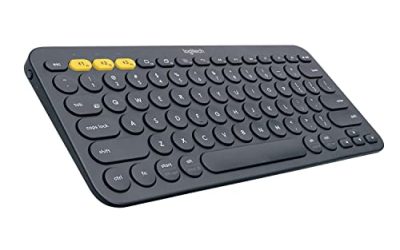
- Keychron K6 — Best overall 65 percent keyboard for most people. Wireless and wired, hot-swappable, Mac and Windows support. View on Amazon
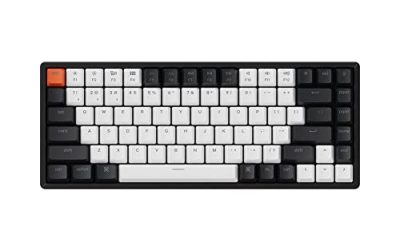
- Ducky One 3 SF — Best typing feel. Cherry MX Blue switches, hot-swappable sockets, double-shot PBT keycaps, pure white finish. View on Amazon
- EPOMAKER TH66 Pro — Best with a knob. Three connection modes, a metal volume knob, hot-swappable sockets, and MDA profile PBT keycaps. View on Amazon
- RK ROYAL KLUDGE RK68 — Best wired budget pick. A simple 68-key wired board with RGB backlighting, hot-swappable red linear switches, and shine-through keycaps. View on Amazon
All 4 Picks at a Glance
| Product | Specs | Action |
|---|---|---|
| Our Top Picks |
| Check price on Amazon |
 2. Ducky One 3 SF — Best Typing Feel | Check price on Amazon | |
 3. EPOMAKER TH66 Pro — Best With a Knob | Check price on Amazon | |
 4. RK ROYAL KLUDGE RK68 — Best Wired Budget Pick | Check price on Amazon |
Key takeaways
- Looking for the best 65 keyboards? We compare four 68-key boards with arrow keys, hot-swappable switches, and wireless or wired links for gaming and typing.
As an Amazon Associate I earn from qualifying purchases.
The Short Answer
A 65 percent keyboard keeps the arrow keys and the navigation column of a larger board while dropping the number pad and the function row, which leaves a compact layout of roughly 68 keys. That middle ground is the whole point of this guide: every board below is a true 65 percent layout, with dedicated arrow keys and no number pad. If you want one answer, the Keychron K6 is the most flexible pick in this set, because it pairs a 68-key layout with Bluetooth and wired connections, hot-swappable switches, and a layout that works on both Mac and Windows. If you want a wired board with a clicky switch and a premium typing feel, the Ducky One 3 SF is the enthusiast choice. The Epomaker TH66 Pro adds a volume knob and three connection modes, and the RK ROYAL KLUDGE RK68 is the straightforward wired pick for a first mechanical board.
One clarification matters before you buy. The phrase “65 keyboards” in this guide means keyboards with a 65 percent layout, not 65 individual keyboards and not a keyboard with 65 keys. A 60 percent board is smaller still, with around 61 keys and no dedicated arrow keys, so arrows live on a function layer. A 75 percent board is larger, with a function row squeezed into a compact frame and usually around 84 keys. The 65 percent layout sits between the two: it keeps arrows and a right-side column for keys such as Delete, Page Up, and Page Down, while cutting the number pad and the function row. If you use arrow keys every day for gaming, coding, or editing text, the 65 percent layout is often the smallest size that still feels complete.
Our Top Picks
- Keychron K6 — Best overall 65 percent keyboard for most people. Wireless and wired, hot-swappable, Mac and Windows support. View on Amazon
- Ducky One 3 SF — Best typing feel. Cherry MX Blue switches, hot-swappable sockets, double-shot PBT keycaps, pure white finish. View on Amazon
- EPOMAKER TH66 Pro — Best with a knob. Three connection modes, a metal volume knob, hot-swappable sockets, and MDA profile PBT keycaps. View on Amazon
- RK ROYAL KLUDGE RK68 — Best wired budget pick. A simple 68-key wired board with RGB backlighting, hot-swappable red linear switches, and shine-through keycaps. View on Amazon
Quick Comparison
| Keyboard | Keys | Connection | Switches | Hot-swappable | Backlight | Standout feature |
|---|---|---|---|---|---|---|
| Keychron K6 | 68 | Bluetooth 5.1 and USB-C wired | Gateron G Pro | Yes | RGB | Connects to three devices |
| Ducky One 3 SF | 68 | USB-C wired | Cherry MX Blue | Yes | RGB | Double-shot PBT keycaps |
| EPOMAKER TH66 Pro | 66 | 2.4GHz, Bluetooth 5.0, USB-C wired | Gateron Pro, confirm on the listing | Yes | RGB | Metal volume knob |
| RK ROYAL KLUDGE RK68 | 68 | USB-C wired | Pre-lubed red linear | Yes | RGB | Shine-through keycaps |
How to Choose
Confirm the layout first
Count the keys and look for the arrow keys. A 65 percent board has dedicated arrows in the bottom right and a compact right column, with no number pad and no function row. Sellers sometimes label a 60 percent board as 65 percent, so check the key count and the layout diagram on the listing before ordering. All four boards in this guide are 65 percent layouts with 66 to 68 keys.
Wired, wireless, or both
A wired board is the simplest choice: plug in the USB-C cable and type, with no battery to manage and no wireless link to drop. A wireless board adds freedom, and the two wireless picks here connect over Bluetooth and 2.4GHz, so they work with a laptop on a couch or a desktop without a cable run. Tri-mode boards such as the Keychron K6 and the Epomaker TH66 Pro give you both, which is useful if you move one keyboard between a desktop and a laptop. If you play fast competitive games, wired mode or a 2.4GHz link is the safer connection.
Switch type decides the feel
Switches are the parts under each keycap, and they decide how a key feels and sounds. Linear switches, such as the red switches in the RK68, travel straight down with no bump and suit fast double taps in games. Tactile switches add a small bump partway down, which many typists prefer for feedback. Clicky switches, such as the Cherry MX Blue switches in the Ducky One 3 SF, add a bump and an audible click, which feels crisp but is loud enough to bother people nearby. If you are unsure, a hot-swappable board is the forgiving choice, because you can change switches later without soldering.
Hot-swappable sockets
All four boards in this guide have hot-swappable sockets, which means the switches pull out and press in by hand. That matters for two reasons. First, you can try a different switch type later without buying a new keyboard. Second, a single worn switch is a small fix instead of a dead board. The TH66 Pro accepts both 3-pin and 5-pin switches, according to its manual, so confirm the pin support on the listing for the exact model you order.
Keycaps and build
Keycap material affects how the board feels after months of use. Double-shot PBT keycaps, such as those on the Ducky One 3 SF, resist shine and fading better than thin ABS keycaps. MDA profile keycaps on the TH66 Pro have a sculpted shape that some typists find more comfortable than flat keycaps. The RK68 uses shine-through keycaps that let the RGB backlight show through the legends.
Battery life and software
Wireless boards live or die by their batteries. The Keychron K6 lists a 4000 mAh battery with up to 240 hours of use with the backlight off, and the TH66 Pro lists a 2200 mAh battery, so confirm battery claims on the listing for the variant you buy, since backlight brightness changes run time a lot. Software is the other half of the decision: the K6, the TH66 Pro, and the RK68 each have companion software for remapping keys, recording macros, and changing lighting, while the Ducky One 3 SF relies on onboard key combinations for its lighting and layers.
The Picks in Detail
1. Keychron K6 — Best Overall
The Keychron K6 is the most versatile 65 percent keyboard in this guide. It has a 68-key layout with dedicated arrow keys, Bluetooth 5.1 and USB-C wired connections, and hot-swappable Gateron G Pro switches. It connects to up to three devices over Bluetooth, so you can switch between a desktop, a laptop, and a tablet from the keyboard itself, and it ships with keycaps for both Mac and Windows layouts.
The listing states a 4000 mAh rechargeable battery, RGB backlighting, a 1000 Hz polling rate in wired mode, and a weight of 530 grams with dimensions of 317 by 107 mm, which makes it light enough to carry in a bag. The plastic case keeps the weight down, and the compact frame leaves plenty of desk space for mouse movement in games.
Pros:
– Bluetooth and wired connections with support for three paired devices
– Hot-swappable Gateron G Pro switches for easy switch changes
– Light at 530 grams, so it travels well between desks
– Mac and Windows keycaps included in the box
Cons:
– Plastic case feels less solid than the metal-framed boards in this guide
– Wireless polling rate is lower than the wired polling rate, so confirm on the listing
– Battery life drops sharply with RGB backlighting on, so confirm on the listing
View the Keychron K6 on Amazon
2. Ducky One 3 SF — Best Typing Feel
The Ducky One 3 SF is the enthusiast pick in this set, and it earns that spot with its parts rather than its features. It is a 65 percent board with 68 keys, Cherry MX Blue clicky switches, RGB backlighting, and hot-swappable sockets. The double-shot PBT keycaps are thick and resist shine, and the board uses a wired USB-C connection with a 1000 Hz polling rate, according to third-party specification pages, so confirm that figure on the listing.
Ducky builds the One 3 series around its Quack Mechanics design, which the listing describes as a combination of sound dampening material, stabilizers, and a hot-swappable PCB. In plain terms, the board is built to sound and feel consistent from key to key, with less rattle on the larger keys. The pure white finish and the RGB backlight give it a clean look on a desk, and the Cherry MX Blue switches give a crisp click with each press.
Pros:
– Cherry MX Blue clicky switches with a crisp, tactile feel
– Thick double-shot PBT keycaps that resist shine
– Hot-swappable sockets for switch changes without soldering
– Sound dampening material and tuned stabilizers in the One 3 design
Cons:
– Wired only, with no Bluetooth or 2.4GHz option
– Clicky switches are loud, so they suit shared rooms poorly
– No volume knob or dedicated media keys
View the Ducky One 3 SF on Amazon
3. EPOMAKER TH66 Pro — Best With a Knob
The Epomaker TH66 Pro is the most feature-dense board in this guide. It is a 65 percent keyboard with 66 keys, a metal volume knob at the top right, and three connection modes: 2.4GHz wireless, Bluetooth 5.0, and wired USB-C. The knob controls volume by default and can be reassigned through the Epomaker software, which also handles lighting, macros, and key remapping.
The manual lists a 2200 mAh battery, MDA profile PBT keycaps, hot-swappable sockets that accept 3-pin and 5-pin switches, per-key RGB lighting, and a polling rate of up to 1000 Hz in 2.4GHz mode. The board supports up to three Bluetooth devices, and its dimensions are 323 by 113 by 25 mm with a listed weight of 1.14 kilograms. The gasket-like structure described in the manual gives the board a softer typing feel than a rigid tray-mount board, and the metal knob adds a control that none of the other picks in this guide has.
Pros:
– Three connection modes, including 2.4GHz and Bluetooth for three devices
– Metal volume knob that can be reassigned in software
– Hot-swappable sockets that accept 3-pin and 5-pin switches
– MDA profile PBT keycaps and a gasket-like structure for a softer feel
Cons:
– Heavier than the other picks, at a listed 1.14 kilograms
– Full customization needs the Epomaker software
– Battery capacity is smaller than the Keychron K6, so confirm run time on the listing
View the EPOMAKER TH66 Pro on Amazon
4. RK ROYAL KLUDGE RK68 — Best Wired Budget Pick
The RK ROYAL KLUDGE RK68 is the simplest board in this guide, and that is its strength. It is a 68-key wired keyboard with a 65 percent layout, RGB backlighting, and hot-swappable pre-lubed red linear switches. The shine-through keycaps let the RGB lighting show through the legends, and the listing states anti-ghosting across the board, so multiple keys pressed at once register together.
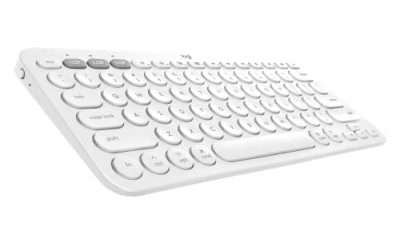
The listing gives a white finish, a USB wired connection, and compatibility with Windows and Mac, and the box includes a keycap puller, a USB cable, and a user manual. Because the board is wired only, there is no battery to charge and no wireless pairing to set up.
Pros:
– Hot-swappable pre-lubed red linear switches, smooth and quiet
– Shine-through keycaps that show the RGB backlight clearly
– Wired only, so there is no battery to charge and no pairing step
– Anti-ghosting stated on the listing for multi-key presses
Cons:
– Wired only, with no wireless option at all
– The listing describes the board as a 60 percent keyboard in places, so confirm the 68-key layout on the listing
– No volume knob and no dedicated media controls
View the RK ROYAL KLUDGE RK68 on Amazon
Who Should Choose What
- You want one keyboard for everything: Take the Keychron K6. It covers wireless and wired use, works on Mac and Windows, and its hot-swappable sockets leave room to change switches later.
- You care most about typing feel: Take the Ducky One 3 SF. Its Cherry MX Blue switches and thick double-shot PBT keycaps give the most deliberate typing feel in this set, as long as you accept a wired-only board and a loud click.
- You want a volume knob and three connection modes: Take the Epomaker TH66 Pro. The metal knob, the tri-mode connection, and the gasket-like structure make it the most feature-rich pick here.
- You want the simplest first mechanical board: Take the RK ROYAL KLUDGE RK68. It is wired, quiet, and hot-swappable, with RGB lighting and shine-through keycaps, and there is nothing to charge or pair.
- You type on a Mac and a Windows PC: Take the Keychron K6 or the TH66 Pro, since both list Mac and Windows support and both switch between multiple devices.
Common Mistakes
Buying a 60 percent board by accident. Listings sometimes use the words compact and small without naming the layout, and a 60 percent board has no dedicated arrow keys. Count the keys and look for the arrow cluster in the product images before you order.
Choosing clicky switches for a shared room. Cherry MX Blue switches sound great alone and carry through walls and voice chat with an open microphone. If you share a room or record audio, choose linear or tactile switches instead.
Assuming wireless means lag-free. Bluetooth is fine for typing and casual play, but for fast competitive games, use the wired connection or the 2.4GHz link, and confirm the polling rate on the listing for the exact variant you buy.
FAQ
What is a 65 percent keyboard?
A 65 percent keyboard is a compact mechanical keyboard with roughly 66 to 68 keys. It keeps the alphanumeric keys, the modifiers, a dedicated arrow key cluster, and a small navigation column, while dropping the number pad and the function row. The function keys are reached through a Fn layer instead.
How is a 65 percent keyboard different from a 60 percent keyboard?
A 60 percent board is smaller, with around 61 keys and no dedicated arrow keys, so arrows and navigation live on a function layer. A 65 percent board keeps dedicated arrow keys and keys such as Delete and Page Up, which makes it easier to use for editing text and for games that use the arrows.
How is a 65 percent keyboard different from a 75 percent keyboard?
A 75 percent board is larger and keeps a function row, usually with around 84 keys, so it is wider and heavier. A 65 percent board drops the function row and keeps only the arrows and a short navigation column, which saves desk space and shortens the reach to the mouse.
Are 65 percent keyboards good for gaming?
Yes, for most games. The compact frame leaves more room for mouse movement, and the dedicated arrow keys cover games that use them. The main limits are the missing function row, which some games and software use for shortcuts, and the missing number pad, which matters for games with many bound keys.
What does hot-swappable mean?
Hot-swappable means the switches pull out of their sockets by hand and new switches press in without soldering. All four boards in this guide are hot-swappable, so you can change the switch type later or replace a single worn switch.
Do I need software for a 65 percent keyboard?
Not for basic typing and gaming, since every board here works when plugged in. Software adds remapping, macros, and lighting control, and the Keychron K6, the Epomaker TH66 Pro, and the RK ROYAL KLUDGE RK68 each have companion software, while the Ducky One 3 SF uses onboard key combinations instead. Confirm the software features on the listing for the exact variant you buy.
Conclusion
The best 65 keyboards keep the keys you use every day and cut the rest. The Keychron K6 is the pick for most buyers, because it mixes Bluetooth and wired connections, hot-swappable switches, and Mac and Windows support in a light 68-key frame. The Ducky One 3 SF is the pick for typing feel, with Cherry MX Blue switches and thick double-shot PBT keycaps. The Epomaker TH66 Pro is the pick for features, with a metal volume knob and three connection modes. The RK ROYAL KLUDGE RK68 is the pick for a simple first mechanical board, with quiet linear switches and a wired connection that needs no setup. Check the key count, the switch variant, and the connection type on the listing before you order, and any of these four will give you a compact board that keeps its arrow keys.
FAQ
What is a 65 percent keyboard?
How is a 65 percent keyboard different from a 60 percent keyboard?
How is a 65 percent keyboard different from a 75 percent keyboard?
Are 65 percent keyboards good for gaming?
What does hot-swappable mean?
Do I need software for a 65 percent keyboard?
More from Amazon
Programs that pair well with the guide above. Offers and eligibility are set by Amazon and may change.
Free shipping on eligible items, Prime Video and more. Eligible new members can start with a free trial.
Start a Prime free trialAd-free music streaming. Eligible new subscribers can start with a free trial.
Try Music Unlimited freeA Prime membership for ages 18-24 with a trial period. Eligibility is set by Amazon.
See Prime for Young AdultsAudiobooks and podcasts to listen to on the go. Eligible new members can start with a free trial.
Try Audible freeAs an Amazon Associate we earn from qualifying purchases.