Our Short List of 3

- Best for: Professionals who switch between a laptop and a desktop and type in low light.
- Layout: Full-size with numeric keypad
- Keys: Low-profile Perfect Stroke scissor keys with spherically dished caps
- Backlighting: Yes, with hand-proximity detection
- Connectivity: Bluetooth Low Energy and Logi Bolt USB receiver

- Best for: Full-time typists who want a more natural hand position without giving up the number pad.
- Layout: Full-size split curved keyframe with integrated number pad, 105 keys
- Wrist rest: Pillowed three-layer rest with stain-resistant fabric coating
- Palm lift: Adjustable tilt legs at 0, -4, and -7 degrees
- Connectivity: Bluetooth 5.0 LE and Logitech Unifying USB receiver

- Best for: Writers, programmers, and number-crunchers who want mechanical feedback at a work desk.
- Layout: Full-size, 104 keys
- Switches: Keychron K Pro Brown mechanical switches, rated up to 50 million keystrokes
- Connectivity: Bluetooth 5.1 for up to 3 devices, plus wired USB-C mode
- Backlighting: White LED
All 4 Picks at a Glance
| Product | Specs | Action |
|---|---|---|
| Logitech MX Keys S |
| Check price on Amazon |
| Logitech Ergo K860 |
| Check price on Amazon |
| Keychron K10 |
| Check price on Amazon |
 Logitech K120 |
| Check price on Amazon |
Our Top Picks
The keyboard decision that matters most at work is rarely about looks or extra features. It is about the surface your hands rest on for six to eight hours a day. A board that fights your typing rhythm, angles your wrists badly, or drops its wireless connection mid-sentence quietly taxes your focus, while the right layout, key feel, and connection type fade into the background and let the work itself take over.
This roundup serves four kinds of buyers: people who hop between several devices, typists who need an ergonomic layout, workers who prefer mechanical keys, and anyone equipping a simple shared desk. Every pick below was chosen from the names and specifications on its Amazon product page, and all four are full-size boards with a number pad, because office keyboards still live or die by spreadsheet and data-entry duty.
Quick Picks
As an Amazon Associate we earn from qualifying purchases.
| Product | Best for | Key spec from title |
|---|---|---|
| Logitech MX Keys S | Multi-device desks and dim rooms | Backlighting, Bluetooth, USB-C rechargeable |
| Logitech Ergo K860 | All-day typists who want a split layout | Split keyboard, wrist rest, Bluetooth and USB |
| Keychron K10 | Mechanical feel for Mac and Windows | 104 keys, Bluetooth wireless mechanical, USB-C wired |
| Logitech K120 | Shared desks and simple setups | Wired USB, plug and play, full-sized |
How to Choose
Start With the Layout and the Number Pad
Layout decides how much desk you give up and how your hands travel during the day. A full-size board keeps the number pad, navigation cluster, and function row in their familiar places, which matters for spreadsheet work, accounting, and any job built on shortcuts. Compact boards free mouse room but force key combinations for everyday actions. For a primary work desk, full-size remains the safer default: the four picks here all keep the pad, and the ergonomic model shows that a wide layout can still be shaped around your hands rather than against them.
Pick the Key Feel You Can Type on All Day
Key feel shapes your speed and fatigue more than any other trait. Membrane keys are soft and quiet but can feel vague under fast typing. Low-profile scissor keys, like the ones on the MX Keys S, give a short, precise stroke that suits long documents. Mechanical switches answer each press with a defined tactile point, which many writers and programmers prefer, though the sound carries further in a shared room. There is no universal winner: match the mechanism to your typing style and to how much noise your workspace tolerates.
Decide How the Keyboard Connects
Connection type decides how flexible your desk can be. A wired USB board never needs charging and never loses pairing, which suits fixed desks and shared workstations. Bluetooth models pair directly with laptops and tablets, while a USB receiver often connects more reliably to a desktop tower tucked under the desk. Multi-device boards add Easy-Switch style keys so one keyboard can serve a laptop, a desktop, and a tablet in rotation. Count your devices first, then choose: connection features only help when they match the machines you actually use.
Check Ergonomics and Desk Fit Honestly
Ergonomics is more than a curved shape on the box. A split keyframe lets your hands rest at shoulder width with straighter wrists, a cushioned rest supports the palms between bursts of typing, and negative tilt legs keep the wrists from bending upward. Measure your desk before ordering, because full-size and split boards are wide: the K860 below spans nearly eighteen inches. Also consider height and cable routing, since a board that crowds your mouse or forces an awkward reach will annoy you long after the newness fades.
The 4 Best Options
Logitech MX Keys S
- Best for: Professionals who switch between a laptop and a desktop and type in low light.
- Layout: Full-size with numeric keypad
- Keys: Low-profile Perfect Stroke scissor keys with spherically dished caps
- Backlighting: Yes, with hand-proximity detection
- Connectivity: Bluetooth Low Energy and Logi Bolt USB receiver
Professionals who switch between a laptop and a desktop and type in low light.
The seller on this listing is not confirmed as Amazon.com, so check who ships it before ordering.
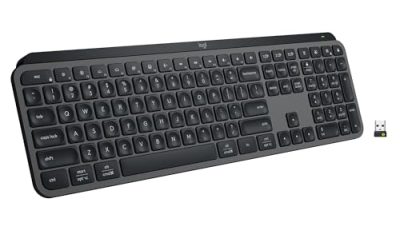
The MX Keys S is the pick for a polished, modern desk where one keyboard serves several machines. Its low-profile keys are spherically dished to match fingertip shape, and the backlighting turns on as your hands approach, which helps in dim rooms and late sessions. It pairs with up to three devices over Bluetooth or its Logi Bolt receiver, charges over USB-C, and carries programmable keys for the shortcuts you repeat all day. Windows and Mac legends are both covered, so it moves between systems without friction.
Watch out for: The seller on this listing is not confirmed as Amazon.com, so check who ships it before ordering.
Logitech Ergo K860
- Best for: Full-time typists who want a more natural hand position without giving up the number pad.
- Layout: Full-size split curved keyframe with integrated number pad, 105 keys
- Wrist rest: Pillowed three-layer rest with stain-resistant fabric coating
- Palm lift: Adjustable tilt legs at 0, -4, and -7 degrees
- Connectivity: Bluetooth 5.0 LE and Logitech Unifying USB receiver
Full-time typists who want a more natural hand position without giving up the number pad.
The split layout takes real adjustment time, and the wide frame needs a desk with room to spare.
The Ergo K860 is built for people whose wrists complain before the workday ends. Its curved, split keyframe places each hand at a more natural angle, and the pillowed wrist rest combines fabric, support foam, and memory foam to keep palms cushioned between sentences. Adjustable palm lift legs tilt the board to zero, minus four, or minus seven degrees, so it works sitting or at a standing desk. It connects to three devices over Bluetooth or the included Unifying receiver, keeps a full number pad, and runs up to two years on a pair of AAA batteries.
Watch out for: The split layout takes real adjustment time, and the wide frame needs a desk with room to spare.
Keychron K10
- Best for: Writers, programmers, and number-crunchers who want mechanical feedback at a work desk.
- Layout: Full-size, 104 keys
- Switches: Keychron K Pro Brown mechanical switches, rated up to 50 million keystrokes
- Connectivity: Bluetooth 5.1 for up to 3 devices, plus wired USB-C mode
- Backlighting: White LED
Writers, programmers, and number-crunchers who want mechanical feedback at a work desk.
The seller on this listing is not confirmed as Amazon.com, so verify the seller and the switch variant before ordering.
The K10 brings a mechanical typing feel to an office roundup without turning the desk into a gaming station. This listing uses Keychron K Pro Brown switches, which give a tactile bump without the sharp click of blue switches, a sensible middle ground for shared spaces. It connects to three devices over Bluetooth 5.1 or runs wired over USB-C, ships with keycaps for both Mac and Windows layouts, and adds dedicated screenshot and screen lock keys. The 4,000 mAh battery is among the largest in its class, and two-level feet let you set a six or nine degree typing angle.
Watch out for: The seller on this listing is not confirmed as Amazon.com, so verify the seller and the switch variant before ordering.
Logitech K120
- Best for: Shared desks, front-office stations, and anyone who wants zero setup or maintenance.
- Layout: Full-size, 104 keys with numeric keypad
- Keys: Deep-profile membrane keys, rated up to 10 million keystrokes
- Connectivity: Wired USB-A, plug and play with no software required
- Design: Spill-resistant construction, tested for spills up to 60 ml
Shared desks, front-office stations, and anyone who wants zero setup or maintenance.
Windows only, and the fixed cable means it stays with one computer permanently.
The K120 is the straightforward answer when a desk simply needs a keyboard that works. It plugs into a USB port and starts typing with no software, no pairing, and no battery to manage, which makes it a natural fit for shared workstations, reception desks, and spare setups. The full-size layout includes the number pad, the deep-profile keys are rated for up to ten million keystrokes, and the spill-resistant design shrugs off the coffee accidents that eventually happen in every office. It is a Windows-focused board with no wireless extras, and that simplicity is exactly the point.
Watch out for: Windows only, and the fixed cable means it stays with one computer permanently.
Which One Fits Your Situation
You Switch Between a Laptop and a Desktop All Day
Choose the MX Keys S. Its Easy-Switch keys move between three paired devices without re-pairing, the Logi Bolt receiver gives the desktop a stable channel, and the backlighting keeps legends readable when the office lights drop. The K860 also switches between three devices, so it becomes the better answer if you want that flexibility in a split layout.
Your Wrists Ache by Mid-Afternoon
Choose the Ergo K860. The split keyframe, cushioned three-layer rest, and negative tilt legs all work toward a straighter, more relaxed wrist position through long documents. Give yourself a week or two to adapt, since split layouts feel strange at first. If your desk is too small for its wide frame, the MX Keys S is the fallback, paired with a separate rest.
You Are Outfitting Shared or Hot-Desking Stations
Choose the K120. There is nothing to pair, charge, configure, or walk away with, and the spill-resistant body tolerates the realities of a desk used by many hands. Buy them in quantity, keep one spare in a drawer, and replacements take seconds to plug in. The other three boards reward a single dedicated owner far more than a rotating cast of users.
You Want Mechanical Keys for Documents and Data
Choose the Keychron K10. The Brown switches give clear tactile feedback for fast, accurate typing while staying moderate in volume, the full layout keeps the number pad for data work, and Bluetooth plus USB-C wired modes cover both a clean desk and a latency-sensitive task. It is the only mechanical board here, and it earns that place on work merits rather than gaming features.
Common Mistakes
- Buying a compact board for a number-heavy job, then fighting key combinations for the number pad you gave up.
- Choosing a loud mechanical switch for an open office without checking how the sound carries to nearby desks.
- Paying for multi-device features when the keyboard will only ever serve one fixed computer.
- Ignoring board width, then discovering a split or full-size model leaves no room for the mouse.
- Forgetting that wireless boards need charging or batteries, and having no wired fallback when they run flat.
Frequently Asked Questions
Is a mechanical keyboard too loud for an office?
It depends on the switch. Tactile Brown switches like the ones in the Keychron K10 listing stay moderate because they skip the extra click mechanism, while clicky switch types carry much further. If your office is very quiet, a low-profile board like the MX Keys S or a membrane model keeps the peace more easily.
Do I need Bluetooth, or is a USB receiver enough?
A receiver is enough for a single desktop and often connects more reliably through a dock or a tower under the desk. Bluetooth earns its place when you pair with a laptop or tablet that lacks free USB ports, or when you switch between devices. Both wireless picks here include a receiver, so you can use whichever method suits each machine.
Can one of these keyboards work with both Windows and Mac?
Yes. The MX Keys S, Ergo K860, and Keychron K10 all support Windows and macOS, and the K10 includes separate keycaps for each layout in the box. The K120 is the exception: it is a Windows board. If your desk mixes systems, pick one of the three wireless models and confirm the layout legend matches your main machine.
When is a wired keyboard still the better choice?
A wired board wins on fixed desks, shared workstations, and anywhere IT wants zero pairing or battery management. It also serves as the backup that keeps you working when a wireless board runs flat mid-deadline. The K120 covers that role for a single Windows computer; if you need wired plus flexibility, the K10 adds a USB-C wired mode alongside Bluetooth.
FAQ
Is a mechanical keyboard too loud for an office?
Do I need Bluetooth, or is a USB receiver enough?
Can one of these keyboards work with both Windows and Mac?
When is a wired keyboard still the better choice?
More from Amazon
Programs that pair well with the guide above. Offers and eligibility are set by Amazon and may change.
Free shipping on eligible items, Prime Video and more. Eligible new members can start with a free trial.
Start a Prime free trialAd-free music streaming. Eligible new subscribers can start with a free trial.
Try Music Unlimited freeA Prime membership for ages 18-24 with a trial period. Eligibility is set by Amazon.
See Prime for Young AdultsAudiobooks and podcasts to listen to on the go. Eligible new members can start with a free trial.
Try Audible freeAs an Amazon Associate we earn from qualifying purchases.