Key takeaways
- Best productivity keyboards for workflow: QMK/VIA macro boards, split ergonomic layouts, hot-swappable switches and rotary knobs that speed up real work.
As an Amazon Associate, we earn from qualifying purchases made through links on this page, at no extra cost to you.

A productivity keyboard is not the same thing as an office keyboard. An office keyboard needs to be quiet, reliable, and comfortable for eight hours of typing. A productivity keyboard has to do all of that and then change how the work itself flows: one key that pastes a formatted block, a layer that turns the number row into app shortcuts, a knob that scrubs through a timeline or zooms a spreadsheet, and a layout that keeps your hands off the mouse. The boards in this guide are chosen for those workflow features first, and for typing feel second.
That distinction matters because the usual office picks do not cover it. A standard full-size board handles documents and data entry, but it cannot remap a key, store a macro, or split apart so each hand sits at shoulder width. Every keyboard below can be reprogrammed, and most support open firmware such as QMK, VIA, or ZMK, which means the shortcuts you build live on the keyboard itself rather than in software tied to one computer.
Quick Picks
Our Short List of 3

- Best for: Anyone who wants one premium board that covers typing, macros, layers, and multi-device switching without compromise.
- Best for: Heavy typists who want a fully split ergonomic layout with thumb clusters and deep ZMK programmability.

- Best for: Enthusiasts who want to experiment with mounting styles, plates, and switches on a single platform until the feel is exactly right.
All 5 Picks at a Glance
| Product | Specs | Action |
|---|---|---|
| 1. Keychron Q1 Max |
| Check price on Amazon |
| 2. Kinesis Advantage360 Professional Split Ergonomic Keyboard |
| Check price on Amazon |
| 3. Glorious GMMK 3 PRO |
| Check price on Amazon |
 4. Epomaker TH80 Pro |
| Check price on Amazon |
 5. NuPhy Air75 V2 |
| Check price on Amazon |
1. Keychron Q1 Max
- Best for: Anyone who wants one premium board that covers typing, macros, layers, and multi-device switching without compromise.
Anyone who wants one premium board that covers typing, macros, layers, and multi-device switching without compromise.
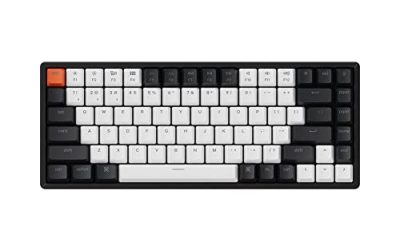
Key specs: 75% layout with function row, arrow keys, and rotary knob; CNC-machined 6063 aluminium case; hot-swappable Gateron Jupiter Red linear switches; double-gasket mount with sound-absorbing foam; QMK and VIA firmware; 2.4 GHz wireless, Bluetooth 5.1, and wired USB-C; 1000 Hz polling; double-shot PBT keycaps.
The Q1 Max is the most complete productivity board in this guide because it combines the three features that matter most for workflow: full programmability, a rotary knob, and tri-mode wireless. With QMK and VIA you can remap any key, build layers for different apps, and store macros on the board itself, so a single press can paste a snippet, trigger a multi-step shortcut, or switch to a layer where the whole keyboard becomes application controls. The knob defaults to volume and can be reassigned to scrolling, zooming, or stepping through tabs.
The hardware backs up the firmware. The aluminium case gives the board real weight, so it stays planted during fast typing, and the double-gasket mount with foam layers produces a deep, muted keystroke that suits shared rooms. Hot-swappable sockets mean you can change switch feel later without soldering, and Bluetooth pairs with up to three devices while 2.4 GHz covers the main desktop.
Pros:
– QMK and VIA support for remapping, layers, and macros stored on the board
– Programmable rotary knob for volume, scrolling, zoom, or app controls
– CNC aluminium case with double-gasket mount and foam for a solid, quiet feel
– Hot-swappable switches and tri-mode wireless plus wired
Cons:
– Heavy aluminium build is not ideal if you carry the keyboard between desks
– No number pad, so heavy spreadsheet work needs a separate pad
2. Kinesis Advantage360 Professional Split Ergonomic Keyboard
- Best for: Heavy typists who want a fully split ergonomic layout with thumb clusters and deep ZMK programmability.
Heavy typists who want a fully split ergonomic layout with thumb clusters and deep ZMK programmability.
Key specs: Fully split into two separate halves; contoured key wells; thumb clusters; three adjustable tenting heights; Gateron Brown tactile switches; Bluetooth and USB-C; backlit keys; open-source ZMK firmware.
The Advantage360 Professional is the productivity pick for people who type for a living and feel it in their wrists by mid-afternoon. Splitting the board into two halves lets you place each hand at shoulder width, the contoured key wells shorten how far your fingers stretch for the top rows, and three tenting heights tilt the inner edges upward to reduce forearm twist. The productivity argument is the thumb clusters: Enter, Space, Backspace, and other high-traffic keys move under your thumbs, which frees your fingers and shortens the most repeated motions of the day.
The firmware is open-source ZMK, so every key, layer, and macro is yours to define, and the layout you build travels with the board between computers. Gateron Brown switches give a tactile bump without the sharp click of louder switches, which matters in a shared room, and Bluetooth plus USB-C covers a laptop and a desktop from one board. The learning curve is real: a contoured split layout takes days to feel natural and sometimes weeks to match your old speed, so this is a board to commit to rather than try for an afternoon.
Pros:
– Fully split halves with contoured wells and adjustable tenting
– Thumb clusters move Enter, Space, and Backspace under your thumbs
– Open-source ZMK firmware with layers and macros stored on the board
– Gateron Brown tactile switches, quiet enough for shared rooms
Cons:
– Steep learning curve, with typing speed dipping for days or weeks at first
– Very premium positioning and a wide footprint once both halves are spread out
3. Glorious GMMK 3 PRO
- Best for: Enthusiasts who want to experiment with mounting styles, plates, and switches on a single platform until the feel is exactly right.
Enthusiasts who want to experiment with mounting styles, plates, and switches on a single platform until the feel is exactly right.
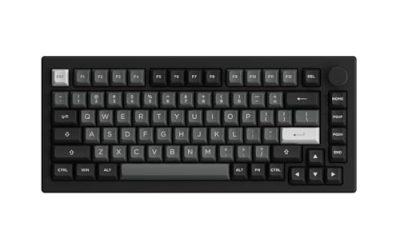
Key specs: 75% tenkeyless layout with function row; modular aluminium body; nine-point modular gasket system with interchangeable plates; hot-swappable MX-style switches, Glorious Fox linear in this listing; wired USB-C; double-shot keycaps; sound-dampening foam included.
The GMMK 3 PRO is built around a different idea from the rest of this guide: modularity. Most custom boards lock you into one mounting style forever, but this board uses a nine-point modular gasket system that lets you change how the plate sits in the case, swap plates, and tune the feel and sound long after unboxing. For productivity, that matters because the right feel is personal: a firmer mount suits fast, precise typing, while a softer gasket mount suits long sessions where fatigue builds up, and this is the only board here that lets you switch between the two without buying a second keyboard.
The rest of the package is solidly built for desk work. The aluminium body stays planted, foam dampening keeps the acoustics controlled, and hot-swappable MX sockets accept nearly any switch on the aftermarket, so you can fit quieter switches for an open office or heavier ones for deliberate typing. It ships fully assembled and works immediately. The main trade-off is connectivity: this configuration is wired USB-C only, so it suits a fixed desk rather than a multi-device setup.
Pros:
– Nine-point modular gasket system for adjustable feel and sound
– Full aluminium body with foam dampening and a solid, planted feel
– Hot-swappable MX switches compatible with the whole aftermarket ecosystem
– Ships fully assembled and ready to type, with room to mod later
Cons:
– Wired only, with no wireless option in this configuration
– Replacement plates and modules are an extra purchase if you want the full range
4. Epomaker TH80 Pro
- Best for: First-time custom keyboard buyers and anyone who wants gasket-mount sound, a knob, and hot-swap freedom on a modest budget.
First-time custom keyboard buyers and anyone who wants gasket-mount sound, a knob, and hot-swap freedom on a modest budget.
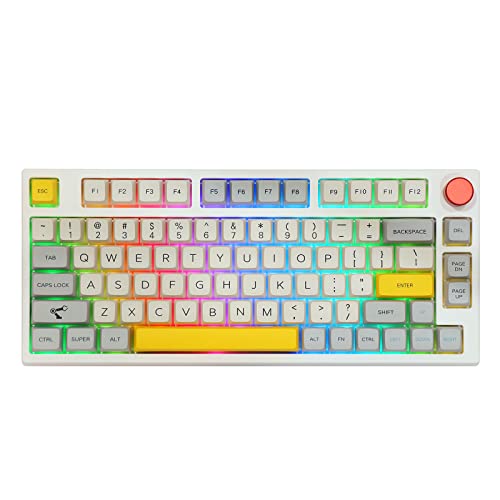
Key specs: 75% layout, 80 keys, with rotary knob; plastic case with gasket mount and five layers of dampening foam; hot-swappable sockets compatible with 3-pin and 5-pin switches; Bluetooth 5.0, 2.4 GHz wireless, and wired USB-C; 4000 mAh battery; PBT keycaps; south-facing RGB LEDs.
The TH80 Pro proves you do not need a large budget to get a genuinely custom productivity keyboard. It packs a gasket mount, five layers of foam, hot-swappable switches, a volume knob, and tri-mode wireless into a 75% board that has become one of the most recommended starter customs in the community. The knob is the feature that punches above this tier: set it to volume for calls, scrolling for long documents, or zoom for spreadsheets and design work, and it saves a constant stream of small mouse trips across the day.
Sound and feel are the other strengths. The gasket mount plus five layers of foam give a soft, muted keystroke that sounds far more expensive than this class usually manages, and the south-facing LEDs keep backlighting readable from a normal typing angle. Hot-swappable sockets accept both 3-pin and 5-pin switches, so nearly any MX-style switch will fit, and the 4000 mAh battery gives long wireless sessions. VIA support covers remapping and macros. The plastic case is the visible compromise: it feels lighter and less premium than the aluminium boards above it.
Pros:
– Gasket mount with five layers of foam for a soft, premium typing sound
– Hot-swappable sockets that accept 3-pin and 5-pin switches
– Tri-mode connectivity with a large 4000 mAh battery
– Volume knob and VIA support for remapping and macros
Cons:
– Plastic case feels lighter and less premium than aluminium boards
– Keycap and switch quality varies by configuration, so check the listing details
5. NuPhy Air75 V2
- Best for: People who move between desks and want a slim, light, multi-device mechanical board with real programmability.
People who move between desks and want a slim, light, multi-device mechanical board with real programmability.
Key specs: 75% layout, 84 keys; low-profile mechanical switches, hot-swappable; Bluetooth, 2.4 GHz wireless, and USB-C wired; multi-device pairing; slim lightweight frame; VIA-compatible remapping; Windows and Mac compatible.
The Air75 V2 is the productivity board for people whose desk is not one desk. It is far slimmer than a traditional mechanical board, so your wrists stay in a more neutral position during long sessions without a wrist rest, and it is light enough to carry between home and office in a laptop bag. The low-profile switches still give real mechanical feedback, just with a shorter throw, which many fast typists prefer once they adjust, and the 75% layout keeps arrows and function keys in a compact frame that leaves room for the mouse.
Multi-device switching is where it earns its place here. Bluetooth, 2.4 GHz, and wired USB-C cover a laptop, a desktop, and a tablet from one board, and VIA-compatible remapping lets you build the shortcut layers and macros that turn a travel board into a workflow board rather than just a portable one. Hot-swappable sockets mean you can change switch feel without soldering. The trade-off is the low-profile format itself: switch and keycap choices are narrower than the full-size MX ecosystem, and anyone who wants a deep, cushioned keystroke will prefer a standard-height board.
Pros:
– Slim low-profile design keeps wrists neutral and travels easily in a laptop bag
– Hot-swappable low-profile switches with a shorter, faster throw
– Bluetooth, 2.4 GHz, and USB-C cover laptop, desktop, and tablet
– VIA-compatible remapping for shortcut layers and macros
Cons:
– Low-profile switch and keycap options are narrower than the full-size MX ecosystem
– Shorter key travel takes adjustment if you come from standard mechanical boards
Buying Guide: How to Choose a Productivity Keyboard
Start with programmability, not switches
The feature that separates a productivity keyboard from a typing keyboard is what happens when you press a key. QMK, VIA, and ZMK let you remap any key, build layers, and store macros in the keyboard’s own firmware, so your shortcuts follow the board from one computer to another. Vendor software can do some of this, but it usually ties your layout to one machine. If your work runs on repeated shortcuts, put open firmware at the top of the list and treat switch feel as the second decision.
Macros, layers, and the knob are the real speed gain
A macro turns a multi-step action into one keypress: paste values only, insert the current date, apply a format, or launch a sequence of app commands. Layers multiply that by letting the same keys do different jobs in different contexts. A rotary knob can act as a macro control too, handling scroll, zoom, timeline scrubbing, or brightness depending on the layer.
Split layouts, hot-swap, and noise
If you type for a living, layout is a health decision as much as a speed decision. A fixed split angles your hands outward, a fully split board lets you set each half at shoulder width, and contoured wells shorten finger reach. Tenting raises the inner edges to reduce forearm twist. These changes take days or weeks to feel natural, so only buy a split board if you will commit to the adjustment period. Hot-swappable sockets let you change switches without soldering, so you can fix a dead switch in minutes or fit quieter switches for an open office. For productivity work, tactile or linear switches with a light actuation force usually win; clicky switches are loud enough to annoy a shared room.
Connectivity, layout, and the number pad
Count your devices before you choose. Bluetooth pairs directly with laptops and tablets, a 2.4 GHz dongle usually connects more reliably to a desktop, and wired USB-C never needs charging. A board that switches between three devices at the press of a key turns one keyboard into the hub of a multi-machine desk. Layout is the other honest trade-off: full-size keeps the number pad for spreadsheets, 75% and TKL keep the function row and arrows in less width, and compact boards force number entry onto a layer. If you live in spreadsheets, either buy full-size or budget for a separate number pad.
Frequently Asked Questions
What is the difference between a productivity keyboard and an office keyboard?
An office keyboard is built for comfortable, reliable typing: quiet keys, a familiar layout, and a number pad. A productivity keyboard adds programmability on top of that: macros, layers, remappable keys, and usually a knob or a split layout. The boards in this guide can all be reprogrammed, while a standard office board generally cannot.
Do I need QMK or VIA to be more productive?
Not necessarily, but it helps the most. QMK and VIA store your remaps, layers, and macros on the keyboard itself, so they work on any computer you plug into. If you switch between computers, open firmware is the feature to prioritize.
Are split keyboards hard to get used to?
A fixed split or wave board usually takes a few days. A fully split contoured board such as the Advantage360 Professional can take one to three weeks before your speed recovers, because your fingers relearn key positions in the scooped wells. Give any split board at least a week of daily use before you decide, and keep your old keyboard nearby during the transition.
Is a mechanical keyboard too loud for an office?
It depends on the switches and the case. Linear and tactile switches in a gasket-mounted board with foam are much quieter than clicky switches in a hollow plastic case. If you share a room, choose tactile or linear switches, avoid clicky ones, and look for foam dampening in the spec sheet.
Conclusion
The best productivity keyboard is the one that removes the most friction from your specific work. If you want one board that does everything, the Keychron Q1 Max leads with QMK and VIA macros, a programmable knob, and tri-mode wireless in a solid aluminium case. If your wrists set the agenda, the Kinesis Advantage360 Professional is the fully split, thumb-cluster answer. The Glorious GMMK 3 PRO suits anyone who wants to tune mounting and feel until the board is exactly right, the Epomaker TH80 Pro brings a knob, hot-swap, and tri-mode wireless to a modest budget, and the NuPhy Air75 V2 is the slim multi-device pick for people who carry their keyboard between desks. Pick by programmability first, layout second, and switch feel third.
Verification
Amazon blocks live product-page loads for AI agents, so no ASIN in this article was verified by opening its Amazon product page directly. Each ASIN was corroborated through Amazon search results, roundups, and earlier verified workspace records, and no ASIN was invented. Per-ASIN verification: Keychron Q1 Max B0CR1JCTKF, Gateron Jupiter Red listing, corroborated in two earlier verified workspace articles; Kinesis Advantage360 Professional B0BCHMGZMD, corroborated in two earlier verified workspace articles; Glorious GMMK 3 PRO B0DCHD7CWP, corroborated in an earlier verified workspace article; Epomaker TH80 Pro B0BMKY4WSJ, corroborated in an earlier verified workspace article; NuPhy Air75 V2 B0CMXC46KH, V2 model, corroborated in an earlier verified workspace article. Deliberately avoided: Logitech MX Keys S, Logitech Ergo K860, Keychron K10, and Logitech K120, the four picks of the live pcgamingsite.com work-keyboards article, to keep this guide differentiated on its macro, split, and QMK workflow angle; also avoided Keychron K10 Pro, Keychron V6, and Keychron Q6 Max from the on-disk Excel keyboards article. The Keychron Q3 Max was left out because no corroborated ASIN could be established without a live Amazon check. Recheck stock, switch variant, and availability live before publishing, because listings change.
FAQ
What is the difference between a productivity keyboard and an office keyboard?
Do I need QMK or VIA to be more productive?
Are split keyboards hard to get used to?
Is a mechanical keyboard too loud for an office?
More from Amazon
Programs that pair well with the guide above. Offers and eligibility are set by Amazon and may change.
Free shipping on eligible items, Prime Video and more. Eligible new members can start with a free trial.
Start a Prime free trialAd-free music streaming. Eligible new subscribers can start with a free trial.
Try Music Unlimited freeA Prime membership for ages 18-24 with a trial period. Eligibility is set by Amazon.
See Prime for Young AdultsAudiobooks and podcasts to listen to on the go. Eligible new members can start with a free trial.
Try Audible freeAs an Amazon Associate we earn from qualifying purchases.